Community listing page, reviews here may not be monitored by the author.
Refined Storage Pattern Terminal

No reviews yet
Wireless Pattern Terminal addon for Refined Storage featuring Pattern, Crafter and Autocraft Manager access, persistent pattern slots, upgrade support, player inventory integration and a Creative terminal with permanent 100% power.
Community voices
Reviews
No reviews yet. Be the first to review this project!
Get it on
Available Platforms
About
Project Details
For authors
Embed Badge
If you're the author of this project, you can embed a live badge anywhere that supports HTML or Markdown. It updates automatically whenever ratings change.
Use HTML for any page that supports it, or Markdown for README files and Markdown-based descriptions.
Identifiers
Platform IDs
Resources
External Links
About
Description
Refined Storage Pattern Terminal
Version 1.0.1 — Minecraft 1.21.1, NeoForge
Refined Storage Pattern Terminal is an addon that lets you create and manage Refined Storage crafting patterns from anywhere using a wireless terminal.
Instead of returning to a physical Pattern Grid whenever you need to create or change a pattern, you can open the Wireless Pattern Terminal directly from your inventory. It also provides quick access to connected Crafters and the Autocrafting Manager.
Main Features
- Create and edit crafting patterns wirelessly
- Access the Pattern Grid from anywhere within wireless range
- Access connected Refined Storage Crafters
- Open the Autocrafting Manager remotely
- Switch between terminal interfaces without losing your work
- Keep the Pattern Grid workspace saved after closing the terminal
- Manage terminal upgrades from your inventory
- Dedicated Creative Mode tab containing every item from the mod
Included Terminals
Wireless Pattern Terminal
The standard Wireless Pattern Terminal provides portable access to pattern creation and management.
It uses stored energy while operating and can be improved by installing terminal upgrades.
Creative Wireless Pattern Terminal
The Creative Wireless Pattern Terminal is designed for Creative Mode and testing.
- Permanently remains at 100% power
- Never consumes or loses energy
- Does not require recharging
- Provides continuous access to all supported terminal interfaces
Terminal Interfaces
The terminal includes several selectable interfaces:
- Pattern Interface: Create and manage Refined Storage crafting patterns.
- Crafter Access: View and interact with connected Crafters.
- Autocraft Manager: Monitor and manage active autocrafting jobs.
- Upgrade Interface: Install, remove and manage terminal upgrades.
- Player Inventory: Access your complete inventory and hotbar without leaving the upgrade screen.
Available Upgrades
Auto-Insert Upgrade
Automatically inserts completed patterns into an available connected Crafter.
Energy Capacity Upgrade
Increases the maximum amount of energy that the Wireless Pattern Terminal can store.
Efficiency Upgrade
Reduces the amount of energy consumed while using the terminal.
How to Use
- Install NeoForge for Minecraft 1.21.1.
- Install the required version of Refined Storage.
- Place the Pattern Terminal mod
.jarinside your Minecraftmodsfolder. - Start Minecraft and open a world.
- Find the new Refined Storage Pattern Terminal Creative Mode tab.
- Take either the standard or Creative Wireless Pattern Terminal.
- Connect the terminal to your Refined Storage network using the normal wireless connection process.
- Hold the terminal and use it to open its interface.
- Select the Pattern Grid, Crafter, Autocraft Manager or Upgrade interface.
- Add supported upgrades through the terminal’s upgrade screen.
The standard terminal must have energy and remain within the supported network range. The Creative Wireless Pattern Terminal always has full power, but it may still require a valid connection to a Refined Storage network.
Screenshots
Gallery
-
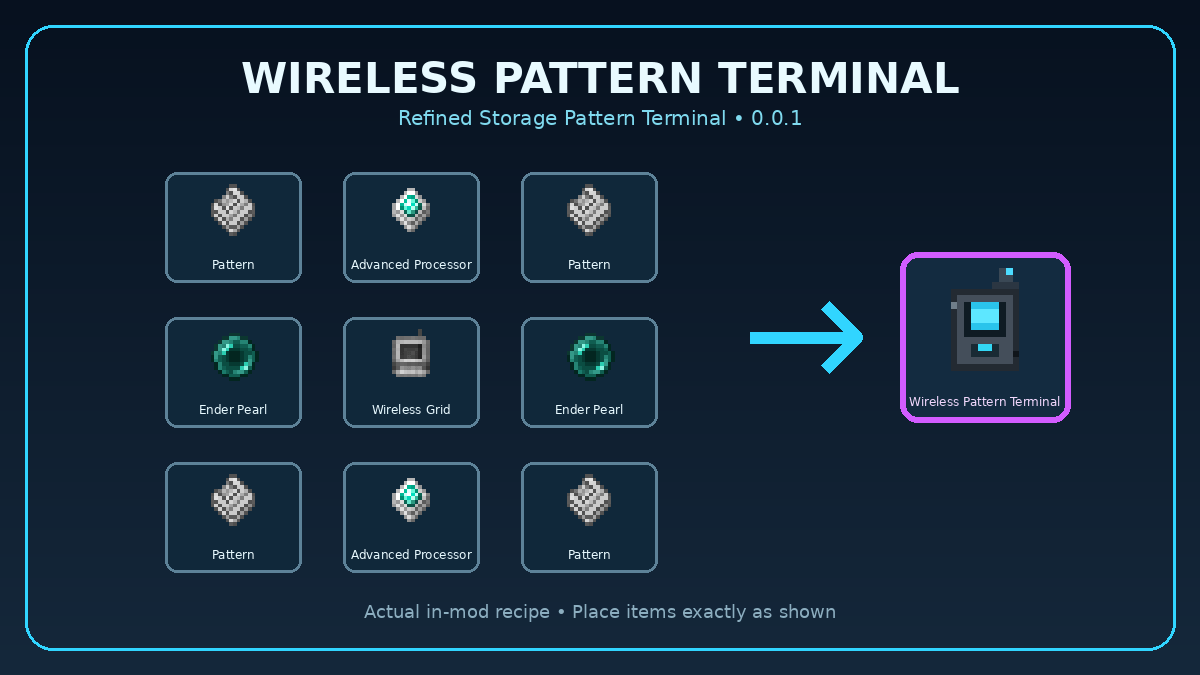 image-attachment_1cfa1f8d-a4e7-4693-abac-cbf822a9c3cb.png
 -
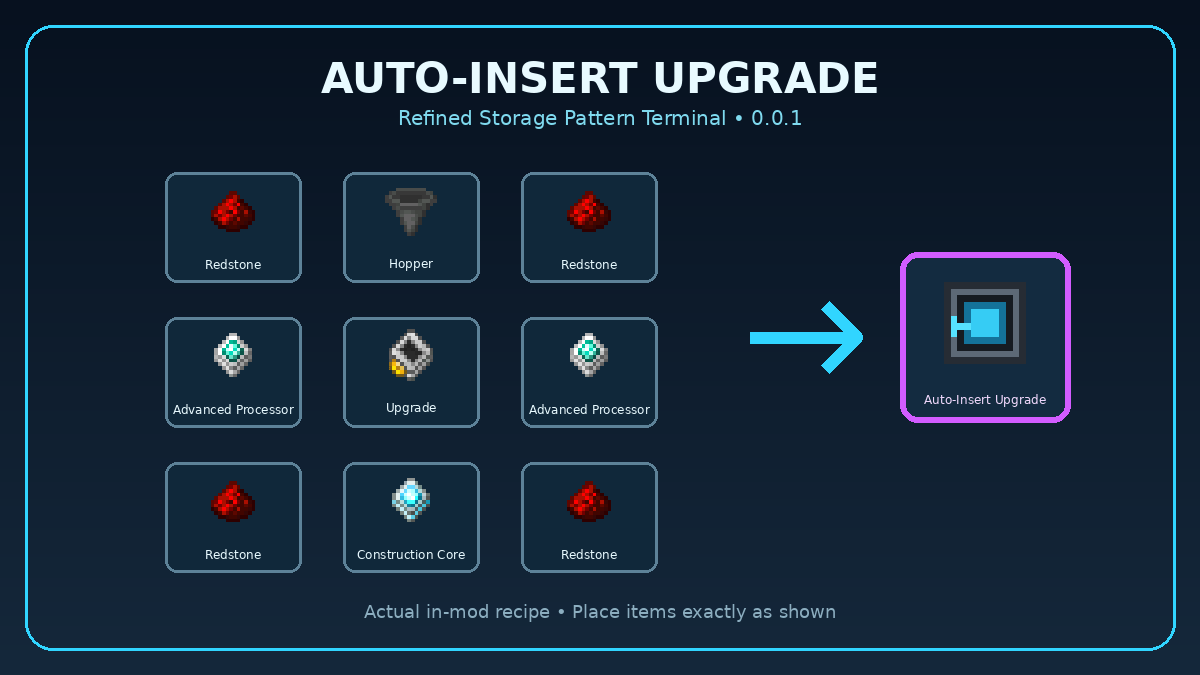 image-attachment_ae900c9e-7173-47d7-851a-869a6d632218.png
 -
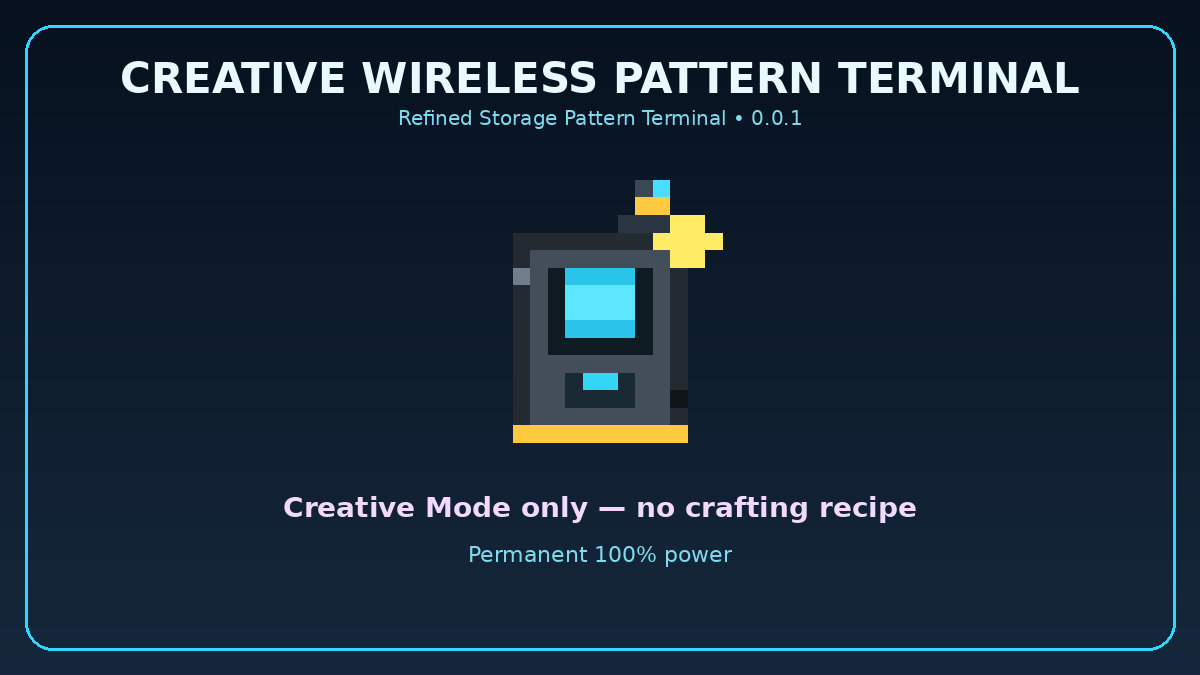 image-attachment_06d99f5b-b46e-47a2-ae6d-aea69f1cb733.png
 -
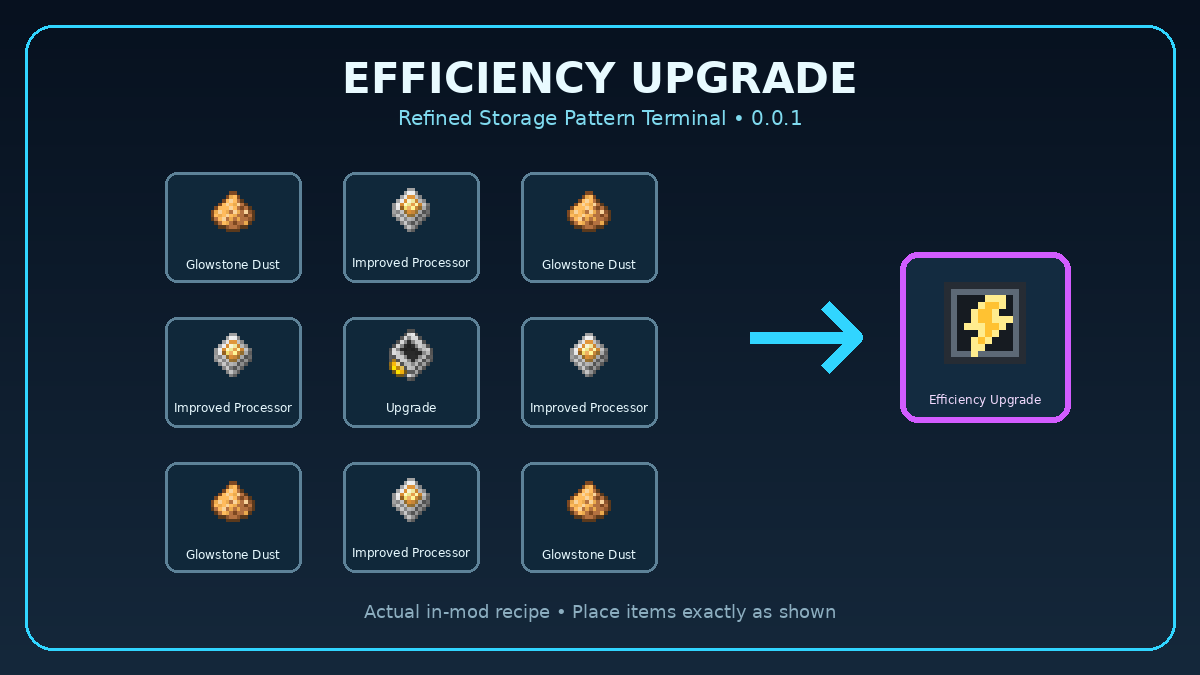 image-attachment_3da8228c-a622-4f9a-9de9-2dd0ee334c3a.png
 -
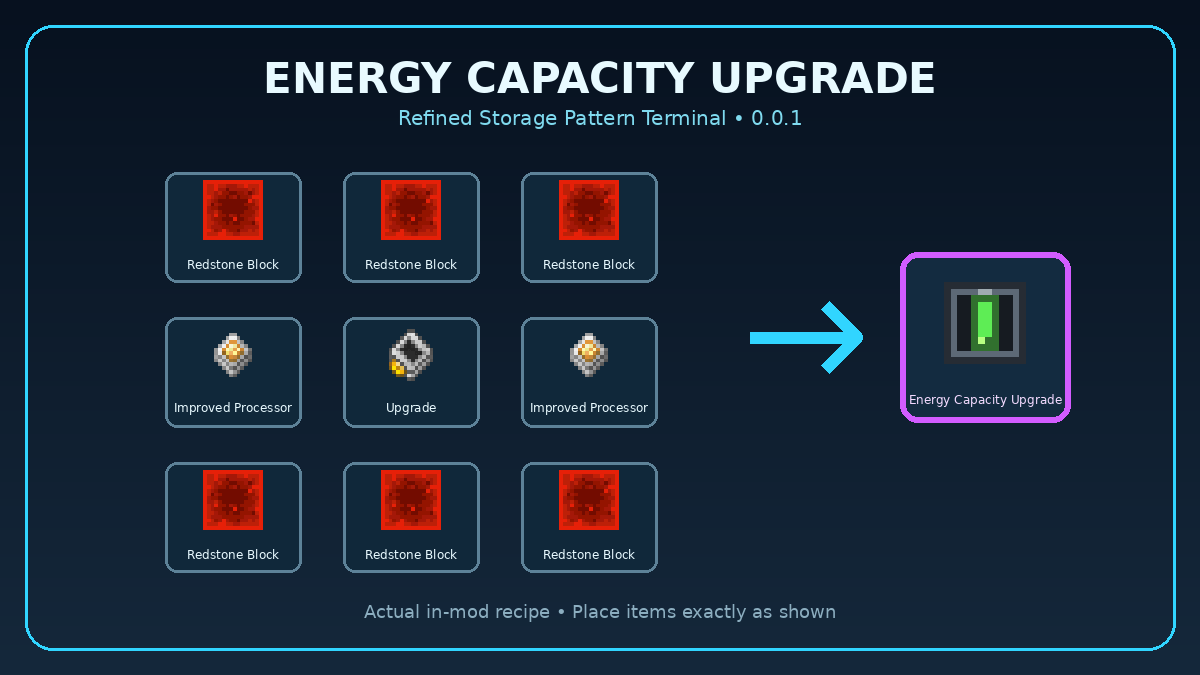 image-attachment_163823a8-8d74-4a26-954a-2bc074289b3a.png
 -
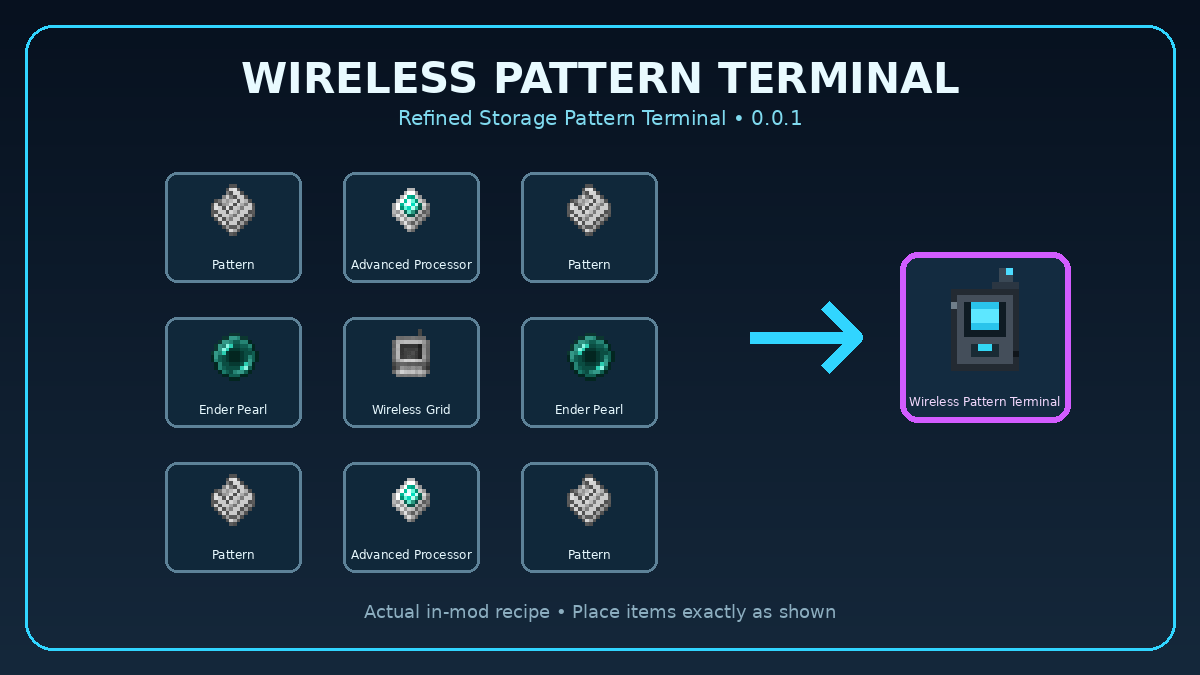 image-attachment_9861e5e0-9930-4d9b-8c31-bc7af76022e2.png
Versions
Files
Relations
Project Relations
More like this
Similar Mods
Suggestions use data such as tags, dependencies, dependents, descriptions, titles, and more to rank how much they overlap with this mod.
On ModDex
Community snapshot
By the numbers
Statistics
Want to reach Minecraft players?
We're looking for a server hosting partner to feature here and other parts of the site. Interested? Send us a message!
Get in touchGet it on
Available Platforms
On ModDex
Community snapshot
By the numbers
Statistics
Resources