Remote Control From Telegram!

Quick rating

Remote Control From Telegram!

No reviews yet

Control your own Minecraft client from your own Telegram bot: chat and commands, anti-AFK, auto-fishing, screenshots and live status.

QoL & Tweaks
Mod Loaders
Forge
Minecraft

Community voices

Reviews

Versions
Loading versions…
Match includes

Click once to include, again to exclude, again to clear

Rating Any
Any 0.5 1.0 1.5 2.0 2.5 3.0 3.5 4.0 4.5 5.0
Min
Max
Play Status
Reviews
Time Played
hrs+
Verified developers only
Has developer response
List view
Grid view
Compact view
Sort by
Date
Rating
Helpful
Unhelpful
Edited
Sort ascending
Delete this review?

This removes your review from the project. You can write a new review after.

Review submitted for moderation

Your review has been sent to moderators, who will check that it meets our guidelines before it appears publicly.

No reviews yet. Be the first to review this project!

Get it on

Available Platforms

About

Project Details

Type
Mod
Latest Version
telegramremote-forge-1.20.1-1.0.0.jar
Authors

For authors

Embed Badge

If you're the author of this project, you can embed a live badge anywhere that supports HTML or Markdown. It updates automatically whenever ratings change.

Custom banner text
ModDex rating badge preview

Use HTML for any page that supports it, or Markdown for README files and Markdown-based descriptions.

Identifiers

Platform IDs

CurseForge ID

Resources

External Links

Source Issues Wiki Discord

About

Description

Control your own Minecraft client from your own Telegram bot.
 
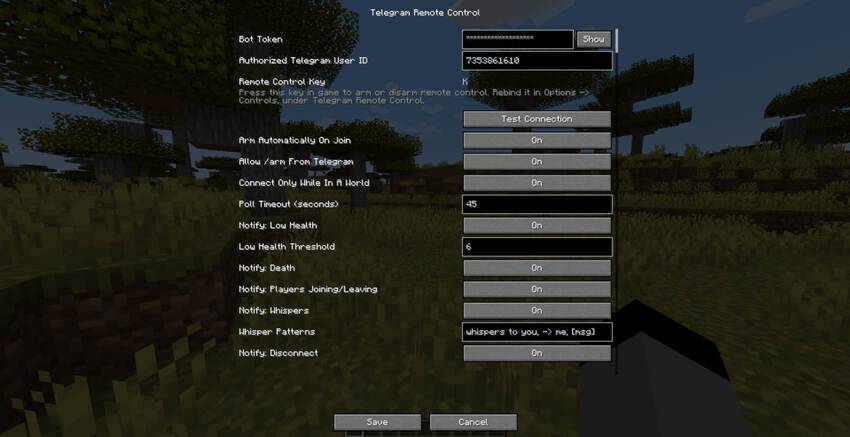
You create a bot with BotFather, paste its token and your numeric Telegram user id
into the mod's config screen, press a key in game to arm it, and from then on you can
drive your own client from your phone.
 
CLIENT-SIDE ONLY. It is never installed on a server.
 
description_914b88d1-6faf-449f-a11d-7e4fc74298c2.jpg
 
SETUP
1. Create a bot with @BotFather and copy the token.
2. Get your numeric Telegram user id (for example from @userinfobot).
3. Mods -> Telegram Remote Control -> Config. Paste both, then press Test Connection.
On Fabric this button is provided by Mod Menu; without Mod Menu you can open the
same screen from a keybind.
4. Open your bot in Telegram and press Start, so it is allowed to message you.
5. Join any world, singleplayer or multiplayer.
6. Press the remote-control key (default K, rebindable in Options -> Controls).
 
COMMANDS
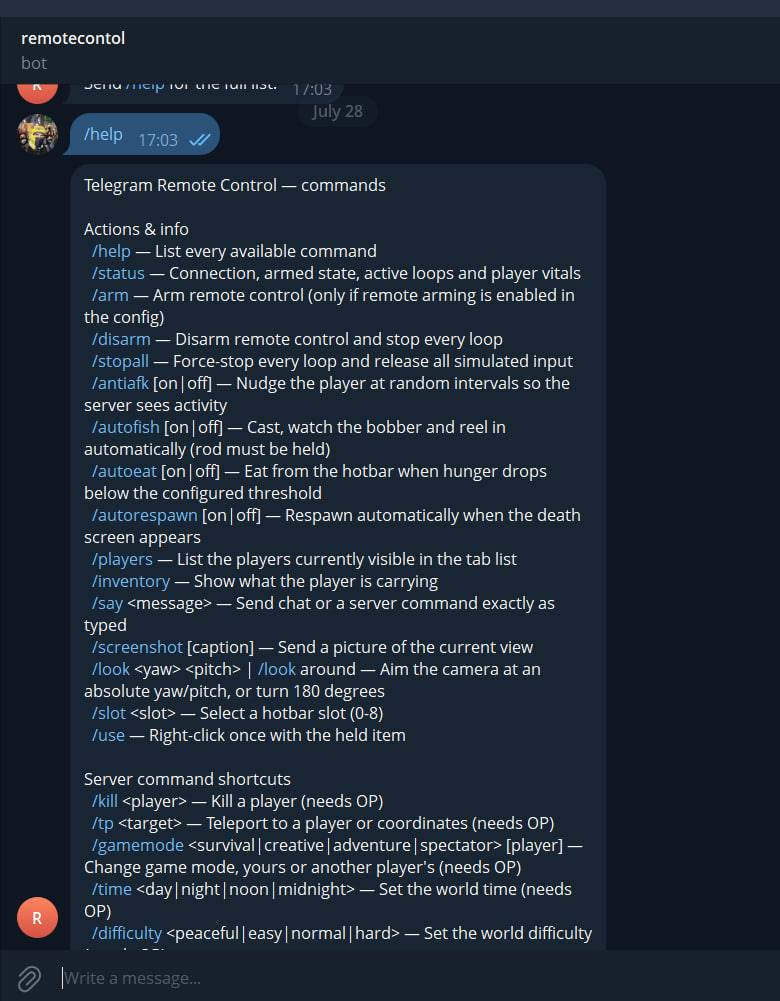
/help /status /arm /disarm /stopall
/say <text> sends the text exactly as if you typed it in the chat box
/screenshot sends the current frame as a photo
/antiafk small random movements so you are not kicked for idling
/autofish casts, watches the bobber, reels in on a bite, repeats
/autoeat /autorespawn
/players /inventory /look /use /slot
Shortcuts: /kill /tp /gamemode /time /weather /gamerule /difficulty /give /effect /seed
 
The bot can also notify you: low health, death, whispers, players joining or leaving,
and unexpected disconnections. Each can be turned off.
 
SECURITY
Only one Telegram account can control the mod: the numeric user id you enter yourself.
Messages from anyone else are ignored silently. Nothing is sent anywhere except to your
own bot, using your own token, from your own machine. Remote arming is off by default,
so the mod also requires that somebody pressed the key at the keyboard at least once.
 
NOTE
Some multiplayer servers forbid automation, anti-AFK and macros under their own rules.
That is between you and the server, not a limitation of this mod, but you should know
it before you start.
 
Available for Forge and Fabric, Minecraft 1.20.1 and 1.21.1.

Screenshots

Gallery

  • photo_2026-07-28_17-25-46.jpg
    photo_2026-07-28_17-25-46.jpg photo_2026-07-28_17-25-46.jpg

Versions

Files

Relations

Project Relations

More like this

Similar Mods

Suggestions use data such as tags, dependencies, dependents, descriptions, titles, and more to rank how much they overlap with this mod.

On ModDex

Community snapshot

0
Ratings
0
Followers
0
In stacks

By the numbers

Statistics

<1,000
Downloads
Last Updated
Created
Last synced
When ModDex last fetched this project from CurseForge or Modrinth. Every project is re-checked on a schedule, and any project that ships a new file is synced automatically within hours of the release.
New file updates sync automatically
How syncing works