Community listing page, reviews here may not be monitored by the author.
Render Scroll


No reviews yet
Change your render distance with the scroll wheel, with a toggleable keybind.
Community voices
Reviews
No reviews yet. Be the first to review this project!
Get it on
Available Platforms
Compatibility
Supported Environments
Runs entirely on the client. Works on vanilla servers.
About
Project Details
For authors
Embed Badge
If you're the author of this project, you can embed a live badge anywhere that supports HTML or Markdown. It updates automatically whenever ratings change.
Use HTML for any page that supports it, or Markdown for README files and Markdown-based descriptions.
Identifiers
Platform IDs
Resources
External Links
About
Description
## Render Scroll
Render Scroll lets you change your render distance instantly using your scroll wheel, without pausing the game or opening video settings.
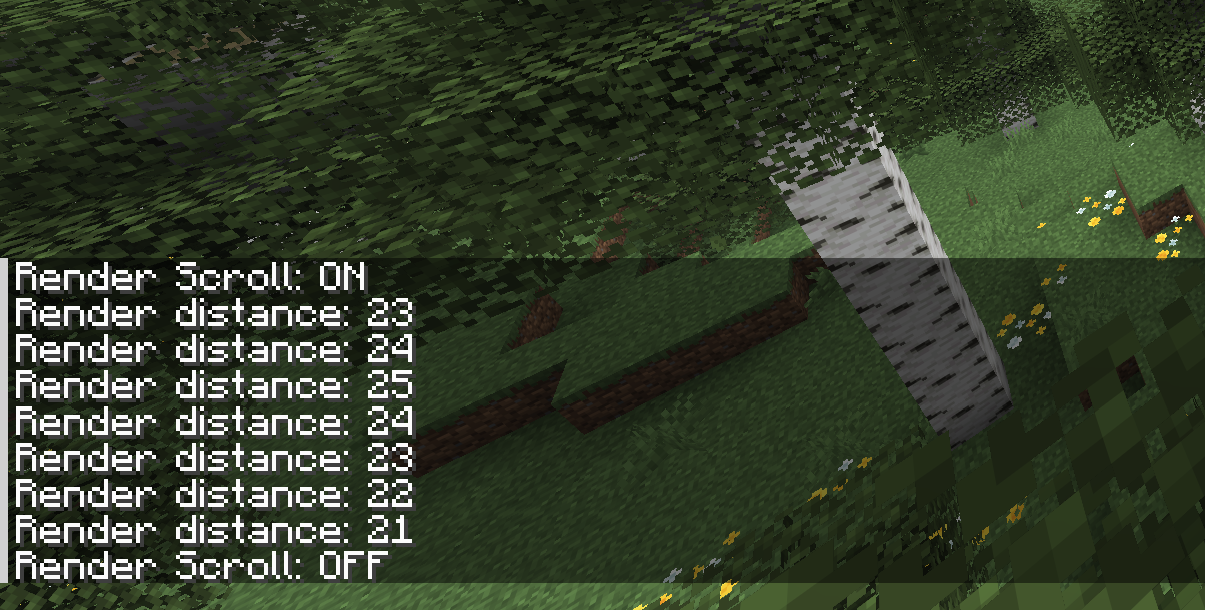
When Render Scroll is enabled, scrolling up increases render distance and scrolling down decreases it. The current render distance is shown in chat after each change.
This is similar to the old F3 + F behavior from Minecraft 1.16, but using the scroll wheel instead.
## Features
- Change render distance without opening settings
- Uses the mouse scroll wheel
- Shows the new render distance in chat
- Toggleable keybind
- Client-side only
## Controls
The default toggle key is `U`.
You can change the keybind in Minecraft’s controls menu.
## Notes
This mod requires Fabric API.
Render Scroll is licensed under the MIT License. You are free to use, modify, and include it in modpacks. Credit and a link to the official project page are appreciated.
Render Scroll
Render Scroll lets you change your render distance instantly using your scroll wheel, without pausing the game or opening video settings.
When Render Scroll is enabled, scrolling up increases render distance and scrolling down decreases it. The current render distance is shown in chat after each change.
This is similar to the old F3 + F behavior from Minecraft 1.16, but using the scroll wheel instead.
Features
- Change render distance without opening settings
- Uses the mouse scroll wheel
- Shows the new render distance in chat
- Toggleable keybind
- Client-side only
Controls
The default toggle key is U.
You can change the keybind in Minecraft’s controls menu.
Notes
This mod requires Fabric API.
Render Scroll is licensed under the MIT License. You are free to use, modify, and include it in modpacks. Credit and a link to the official project page are appreciated.
Screenshots
Gallery
Versions
Files
Relations
Project Relations
More like this
Similar Mods
Suggestions use data such as tags, dependencies, dependents, descriptions, titles, and more to rank how much they overlap with this mod.
On ModDex
Community snapshot
By the numbers
Statistics
Want to reach Minecraft players?
We're looking for a server hosting partner to feature here and other parts of the site. Interested? Send us a message!
Get in touchGet it on
Available Platforms
On ModDex
Community snapshot
By the numbers
Statistics
Resources