Community listing page, reviews here may not be monitored by the author.
Renice Shot


No reviews yet
A Fabric client mod for taking high-resolution screenshots.
Community voices
Reviews
No reviews yet. Be the first to review this project!
Get it on
Available Platforms
Compatibility
Supported Environments
Runs entirely on the client. Works on vanilla servers.
About
Project Details
For authors
Embed Badge
If you're the author of this project, you can embed a live badge anywhere that supports HTML or Markdown. It updates automatically whenever ratings change.
Use HTML for any page that supports it, or Markdown for README files and Markdown-based descriptions.
Identifiers
Platform IDs
About
Description
A lightweight client-side Fabric mod for taking high-resolution screenshots.
It keeps the familiar Fabrishot workflow while focusing on faster support for new mc versions and more reliable screenshot capture.
Screenshot controls
Press F9 to take a screenshot.
The game is temporarily rendered at the configured resolution, the screenshot is captured and the original resolution is restored automatically.
By default screenshots are captured at 3840×2160 (4k).
Features
- Custom screenshot width and height
- PNG, JPG, TGA and BMP output
- Optional HUD hiding during capture
- Configurable capture delay
- Custom screenshot file names,
%time%and%world%file name variables - Automatic restoration of resolution and HUD state
- Cleanup of incomplete screenshot files and in-game error reporting
Screenshots are saved to mc's default screenshots folder and named with the huge_ prefix.
Config
With Mod Menu and Cloth Config installed, Renice Shot can be configured directly in-game. Both are optional.
Without them, settings can be changed manually in: config/renice-shot.properties
The maximum screenshot resolution depends on the limits supported by your graphics hardware.
A lightweight client-side Fabric mod for taking high-resolution screenshots.
It keeps the familiar Fabrishot workflow while focusing on faster support for new mc versions and more reliable screenshot capture.
Screenshot controls
Press F9 to take a screenshot.
The game is temporarily rendered at the configured resolution, the screenshot is captured and the original resolution is restored automatically.
By default screenshots are captured at 3840×2160 (4k).
Features
- Custom screenshot width and height
- PNG, JPG, TGA and BMP output
- Optional HUD hiding during capture
- Configurable capture delay
- Custom screenshot file names,
%time%and%world%file name variables - Automatic restoration of resolution and HUD state
- Cleanup of incomplete screenshot files and in-game error reporting
Screenshots are saved to mc's default screenshots folder and named with the huge_ prefix.
Config
With Mod Menu and Cloth Config installed, Renice Shot can be configured directly in-game. Both are optional.
Without them, settings can be changed manually in: config/renice-shot.properties
The maximum screenshot resolution depends on the limits supported by your graphics hardware.
Screenshots
Gallery
-
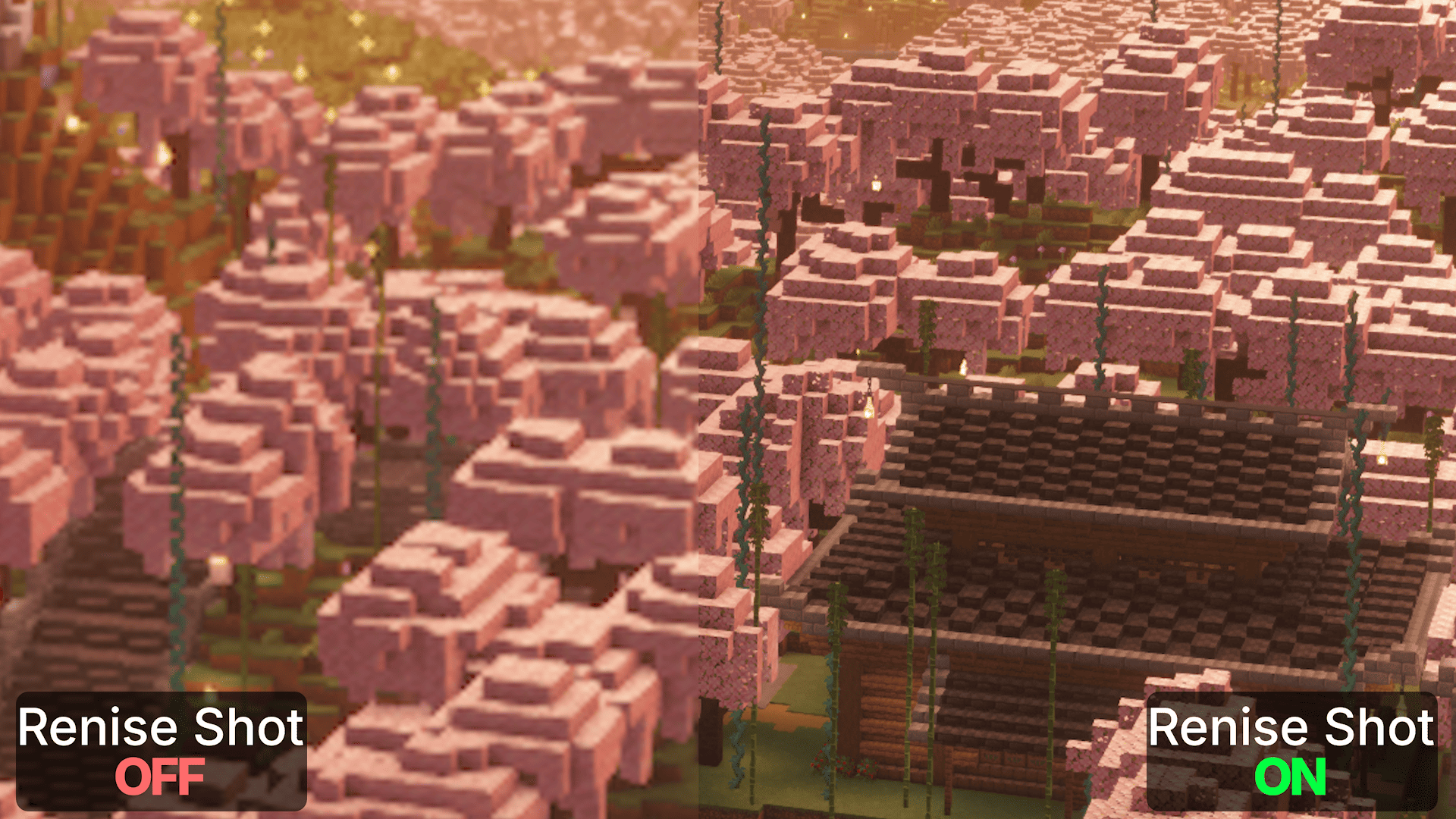 Cropped screenshot: 1080p vs 4k Renice Shot Cropped screenshot: 1080p vs 4k Renice Shot. Both screenshots were taken on a 1080p display. With Renice Shot enabled, the screenshot is captured at native 4K resolution, preserving significantly more detail!
-
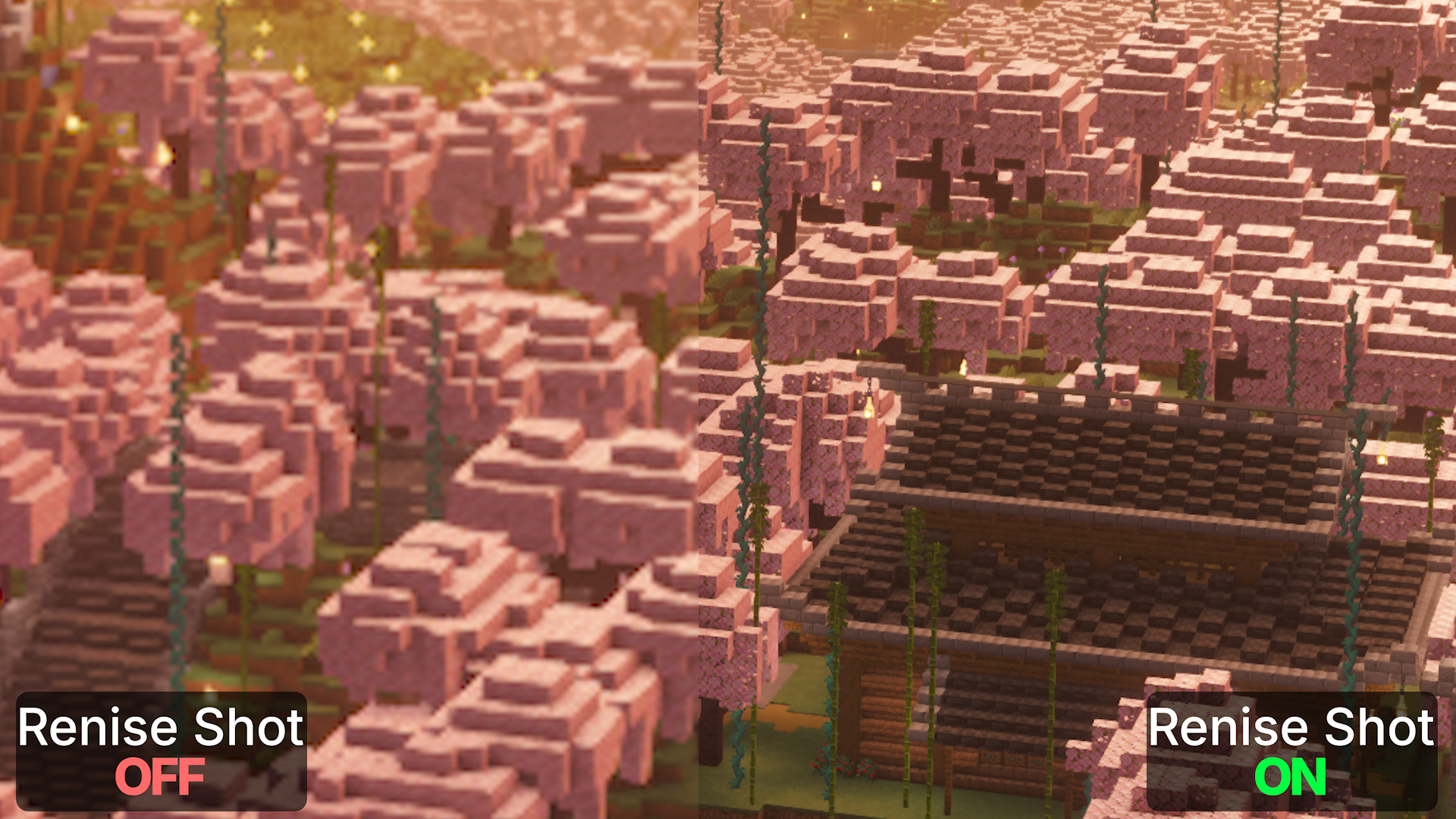 Cropped screenshot: 1080p vs 4k Renice Shot Both screenshots were taken on a 1080p display. With Renice Shot enabled, the screenshot is captured at native 4K resolution, preserving significantly more detail!
Versions
Files
Relations
Project Relations
More like this
Similar Mods
Suggestions use data such as tags, dependencies, dependents, descriptions, titles, and more to rank how much they overlap with this mod.
On ModDex
Community snapshot
By the numbers
Statistics
Want to reach Minecraft players?
We're looking for a server hosting partner to feature here and other parts of the site. Interested? Send us a message!
Get in touchGet it on
Available Platforms
On ModDex
Community snapshot
By the numbers