
Community listing page, reviews here may not be monitored by the author.
Resource Pack Profiles


No reviews yet
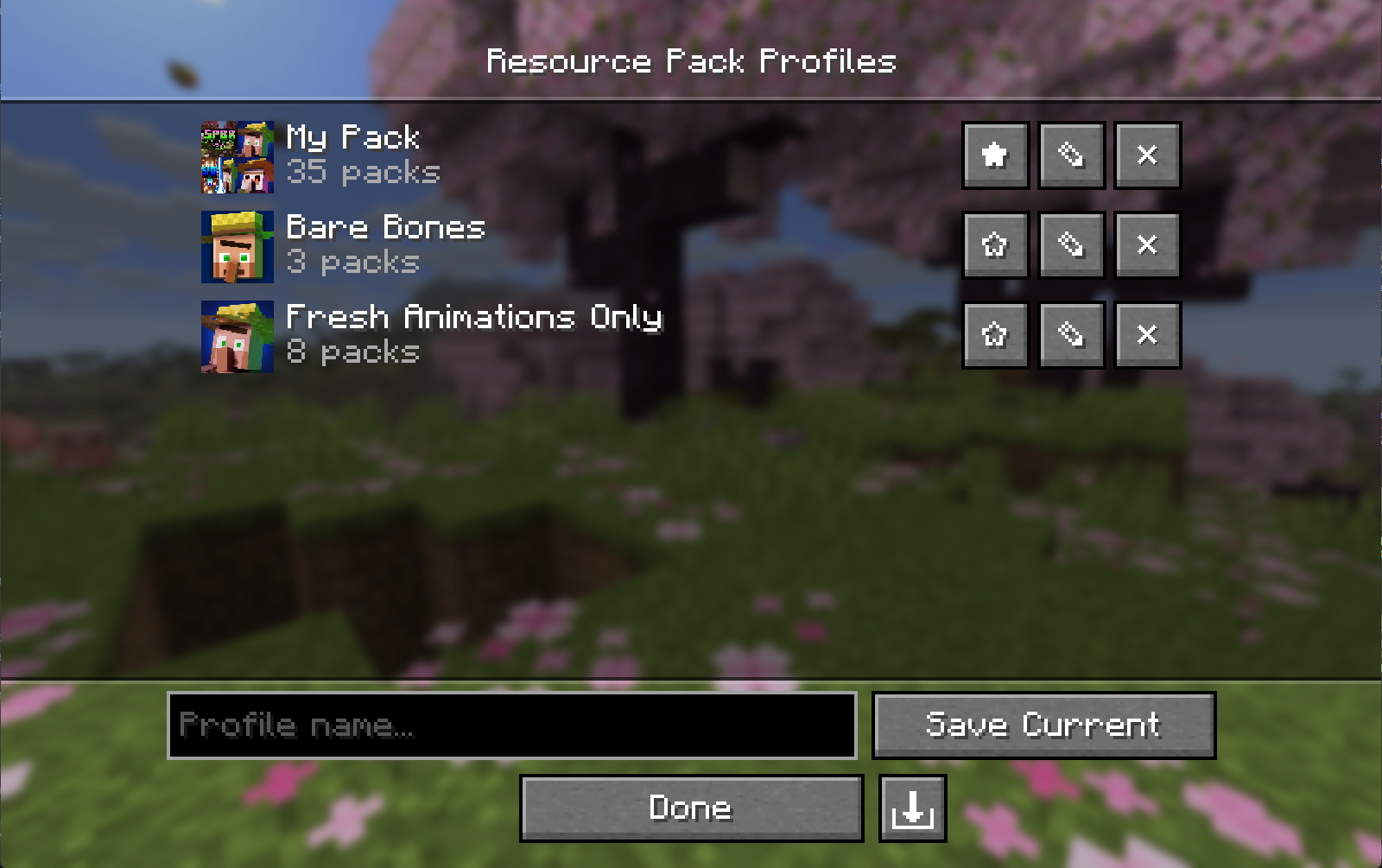
Save, manage, and share named resource pack load-order profiles. Switch between completely different pack setups in seconds, right from the resource pack screen.
Community voices
Reviews
No reviews yet. Be the first to review this project!
Get it on
Available Platforms
Compatibility
Supported Environments
Runs entirely on the client. Works on vanilla servers.
About
Project Details
For authors
Embed Badge
If you're the author of this project, you can embed a live badge anywhere that supports HTML or Markdown. It updates automatically whenever ratings change.
Use HTML for any page that supports it, or Markdown for README files and Markdown-based descriptions.
Identifiers
Platform IDs
About
Description
Resource Pack Profiles


A lightweight client-side Fabric mod that lets you save, manage, and share named resource pack load order profiles — switch between completely different pack setups in seconds, right from the resource pack screen.
Features
- Profile Saving — Snapshot your current resource pack load order as a named profile with a single click.
- Instant Loading — Apply any saved profile and have your packs reload automatically; no restarts needed.
- Profile Editing — Add, remove, and reorder packs within a profile without touching your main load order. Edit the active profile and it re-applies automatically, so your changes stay live.
- Favorites — Star profiles to pin them to the top of the list.
- Custom Icons — Assign a custom image to any profile; auto-generates a composite icon from your pack art if none is set.
- Import / Export — Share profiles as
.rpprofilefiles — a single JSON that includes your pack list and custom icon. - Missing Pack Detection — Profiles with unavailable packs are flagged automatically and can still be applied without the missing packs.
- Keyboard & Narrator Friendly — Built on Minecraft's native widgets, so the profile and pack lists support full keyboard navigation and screen-reader narration.
Download
Installation
- Install Fabric Loader for your Minecraft version.
- Install Fabric API.
- Install Fabric Language Kotlin.
- Drop the mod
.jarinto your.minecraft/modsfolder. - (Optional) Install Mod Menu to open the profiles screen from the mods list.
Client-side only — no server installation needed.
Compatibility
| Dependency | Version |
|---|---|
| Minecraft | 26.1 - 26.2 |
| Fabric Loader | 0.19.3+ |
| Fabric API | 0.152.1+26.1.2 |
| Fabric Language Kotlin | 1.13.12+kotlin.2.4.0 |
| Mod Menu | 18.0.0-beta.1 (optional) |
Usage
Open the Resource Pack Profiles screen via the Profiles button on the vanilla resource pack screen (left of Open Pack Folder), or via Mod Menu.
| Action | How |
|---|---|
| Save current load order | Type a name → click Save Current |
| Load a profile | Click anywhere on the profile's row |
| Edit packs in a profile | Click ✎ |
| Delete a profile | Click ✕ |
| Favorite a profile | Click ★ / ☆ |
| Set / change a profile icon | Open Edit (✎) → click Icon… |
| Remove a custom icon | Open Edit (✎) → click ✕ next to the icon |
| Export a profile | Open Edit (✎) → click the export button (bottom right) |
| Import a profile | Click the import button (bottom right of the profile list) |
In the editor, click a pack in the Available column to add it to the top of Selected. Use the arrow overlay on a selected pack's icon to remove it or reorder it. With keyboard focus, use Enter to add/remove and Shift+Up/Down to reorder.
Profile File Format
Profiles are saved to:
config/resourcepackprofiles.jsonCustom icons are stored in:
config/resourcepackprofiles/icons/Exported .rpprofile files are standard JSON:
{
  "name": "My Profile",
  "packIds": ["file/Pack1", "file/Pack2"],
  "favorite": false,
  "customIcon": "<base64 encoded PNG, or null>"
}
Building from Source
git clone https://github.com/ZephByte/ResourcePackProfiles.git
cd ResourcePackProfiles
./gradlew build
The built jar will be in build/libs/.
License
MIT - free to use, modify, and redistribute. See LICENSE.
Author
Made by ZephByte.
Resource Pack Profiles


A lightweight client-side Fabric mod that lets you save, manage, and share named resource pack load order profiles right from the resource pack screen.
Features
- Profile Saving - Snapshot your current resource pack load order as a named profile with a single click.
- Instant Loading - Apply any saved profile and have your packs reload automatically; no restarts needed.
- Profile Editing - Add, remove, and reorder packs within a profile without touching your main load order. Edit the active profile and it re-applies automatically, so your changes stay live.
- Favorites - Star profiles to pin them to the top of the list.
- Custom Icons - Assign a custom image to any profile; auto-generates a composite icon from your pack art if none is set.
- Import / Export - Share profiles as
.rpprofilefiles, a single JSON that includes your pack list and custom icon. - Missing Pack Detection - Profiles with unavailable packs are flagged automatically and can still be applied without the missing packs.
- Keyboard & Narrator Friendly - Built on Minecraft's native widgets, so the profile and pack lists support full keyboard navigation and screen-reader narration.
Download
- Modrinth (recommended)
- GitHub Releases
Installation
- Install Fabric Loader for your Minecraft version.
- Install Fabric API.
- Install Fabric Language Kotlin.
- Drop the mod
.jarinto your.minecraft/modsfolder. - (Optional) Install Mod Menu to open the profiles screen from the mods list.
Client-side only — no server installation needed.
Compatibility
| Dependency | Version |
|---|---|
| Minecraft | 26.1 - 26.2 |
| Fabric Loader | 0.19.3+ |
| Fabric API | 0.152.1+26.1.2 |
| Fabric Language Kotlin | 1.13.12+kotlin.2.4.0 |
| Mod Menu | 18.0.0-beta.1 (optional) |
Usage
Open the Resource Pack Profiles screen via the Profiles button on the vanilla resource pack screen (left of Open Pack Folder), or via Mod Menu.
| Action | How |
|---|---|
| Save current load order | Type a name → click Save Current |
| Load a profile | Click anywhere on the profile's row |
| Edit packs in a profile | Click ✎ |
| Delete a profile | Click ✕ |
| Favorite a profile | Click ★ / ☆ |
| Set / change a profile icon | Open Edit (✎) → click Icon… |
| Remove a custom icon | Open Edit (✎) → click ✕ next to the icon |
| Export a profile | Open Edit (✎) → click the export button (bottom right) |
| Import a profile | Click the import button (bottom right of the profile list) |
In the editor, click a pack in the Available column to add it to the top of Selected. Use the arrow overlay on a selected pack's icon to remove it or reorder it. With keyboard focus, use Enter to add/remove and Shift+Up/Down to reorder.
Profile File Format
Profiles are saved to:
config/resourcepackprofiles.json
Custom icons are stored in:
config/resourcepackprofiles/icons/
Exported .rpprofile files are standard JSON:
{
  "name": "My Profile",
  "packIds": ["file/Pack1", "file/Pack2"],
  "favorite": false,
  "customIcon": "<base64 encoded PNG, or null>"
}
Building from Source
git clone https://github.com/ZephByte/ResourcePackProfiles.git
cd ResourcePackProfiles
./gradlew build
The built jar will be in build/libs/.
License
MIT - free to use, modify, and redistribute. See LICENSE.
Author
Made by ZephByte.
Screenshots
Gallery
Versions
Files
Relations
Project Relations
More like this
Similar Mods
Suggestions use data such as tags, dependencies, dependents, descriptions, titles, and more to rank how much they overlap with this mod.
On ModDex
Community snapshot
By the numbers
Statistics
Want to reach Minecraft players?
We're looking for a server hosting partner to feature here and other parts of the site. Interested? Send us a message!
Get in touchGet it on
Available Platforms
On ModDex
Community snapshot
By the numbers