Community listing page, reviews may not be monitored by the author.
Rift Caster

No reviews yet
Save ten destinations with snapshots, cast animated portals, and upgrade from Overworld travel to any dimension.

Community voices
Reviews
No reviews yet. Be the first to review this project!
Get it on
Available Platforms
About
Project Details
For authors
Embed Badge
If you're the author of this project, you can embed a live badge anywhere that supports HTML or Markdown. It updates automatically whenever ratings change.
Use HTML for any page that supports it, or Markdown for README files and Markdown-based descriptions.
Identifiers
Platform IDs
Resources
External Links
About
Description
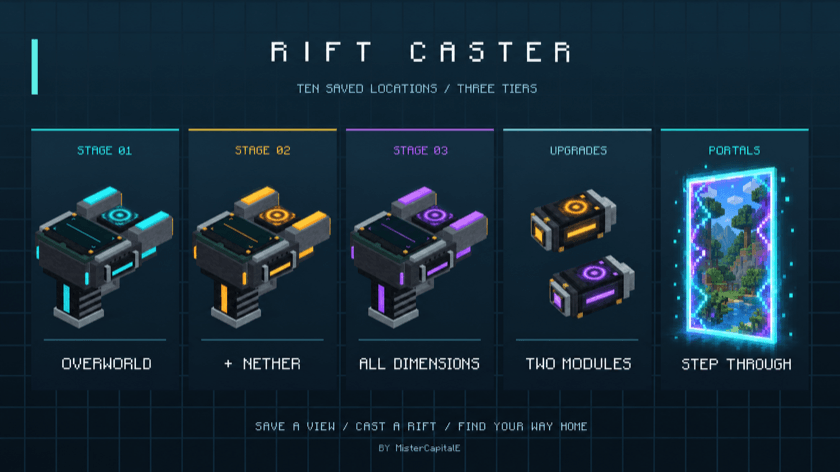
Save a view. Cast a rift. Find your way home.
10 saved destinations • 3 travel tiers • 1 device in your hand
Minecraft 26.3 • Fabric • By MisterCapitalE
Rift Caster turns your favorite places into doorways you can carry. Save a destination and a snapshot of the view, choose it on the device's landscape screen, and cast an animated portal in front of you. Step through to arrive, then use the brief return window if you forgot something—or need a quick escape.
Your destinations, on display
- Ten memory slots: save named locations with their dimension, facing direction, and a photo of what you were looking at.
- A screen that follows your selection: the held device shows the selected destination and slot number. Scroll through saved locations without opening the menu; empty slots are skipped.
- Animated hardware: moving rings, electrical effects, sounds, and changing trim bring each upgrade to life.
- Snapshot portals: your saved image appears on both sides of the doorway, beneath the animated energy. These are captured images, rather than a live view of the destination.
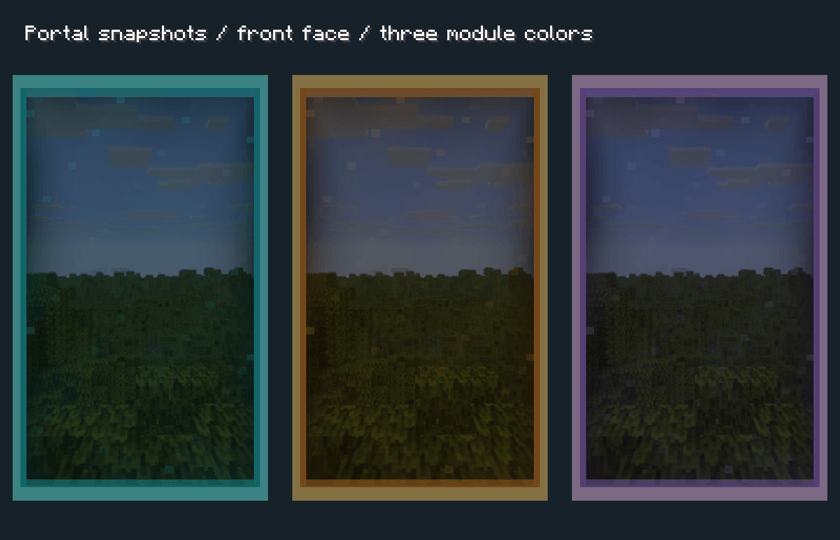
In-engine portal preview showing the three module colors and snapshot surfaces.
Upgrade your reach
Two sequential module upgrades expand where you can travel and reduce the cooldown. Each tier changes the device's trim color.
| Device tier | Available dimensions | Cooldown |
|---|---|---|
| Base · Cyan | Overworld | 60 seconds |
| Nether Module · Amber | Overworld + Nether | 30 seconds |
| Universal Module · Violet | Overworld + Nether + End, plus other loaded mod or datapack dimensions | No cooldown |
Install the Nether Module first, then the Universal Module. Use the two upgrade sockets in the GUI, or hold the caster in one hand and the module in the other and Shift + right-click. Upgrades preserve your saved locations and consume the module in Survival. Both the departure and destination dimensions must be unlocked by your installed tier.
From first save to first rift
- Right-click with Rift Caster to open its screen.
- Choose an empty slot, name your destination, and select Save Location. Look at the scene you want to capture and hold still while it saves.
- Select a saved destination in the GUI, or use the scroll wheel while holding the device.
- Choose Open Portal, or Shift + right-click for quick access to your selected destination.
- Walk through the doorway. It waits up to 15 seconds for entry; after your first crossing, both ends remain available for a 5-second return window.
The cooldown begins when you open a portal. Returning through that pair adds no extra cooldown, and repeated crossings do not extend the return window. Each player can have one active portal pair at a time, including with the Universal Module. Portals are personal to their owner.
Portals do not break or replace terrain. Arrival checks look for safe footing and room for the player, including supported treetop arrivals. Unsafe destinations are blocked. Dismount before traveling.
Craft your caster
Arrange these ingredients in a crafting table:
| Diamond | Compass | Diamond |
| Ender Pearl | Redstone Block | Ender Pearl |
| Iron Ingot | Iron Block | Iron Ingot |
Nether Module: Obsidian / Blaze Powder / Obsidian; Blaze Powder / Eye of Ender / Blaze Powder; Obsidian / Blaze Powder / Obsidian.
Universal Module: Diamond / Popped Chorus Fruit / Diamond; Eye of Ender / Nether Star / Eye of Ender; Diamond / Popped Chorus Fruit / Diamond.
Installation
Requires Minecraft 26.3, Fabric Loader 0.19.5 or newer, Java 25, and Fabric API for 26.3 (built with Fabric API 0.162.0+26.3). Install Rift Caster and Fabric API on both the client and server for multiplayer.
Custom dimensions must be loaded in the world and require the Universal Module. Include the world's teleportremote/snapshots folder in backups to preserve destination images.
RIFT CASTER
Created by MisterCapitalE
© 2026 Eventide Labs LLC. All Rights Reserved.
Screenshots
Gallery
Versions
Files
Relations
Project Relations
More like this
Similar Mods
Suggestions use data such as tags, dependencies, dependents, descriptions, titles, and more to rank how much they overlap with this mod.
On ModDex
Community snapshot
By the numbers
Statistics

Get it on
Available Platforms
On ModDex
Community snapshot
By the numbers
Statistics
Resources