
Community listing page, reviews here may not be monitored by the author.
RS's AutoMessage

No reviews yet
Automatically send customized messages at set intervals, allowing for the sending of a large number of customized messages. It can recognize keyword matches and automatically reply with customized messages, without causing game lag when sending messages
Community voices
Reviews
No reviews yet. Be the first to review this project!
Get it on
Available Platforms
About
Project Details
For authors
Embed Badge
If you're the author of this project, you can embed a live badge anywhere that supports HTML or Markdown. It updates automatically whenever ratings change.
Use HTML for any page that supports it, or Markdown for README files and Markdown-based descriptions.
Identifiers
Platform IDs
Resources
External Links
About
Description
RS's AutoMessage v1.1.4 (support 1.20-26.1.2)
✨ Features
- 🕐 Scheduled Batch Sending - Send all messages in the list at once at set intervals
- 💬 Smart Auto Reply - Automatically reply when keywords are detected, supports multiple keyword matching
- 🎮 Command Support - Supports sending Minecraft commands (auto-detects prefix)
- 📂 TXT Batch Import - Import message lists from text files for quick setup
- ⏱️ Countdown Display - Real-time countdown timer displayed in the bottom-left corner
- ⚙️ Visual Configuration - Built-in Mod Menu + YACL configuration interface, no need to edit config files
- 🌍 Multi-language Support - Supports Simplified Chinese and English
📋 Requirements(1.21.8 sample)
| Dependency | Version | Download |
|---|---|---|
| Fabric Loader | ≥0.16.13 | Download |
| Fabric API | ≥0.133.4 | Download |
| Mod Menu | ≥15.0.0 | Download |
| YACL | ≥3.8.2 | Download |
📥 Installation
- Ensure Fabric Loader 0.16.13 or higher is installed
- Download the mod
.jarfile - Place the file into your
.minecraft/mods/folder - Launch the game and verify the mod is loaded in the Mods menu
🚀 Usage Guide
Basic Configuration
After installation, press Esc → Mods → find RS's AutoMessage → Configure to open the settings interface.
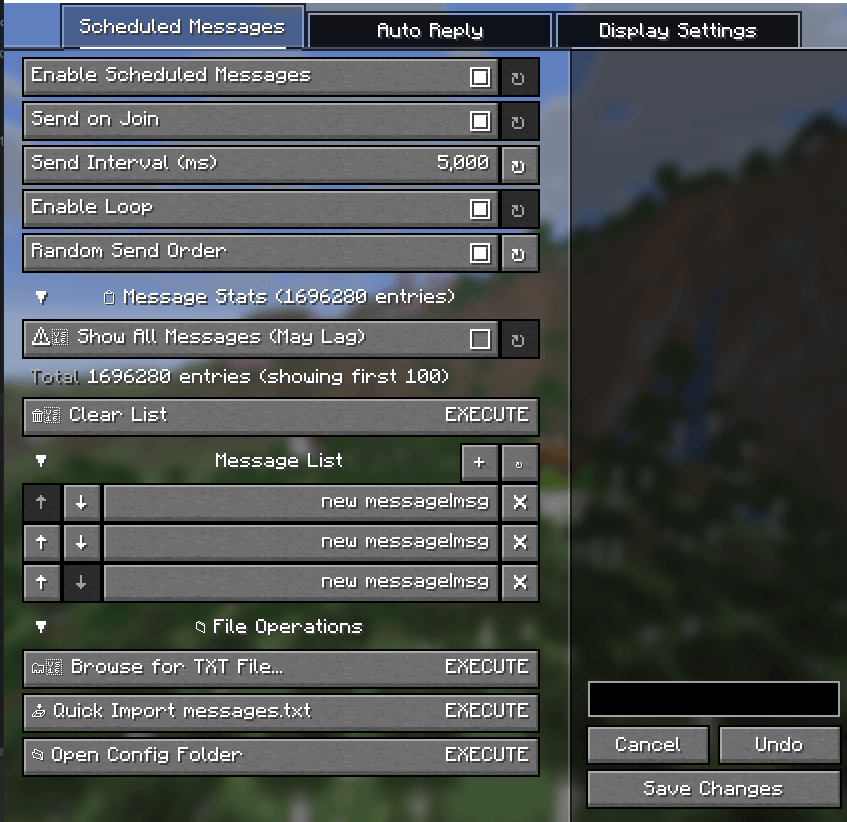
1. Scheduled Messages Settings
Enable Features
- Enable Scheduled Messages - Turns on automatic message sending
- Send on Join - Execute a send immediately upon joining a server
- Send Interval - Set the loop interval (milliseconds, 1000ms = 1 second)

Edit Message List
Add messages in the Scheduled Message List. Two formats are supported:
| Format | Example | Description |
|---|---|---|
content|msg |
Hello everyone!|msg |
Send a normal chat message |
content|cmd |
warp spawn|cmd |
Execute a command (automatically adds /) |
Sending Logic: When the interval is reached, the mod will send all items in the list sequentially, with a 150ms delay between each to prevent lag.

2. Auto Reply Settings
Configure Triggers
- Enable Auto Reply - Turns on automatic reply functionality
- Trigger Keywords List - Add multiple trigger keywords (e.g.,
hello,hi,help) - Reply Message - Set the reply content (supports commands starting with
/) - Reply Cooldown - Minimum interval between replies to prevent spam (milliseconds)
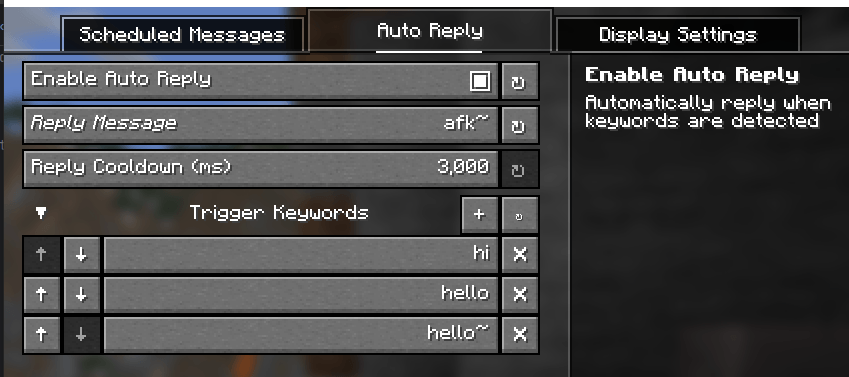
How it Works: When a chat message containing any of the keywords is received (case-insensitive), the reply message is automatically sent.
3. Countdown Display
Enable Show Countdown to display the remaining time until the next send in the bottom-left corner of the screen:
Note: Display settings require a game restart to take effect.
📝 Configuration Format Details
Message List Format
Welcome!|msg
warp lobby|cmd
gamemode creative|cmd
Have fun!|msg
Actual Execution:
- Sends chat: "Welcome!"
- Executes command:
/warp lobby - Executes command:
/gamemode creative - Sends chat: "Have fun!"
Auto Reply Example
Trigger Keywords: ["hello", "hi", "help"]
Reply Content: "I'm AFK, leave a message~"
When messages like "hello there", "hi!", or "help me" are received, the reply will be triggered.
🔧 FAQ
Q: Does sending messages cause lag?
A: The mod has been optimized for frame-spaced sending, with a 3 tick (150ms) delay between each message to avoid lag spikes.
Q: Commands are not executing?
A: Ensure the command format is correct (do not add the / prefix, the mod handles this automatically). Some servers may require specific permissions.
Q: Countdown display is not working?
A: Please ensure:
- "Show Countdown" and "Enable Scheduled Messages" are both enabled
- The message list is not empty
- "Enable Loop" is turned on (or wait for the first trigger)
Q: How do I temporarily pause sending?
A: Turn off "Enable Scheduled Messages" in the configuration interface. No game restart is required.
Made with ❤️ by Real_SShwer
GitHub • Issues • Releases
中文版
RS's AutoMessage v1.1.2
✨ 功能特性
- 🕐 定时批量发送 - 按设定间隔一次性发送消息列表中的所有内容
- 💬 智能自动回复 - 检测关键词自动回复,支持多关键词匹配
- 🎮 指令支持 - 支持发送 Minecraft 指令(自动识别
/前缀) - 📂 TXT 批量导入 - 支持从文本文件批量导入消息列表,快速配置
- ⏱️ 倒计时显示 - 屏幕左下角实时显示下次发送剩余时间
- ⚙️ 可视化配置 - 内置 Mod Menu + YACL 配置界面,无需编辑配置文件
- 🌍 多语言支持 - 支持简体中文与英文
📋 前置需求
| 依赖项 | 版本要求 | 下载链接 |
|---|---|---|
| Fabric Loader | ≥0.16.13 | Download |
| Fabric API | ≥0.133.4 | Download |
| Mod Menu | ≥15.0.0 | Download |
| YACL | ≥3.8.2 | Download |
📥 安装说明
- 确保已安装 Fabric Loader 0.16.13 或更高版本
- 下载本模组
.jar文件 - 将文件放入
.minecraft/mods/文件夹 - 启动游戏,在 Mods 菜单中确认加载成功
🚀 使用指南
基础配置
安装并进入游戏后,按 Esc → Mods → 找到 RS's AutoMessage → 配置 即可打开设置界面。
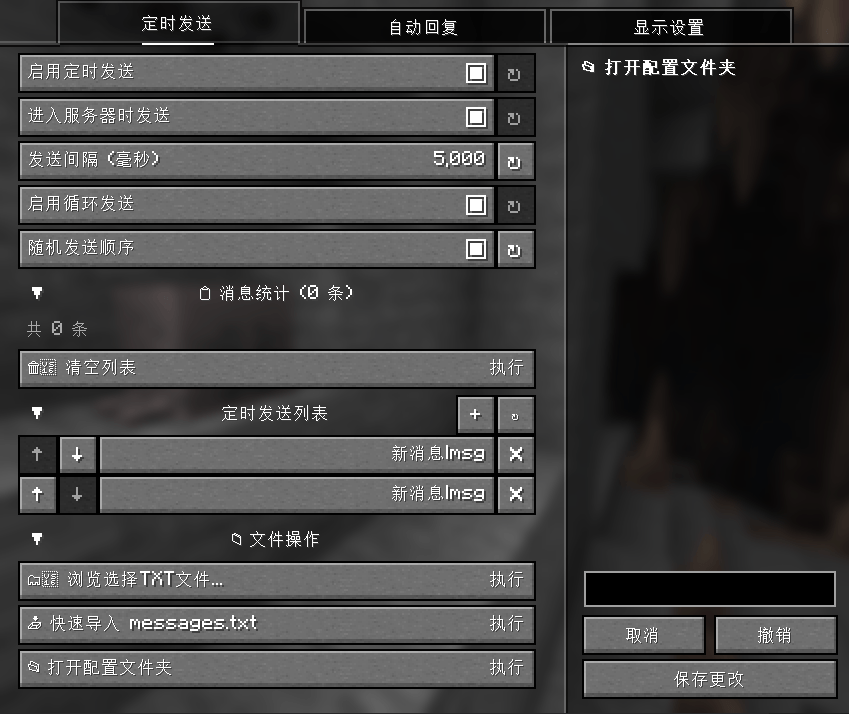
1. 定时发送设置
启用功能
- 启用定时发送 - 开启自动发送功能
- 进入服务器时发送 - 加入服务器立即执行一次发送
- 发送间隔 - 设置循环间隔(毫秒,1000ms = 1秒)
编辑消息列表
在 定时发送列表 中添加消息,支持两种格式:
| 格式 | 示例 | 说明 |
|---|---|---|
内容|msg |
大家好!|msg |
发送普通聊天消息 |
内容|cmd |
warp spawn|cmd |
执行指令(自动添加 /) |
发送逻辑:当间隔到达时,模组会一次性顺序发送列表中的所有内容,每条间隔 150ms 避免卡顿。
2. 自动回复设置
配置触发器
- 启用自动回复 - 开启自动回复功能
- 触发关键词列表 - 添加多个触发关键词(如:
你好、hello、在吗) - 回复消息内容 - 设置回复内容(支持指令,以
/开头) - 回复冷却 - 防止刷屏的最小间隔(毫秒)
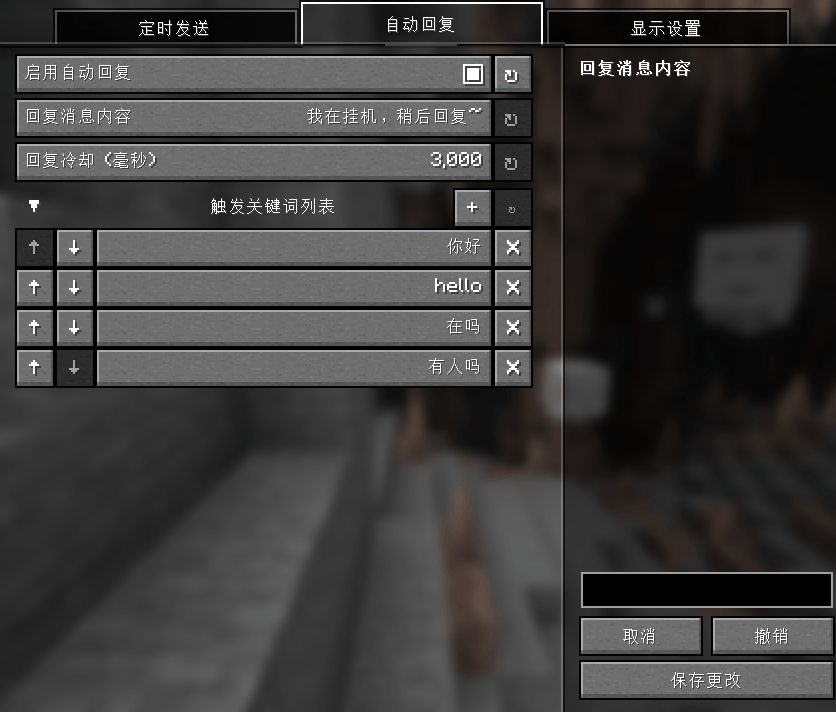
工作原理:当收到聊天消息包含任一关键词时(不区分大小写),自动发送回复消息。
3. 倒计时显示
启用 显示倒计时 后,屏幕左下角会显示下次发送的剩余时间:
> 提示:修改显示设置后需要重启游戏生效。
📝 配置格式详解
消息列表格式
欢迎语|msg
warp lobby|cmd
gamemode creative|cmd
祝游戏愉快|msg
实际执行:
- 发送聊天:"欢迎语"
- 执行指令:
/warp lobby - 执行指令:
/gamemode creative - 发送聊天:"祝游戏愉快"
自动回复示例
触发关键词:["在吗", "有人吗", "help"]
回复内容:"我在挂机,有事请留言~"
当收到 "在吗?"、"有人在吗?" 或 "help me" 时,都会触发回复。
🔧 常见问题
Q: 发送消息时会卡顿?
A: 模组已优化为分帧发送,每 3 tick(150ms)发送一条消息,避免一次性发送造成的卡顿。
Q: 指令执行失败?
A: 确保指令格式正确(不需要添加 / 前缀,模组会自动处理)。部分服务器可能需要特定权限。
Q: 倒计时显示异常?
A: 请确保:
- 已启用 "显示倒计时" 和 "启用定时发送"
- 消息列表不为空
- 已开启 "循环发送"(或等待首次触发)
Q: 如何临时暂停发送?
A: 在配置界面关闭 "启用定时发送" 即可,不需要重启游戏。
Made with ❤️ by Real_SShwer
GitHub • 问题反馈 • 下载 Releases
Screenshots
Gallery
Versions
Files
Relations
Project Relations
More like this
Similar Mods
Suggestions use data such as tags, dependencies, dependents, descriptions, titles, and more to rank how much they overlap with this mod.
On ModDex
Community snapshot
By the numbers
Statistics
Want to reach Minecraft players?
We're looking for a server hosting partner to feature here and other parts of the site. Interested? Send us a message!
Get in touchGet it on
Available Platforms
On ModDex
Community snapshot
By the numbers
Statistics
Resources