Community listing page, reviews here may not be monitored by the author.
Runorama Next


No reviews yet
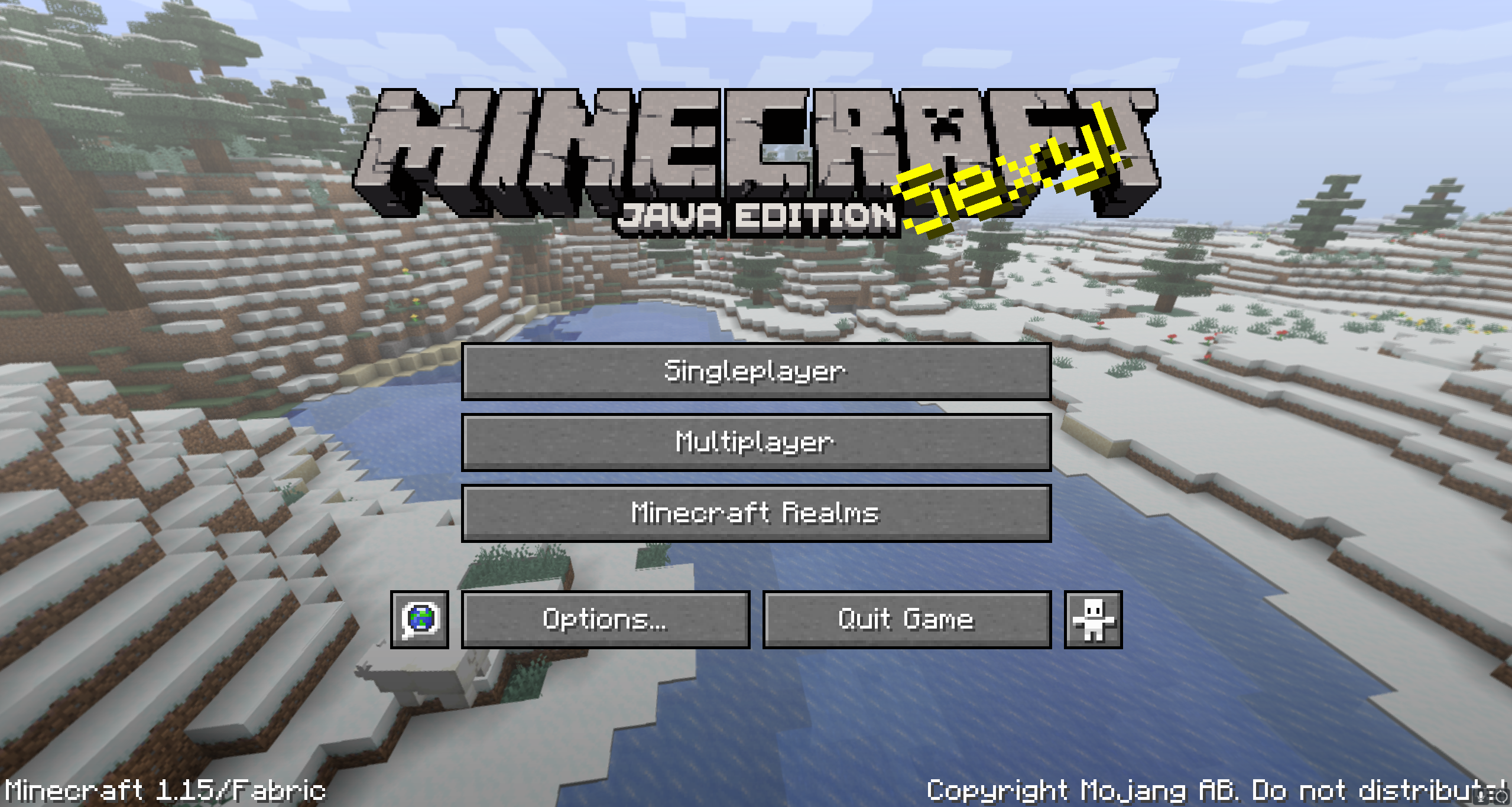
A mod allowing you to capture panoramic screenshots to modify the appearance of your main menu.

Community voices
Reviews
No reviews yet. Be the first to review this project!
Get it on
Available Platforms
Compatibility
Supported Environments
Runs entirely on the client. Works on vanilla servers.
About
Project Details
For authors
Embed Badge
If you're the author of this project, you can embed a live badge anywhere that supports HTML or Markdown. It updates automatically whenever ratings change.
Use HTML for any page that supports it, or Markdown for README files and Markdown-based descriptions.
Identifiers
Platform IDs
About
Description
Runorama Next
Runorama Next is a Minecraft mod for Fabric that continues the work of the Runorama mod by Liachmodded. The mod lets you take panoramic screenshots that replaces the normal start screen background with an image from your own world. It also allows you to easily create a resource pack with your own custom screenshots.
Installation
- Download and install Fabric Loader following the instructions on the Fabric website.
- Download the Runorama Next mod JAR file from the releases page.
- Move the JAR file to the mods folder in your Minecraft installation directory.
- Launch Minecraft with the Fabric profile.
Usage
The H button is bound to take a panoramic screenshot that will replace the normal start screen background with a randomized image from your collection of panoramic screenshots. The default keybind can be changed in the controls. See the commands section for more information.
Commands
The following commands can be used to configure the mod:
/runoramanext config setpanoramafov [fov]: Sets the field of view (FOV) for the panoramic screenshot. FOV must be a number between 30 and 110. Default is set to 82, but it can be adjusted for better results if you're taking panoramas very close to the ground or high up in the sky./runoramanext config rotationspeed [speed]: Sets the rotation speed for the panoramic screenshot. The default value is 1, which is a multiplier of the standard minecraft rotation speed./runoramanext config poolsize [size]: Sets the pool size for the panoramic screenshot./runoramanext config includevanillapanorama [true/false]: Sets whether to include vanilla Minecraft panorama images in the pool of images used for the start screen background./runoramanext config replacetitlescreen [true/false]: Sets whether to replace the vanilla Minecraft title screen with the modded version.
Additionally, the following command can be used to create a resource pack with your custom panoramic screenshots:
/runoramanext createresourcepack [name] [description]: Creates a resource pack with your custom panoramic screenshots. You can provide a name and description for the resource pack.
Source Code
The source code can be found on GitHub under the MPL-2.0 License. More information about the license can be found under the License section.
License
The Runorama Next mod is released under the MPL-2.0 license. This allows you to, modify and redistribute the mod as long as it adheres to the license terms. The license requires that any modifications to the code are made publicly available. It also requires that any original or modified code that is distributed must be released under the same license.
Bugs and Feedback
Bug reports can be submitted either through the GitHub Issues page of the Runorama Next mod repository or by contacting me personally over Discord (WinterWolfSV#9577). Please provide as much information as possible, including steps to reproduce the issue, error messages, and any relevant screenshots or log files. Your feedback is greatly appreciated and will help improve the mod for all users.
Credits
The Runorama Next mod is a continuation of the original Runorama mod, created by liachmodded.
Here are some other mod links you may be interested in:
- Runorama equivalent for Forge created by suppergerrie2: Panorama Creator
- Runorama for versions below 1.15 created by liachmodded: Runorama
Runorama Next
Runorama Next is a Minecraft mod for Fabric that continues the work of the Runorama mod by Liachmodded. The mod lets you take panoramic screenshots that replaces the normal start screen background with an image from your own world. It also allows you to easily create a resource pack with your own custom screenshots.
Installation
- Download and install Fabric Loader following the instructions on the Fabric website.
- Download the Runorama Next mod JAR file from the releases page.
- Move the JAR file to the mods folder in your Minecraft installation directory.
- Launch Minecraft with the Fabric profile.
Usage
The H button is bound to take a panoramic screenshot that will replace the normal start screen background with a randomized image from your collection of panoramic screenshots. The default keybind can be changed in the controls. See the commands section for more information.
Commands
The following commands can be used to configure the mod:
/runoramanext config setpanoramafov [fov]: Sets the field of view (FOV) for the panoramic screenshot. FOV must be a number between 30 and 110. Default is set to 82, but it can be adjusted for better results if you're taking panoramas very close to the ground or high up in the sky./runoramanext config rotationspeed [speed]: Sets the rotation speed for the panoramic screenshot. The default value is 1, which is a multiplier of the standard minecraft rotation speed./runoramanext config poolsize [size]: Sets the pool size for the panoramic screenshot./runoramanext config includevanillapanorama [true/false]: Sets whether to include vanilla Minecraft panorama images in the pool of images used for the start screen background./runoramanext config replacetitlescreen [true/false]: Sets whether to replace the vanilla Minecraft title screen with the modded version.
Additionally, the following command can be used to create a resource pack with your custom panoramic screenshots:
/runoramanext createresourcepack [name] [description]: Creates a resource pack with your custom panoramic screenshots. You can provide a name and description for the resource pack.
Source Code
The source code can be found on GitHub under the MPL-2.0 License. More information about the license can be found under the License section.
License
The Runorama Next mod is released under the MPL-2.0 license. This allows you to, modify and redistribute the mod as long as it adheres to the license terms. The license requires that any modifications to the code are made publicly available. It also requires that any original or modified code that is distributed must be released under the same license.
Bugs and Feedback
Bug reports can be submitted either through the GitHub Issues page of the Runorama Next mod repository or by contacting me personally over Discord (WinterWolfSV#9577). Please provide as much information as possible, including steps to reproduce the issue, error messages, and any relevant screenshots or log files. Your feedback is greatly appreciated and will help improve the mod for all users.
Credits
The Runorama Next mod is a continuation of the original Runorama mod, created by liachmodded.
Here are some other mod links you may be interested in:
- Runorama equivalent for Forge created by suppergerrie2: Panorama Creator
- Runorama for versions below 1.15 created by liachmodded: Runorama
Screenshots
Gallery
Versions
Files
Relations
Project Relations
More like this
Similar Mods
Suggestions use data such as tags, dependencies, dependents, descriptions, titles, and more to rank how much they overlap with this mod.
On ModDex
Community snapshot
By the numbers
Statistics
 (opens in a new tab)
Get it on
Available Platforms
On ModDex
Community snapshot
By the numbers