Community listing page, reviews here may not be monitored by the author.
Saros Worldborder Customizer


No reviews yet
Fully customize your world border with RGB colors, opacity settings, and animated pulse effects. Works instantly in multiplayer and saves all settings automatically.
Community voices
Reviews
No reviews yet. Be the first to review this project!
Get it on
Available Platforms
Compatibility
Supported Environments
Must be installed on both the client and the server.
About
Project Details
For authors
Embed Badge
If you're the author of this project, you can embed a live badge anywhere that supports HTML or Markdown. It updates automatically whenever ratings change.
Use HTML for any page that supports it, or Markdown for README files and Markdown-based descriptions.
Identifiers
Platform IDs
Resources
External Links
About
Description
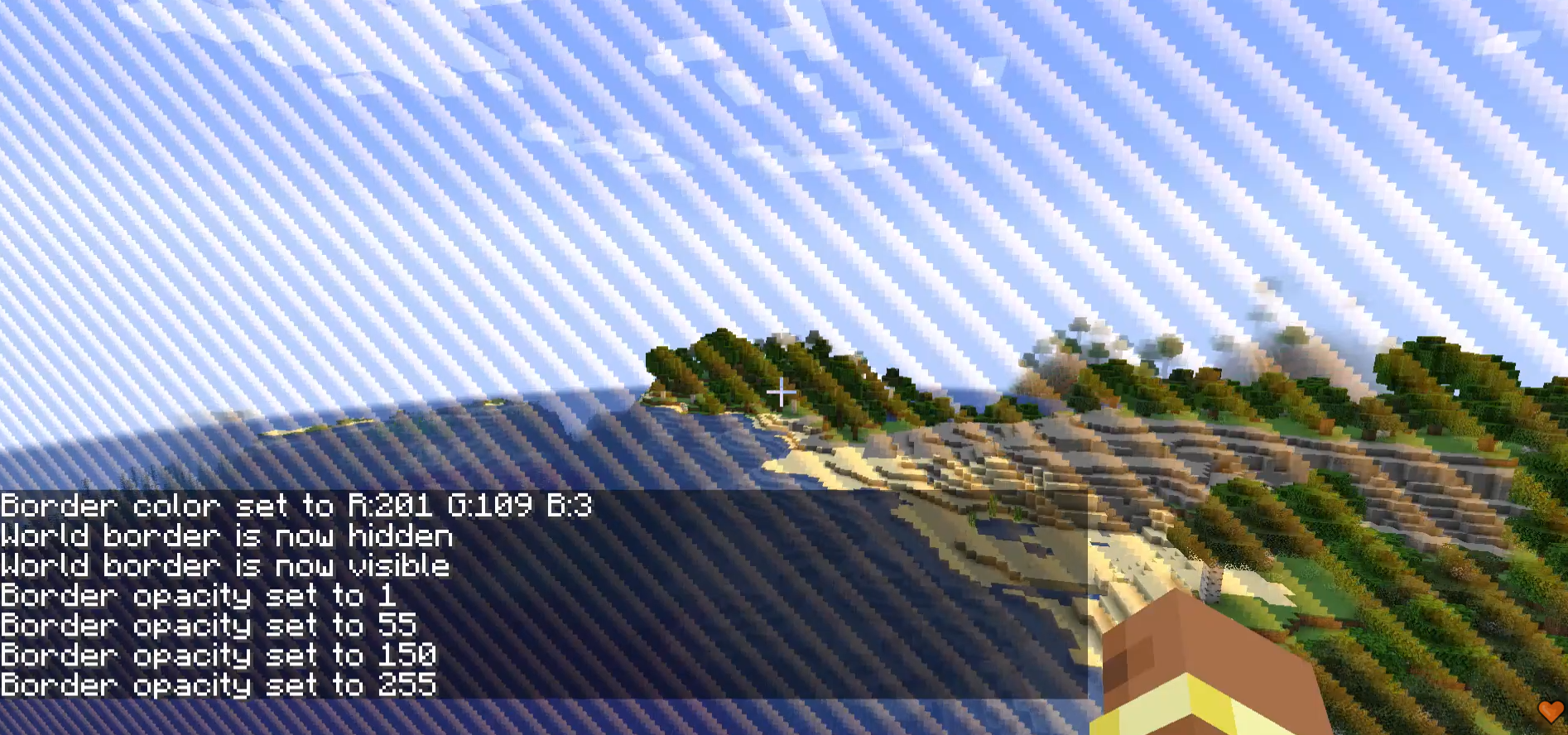
Saros Worldborder Customizer gives server admins and singleplayer users full control over the look of the Minecraft world border. Change its color, make it invisible, adjust transparency, set a custom warning color, or let it pulse with animated flair — all in real time, synced instantly to every connected player, and saved across server restarts.

Custom Border Color 🎨
- Set any color using RGB values (0–255 per channel).
/saros_worldborder color <r> <g> <b>- Example:
/saros_worldborder color 255 128 0→ orange border.
Hide / Show 👻
- Make the world border completely invisible with a single command.
/saros_worldborder hide— border disappears entirely./saros_worldborder show— border becomes visible again.
Opacity Control 🔆
- Adjust the transparency of the border independently of its color.
/saros_worldborder opacity <0-255>— 0 = fully transparent, 255 = fully opaque.
Warning Color ⚠️
- Define a separate color that activates automatically when a player steps inside the border's warning distance.
/saros_worldborder warningcolor <r> <g> <b>- Works alongside Minecraft's built-in warning distance setting.
Pulse Animation 💫
- Animate the border so it smoothly pulses between the main color and a secondary color.
/saros_worldborder pulse <r> <g> <b> <speed 1-10>— speed 1 is slow, 10 is fast./saros_worldborder pulse off— disables the animation.
Instant Multiplayer Sync 🌐
- Every change is broadcast to all online players the moment the command is executed.
- Newly joining players automatically receive the current state.
Persistent Storage 🔄
- All settings are saved to the world folder (
wbcustomizer_state.json) and restored after every server restart. - Per-world: different worlds can have different border configurations.
- All settings are saved to the world folder (
Permission System 🔒
- On multiplayer servers: OP level 2 required.
- In singleplayer: all commands are available by default.

| Command | Description |
|---|---|
/saros_worldborder |
Show all available commands (EN + DE) |
/saros_worldborder color <r> <g> <b> |
Set border color (RGB 0–255 each) |
/saros_worldborder opacity <0-255> |
Set border transparency |
/saros_worldborder warningcolor <r> <g> <b> |
Set color shown near border edge |
/saros_worldborder pulse <r> <g> <b> <speed> |
Enable pulsing animation (speed 1–10) |
/saros_worldborder pulse off |
Disable pulsing animation |
/saros_worldborder hide |
Make border completely invisible |
/saros_worldborder show |
Restore border visibility |
/saros_worldborder reset |
Reset everything to default blue |

Currently Supported ✅
- Forge 1.20.1
- Fabric 1.20.1
- Forge 1.21.1
- NeoForge 1.21.1
- Fabric 1.21.1
- Forge 26.1
- NeoForge 26.1
- Fabric 26.1
- Forge 26.1.2
- NeoForge 26.1.2
- Fabric 26.1.2

For requests, suggestions, or bug reports, join the Discord and become part of the Saro's Mod community!

Saros Worldborder Customizer gives server admins and singleplayer users full control over the look of the Minecraft world border. Change its color, make it invisible, adjust transparency, set a custom warning color, or let it pulse with animated flair — all in real time, synced instantly to every connected player, and saved across server restarts.

-
Custom Border Color 🎨
- Set any color using RGB values (0–255 per channel).
/saros_worldborder color <r> <g> <b>- Example:
/saros_worldborder color 255 128 0→ orange border.
-
Hide / Show 👻
- Make the world border completely invisible with a single command.
/saros_worldborder hide— border disappears entirely./saros_worldborder show— border becomes visible again.
-
Opacity Control 🔆
- Adjust the transparency of the border independently of its color.
/saros_worldborder opacity <0-255>— 0 = fully transparent, 255 = fully opaque.
-
Warning Color ⚠️
- Define a separate color that activates automatically when a player steps inside the border's warning distance.
/saros_worldborder warningcolor <r> <g> <b>- Works alongside Minecraft's built-in warning distance setting.
-
Pulse Animation 💫
- Animate the border so it smoothly pulses between the main color and a secondary color.
/saros_worldborder pulse <r> <g> <b> <speed 1-10>— speed 1 is slow, 10 is fast./saros_worldborder pulse off— disables the animation.
-
Instant Multiplayer Sync 🌐
- Every change is broadcast to all online players the moment the command is executed.
- Newly joining players automatically receive the current state.
-
Persistent Storage 🔄
- All settings are saved to the world folder (
wbcustomizer_state.json) and restored after every server restart. - Per-world: different worlds can have different border configurations.
- All settings are saved to the world folder (
-
Permission System 🔒
- On multiplayer servers: OP level 2 required.
- In singleplayer: all commands are available by default.

| Command | Description |
|---|---|
/saros_worldborder |
Show all available commands (EN + DE) |
/saros_worldborder color <r> <g> <b> |
Set border color (RGB 0–255 each) |
/saros_worldborder opacity <0-255> |
Set border transparency |
/saros_worldborder warningcolor <r> <g> <b> |
Set color shown near border edge |
/saros_worldborder pulse <r> <g> <b> <speed> |
Enable pulsing animation (speed 1–10) |
/saros_worldborder pulse off |
Disable pulsing animation |
/saros_worldborder hide |
Make border completely invisible |
/saros_worldborder show |
Restore border visibility |
/saros_worldborder reset |
Reset everything to default blue |

Currently Supported ✅
- Forge 1.20.1
- Fabric 1.20.1
- Forge 1.21.1
- NeoForge 1.21.1
- Fabric 1.21.1
- Forge 26.1
- NeoForge 26.1
- Fabric 26.1
- Forge 26.1.2
- NeoForge 26.1.2
- Fabric 26.1.2

For requests, suggestions, or bug reports, join the Discord and become part of the Saro's Mod community!

Screenshots
Gallery
Versions
Files
Relations
Project Relations
More like this
Similar Mods
Suggestions use data such as tags, dependencies, dependents, descriptions, titles, and more to rank how much they overlap with this mod.
On ModDex
Community snapshot
By the numbers
Statistics
Want to reach Minecraft players?
We're looking for a server hosting partner to feature here and other parts of the site. Interested? Send us a message!
Get in touchGet it on
Available Platforms
On ModDex
Community snapshot
By the numbers
Statistics
Resources