
Community listing page, reviews may not be monitored by the author.
Scaffolding Blueprint


No reviews yet
Pack your scaffolding into a blueprint and place it anywhere!

Community voices
Reviews
No reviews yet. Be the first to review this project!
Get it on
Available Platforms
Compatibility
Supported Environments
Must be installed on both the client and the server.
About
Project Details
For authors
Embed Badge
If you're the author of this project, you can embed a live badge anywhere that supports HTML or Markdown. It updates automatically whenever ratings change.
Use HTML for any page that supports it, or Markdown for README files and Markdown-based descriptions.
Identifiers
Platform IDs
About
Description



📖 What's this mod?
This mod add 1 item: The Scaffolding Blueprint. Used to quickly copy or retract a scaffolding structure and quickly deploy it elsewhere
How to use:
- Right click a scaffolding structure with the empty blueprint will copy it. Shift-right click to retract it.
- Right click with a filled blueprint onto a block will place the preview of the structure there. Shift-right click to confirm and place the structure or place it directly at the aim location if you haven't set the preview (You will need to have enough scaffolding block in survival mode). Right click in the air to clear the preview.
There are 2 config options available:
- max_scaffolding_blocks: Control the maximum number of scaffolding blocks the blueprint can hold (Default: 128).
- consume_blueprint_after_placing: Whether the blueprint will become empty after using or will it hold the design to be placed again (Default: true).
🖼️ Screenshots
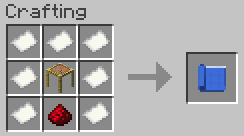
Blueprint crafting recipe
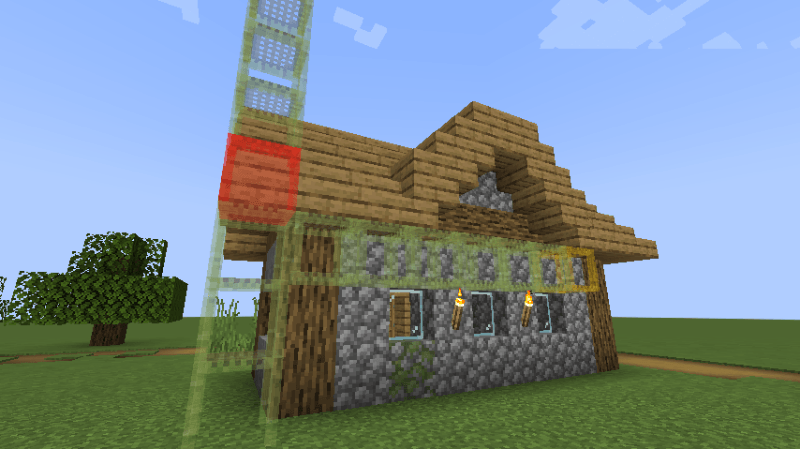
Scaffolding structure preview
Red means there is a block obstructing the structure, yellow means the scaffolding block doesn't have proper support and might fall after placing.


📖 What's this mod?
This mod add 1 item: The Scaffolding Blueprint. Used to quickly copy or retract a scaffolding structure and quickly deploy it elsewhere
How to use:
- Right click a scaffolding structure with the empty blueprint will copy it. Shift-right click to retract it.
- Right click with a filled blueprint onto a block will place the preview of the structure there. Shift-right click to confirm and place the structure or place it directly at the aim location if you haven't set the preview (You will need to have enough scaffolding block in survival mode). Right click in the air to clear the preview.
There are 2 config options available:
- max_scaffolding_blocks: Control the maximum number of scaffolding blocks the blueprint can hold (Default: 128).
- consume_blueprint_after_placing: Whether the blueprint will become empty after using or will it hold the design to be placed again (Default: true).
🖼️ Screenshots
Blueprint crafting recipe
Scaffolding structure preview
Red means there is a block obstructing the structure, yellow means the scaffolding block doesn't have proper support and might fall after placing.
Screenshots
Gallery
Versions
Files
Relations
Project Relations
More like this
Similar Mods
Suggestions use data such as tags, dependencies, dependents, descriptions, titles, and more to rank how much they overlap with this mod.
On ModDex
Community snapshot
By the numbers
Statistics
 (opens in a new tab)
Get it on
Available Platforms
On ModDex
Community snapshot
By the numbers