
Scavenge

Quick rating

Scavenge

No reviews yet

Apply a custom Rightclick behavior to any block!

No Theme
No Genre
Mod Loaders
Forge
NeoForge
Minecraft
1.21

Community voices

Reviews

Versions
Loading versions…
Match includes

Click once to include, again to exclude, again to clear

Rating Any
Any 0.5 1.0 1.5 2.0 2.5 3.0 3.5 4.0 4.5 5.0
Min
Max
Play Status
Reviews
Time Played
hrs+
Verified developers only
Has developer response
List view
Grid view
Compact view
Sort by
Date
Rating
Helpful
Unhelpful
Edited
Sort ascending
Delete this review?

This removes your review from the project. You can write a new review after.

Review submitted for moderation

Your review has been sent to moderators, who will check that it meets our guidelines before it appears publicly.

No reviews yet. Be the first to review this project!

Get it on

Available Platforms

Compatibility

Supported Environments

Dev Environment
Client Required
Server Required

About

Project Details

Type
Mod
License
All Rights Reserved
Latest Version
Scavenge-Neoforge-1.21-2.0.2
Authors
CurseForge
Modrinth

For authors

Embed Badge

If you're the author of this project, you can embed a live badge anywhere that supports HTML or Markdown. It updates automatically whenever ratings change.

Custom banner text
ModDex rating badge preview

Use HTML for any page that supports it, or Markdown for README files and Markdown-based descriptions.

Identifiers

Platform IDs

CurseForge ID
Modrinth ID

Resources

External Links

Source Issues Wiki Discord

About

Description

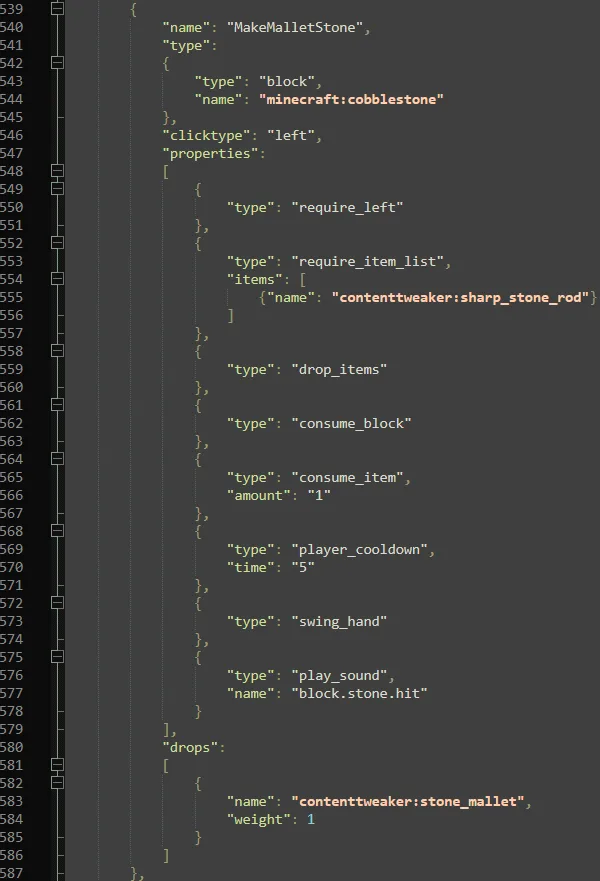
Scavenge is a mod that allows you to apply custom RightClick/LeftClick behaviors
to any Block. On top of that you can add LootPools to these behaviors that are dropped when the conditions are met. These things are loaded from JsonFiles and act closely to a Scripting language.

On top of that you can add certain unque features/conditions when rightclicking these blocks.

For example:   

  • Player has to sneak,
  • Player has to have a Diamond in his hands
  • The block is unbreakable
  • The block disapears after 5 uses
  • etc.

1.10.2-1.12.2 Documentation: ClickMe

Anything below this is the 1.16 Documentation:

If you want a good tutorial on How to make Scavenge Scripts.

Xaikii had written some examples and tutorials on how Scripts work. ClickMe

Ported Addon to 1.16:

- Refraction


Documentation is now part of the mod. How to view it:

Set "printExamples" to true and the documentation will be generated in the Minecraft Folder in the "scavenge_doc" folder.
The documentation is sorted by Plugin -> TypeOfProperty -> PropertyName.

To simplify the finding of the Documentation. Also since its autogenerated. It can only get lost if all Scavenge Jars get lost.
Also If you install plugins they will also generate documentation automatically with it. And it would be sorted by the addon Plugins.

1.16.5 version also can now Dump Loaded Scripts. They will look a tiny bit different because it depends on how the Property is implemented but it will make debugging a lot easier. If something didn't get added in the script the dump can not see it either because the Mod dumps the parsed scripts.

This is also a config entry. Note: This also works with Multiplayer.

How to add a Scavenge Script:

Scavenge now works with Resource Packs. It will automatically load all files that are in the "datapacks/DATAPACK_NAME/data/DOMAIN/scavenge_scripts" folder.
And will automatically reload them on resource packs reload. They will be automatically synced over to the client so no more "server->client" manual Syncing. Its done automatically.

Since the tool has a JEI plugin i had to install a JEI hack that reloads JEI 1 tick after scripts got reloaded because JEI does not support any mod that has recipe/data autosyncing. (This can get fast into the 2-3 digit reload range if jei does not fix this problem)

What has Changed outside of ResourcePacks now:

- Effects are now only executed on server, while conditions are tested both on server & client. So there can be desyncs if you store data unsynchronized.

- Math Operations/Conditions are now a lot more enforced then before because more flexibility even if  the code is bigger.

- Error Messages can now be directly added into Conditions so no longer the separate section with messages. And for effects there is a Message Effect.

- Conditions can by default now be inverted. (Addons can not be guaranteed to support that)

- Scavenge now uses Vanilla LootPools and you can just link them to the lootpool. It will try to show them in JEI but accuracy for more random/complex loot may not look as good.

- Math Operations/Conditions have now bit support.

- Examples for everything are generated. (Again Addons can not guaranteed to support that)

Scavenge is a mod that allows you to apply custom RightClick/LeftClick behaviors to any Block.
On top of that you can add LootPools to these behaviors that are dropped when the conditions are met.
These things are loaded from JsonFiles and act closely to a Scripting language.

On top of that you can add certain unque features/conditions when rightclicking these blocks.

For example:   

  • Player has to sneak,
  • Player has to have a Diamond in his hands
  • The block is unbreakable
  • The block disapears after 5 uses
  • etc.

Tutorial:

If you want a good example tutorial on how to write Scavenge Scripts,
Xaikii made one, which can be found Here

Documentation

Documentation is now part of the mod.
Which can be generated by setting the "printExamples" in the config section and start the game.
Addons should be supporting this too.
Said generated docs will be in the game folder and in the "scavenge_doc" folder.
The documentation is sorted by Plugin -> TypeOfProperty -> PropertyName.

This is done to simplify the process of finding the documentation and keep it preserved.

Dumping Scripts

Scavenge supports dumping ingame loaded scripts.
Which can be done by setting the "dumpScripts" to true.
This was done to make debugging easier, due to now being able to see what got loaded and what got discarded due to errors in the source script.
Script dumping happens directly after scavenge scripts get reloaded.
(So no game restart required)

Datapacks

How to add a Scavenge Script:

Scavenge now works with Datapacks. It will automatically load all files that are in the "datapacks/DATAPACK_NAME/data/DOMAIN/scavenge_scripts" folder. And will automatically reload them on resource packs reload. They will be automatically synced over to the client so no more "server->client" manual Syncing. Its done automatically.

Since the tool has a JEI plugin i had to install a JEI hack that reloads JEI 1 tick after scripts got reloaded because JEI does not support any mod that has recipe/data autosyncing. (This can get fast into the 2-3 digit reload range if jei does not fix this problem)

What has Changed outside of ResourcePacks now:

  • Effects are now only executed on server, while conditions are tested both on server & client. So there can be desyncs if you store data unsynchronized.
  • Math Operations/Conditions are now a lot more enforced then before because more flexibility even if  the code is bigger.
  • Error Messages can now be directly added into Conditions so no longer the separate section with messages. And for effects there is a Message Effect.
  • Conditions can by default now be inverted. (Addons can not be guaranteed to support that)
  • Scavenge now uses Vanilla LootPools and you can just link them to the lootpool. It will try to show them in JEI but accuracy for more random/complex loot may not look as good.
  • Math Operations/Conditions have now bit support.
  • Examples for everything are generated. (Again Addons can not guaranteed to support that)

Screenshots

Gallery

This project has no gallery images yet.

Versions

Files

Relations

Project Relations

More like this

Similar Mods

Suggestions use data such as tags, dependencies, dependents, descriptions, titles, and more to rank how much they overlap with this mod.

On ModDex

Community snapshot

0
Ratings
0
Followers
0
In stacks

By the numbers

Statistics

2.5m
Total Downloads
CurseForge
2.5m
Modrinth
~1,000
Last Updated
CurseForge
Created
CurseForge
Modrinth
Last synced
When ModDex last fetched this project from CurseForge or Modrinth. Every project is re-checked on a schedule, and any project that ships a new file is synced automatically within hours of the release.
New file updates sync automatically
How syncing works