
Community listing page, reviews here may not be monitored by the author.
Schematica-Plus


No reviews yet
Enhanced Schematica mod for 1.7.10, contains modern functions from Litematica.
Community voices
Reviews
No reviews yet. Be the first to review this project!
Get it on
Available Platforms
Compatibility
Supported Environments
Runs entirely on the client. Works on vanilla servers.
About
Project Details
For authors
Embed Badge
If you're the author of this project, you can embed a live badge anywhere that supports HTML or Markdown. It updates automatically whenever ratings change.
Use HTML for any page that supports it, or Markdown for README files and Markdown-based descriptions.
Identifiers
Platform IDs
Resources
External Links
About
Description
Schematica-Plus
Schematica-Plus is an enhanced version of the classic Schematica mod for Minecraft 1.7.10 (Forge).
It restores and extends the original Schematica's functionality while bringing many modern features inspired by Litematica, the popular schematic mod for newer Minecraft versions.
If you wanted a more modern Schematica mod in 1.7.10 and wished it could do more, this is the mod for you.
What Does This Mod Do?
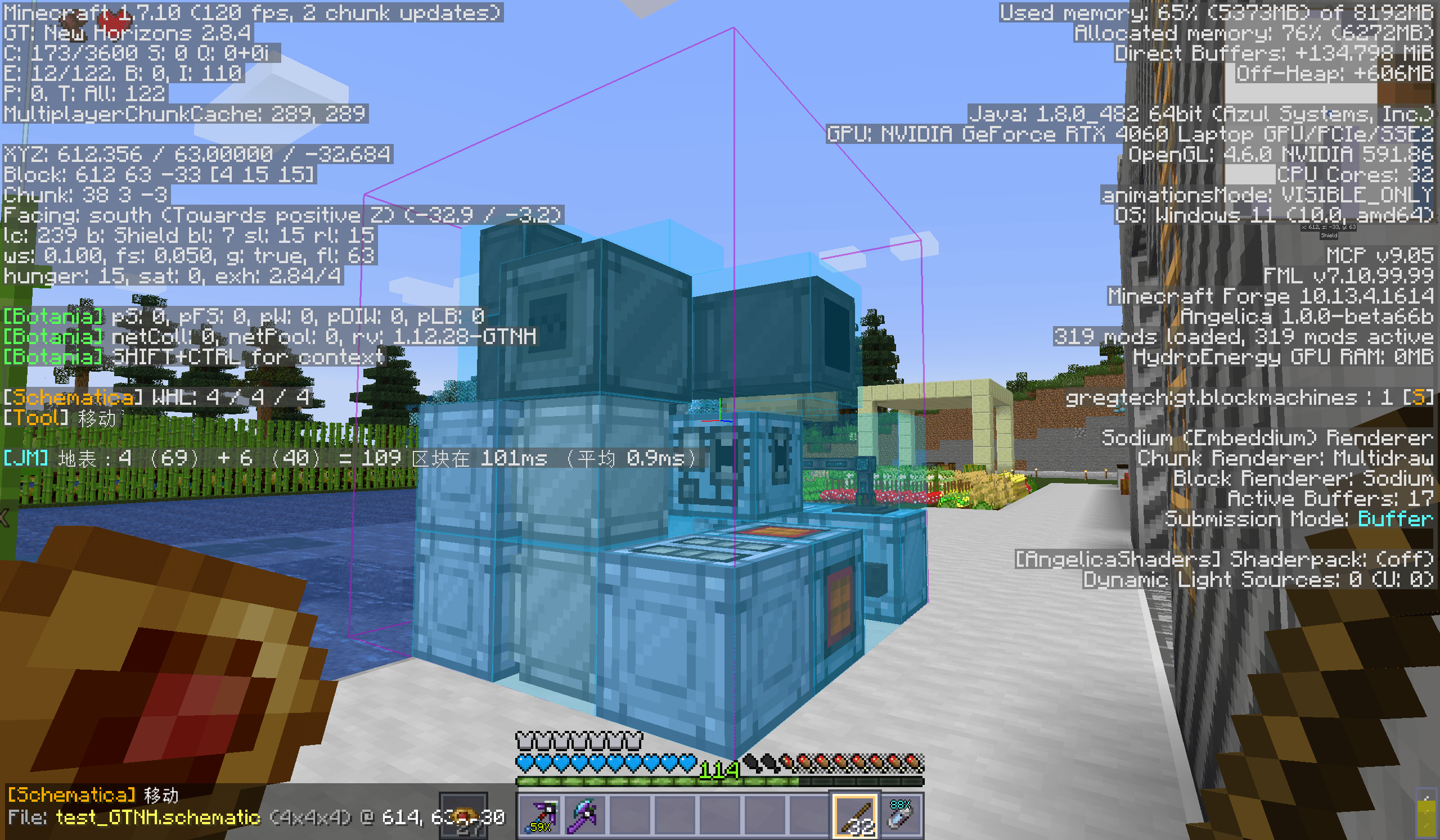
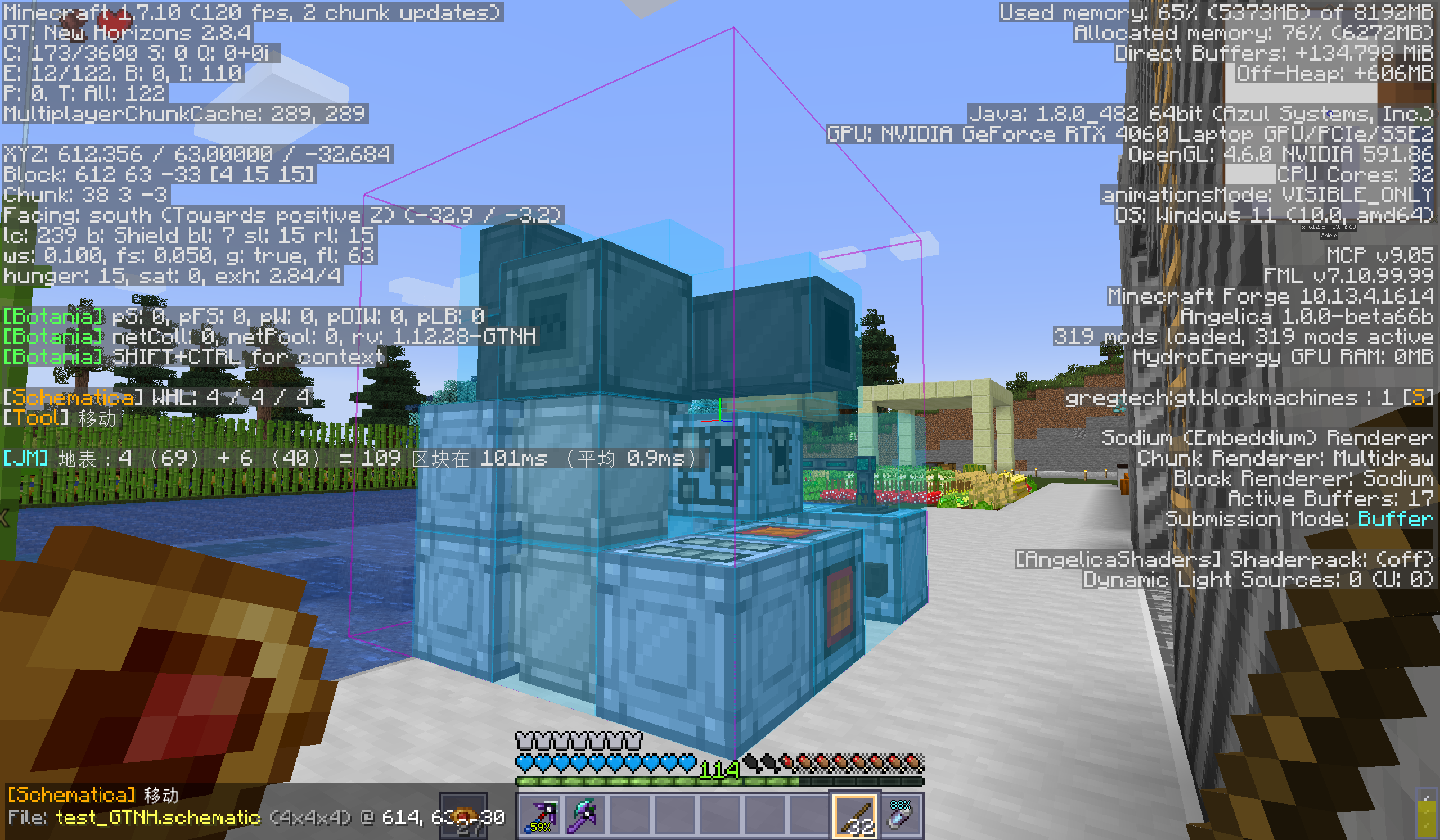
Schematica-Plus lets you load, display, and build from schematic files as 3D hologram overlays in your world. You can save your own builds to schematic files and share them with others. The hologram guides you block-by-block so you can accurately recreate complex structures — from small houses to massive redstone contraptions — without memorizing every block placement.
Key Features
Hologram Display & Building Guide
- Load
.schematicfiles and display them as transparent 3D holograms overlaid on your world. Each block is rendered in its correct position, color, and orientation, so you always know exactly what to place and where. - Use the layer-by-layer rendering mode to focus on one horizontal slice at a time, making tall or complex builds much easier to follow.
- Misplaced or missing blocks are highlighted, helping you spot errors at a glance.
Litematica File Support (.litematic)
- Natively reads
.litematicfiles created by Litematica (the modern schematic mod for Fabric/Rift). This means you can download schematics shared by players on newer Minecraft versions and use them directly in 1.7.10 — no conversion tools needed. - Full support for multi-region litematic files: all regions are merged into a single hologram automatically.
- Block states from modern versions (1.13+) are intelligently translated to their 1.7.10 equivalents, including metadata, tile entity NBT data (chests, signs, skulls, banners, flower pots, etc.), and entities.
Multiple Schematic Instances
- Load and manage multiple schematics at the same time. Each instance has its own position, rotation, and visibility settings.
- Use the Instances Manager GUI (accessible from the control screen) to switch between loaded schematics, toggle visibility, toggle entity rendering, toggle block NBT pasting, or remove individual instances.
- This is especially useful for large projects where you need to reference several structures simultaneously — for example, placing multiple buildings in a town layout.
Schematic Pasting (Creative Mode)
- Paste an entire schematic directly into the world with a single key press (default:
Enter). Blocks, tile entity NBT data (chest contents, sign text, etc.), and entities (armor stands, item frames, paintings, etc.) are all placed faithfully. - In singleplayer or with server access, pasting uses direct chunk manipulation for maximum speed and accuracy — even fragile multi-block structures like doors and beds are placed correctly without breaking.
- On servers without direct access, pasting falls back to
/setblockand/summoncommands automatically. - You can toggle whether NBT data and entities are included in the paste via the Instances Manager.
Litematica-Style Tool Modes
- A versatile tool system (activated by holding a configurable item, default: stick) with 7 modes cycled via
LCTRL + Scroll:- Area Selection — Left-click and right-click to set two corner points, defining a 3D selection box. Press
Enterto open save Schematic GUI. - Schematic Placement — Right-click to open the schematic loader and import a new schematic file.
- Paste Schematic — Press
Enterto paste the currently loaded schematic into the world (creative only). - Move — Right-click a block to reposition the schematic origin on top of it, or right-click air to snap it to your player position.
- Delete — Press
Enterto clear all blocks within the selected area (creative only). - Fill — Left-click a block to pick it as the fill material, then press
Enterto fill the entire selected area with that block (creative only). - Replace Block — Left-click to pick the replacement block, right-click to pick the target block, then press
Enterto replace all matching blocks in the selection (creative only).
- Area Selection — Left-click and right-click to set two corner points, defining a 3D selection box. Press
- Creative-only modes are automatically hidden when in survival mode.
Tool HUD Overlay
- When holding the tool item, a compact HUD appears in the bottom-left corner showing your current mode, loaded schematic name and dimensions, selection coordinates, and picked blocks for fill/replace operations. You always know what state the tool is in without opening any menus.
Per-World Coordinate & Rotation Memory
- Schematic positions and rotations are saved per world/server. When you rejoin a world, your schematics are restored to exactly where you left them — no more re-entering coordinates for large multi-session builds.
Schematic Manipulation
- Move schematics to precise coordinates via the control GUI, or snap them to your player position with one click.
- Rotate schematics around the X, Y, or Z axis.
- Flip/mirror schematics along any axis.
Printer (Auto-Builder)
- The built-in printer automatically places blocks from your inventory to match the loaded schematic hologram. Configurable placement speed, slot swapping, and adjacent-block requirements let you tune it to your play style and server rules.
Material List
- View a complete list of all blocks required to build the loaded schematic, so you can gather materials before you start building.
Save Your Builds
- Select an area in the world and save it as a
.schematicfile. Tile entity NBT and entities can optionally be included. Share your creations with friends or upload them to schematic repositories.
Configurable Tool Item
- The tool activation item can be changed to any item in the game (default:
minecraft:stick). Supports item metadata for modded items (e.g.,minecraft:dye@4).
Full Rendering Controls
- Toggle schematic transparency (alpha blending) and adjust opacity.
- Toggle block highlight overlays for misplaced/missing blocks.
- Toggle quad and line rendering independently.
- Show or hide individual schematic instances.
Default Keybinds
| Key | Action |
|---|---|
M |
Open Schematic Management GUI |
N |
Open Save Schematic GUI |
Enter |
Execute current tool action (save, paste, fill, delete, replace) |
LCTRL + Scroll |
Cycle tool mode (while holding tool item) |
| Left Click | Set point A / Pick primary block (while holding tool item) |
| Right Click | Set point B / Pick secondary block / Place schematic (while holding tool item) |
Requirements
- Minecraft 1.7.10
- Minecraft Forge
- LunatriusCore (>= 1.2.1-GTNH)
Installation
Drop the mod jar and LunatriusCore into your mods folder. If you are playing GTNH 2.8.4, you can simply replace the existing Schematica-1.12.6-GTNH.jar with this mod.
Compatibility
- Compatible with GTNH (GregTech: New Horizons) modpack.
- Fixes heavy lag caused by LOTR armor stands and weapon racks in loaded schematics.
- Includes updated Chinese (zh_CN) translation.
Schematica-Plus
Schematica-Plus is an enhanced version of the classic Schematica mod for Minecraft 1.7.10 (Forge).
It restores and extends the original Schematica's functionality while bringing many modern features inspired by Litematica, the popular schematic mod for newer Minecraft versions.
If you wanted a more modern Schematica mod in 1.7.10 and wished it could do more, this is the mod for you.
What Does This Mod Do?
Schematica-Plus lets you load, display, and build from schematic files as 3D hologram overlays in your world. You can save your own builds to schematic files and share them with others. The hologram guides you block-by-block so you can accurately recreate complex structures — from small houses to massive redstone contraptions — without memorizing every block placement.
Key Features
Hologram Display & Building Guide
- Load
.schematicfiles and display them as transparent 3D holograms overlaid on your world. Each block is rendered in its correct position, color, and orientation, so you always know exactly what to place and where. - Use the layer-by-layer rendering mode to focus on one horizontal slice at a time, making tall or complex builds much easier to follow.
- Misplaced or missing blocks are highlighted, helping you spot errors at a glance.
Litematica File Support (.litematic)
- Natively reads
.litematicfiles created by Litematica (the modern schematic mod for Fabric/Rift). This means you can download schematics shared by players on newer Minecraft versions and use them directly in 1.7.10 — no conversion tools needed. - Full support for multi-region litematic files: all regions are merged into a single hologram automatically.
- Block states from modern versions (1.13+) are intelligently translated to their 1.7.10 equivalents, including metadata, tile entity NBT data (chests, signs, skulls, banners, flower pots, etc.), and entities.
Multiple Schematic Instances
- Load and manage multiple schematics at the same time. Each instance has its own position, rotation, and visibility settings.
- Use the Instances Manager GUI (accessible from the control screen) to switch between loaded schematics, toggle visibility, toggle entity rendering, toggle block NBT pasting, or remove individual instances.
- This is especially useful for large projects where you need to reference several structures simultaneously — for example, placing multiple buildings in a town layout.
Schematic Pasting (Creative Mode)
- Paste an entire schematic directly into the world with a single key press (default:
Enter). Blocks, tile entity NBT data (chest contents, sign text, etc.), and entities (armor stands, item frames, paintings, etc.) are all placed faithfully. - In singleplayer or with server access, pasting uses direct chunk manipulation for maximum speed and accuracy — even fragile multi-block structures like doors and beds are placed correctly without breaking.
- On servers without direct access, pasting falls back to
/setblockand/summoncommands automatically. - You can toggle whether NBT data and entities are included in the paste via the Instances Manager.
Litematica-Style Tool Modes
- A versatile tool system (activated by holding a configurable item, default: stick) with 7 modes cycled via
LCTRL + Scroll:- Area Selection — Left-click and right-click to set two corner points, defining a 3D selection box. Press
Enterto open save Schematic GUI. - Schematic Placement — Right-click to open the schematic loader and import a new schematic file.
- Paste Schematic — Press
Enterto paste the currently loaded schematic into the world (creative only). - Move — Right-click a block to reposition the schematic origin on top of it, or right-click air to snap it to your player position.
- Delete — Press
Enterto clear all blocks within the selected area (creative only). - Fill — Left-click a block to pick it as the fill material, then press
Enterto fill the entire selected area with that block (creative only). - Replace Block — Left-click to pick the replacement block, right-click to pick the target block, then press
Enterto replace all matching blocks in the selection (creative only).
- Creative-only modes are automatically hidden when in survival mode.
- Area Selection — Left-click and right-click to set two corner points, defining a 3D selection box. Press
Tool HUD Overlay
- When holding the tool item, a compact HUD appears in the bottom-left corner showing your current mode, loaded schematic name and dimensions, selection coordinates, and picked blocks for fill/replace operations. You always know what state the tool is in without opening any menus.
Per-World Coordinate & Rotation Memory
- Schematic positions and rotations are saved per world/server. When you rejoin a world, your schematics are restored to exactly where you left them — no more re-entering coordinates for large multi-session builds.
Schematic Manipulation
- Move schematics to precise coordinates via the control GUI, or snap them to your player position with one click.
- Rotate schematics around the X, Y, or Z axis.
- Flip/mirror schematics along any axis.
Printer (Auto-Builder)
- The built-in printer automatically places blocks from your inventory to match the loaded schematic hologram. Configurable placement speed, slot swapping, and adjacent-block requirements let you tune it to your play style and server rules.
Material List
- View a complete list of all blocks required to build the loaded schematic, so you can gather materials before you start building.
Save Your Builds
- Select an area in the world and save it as a
.schematicfile. Tile entity NBT and entities can optionally be included. Share your creations with friends or upload them to schematic repositories.
Configurable Tool Item
- The tool activation item can be changed to any item in the game (default:
minecraft:stick). Supports item metadata for modded items (e.g.,minecraft:dye@4).
Full Rendering Controls
- Toggle schematic transparency (alpha blending) and adjust opacity.
- Toggle block highlight overlays for misplaced/missing blocks.
- Toggle quad and line rendering independently.
- Show or hide individual schematic instances.
Default Keybinds
| Key | Action |
|---|---|
M |
Open Schematic Management GUI |
N |
Open Save Schematic GUI |
Enter |
Execute current tool action (save, paste, fill, delete, replace) |
LCTRL + Scroll |
Cycle tool mode (while holding tool item) |
| Left Click | Set point A / Pick primary block (while holding tool item) |
| Right Click | Set point B / Pick secondary block / Place schematic (while holding tool item) |
Requirements
- Minecraft 1.7.10
- Minecraft Forge
- LunatriusCore (>= 1.2.1-GTNH)
Installation
Drop the mod jar and LunatriusCore into your mods folder. If you are playing GTNH 2.8.4, you can simply replace the existing Schematica-1.12.6-GTNH.jar with this mod.
Compatibility
- Compatible with GTNH (GregTech: New Horizons) modpack.
- Fixes heavy lag caused by LOTR armor stands and weapon racks in loaded schematics.
- Includes updated Chinese (zh_CN) translation.
Screenshots
Gallery
-
 2026-03-14_14.54.32.png 2026-03-14_14.54.32.png
-
 supports GTNH-2.8.4
Versions
Files
Relations
Project Relations
More like this
Similar Mods
Suggestions use data such as tags, dependencies, dependents, descriptions, titles, and more to rank how much they overlap with this mod.
On ModDex
Community snapshot
By the numbers
Statistics
Want to reach Minecraft players?
We're looking for a server hosting partner to feature here and other parts of the site. Interested? Send us a message!
Get in touchGet it on
Available Platforms
On ModDex
Community snapshot
By the numbers
Statistics
Resources