Community listing page, reviews here may not be monitored by the author.
SCMowns Server Home Protection and Guilds Mod

No reviews yet
Adds a variety of home protection commands to protect homes
Community voices
Reviews
No reviews yet. Be the first to review this project!
Get it on
Available Platforms
About
Project Details
For authors
Embed Badge
If you're the author of this project, you can embed a live badge anywhere that supports HTML or Markdown. It updates automatically whenever ratings change.
Use HTML for any page that supports it, or Markdown for README files and Markdown-based descriptions.
Identifiers
Platform IDs
Resources
External Links
About
Description
Description:
This mod protects players homes on SCMowns Modded Server. There are a number of commands to use which will get the player started keeping their belongings safe:
/lowpoint - sets the lowest point of the house
/highpoint - sets the highest point of the house
/property reset - clears your selected points (low & high)
/property set <id> - claims a piece of land (default max 3 claims)
/property delete <id> -unclaims the land you own
/property info - returns all the property’s information to you
/property check <id> - returns all the property's info according to the given property id
/property expand <id> <top, bottom, north, west, east, south> - Expands your property by 1 in the specified direction. Costs $75 MineCash per expansion.
/property guest <id> <add/remove> <guest name> - adds a guest to your property. They can open chests and break blocks but cannot expand land, add new guests, or delete the property.
/property sell <id> <cost> - sells a property for that cost. Posts on #🏠-properties-for-sale too.
/property unlist <id> - no longer places this property for sale
/property buy <id> - purchases a property available in #🏠-properties-for-sale
/property rename <id> <new id> - ability to rename property id's
/property list - shows all your property id's and your build limit
/property transfer <id> <username> - transfer ownership of your property to someone else at no cost, but it considers their build limit.
/property offer <id> <price> - alerts a player who is selling a property with your offer on Discord. [Do not spam this]
/property tax - gives you all your tax info (upkeep time, IRL daily deductions, etc)
/property raid <id> - raids a home that is RED/raidable and alerts all players. Once raiding, you will not be able to use commands for 15 minutes. You get $100 MineCash for each raid.
/property pay - if you're in a raidable state, use this to get out of it. It will cost you 1 day's worth of property tax.
Check out my modded server by downloading the modpack, SCMowns Server Modpack.
For help and assistance on setup please check out my Discord.
Want to host a powerful modded server? Use Bisect Hosting to make it all possible! Now get 25% off your first month using our special code: SCMowns

SCMowns Server:
Players Are Becoming Real Estate Agents:
If players don't pay their property tax, they can get raided by other players!
How to Connect:
How to use Home Protection Mod:
Bot Guild Update!
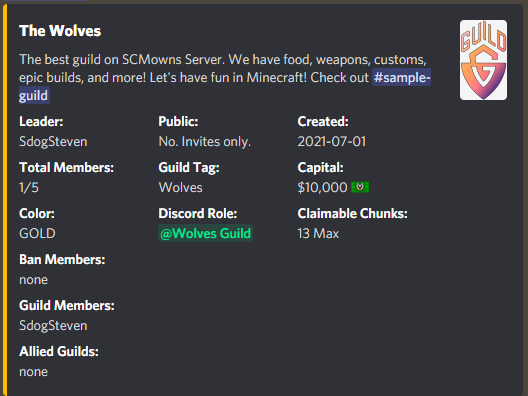
New bot commands:
Guild Leaders:
!guild create [name] - creates a new guild with that name (if available) Ex: The Wolves Guild. Your guild can have up to 5 members by default.
!guild tag [tag] - create a single word tag (ex: Wolves) - This will show up when players press TAB in-game.
!guild disband - if you're the leader, you delete your guild (Cannot be undone).
!guild kick @player - kick a player (it will ping him) Ex: !guild kick @SCMowns
!guild ban @player - ban a player (it will ping him)
!guild invite @player - allows this player to join your guild at anytime. (it will ping him)
!guild uninvite @player - remove the invite to the guild (it will ping him)
!guild pardon @player - unbans a player from your guild
!guild [public/private] - sets a guild as public (anyone can join or private - no one can join without invites)
!guild expand - increase the number of players your guild can have by 2 new slots (Cost $500 MineCash)
!guild transfer @player - transfer ownership of the guild to this user
!guild rename [name] - rename your guild to something different
!guild thumbnail [url] - provide an image url to display for your guild. Copy the URL like this (right-click image) https://bit.ly/3hnleFQ
Anyone:
!guild join [name] - join a public guild
!guild leave - leave your guild
!guild info [name/tag] - returns a guild's information.
!guild - returns your guild info
There is no video for this mod as of right now. I plan to show how it all works soon. Try for yourself today!
Join our community on Discord!



Screenshots
Gallery
Versions
Files
Relations
Project Relations
More like this
Similar Mods
Suggestions use data such as tags, dependencies, dependents, descriptions, titles, and more to rank how much they overlap with this mod.
On ModDex
Community snapshot
By the numbers
Statistics
Want to reach Minecraft players?
We're looking for a server hosting partner to feature here and other parts of the site. Interested? Send us a message!
Get in touchGet it on
Available Platforms
On ModDex
Community snapshot
By the numbers
Statistics
Resources