
Community listing page, reviews here may not be monitored by the author.
Screentext


No reviews yet
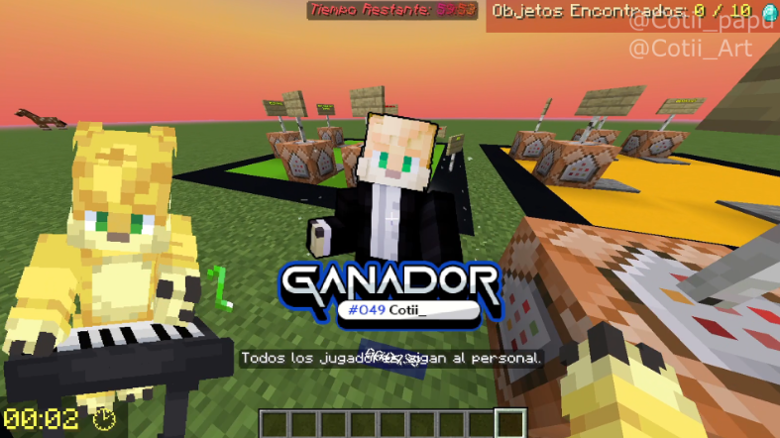
Screentext is a Minecraft Mod for Fabric 1.20.1 - 26.2, Neoforge 1.20.1 - 26.2 and Forge 1.20.1 - 1.20.4 that let you display custom Text, Timers, Counters and Texture on the screen with fully customization!
Community voices
Reviews
No reviews yet. Be the first to review this project!
Get it on
Available Platforms
Compatibility
Supported Environments
Required on the client. Installing it on the server adds functionality.
Works on the client or the server alone, but does more when on both.
Varies by version.
About
Project Details
For authors
Embed Badge
If you're the author of this project, you can embed a live badge anywhere that supports HTML or Markdown. It updates automatically whenever ratings change.
Use HTML for any page that supports it, or Markdown for README files and Markdown-based descriptions.
Identifiers
Platform IDs
Resources
External Links
About
Description
<iframe width="560" height="315" src="https://www.youtube-nocookie.com/embed/kQWAuaRU1aE" title="YouTube video player" frameborder="0" allow="accelerometer; autoplay; clipboard-write; encrypted-media; gyroscope; picture-in-picture; web-share" allowfullscreen></iframe>
# ScreenText
Display **text, timers, counters, textures and GIFs** anywhere on your screen, with backgrounds, animations, movement, live placeholders and more. Works on its own with client commands, or controlled from a server with **ScreenTextPlugin**.
## **Supported versions**
| Loader | Versions |
|---|---|
| **Fabric** | 1.20.1 · 1.20.4 · 1.21.1 · 1.21.4 · 1.21.5 · 1.21.8 · 1.21.11 · 26.2 |
| **NeoForge** | 1.20.1 · 1.20.4 · 1.21.1 · 1.21.4 · 1.21.5 · 1.21.8 · 1.21.11 · 26.2 |
| **Forge** | 1.20.1 · 1.20.4 |
## **Features**
- Display **text** on the screen at any position, scale and rotation
- Display **timers** (countdown) and **counters** (count up, optional decimals) with tick sounds
- Display **textures and GIFs** anywhere, even **fullscreen**
- **Backgrounds**: solid color with 4 styles, or your own **custom background texture** *(NEW)*
- **Entry / exit animations**: scale, slide, pixelate, glitch, bounce, spin...
- **Move** any display to another position with easing, looping **animation presets**, custom time and text color transitions
- **Opacity** control for every display and background
- **Inline items and textures** inside text, **HEX colors**, multiline text
- **Letter-by-letter delay** with optional typing sound
- **Placeholders** (`%stp_...%`): player stats, items, effects, world time, FPS and more *(NEW)*
- **Tab completion** for everything, including texture paths from your resource packs *(NEW)*
- Local displays are **saved** and come back after restarting the game
- **Server control** with ScreenTextPlugin (Spigot/Paper 1.20.1 → 26.2): displays for all players, persistence for players who join later, synced timers and timer actions
## **Texture folders**
- Resource pack: **`assets/screentext/`** → use as `assets/screentext/my_texture.png`
- Config folder: **`config/screentext/textures/`** → use as `screentext:my_texture.png` (or just `my_texture.png`)
- Vanilla textures also work: `assets/minecraft/textures/...`
Use `/screentext reload` to reload textures after changing them.
## **Examples**
**Timer with a sound at 50% volume:**
```
/screentext timer ronda1_starting_timer CENTER TOP 1 0 disablebackground 0 1 none glitch_out "block.note_block.hat;vol:50" #BAFF60ʟᴀ ʀᴏɴᴅᴀ ɪ ɪɴɪᴄɪᴀ ᴇɴ: &f"00:00:11"
```
**GIF texture that plays once:**
```
/screentext texture test 50 50 1.6 0 0 1 none none 1 false assets/screentext/cortinas_overlay.gif
```
**Text with a 2 second delay:**
```
/screentext display ronda1_timer_text CENTER TOP 1 0 disablebackground 0 1 up_in up_out {"d:2"}#BAFF60ʀᴏɴᴅᴀ ɪ - ᴏᴠᴇʀᴡᴏʀʟᴅ
```
**Text with a colored rounded background:**
```
/screentext display welcome CENTER CENTER 2 0 enablebackground BLACK 0.6 ROUNDED 1.2 10 1 scale_in scale_out &eWelcome, &f%stp_player_level% levels!
```
**Text with a custom background texture** *(NEW)*:
```
/screentext display banner CENTER 20 1.5 0 backgroundtexture assets/screentext/banner_bg.png 0.9 1.5 10 1 left_in right_out #FFD700Boss incoming!
```
**Live coordinates HUD:**
```
/screentext display coords LEFT TOP 1 0 enablebackground BLACK 0.4 SQUARE_SMALL 1 0 1 none none XYZ: %stp_player_x% %stp_player_y% %stp_player_z%/n%stp_player_biome% | %stp_fps% FPS
```
**Counter with decimals:**
```
/screentext counter speedrun RIGHT TOP 1 0 disablebackground 0 1 none none none true &aTime: "timer"
```
**Fullscreen overlay:**
```
/screentext texture overlay CENTER CENTER fullscreen 0 20 0.8 none none 1 true assets/screentext/vignette.png
```
**Move a display with a looping preset and color change:**
```
/screentext move welcome CENTER 80 1.5 0 SMOOTH PULSE 1.5 #FF5555
/screentext move_reset welcome BOUNCE NONE 1
```
## **Commands**
```
Base command: /screentext

Text:
/screentext display <id> <posX> <posY> <scale> <rotation> enablebackground <backcolor> <backopacity> <backstyle> <bgscale> <fadeIn> <opacity> <animationIn> <animationOut> <text>
/screentext display <id> <posX> <posY> <scale> <rotation> backgroundtexture <texturepath> <bgopacity> <bgscale> <fadeIn> <opacity> <animationIn> <animationOut> <text>
/screentext display <id> <posX> <posY> <scale> <rotation> disablebackground <fadeIn> <opacity> <animationIn> <animationOut> <text>

Timer (counts down):
/screentext timer <id> <posX> <posY> <scale> <rotation> enablebackground <backcolor> <backopacity> <backstyle> <bgscale> <fadeIn> <opacity> <animationIn> <animationOut> <sound> <text + "HH:MM:SS">
/screentext timer <id> <posX> <posY> <scale> <rotation> backgroundtexture <texturepath> <bgopacity> <bgscale> <fadeIn> <opacity> <animationIn> <animationOut> <sound> <text + "HH:MM:SS">
/screentext timer <id> <posX> <posY> <scale> <rotation> disablebackground <fadeIn> <opacity> <animationIn> <animationOut> <sound> <text + "HH:MM:SS">
/screentext stoptimer <id>
/screentext resumetimer <id>

Counter (counts up):
/screentext counter <id> <posX> <posY> <scale> <rotation> enablebackground <backcolor> <backopacity> <backstyle> <bgscale> <fadeIn> <opacity> <animationIn> <animationOut> <sound> <decimals> <text + "timer">
/screentext counter <id> <posX> <posY> <scale> <rotation> backgroundtexture <texturepath> <bgopacity> <bgscale> <fadeIn> <opacity> <animationIn> <animationOut> <sound> <decimals> <text + "timer">
/screentext counter <id> <posX> <posY> <scale> <rotation> disablebackground <fadeIn> <opacity> <animationIn> <animationOut> <sound> <decimals> <text + "timer">
/screentext stoptimer <id>
/screentext resumetimer <id>

Texture / GIF:
/screentext texture <id> <posX> <posY> <scale|fullscreen> <rotation> <fadeIn> <opacity> <animationIn> <animationOut> <gifspeed> <gifloop> <texturepath>

Move:
/screentext move <id> <posX> <posY> <scale> <rotation> [movetype] [animationpreset] [time] [color]
/screentext move_reset <id> [movetype] [animationpreset] [time]

Other:
/screentext remove <id|all> [fadeOutTicks]
/screentext list
/screentext reload
```
## **Options**
| Option | Values |
|---|---|
| **posX / posY** | `0`–`100` (percent of the screen) or `LEFT` `CENTER` `RIGHT` / `TOP` `CENTER` `DOWN` |
| **scale** | `0.01`–`1000` (textures also accept `fullscreen`) |
| **rotation** | `-360`–`360` |
| **background** | `enablebackground` (color) · `backgroundtexture` (custom texture) · `disablebackground` |
| **backcolor** | `BLACK` `DARK_BLUE` `DARK_GREEN` `DARK_CYAN` `DARK_RED` `PURPLE` `ORANGE` `LIGHT_GRAY` `GRAY` `DARK_GRAY` `BLUE` `GREEN` `CYAN` `RED` `PINK` `YELLOW` `WHITE` or HEX `#RRGGBB` |
| **backstyle** | `SQUARE` `ROUNDED` `SQUARE_SMALL` `ROUNDED_SMALL` |
| **backopacity / bgopacity / opacity** | `0`–`1` |
| **bgscale** | `0`–`10` (size of the background around the text) |
| **fadeIn** | `0`–`100` ticks |
| **animationIn** | `none` `scale_in` `left_in` `right_in` `up_in` `down_in` `pixelate_in` `glitch_in` `bounce_in` `spin_in` |
| **animationOut** | `none` `scale_out` `left_out` `right_out` `up_out` `down_out` `pixelate_out` `glitch_out` `bounce_out` `spin_out` |
| **sound** | `none` or any sound id, e.g. `"block.note_block.pling"`, `"block.note_block.pling;vol:50"` |
| **decimals** | `true` / `false` |
| **gifspeed** | `0`–`2` |
| **gifloop** | `true` / `false` (with `false` the GIF plays once and disappears) |
| **movetype** | `LINEAR` `SMOOTH` `STEP` `BOUNCE` |
| **animationpreset** | `NONE` `SHAKE` `WIGGLE` `PULSE` `X_CYCLE` `Y_CYCLE` `SPIN` `CIRCLE` `FLOAT` `SWING` `HEARTBEAT` `BREATHE` `GLITCH` `WAVE` `BOUNCE` `PENDULUM` `VIBRATE` `SWAY` |
| **time** (move) | `0.1`–`60` seconds |
| **color** (move) | `none`, a color name or HEX `#RRGGBB` (text only) |
## **Tips**
**Text formatting**
- `&a`, `&l`... = Minecraft color and format codes
- `#RRGGBB` = HEX color, e.g. `#BAFF60Hello`
- `\n` or `/n` = new line
- `|` = space
**Timers and counters**
- Timer time goes in quotes: `"00:05:00"`, `"05:00"`. Text around it is kept: `&cEnds in &f"00:01:30"`
- In counters, `"timer"` marks where the counter goes: `&aTime: "timer" seconds`
- Sound volume: add `;vol:(0-100)` → `"customsound;vol:30"`
**Delay (letter by letter)**
```
{"delay:<seconds>"}
{"d:<seconds>"}
{"delay:<seconds>;sound:<sound>"}
{"d:<seconds>;s:<sound>"}
```
**Inline items**
```
{"diamond"}
{"diamond,scale:1.5"}
{"diamond,scale:1.5,nbt:3"}      ← nbt = CustomModelData
{"%stp_player_item_mainhand_id%"} ← shows the item you are holding
```
**Inline textures**
```
{"assets/screentext/icon.png"}
{"assets/minecraft/textures/gui/sprites/hud/heart/full.png,scale:2"}
```
**Background textures** *(NEW)*
- The texture is stretched over the area a normal background would cover, so `bgscale` makes it bigger or smaller.
- Press **Tab** after `backgroundtexture` to see every texture found in your resource packs and in `config/screentext/textures/`.
- PNG and GIF both work.
## **Placeholders**
Placeholders update live. Use them in any text, timer or counter.
**Client placeholders** work in `/screentext` commands and in server commands from ScreenTextPlugin.
**[S] Server placeholders** only work in server commands (`/stp`), because the client can't know them.
### Player – position
| Placeholder | Description |
|---|---|
| `%stp_player_x%` `%stp_player_y%` `%stp_player_z%` | Block coordinates |
| `%stp_player_x_exact%` `%stp_player_y_exact%` `%stp_player_z_exact%` | Coordinates with 2 decimals |
| `%stp_player_world%` | World / dimension |
| `%stp_player_biome%` | Biome |
| `%stp_player_direction%` | Cardinal direction (N, NE, E...) |
| `%stp_player_yaw%` `%stp_player_pitch%` | Camera rotation |
### Player – health, food and XP
| Placeholder | Description |
|---|---|
| `%stp_player_health%` `%stp_player_maxhealth%` | Health / max health |
| `%stp_player_health_percent%` | Health 0–100 |
| `%stp_player_food%` `%stp_player_saturation%` | Food / saturation |
| `%stp_player_absorption%` | Absorption hearts |
| `%stp_player_level%` | XP level |
| `%stp_player_xp_progress%` | Progress to next level 0–100 |
| `%stp_player_total_xp%` | Total XP |
### Player – combat and movement
| Placeholder | Description |
|---|---|
| `%stp_player_armor%` `%stp_player_armor_toughness%` | Armor points / toughness |
| `%stp_player_attack_speed%` | Attack speed |
| `%stp_player_attack_damage%` **[S]** | Attack damage |
| `%stp_player_speed%` `%stp_player_speed_vertical%` | Speed in blocks/second |
| `%stp_player_walk_speed%` `%stp_player_fly_speed%` | Speed multipliers |
### Player – status (true / false)
`%stp_player_is_flying%` `%stp_player_is_sneaking%` `%stp_player_is_sprinting%` `%stp_player_is_swimming%` `%stp_player_is_blocking%` `%stp_player_is_gliding%` `%stp_player_is_sleeping%` `%stp_player_is_dead%` `%stp_player_is_on_fire%` `%stp_player_is_in_water%` `%stp_player_is_on_ground%` · `%stp_player_is_op%` **[S]**
### Player – items
| Placeholder | Description |
|---|---|
| `%stp_player_item_mainhand%` `%stp_player_item_offhand%` | Item name |
| `%stp_player_item_mainhand_id%` `%stp_player_item_offhand_id%` | Item id (with `:CustomModelData`) |
| `%stp_player_item_mainhand_amount%` `%stp_player_item_offhand_amount%` | Stack amount |
| `%stp_player_item_mainhand_durability%` `%stp_player_item_offhand_durability%` | Durability, e.g. `1561/1561` |
| `%stp_player_item_helmet%` `_chestplate%` `_leggings%` `_boots%` (+ `_id`) | Armor |
| `%stp_player_item_slot_<0-40>%` (+ `_id`, `_amount`, `_durability`) | Any slot: 0–8 hotbar, 9–35 inventory, 36 boots, 37 leggings, 38 chestplate, 39 helmet, 40 offhand |
### Player – potion effects
| Placeholder | Description |
|---|---|
| `%stp_player_effect_list%` | Active effects |
| `%stp_player_effect_count%` | Number of active effects |
| `%stp_player_effect_<name>%` | Effect name if active |
| `%stp_player_effect_<name>_active%` | true / false |
| `%stp_player_effect_<name>_level%` | Level (1, 2, 3...) |
| `%stp_player_effect_<name>_duration%` | Seconds left |
Effect names: `speed`, `slowness`, `haste`, `strength`, `jump_boost`, `regeneration`, `resistance`, `fire_resistance`, `water_breathing`, `invisibility`, `night_vision`, `poison`, `wither`, `absorption`, `glowing`, `levitation`, `slow_falling`, `darkness`...
### Player – misc
| Placeholder | Description |
|---|---|
| `%stp_player_gamemode%` | Game mode |
| `%stp_player_ping%` | Ping in ms |
| `%stp_player_air%` `%stp_player_max_air%` | Air in seconds |
| `%stp_player_freeze_ticks%` | Powder snow freeze |
| `%stp_player_online_survival%` `_creative%` `_adventure%` `_spectator%` | Players in each game mode |
| `%stp_player_fire_ticks%` **[S]** | Fire time left |
| `%stp_player_bed_exists%` `%stp_player_bed_x%` `_y%` `_z%` **[S]** | Bed spawn |
| `%stp_player_stat_kills%` `_mob_kills%` `_deaths%` `_damage_dealt%` `_damage_taken%` `_jumps%` **[S]** | Statistics |
| `%stp_player_stat_playtime%` `_playtime_hours%` `_playtime_minutes%` **[S]** | Play time |
| `%stp_player_stat_distance_walked%` `_sprinted%` `_flown%` `_swum%` **[S]** | Distances in blocks |
### Timers and displays
| Placeholder | Description |
|---|---|
| `%stp_timer_<id>%` | Formatted time |
| `%stp_timer_<id>_hours%` `_minutes%` `_seconds%` `_total_seconds%` | Time parts |
| `%stp_timer_<id>_active%` `_finished%` `_stopped%` | true / false |
| `%stp_timer_<id>_progress%` | Progress 0–100 |
| `%stp_timer_<id>_text%` | Timer text |
| `%stp_timer_count%` | Active timers |
| `%stp_display_<id>_active%` | true / false |
| `%stp_display_count%` `%stp_display_list%` | Active displays |
### World, server and time
| Placeholder | Description |
|---|---|
| `%stp_fps%` | Your FPS (client only) |
| `%stp_server_online%` | Online players |
| `%stp_server_weather%` | Clear / Rain / Thunder |
| `%stp_server_world_time%` | In-game time (HH:MM) |
| `%stp_server_day%` | In-game day |
| `%stp_server_max%` **[S]** | Max players |
| `%stp_server_tps%` `%stp_server_mspt%` **[S]** | Server performance |
| `%stp_server_uptime%` **[S]** | Server uptime |
| `%stp_time%` `%stp_date%` `%stp_datetime%` | Real date and time |
## **ScreenTextPlugin (servers)**
With the plugin installed on a Spigot/Paper server (1.20.1 → 26.2), use the same commands as `/stp <command> <player|@a> ...`. One plugin works with Fabric, Forge and NeoForge clients.
- `@a` displays are saved and shown to players who join later; removed displays are removed for them too
- Timers stay in sync after reconnecting, and paused timers stay paused
- Timer actions: run console commands when a timer ends or reaches a time (`/stp timerconfig`)
- PlaceholderAPI support (including all `%stp_...%` server placeholders)
ScreenText
Display text, timers, counters, textures and GIFs anywhere on your screen, with backgrounds, animations, movement, live placeholders and more. Works on its own with client commands, or controlled from a server with ScreenTextPlugin.
Supported versions
| Loader | Versions |
|---|---|
| Fabric | 1.20.1 · 1.20.4 · 1.21.1 · 1.21.4 · 1.21.5 · 1.21.8 · 1.21.11 · 26.2 |
| NeoForge | 1.20.1 · 1.20.4 · 1.21.1 · 1.21.4 · 1.21.5 · 1.21.8 · 1.21.11 · 26.2 |
| Forge | 1.20.1 · 1.20.4 |
Features
- Display text on the screen at any position, scale and rotation
- Display timers (countdown) and counters (count up, optional decimals) with tick sounds
- Display textures and GIFs anywhere, even fullscreen
- Backgrounds: solid color with 4 styles, or your own custom background texture (NEW)
- Entry / exit animations: scale, slide, pixelate, glitch, bounce, spin...
- Move any display to another position with easing, looping animation presets, custom time and text color transitions
- Opacity control for every display and background
- Inline items and textures inside text, HEX colors, multiline text
- Letter-by-letter delay with optional typing sound
- Placeholders (
%stp_...%): player stats, items, effects, world time, FPS and more (NEW) - Tab completion for everything, including texture paths from your resource packs (NEW)
- Local displays are saved and come back after restarting the game
- Server control with ScreenTextPlugin (Spigot/Paper 1.20.1 → 26.2): displays for all players, persistence for players who join later, synced timers and timer actions
Texture folders
- Resource pack:
assets/screentext/→ use asassets/screentext/my_texture.png - Config folder:
config/screentext/textures/→ use asscreentext:my_texture.png(or justmy_texture.png) - Vanilla textures also work:
assets/minecraft/textures/...
Use /screentext reload to reload textures after changing them.
Examples
Timer with a sound at 50% volume:
/screentext timer ronda1_starting_timer CENTER TOP 1 0 disablebackground 0 1 none glitch_out "block.note_block.hat;vol:50" #BAFF60ʟᴀ ʀᴏɴᴅᴀ ɪ ɪɴɪᴄɪᴀ ᴇɴ: &f"00:00:11"
GIF texture that plays once:
/screentext texture test 50 50 1.6 0 0 1 none none 1 false assets/screentext/cortinas_overlay.gif
Text with a 2 second delay:
/screentext display ronda1_timer_text CENTER TOP 1 0 disablebackground 0 1 up_in up_out {"d:2"}#BAFF60ʀᴏɴᴅᴀ ɪ - ᴏᴠᴇʀᴡᴏʀʟᴅ
Text with a colored rounded background:
/screentext display welcome CENTER CENTER 2 0 enablebackground BLACK 0.6 ROUNDED 1.2 10 1 scale_in scale_out &eWelcome, &f%stp_player_level% levels!
Text with a custom background texture (NEW):
/screentext display banner CENTER 20 1.5 0 backgroundtexture assets/screentext/banner_bg.png 0.9 1.5 10 1 left_in right_out #FFD700Boss incoming!
Live coordinates HUD:
/screentext display coords LEFT TOP 1 0 enablebackground BLACK 0.4 SQUARE_SMALL 1 0 1 none none XYZ: %stp_player_x% %stp_player_y% %stp_player_z%/n%stp_player_biome% | %stp_fps% FPS
Counter with decimals:
/screentext counter speedrun RIGHT TOP 1 0 disablebackground 0 1 none none none true &aTime: "timer"
Fullscreen overlay:
/screentext texture overlay CENTER CENTER fullscreen 0 20 0.8 none none 1 true assets/screentext/vignette.png
Move a display with a looping preset and color change:
/screentext move welcome CENTER 80 1.5 0 SMOOTH PULSE 1.5 #FF5555
/screentext move_reset welcome BOUNCE NONE 1
Commands
Base command: /screentext
Text:
/screentext display <id> <posX> <posY> <scale> <rotation> enablebackground <backcolor> <backopacity> <backstyle> <bgscale> <fadeIn> <opacity> <animationIn> <animationOut> <text>
/screentext display <id> <posX> <posY> <scale> <rotation> backgroundtexture <texturepath> <bgopacity> <bgscale> <fadeIn> <opacity> <animationIn> <animationOut> <text>
/screentext display <id> <posX> <posY> <scale> <rotation> disablebackground <fadeIn> <opacity> <animationIn> <animationOut> <text>
Timer (counts down):
/screentext timer <id> <posX> <posY> <scale> <rotation> enablebackground <backcolor> <backopacity> <backstyle> <bgscale> <fadeIn> <opacity> <animationIn> <animationOut> <sound> <text + "HH:MM:SS">
/screentext timer <id> <posX> <posY> <scale> <rotation> backgroundtexture <texturepath> <bgopacity> <bgscale> <fadeIn> <opacity> <animationIn> <animationOut> <sound> <text + "HH:MM:SS">
/screentext timer <id> <posX> <posY> <scale> <rotation> disablebackground <fadeIn> <opacity> <animationIn> <animationOut> <sound> <text + "HH:MM:SS">
/screentext stoptimer <id>
/screentext resumetimer <id>
Counter (counts up):
/screentext counter <id> <posX> <posY> <scale> <rotation> enablebackground <backcolor> <backopacity> <backstyle> <bgscale> <fadeIn> <opacity> <animationIn> <animationOut> <sound> <decimals> <text + "timer">
/screentext counter <id> <posX> <posY> <scale> <rotation> backgroundtexture <texturepath> <bgopacity> <bgscale> <fadeIn> <opacity> <animationIn> <animationOut> <sound> <decimals> <text + "timer">
/screentext counter <id> <posX> <posY> <scale> <rotation> disablebackground <fadeIn> <opacity> <animationIn> <animationOut> <sound> <decimals> <text + "timer">
/screentext stoptimer <id>
/screentext resumetimer <id>
Texture / GIF:
/screentext texture <id> <posX> <posY> <scale|fullscreen> <rotation> <fadeIn> <opacity> <animationIn> <animationOut> <gifspeed> <gifloop> <texturepath>
Move:
/screentext move <id> <posX> <posY> <scale> <rotation> [movetype] [animationpreset] [time] [color]
/screentext move_reset <id> [movetype] [animationpreset] [time]
Other:
/screentext remove <id|all> [fadeOutTicks]
/screentext list
/screentext reload
Options
| Option | Values |
|---|---|
| posX / posY | 0–100 (percent of the screen) or LEFT CENTER RIGHT / TOP CENTER DOWN |
| scale | 0.01–1000 (textures also accept fullscreen) |
| rotation | -360–360 |
| background | enablebackground (color) · backgroundtexture (custom texture) · disablebackground |
| backcolor | BLACK DARK_BLUE DARK_GREEN DARK_CYAN DARK_RED PURPLE ORANGE LIGHT_GRAY GRAY DARK_GRAY BLUE GREEN CYAN RED PINK YELLOW WHITE or HEX #RRGGBB |
| backstyle | SQUARE ROUNDED SQUARE_SMALL ROUNDED_SMALL |
| backopacity / bgopacity / opacity | 0–1 |
| bgscale | 0–10 (size of the background around the text) |
| fadeIn | 0–100 ticks |
| animationIn | none scale_in left_in right_in up_in down_in pixelate_in glitch_in bounce_in spin_in |
| animationOut | none scale_out left_out right_out up_out down_out pixelate_out glitch_out bounce_out spin_out |
| sound | none or any sound id, e.g. "block.note_block.pling", "block.note_block.pling;vol:50" |
| decimals | true / false |
| gifspeed | 0–2 |
| gifloop | true / false (with false the GIF plays once and disappears) |
| movetype | LINEAR SMOOTH STEP BOUNCE |
| animationpreset | NONE SHAKE WIGGLE PULSE X_CYCLE Y_CYCLE SPIN CIRCLE FLOAT SWING HEARTBEAT BREATHE GLITCH WAVE BOUNCE PENDULUM VIBRATE SWAY |
| time (move) | 0.1–60 seconds |
| color (move) | none, a color name or HEX #RRGGBB (text only) |
Tips
Text formatting
&a,&l... = Minecraft color and format codes#RRGGBB= HEX color, e.g.#BAFF60Hello\nor/n= new line|= space
Timers and counters
- Timer time goes in quotes:
"00:05:00","05:00". Text around it is kept:&cEnds in &f"00:01:30" - In counters,
"timer"marks where the counter goes:&aTime: "timer" seconds - Sound volume: add
;vol:(0-100)→"customsound;vol:30"
Delay (letter by letter)
{"delay:<seconds>"}
{"d:<seconds>"}
{"delay:<seconds>;sound:<sound>"}
{"d:<seconds>;s:<sound>"}
Inline items
{"diamond"}
{"diamond,scale:1.5"}
{"diamond,scale:1.5,nbt:3"} ← nbt = CustomModelData
{"%stp_player_item_mainhand_id%"} ← shows the item you are holding
Inline textures
{"assets/screentext/icon.png"}
{"assets/minecraft/textures/gui/sprites/hud/heart/full.png,scale:2"}
Background textures (NEW)
- The texture is stretched over the area a normal background would cover, so
bgscalemakes it bigger or smaller. - Press Tab after
backgroundtextureto see every texture found in your resource packs and inconfig/screentext/textures/. - PNG and GIF both work.
Placeholders
Placeholders update live. Use them in any text, timer or counter.
Client placeholders work in /screentext commands and in server commands from ScreenTextPlugin.
[S] Server placeholders only work in server commands (/stp), because the client can't know them.
Player – position
| Placeholder | Description |
|---|---|
%stp_player_x% %stp_player_y% %stp_player_z% |
Block coordinates |
%stp_player_x_exact% %stp_player_y_exact% %stp_player_z_exact% |
Coordinates with 2 decimals |
%stp_player_world% |
World / dimension |
%stp_player_biome% |
Biome |
%stp_player_direction% |
Cardinal direction (N, NE, E...) |
%stp_player_yaw% %stp_player_pitch% |
Camera rotation |
Player – health, food and XP
| Placeholder | Description |
|---|---|
%stp_player_health% %stp_player_maxhealth% |
Health / max health |
%stp_player_health_percent% |
Health 0–100 |
%stp_player_food% %stp_player_saturation% |
Food / saturation |
%stp_player_absorption% |
Absorption hearts |
%stp_player_level% |
XP level |
%stp_player_xp_progress% |
Progress to next level 0–100 |
%stp_player_total_xp% |
Total XP |
Player – combat and movement
| Placeholder | Description |
|---|---|
%stp_player_armor% %stp_player_armor_toughness% |
Armor points / toughness |
%stp_player_attack_speed% |
Attack speed |
%stp_player_attack_damage% [S] |
Attack damage |
%stp_player_speed% %stp_player_speed_vertical% |
Speed in blocks/second |
%stp_player_walk_speed% %stp_player_fly_speed% |
Speed multipliers |
Player – status (true / false)
%stp_player_is_flying% %stp_player_is_sneaking% %stp_player_is_sprinting% %stp_player_is_swimming% %stp_player_is_blocking% %stp_player_is_gliding% %stp_player_is_sleeping% %stp_player_is_dead% %stp_player_is_on_fire% %stp_player_is_in_water% %stp_player_is_on_ground% · %stp_player_is_op% [S]
Player – items
| Placeholder | Description |
|---|---|
%stp_player_item_mainhand% %stp_player_item_offhand% |
Item name |
%stp_player_item_mainhand_id% %stp_player_item_offhand_id% |
Item id (with :CustomModelData) |
%stp_player_item_mainhand_amount% %stp_player_item_offhand_amount% |
Stack amount |
%stp_player_item_mainhand_durability% %stp_player_item_offhand_durability% |
Durability, e.g. 1561/1561 |
%stp_player_item_helmet% _chestplate% _leggings% _boots% (+ _id) |
Armor |
%stp_player_item_slot_<0-40>% (+ _id, _amount, _durability) |
Any slot: 0–8 hotbar, 9–35 inventory, 36 boots, 37 leggings, 38 chestplate, 39 helmet, 40 offhand |
Player – potion effects
| Placeholder | Description |
|---|---|
%stp_player_effect_list% |
Active effects |
%stp_player_effect_count% |
Number of active effects |
%stp_player_effect_<name>% |
Effect name if active |
%stp_player_effect_<name>_active% |
true / false |
%stp_player_effect_<name>_level% |
Level (1, 2, 3...) |
%stp_player_effect_<name>_duration% |
Seconds left |
Effect names: speed, slowness, haste, strength, jump_boost, regeneration, resistance, fire_resistance, water_breathing, invisibility, night_vision, poison, wither, absorption, glowing, levitation, slow_falling, darkness...
Player – misc
| Placeholder | Description |
|---|---|
%stp_player_gamemode% |
Game mode |
%stp_player_ping% |
Ping in ms |
%stp_player_air% %stp_player_max_air% |
Air in seconds |
%stp_player_freeze_ticks% |
Powder snow freeze |
%stp_player_online_survival% _creative% _adventure% _spectator% |
Players in each game mode |
%stp_player_fire_ticks% [S] |
Fire time left |
%stp_player_bed_exists% %stp_player_bed_x% _y% _z% [S] |
Bed spawn |
%stp_player_stat_kills% _mob_kills% _deaths% _damage_dealt% _damage_taken% _jumps% [S] |
Statistics |
%stp_player_stat_playtime% _playtime_hours% _playtime_minutes% [S] |
Play time |
%stp_player_stat_distance_walked% _sprinted% _flown% _swum% [S] |
Distances in blocks |
Timers and displays
| Placeholder | Description |
|---|---|
%stp_timer_<id>% |
Formatted time |
%stp_timer_<id>_hours% _minutes% _seconds% _total_seconds% |
Time parts |
%stp_timer_<id>_active% _finished% _stopped% |
true / false |
%stp_timer_<id>_progress% |
Progress 0–100 |
%stp_timer_<id>_text% |
Timer text |
%stp_timer_count% |
Active timers |
%stp_display_<id>_active% |
true / false |
%stp_display_count% %stp_display_list% |
Active displays |
World, server and time
| Placeholder | Description |
|---|---|
%stp_fps% |
Your FPS (client only) |
%stp_server_online% |
Online players |
%stp_server_weather% |
Clear / Rain / Thunder |
%stp_server_world_time% |
In-game time (HH:MM) |
%stp_server_day% |
In-game day |
%stp_server_max% [S] |
Max players |
%stp_server_tps% %stp_server_mspt% [S] |
Server performance |
%stp_server_uptime% [S] |
Server uptime |
%stp_time% %stp_date% %stp_datetime% |
Real date and time |
ScreenTextPlugin (servers)
With the plugin installed on a Spigot/Paper server (1.20.1 → 26.2), use the same commands as /stp <command> <player|@a> .... One plugin works with Fabric, Forge and NeoForge clients.
@adisplays are saved and shown to players who join later; removed displays are removed for them too- Timers stay in sync after reconnecting, and paused timers stay paused
- Timer actions: run console commands when a timer ends or reaches a time (
/stp timerconfig) - PlaceholderAPI support (including all
%stp_...%server placeholders)
Screenshots
Gallery
-
 All Examples
Versions
Files
Relations
Project Relations
More like this
Similar Mods
Suggestions use data such as tags, dependencies, dependents, descriptions, titles, and more to rank how much they overlap with this mod.
On ModDex
Community snapshot
By the numbers
Statistics
Want to reach Minecraft players?
We're looking for a server hosting partner to feature here and other parts of the site. Interested? Send us a message!
Get in touchGet it on
Available Platforms
On ModDex
Community snapshot
By the numbers
Statistics
Resources