
Community listing page, reviews here may not be monitored by the author.
SecPlayer


No reviews yet
Registration and login mod for Forge: players must register or log in before playing. Includes TOS/age verification, forgot-password email, IP geolocation, custom login logo, and an OP admin panel.
Community voices
Reviews
No reviews yet. Be the first to review this project!
Get it on
Available Platforms
Compatibility
Supported Environments
Must be installed on both the client and the server.
About
Project Details
For authors
Embed Badge
If you're the author of this project, you can embed a live badge anywhere that supports HTML or Markdown. It updates automatically whenever ratings change.
Use HTML for any page that supports it, or Markdown for README files and Markdown-based descriptions.
Identifiers
Platform IDs
Resources
External Links
About
Description
SecPlayer adds registration and login to your Minecraft server. Players must register once (or log in on later joins) before they can move or play. The mod provides a Terms of Service and age-confirmation screen, optional forgot-password emails, IP and geolocation logging, a custom login-screen logo, an OP-only admin panel (with optional approval mode for new registrations, timezone grouping, and approve/deny), and a player profile where users can change their password, update their email, or delete their account (with an email notification and disconnect).
What This Mod Does
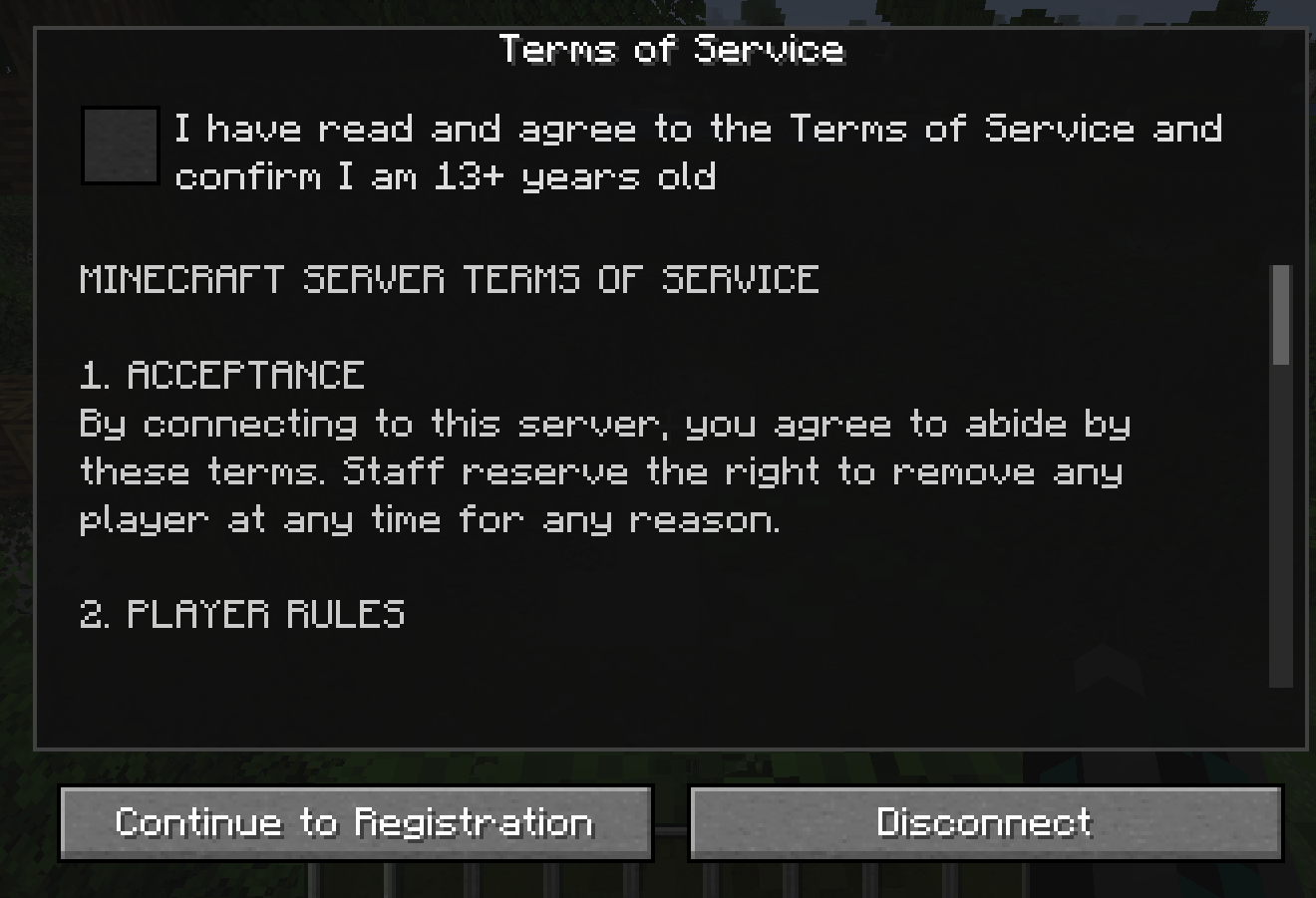
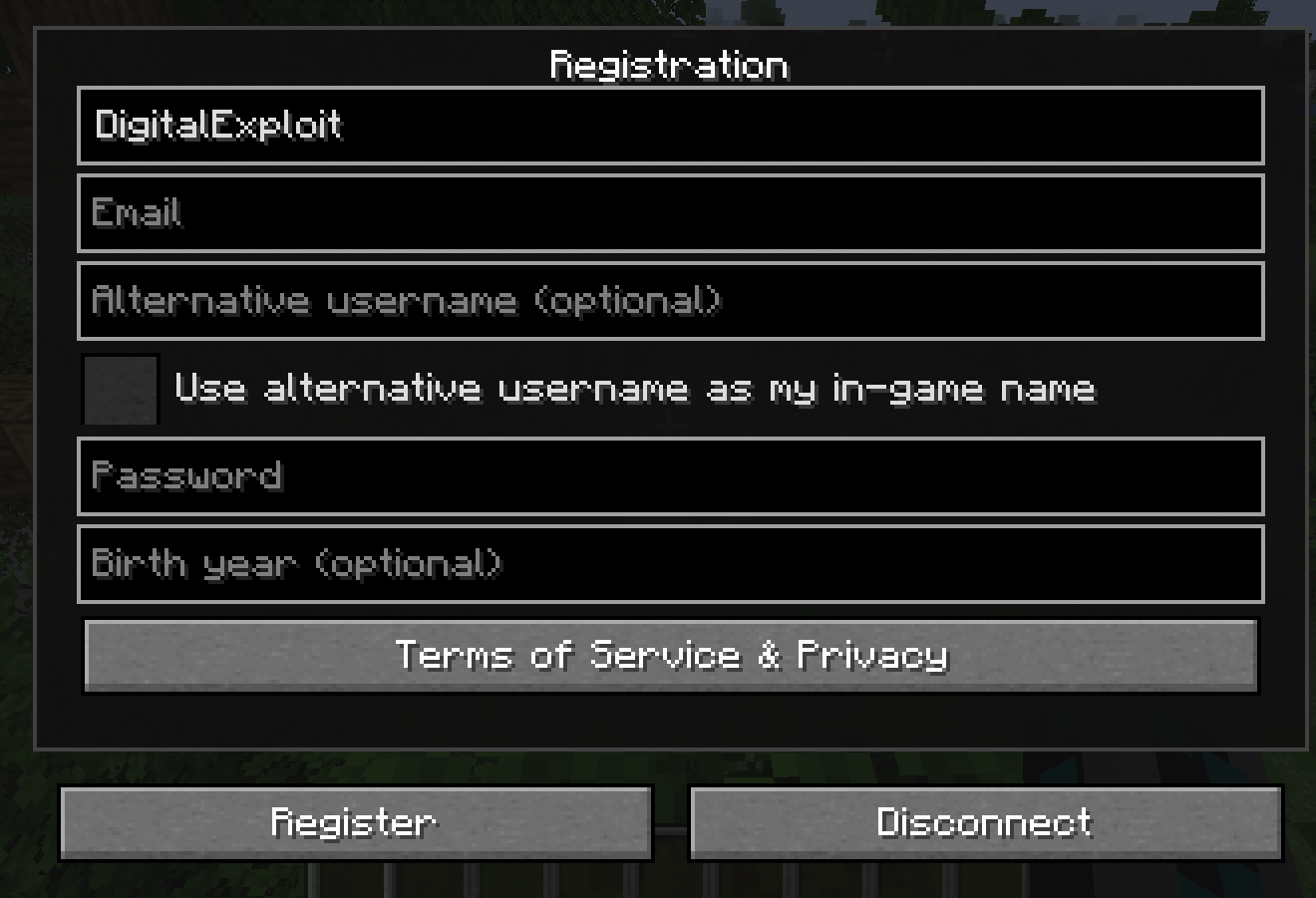
- Registration: New players see a TOS screen, then a registration form. The full-name field is pre-filled with your Minecraft username and cannot be edited. You also enter email, optional display name, and password. A "Terms of Service & Privacy" button opens a scrollable data/privacy policy (from
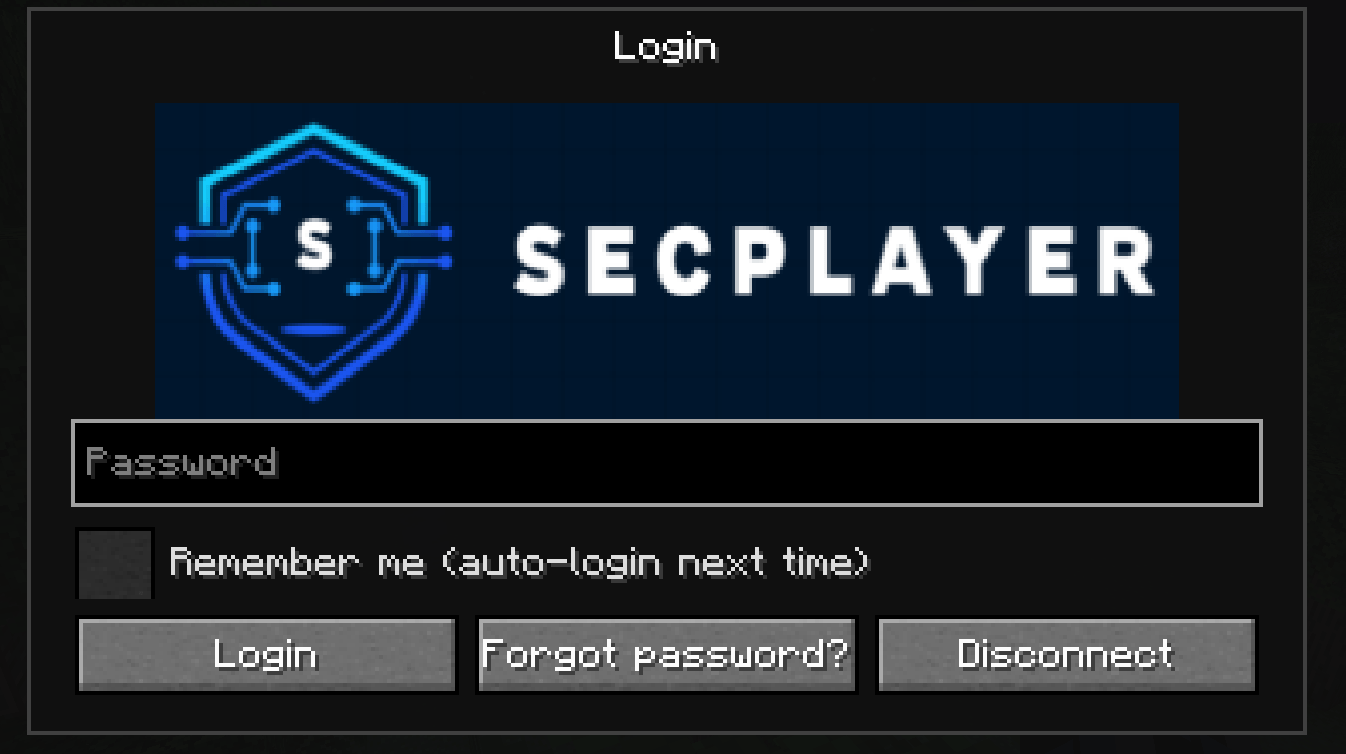
config/secplayer_privacy.txton the client). Passwords are masked. One "I agree to the Terms of Service" checkbox confirms age (minimum configurable). - Login: Returning players enter their password on join. Optional "Remember me" stores the password securely per server for auto-login next time. "Forgot password?" sends a reset code by email (when SMTP is configured). An "Enter reset code" button lets you open the code + new password screen without requesting another email (e.g. if you closed the menu or reopened the game).
- Player profile: Run
/secplayer infoto open a profile screen. You can view your info (username, masked email, alternative name), change password, update email, or delete your account. Deleting your account removes all data, sends you a confirmation email (including the server name), and disconnects you; re-joining requires registering again. - TOS text: Server operators can edit the exact Terms of Service in
config/secplayer_tos.txt(file is created on server start if missing). - IP & geolocation: The mod records IP, country, region, city, and optionally ISP (ASN) on registration and login. Uses GeoLite2 database files in
config/(you place the files manually; obtain them from a free MaxMind account). In the admin player detail, only country and last login (timezone-formatted) are shown; full geo data is still stored in the database until the account is deleted. - Admin panel: OPs run
/secplayer adminto open a list of registered players grouped by timezone (search by player or timezone; players with no timezone appear under "Local"). Open a player to view details (username, UUID, masked email, alternative name, birth year, status, country, last login), ban/unban (Minecraft's ban list), reset password, set alternative username, approve/deny (when approval mode is on), or delete the player (sends them an email and removes the account). All scrollbars support click-and-drag. - Approval mode: Set
requireApproval=truein config so new registrations are "pending" until an admin approves. Use the Pending filter in the admin list, or Approve / Deny in player detail, or/secplayer approve <player>//secplayer deny <player>. Deny adds the player to the ban list; optional email when approved (if SMTP is configured). - Display names: Players can choose an optional "alternative username" and use it as their in-game name (chat, tab list). Use
/secplayer setAlt <name>to set or clear it; setting a non-empty name automatically enables "use as in-game name," so you don't need to have checked the box at registration. - Login logo: You can show a custom logo on the login screen. The server can send one image to all clients (no per-client config), or clients can use a local image. Logo is scaled to fit the panel.
- Data storage: All account data is stored in a SQLite database on the server. No separate database server is required. The file
config/secplayer.dbis created on first run and holds accounts, login history (IP, geolocation, timestamps), and password-reset tokens. You can back up or inspect it with any SQLite tool.
Installation
- Install Forge for Minecraft 1.18.2.
- Place the mod JAR in the
mods/folder on both the server and every client.
Registration and login only run on dedicated servers. Single-player / integrated server does not use the registration flow.
How to Use (Players)
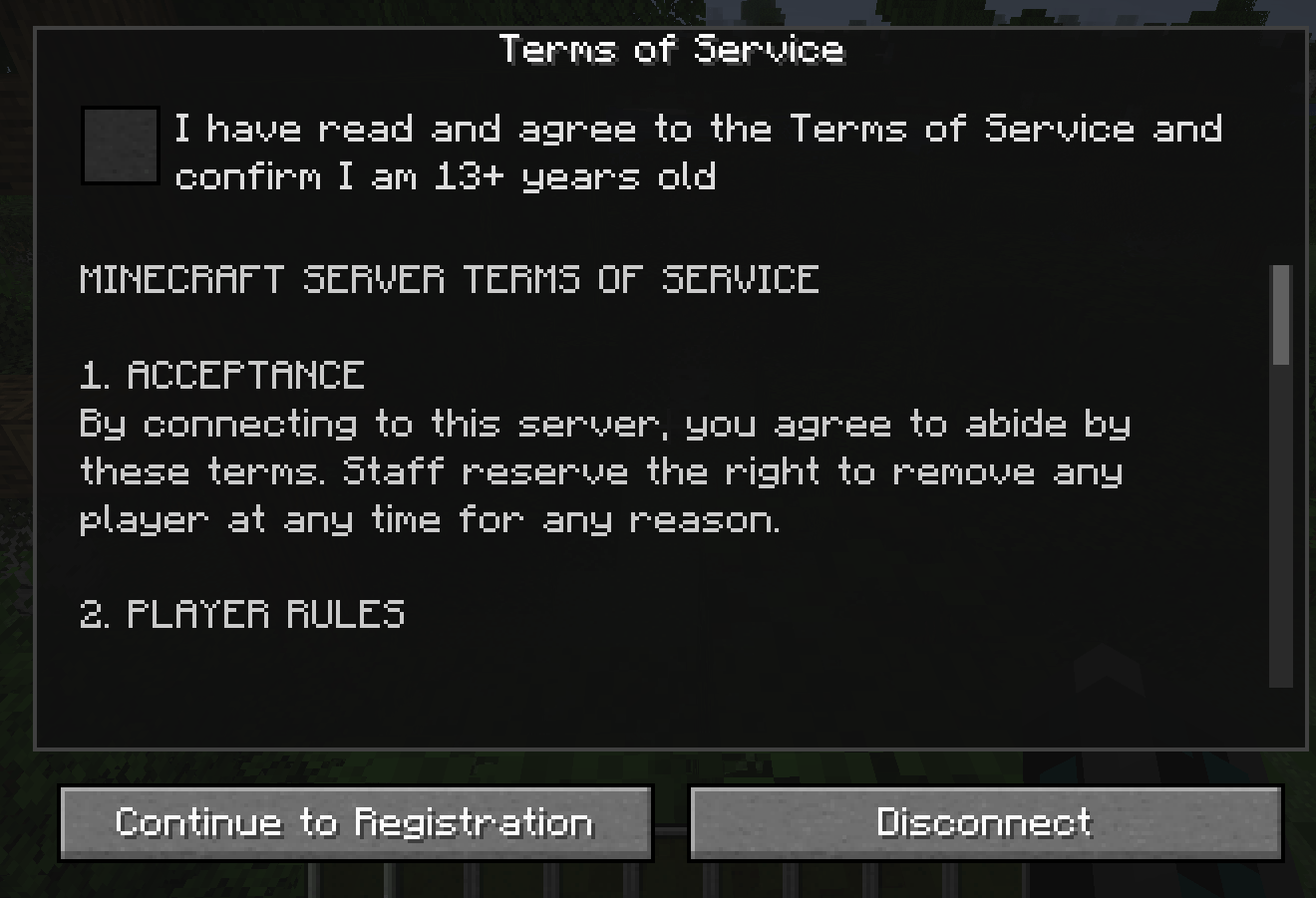
- First time: On join you see the TOS screen. Check the agreement box and click Continue to Registration. Your name is pre-filled with your Minecraft username. Fill in email, optional display name, and password, then submit. Use Disconnect to leave without registering.
- Later joins: Enter your password on the login screen. Optionally check Remember me for auto-login next time. Use Forgot password? to receive a reset code by email (if the server has SMTP configured). You can also click Enter reset code to type an existing code and new password without requesting another email.
- Profile: Run
/secplayer infoto open your profile. From there you can change your password, update your email, or delete your account (you'll get an email and be disconnected). - Display name: Use
/secplayer setAlt <name>to set or clear your in-game display name (no spaces). Setting a name automatically turns on "use as in-game name" if you didn't enable it at registration.
How to Use (Server Ops)
- Admin list: Run
/secplayer admin(requires OP). You’ll see registered players grouped by timezone (search box filters by player or timezone). Use the Pending filter when approval mode is on. Open a player to view details (country and last login are shown; full geo is stored but not shown in the UI), ban/unban, reset password, set alternative username, approve/deny (for pending players), or delete the player (sends them an email and removes the account). You can also use/secplayer approve <player>and/secplayer deny <player>from chat or console. - TOS: Edit
config/secplayer_tos.txton the server. Use%din the text for the minimum age number. The file is created with default text on first server start if missing.
Configuration
Main config: config/secplayer.properties (created on first run).
| Option | What it does | Default |
|---|---|---|
| minAge | Minimum age in the TOS text (e.g. 13) | 13 |
| requireApproval | When true, new registrations need admin approval before they can log in | false |
| smtpHost, smtpPort, smtpUseTls | SMTP server for "Forgot password?" and account-deleted emails | (empty), 587, true |
| smtpUsername, smtpPassword | SMTP login | (empty) |
| smtpFromAddress, smtpFromName | Sender address and name for emails | (empty), SecPlayer |
| smtpPasswordFile | Optional: path to a file (relative to config/) containing the SMTP password; avoids special-character issues in .properties | (empty) |
| smtpDebug | Set to true to log the SMTP dialog to the server log (for troubleshooting) | false |
| loginLogoPath | Logo filename in the server config/ folder (e.g. mylogo.png). Server sends it to clients so everyone sees the same logo. |
(empty) |
| bannedAltNames | Comma-separated display names players cannot use (e.g. herobrine) |
herobrine |
| displayTimezone | Timezone for "last login" in the admin list (e.g. America/New_York, UTC) |
UTC |
Login logo (client-only override): Create config/secplayer_client.properties and set loginLogoPath=filename.png, then put the PNG in config/. Used when the server does not send a logo.
Geolocation (optional): For country/region/city, place GeoLite2-City.mmdb in the server config/ folder. For ISP (ASN), add GeoLite2-ASN.mmdb. Obtain these from MaxMind (free account) and place them in your server config/ folder.
Troubleshooting
/secplayer admindoes nothing: You must be OP (e.g./op YourNamein the server console). There is no in-game menu button; the command opens the admin list.- Registration/login never appears: The mod only runs the flow on dedicated servers. Use a dedicated server or LAN host to test.
- Crashes or exit code 1: Check the latest file in
crash-reports/(client or server). Ensure the mod and Forge versions match (e.g. Forge 40.x for 1.18.2).
Requires Minecraft 1.18.2 and Forge 40.x. All Rights Reserved.
SecPlayer adds registration and login to your Minecraft server. Players must register once (or log in on later joins) before they can move or play. The mod provides a Terms of Service and age-confirmation screen, optional forgot-password emails, IP and geolocation logging, a custom login-screen logo, an OP-only admin panel (with optional approval mode for new registrations, timezone grouping, and approve/deny), and a player profile where users can change their password, update their email, or delete their account (with an email notification and disconnect).
What This Mod Does
- Registration: New players see a TOS screen, then a registration form. The full-name field is pre-filled with your Minecraft username and cannot be edited. You also enter email, optional display name, and password. A "Terms of Service & Privacy" button opens a scrollable data/privacy policy (from
config/secplayer_privacy.txton the client). Passwords are masked. One "I agree to the Terms of Service" checkbox confirms age (minimum configurable). - Login: Returning players enter their password on join. Optional "Remember me" stores the password securely per server for auto-login next time. "Forgot password?" sends a reset code by email (when SMTP is configured). An "Enter reset code" button lets you open the code + new password screen without requesting another email (e.g. if you closed the menu or reopened the game).
- Player profile: Run
/secplayer infoto open a profile screen. You can view your info (username, masked email, alternative name), change password, update email, or delete your account. Deleting your account removes all data, sends you a confirmation email (including the server name), and disconnects you; re-joining requires registering again. - TOS text: Server operators can edit the exact Terms of Service in
config/secplayer_tos.txt(file is created on server start if missing). - IP & geolocation: The mod records IP, country, region, city, and optionally ISP (ASN) on registration and login. Uses GeoLite2 database files in
config/(you place the files manually; obtain them from a free MaxMind account). In the admin player detail, only country and last login (timezone-formatted) are shown; full geo data is still stored in the database until the account is deleted. - Admin panel: OPs run
/secplayer adminto open a list of registered players grouped by timezone (search by player or timezone; players with no timezone appear under "Local"). Open a player to view details (username, UUID, masked email, alternative name, birth year, status, country, last login), ban/unban (Minecraft's ban list), reset password, set alternative username, approve/deny (when approval mode is on), or delete the player (sends them an email and removes the account). All scrollbars support click-and-drag. - Approval mode: Set
requireApproval=truein config so new registrations are "pending" until an admin approves. Use the Pending filter in the admin list, or Approve / Deny in player detail, or/secplayer approve <player>//secplayer deny <player>. Deny adds the player to the ban list; optional email when approved (if SMTP is configured). - Display names: Players can choose an optional "alternative username" and use it as their in-game name (chat, tab list). Use
/secplayer setAlt <name>to set or clear it; setting a non-empty name automatically enables "use as in-game name," so you don't need to have checked the box at registration. - Login logo: You can show a custom logo on the login screen. The server can send one image to all clients (no per-client config), or clients can use a local image. Logo is scaled to fit the panel.
- Data storage: All account data is stored in a SQLite database on the server. No separate database server is required. The file
config/secplayer.dbis created on first run and holds accounts, login history (IP, geolocation, timestamps), and password-reset tokens. You can back up or inspect it with any SQLite tool.
Installation
- Install Forge for Minecraft 1.18.2.
- Place the mod JAR in the
mods/folder on both the server and every client.
Registration and login only run on dedicated servers. Single-player / integrated server does not use the registration flow.
How to Use (Players)
- First time: On join you see the TOS screen. Check the agreement box and click Continue to Registration. Your name is pre-filled with your Minecraft username. Fill in email, optional display name, and password, then submit. Use Disconnect to leave without registering.
- Later joins: Enter your password on the login screen. Optionally check Remember me for auto-login next time. Use Forgot password? to receive a reset code by email (if the server has SMTP configured). You can also click Enter reset code to type an existing code and new password without requesting another email.
- Profile: Run
/secplayer infoto open your profile. From there you can change your password, update your email, or delete your account (you'll get an email and be disconnected). - Display name: Use
/secplayer setAlt <name>to set or clear your in-game display name (no spaces). Setting a name automatically turns on "use as in-game name" if you didn't enable it at registration.
How to Use (Server Ops)
- Admin list: Run
/secplayer admin(requires OP). You’ll see registered players grouped by timezone (search box filters by player or timezone). Use the Pending filter when approval mode is on. Open a player to view details (country and last login are shown; full geo is stored but not shown in the UI), ban/unban, reset password, set alternative username, approve/deny (for pending players), or delete the player (sends them an email and removes the account). You can also use/secplayer approve <player>and/secplayer deny <player>from chat or console. - TOS: Edit
config/secplayer_tos.txton the server. Use%din the text for the minimum age number. The file is created with default text on first server start if missing.
Configuration
Main config: config/secplayer.properties (created on first run).
| Option | What it does | Default |
|---|---|---|
| minAge | Minimum age in the TOS text (e.g. 13) | 13 |
| requireApproval | When true, new registrations need admin approval before they can log in | false |
| smtpHost, smtpPort, smtpUseTls | SMTP server for "Forgot password?" and account-deleted emails | (empty), 587, true |
| smtpUsername, smtpPassword | SMTP login | (empty) |
| smtpFromAddress, smtpFromName | Sender address and name for emails | (empty), SecPlayer |
| smtpPasswordFile | Optional: path to a file (relative to config/) containing the SMTP password; avoids special-character issues in .properties | (empty) |
| smtpDebug | Set to true to log the SMTP dialog to the server log (for troubleshooting) | false |
| loginLogoPath | Logo filename in the server config/ folder (e.g. mylogo.png). Server sends it to clients so everyone sees the same logo. |
(empty) |
| bannedAltNames | Comma-separated display names players cannot use (e.g. herobrine) |
herobrine |
| displayTimezone | Timezone for "last login" in the admin list (e.g. America/New_York, UTC) |
UTC |
Login logo (client-only override): Create config/secplayer_client.properties and set loginLogoPath=filename.png, then put the PNG in config/. Used when the server does not send a logo.
Geolocation (optional): For country/region/city, place GeoLite2-City.mmdb in the server config/ folder. For ISP (ASN), add GeoLite2-ASN.mmdb. Obtain these from MaxMind (free account) and place them in your server config/ folder.
Troubleshooting
/secplayer admindoes nothing: You must be OP (e.g./op YourNamein the server console). There is no in-game menu button; the command opens the admin list.- Registration/login never appears: The mod only runs the flow on dedicated servers. Use a dedicated server or LAN host to test.
- Crashes or exit code 1: Check the latest file in
crash-reports/(client or server). Ensure the mod and Forge versions match (e.g. Forge 40.x for 1.18.2).
Requires Minecraft 1.18.2 and Forge 40.x. All Rights Reserved.
Screenshots
Gallery
-
 Screenshot from 2026-03-08 08-35-22.png Screenshot from 2026-03-08 08-35-22.png
 -
 Screenshot from 2026-03-08 08-42-08.png Screenshot from 2026-03-08 08-42-08.png
 -
 Screenshot from 2026-02-28 16-26-35.png Screenshot from 2026-02-28 16-26-35.png
-
 TOS TOS page
 -
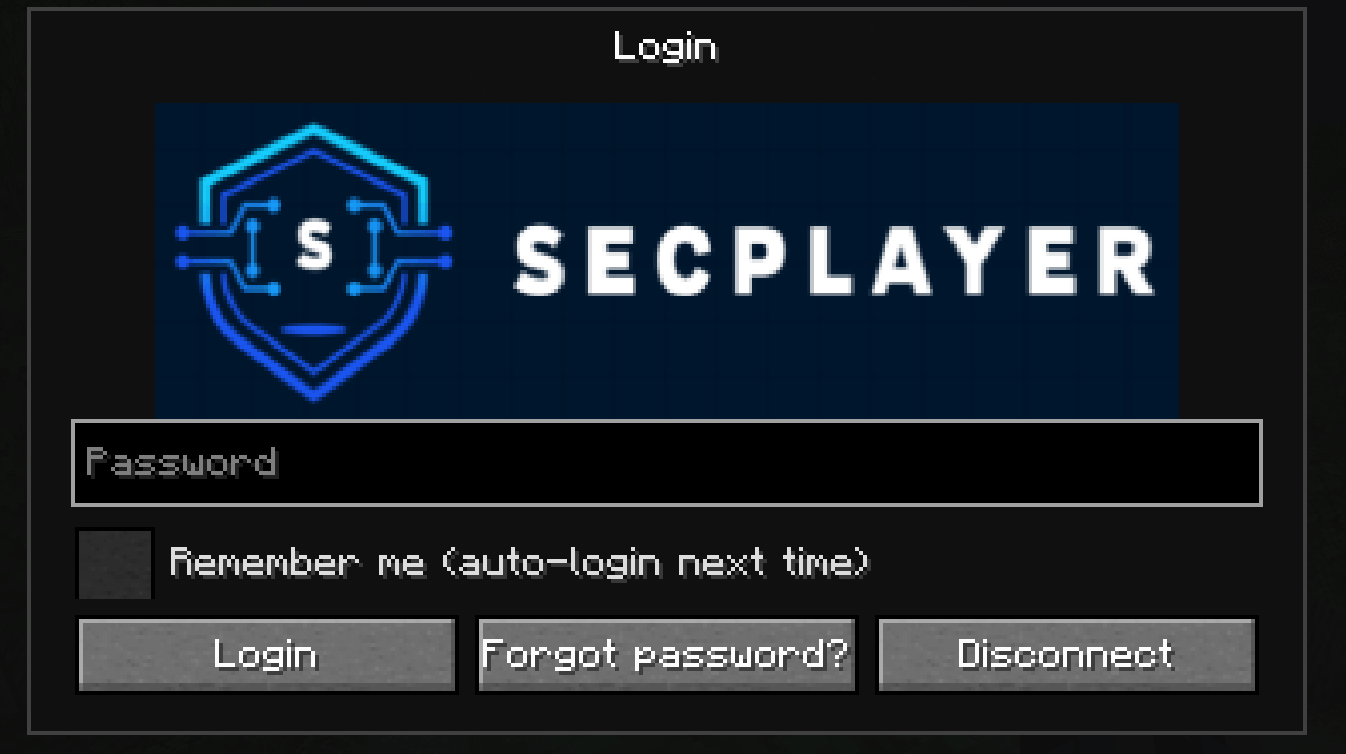 Login Login page
 -
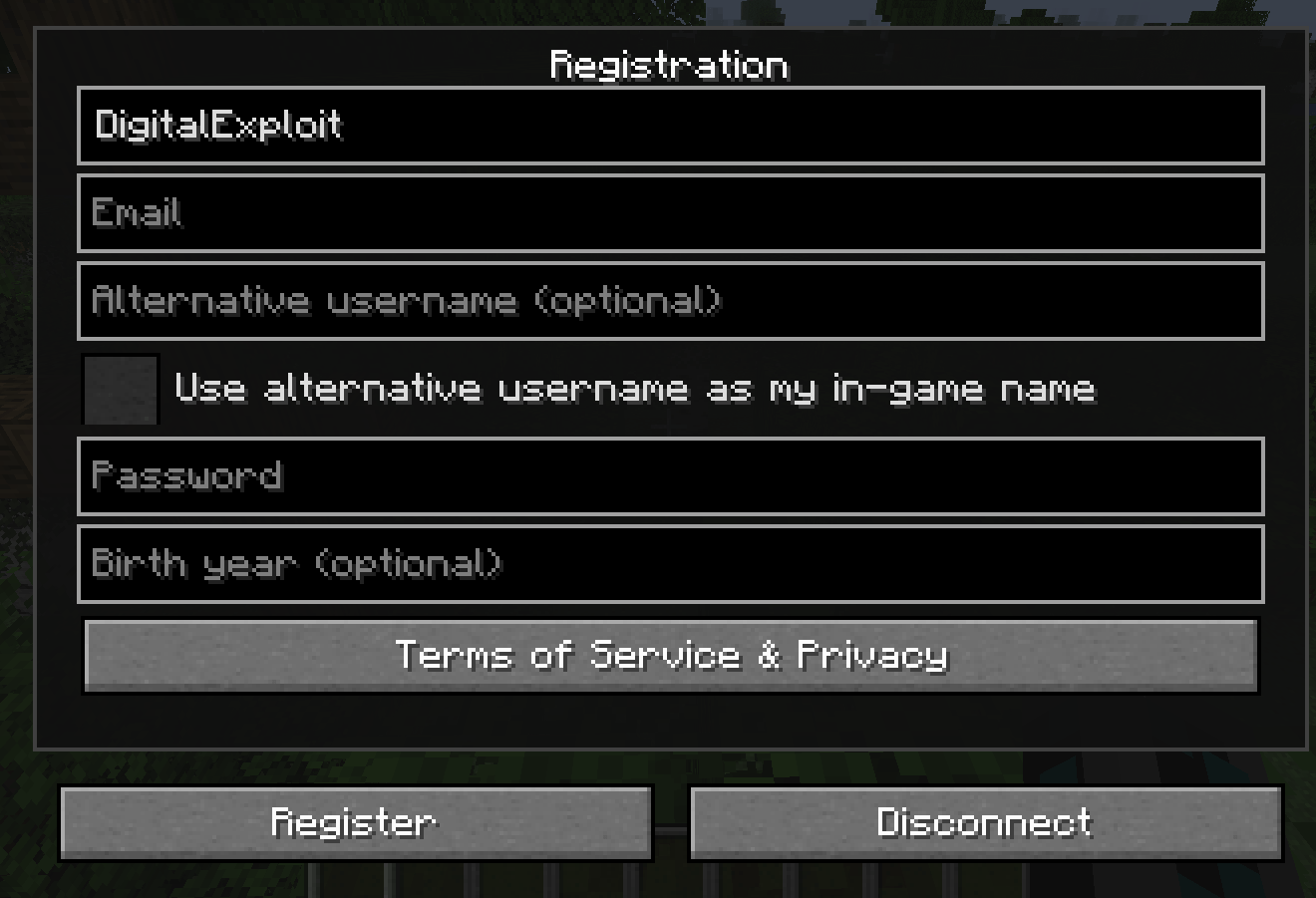 Registration Registration page
Versions
Files
Relations
Project Relations
More like this
Similar Mods
Suggestions use data such as tags, dependencies, dependents, descriptions, titles, and more to rank how much they overlap with this mod.
On ModDex
Community snapshot
By the numbers
Statistics
Want to reach Minecraft players?
We're looking for a server hosting partner to feature here and other parts of the site. Interested? Send us a message!
Get in touchGet it on
Available Platforms
On ModDex
Community snapshot
By the numbers
Statistics
Resources