
Community listing page, reviews here may not be monitored by the author.
Secure Trade


No reviews yet
Player Trade from anywhere: exchange items and XP across distance and dimensions with a custom GUI and configurable server-side limits.
Community voices
Reviews
No reviews yet. Be the first to review this project!
Get it on
Available Platforms
Compatibility
Supported Environments
Must be installed on both the client and the server.
About
Project Details
For authors
Embed Badge
If you're the author of this project, you can embed a live badge anywhere that supports HTML or Markdown. It updates automatically whenever ratings change.
Use HTML for any page that supports it, or Markdown for README files and Markdown-based descriptions.
Identifiers
Platform IDs
Resources
External Links
About
Description
Secure Trade
Secure Trade adds a direct player-to-player trade menu for multiplayer worlds, co-op servers, and modpacks.
Trade items and experience with another player from anywhere: across a base, across the map, or even across dimensions. No more running back home just to hand over ores, tools, drops, or XP.
Why Use It?
Minecraft multiplayer often splits players across different jobs and locations. One player may be mining, another crafting at base, and someone else exploring the Nether or a modded dimension.
Secure Trade keeps that flow intact: send a trade request, review both offers, confirm the exchange, and keep playing.
By default, trades are not limited by distance or dimension. Server owners can keep that freedom or configure stricter rules for distance, dimensions, item restrictions, cooldowns, logging, and trade history.
How It Works
- Run
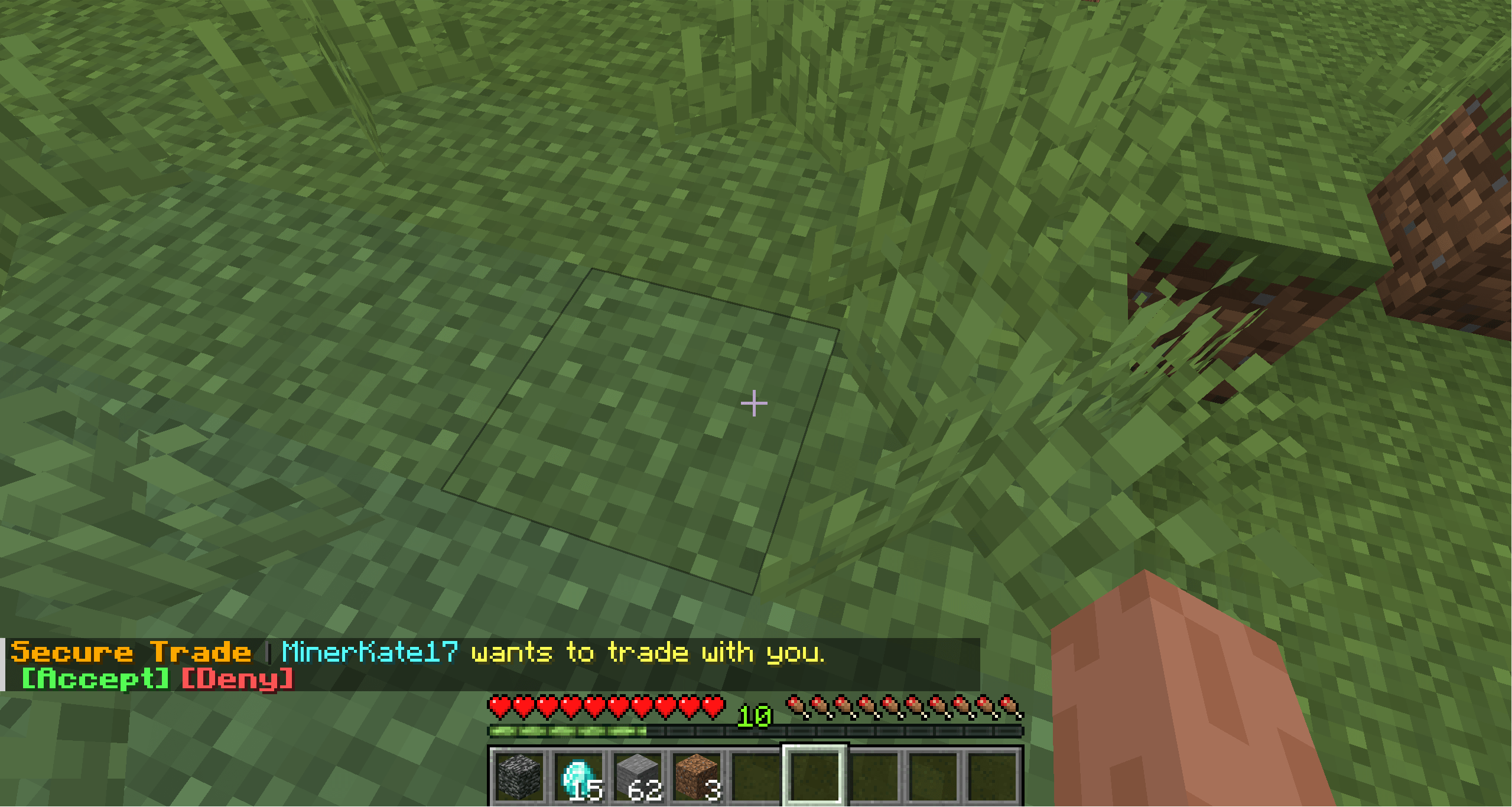
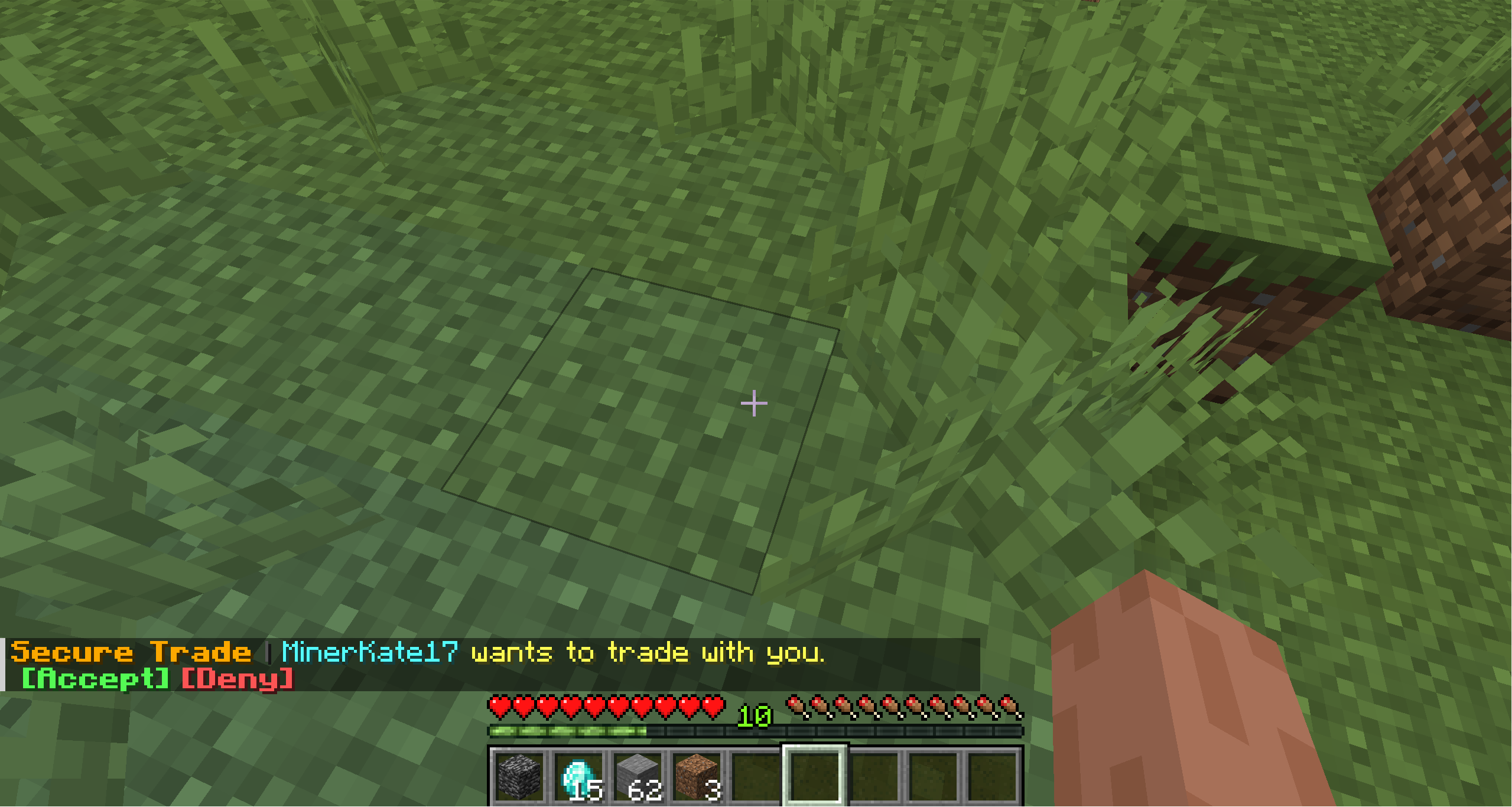
/trade <player>. - The other player accepts the request from chat.
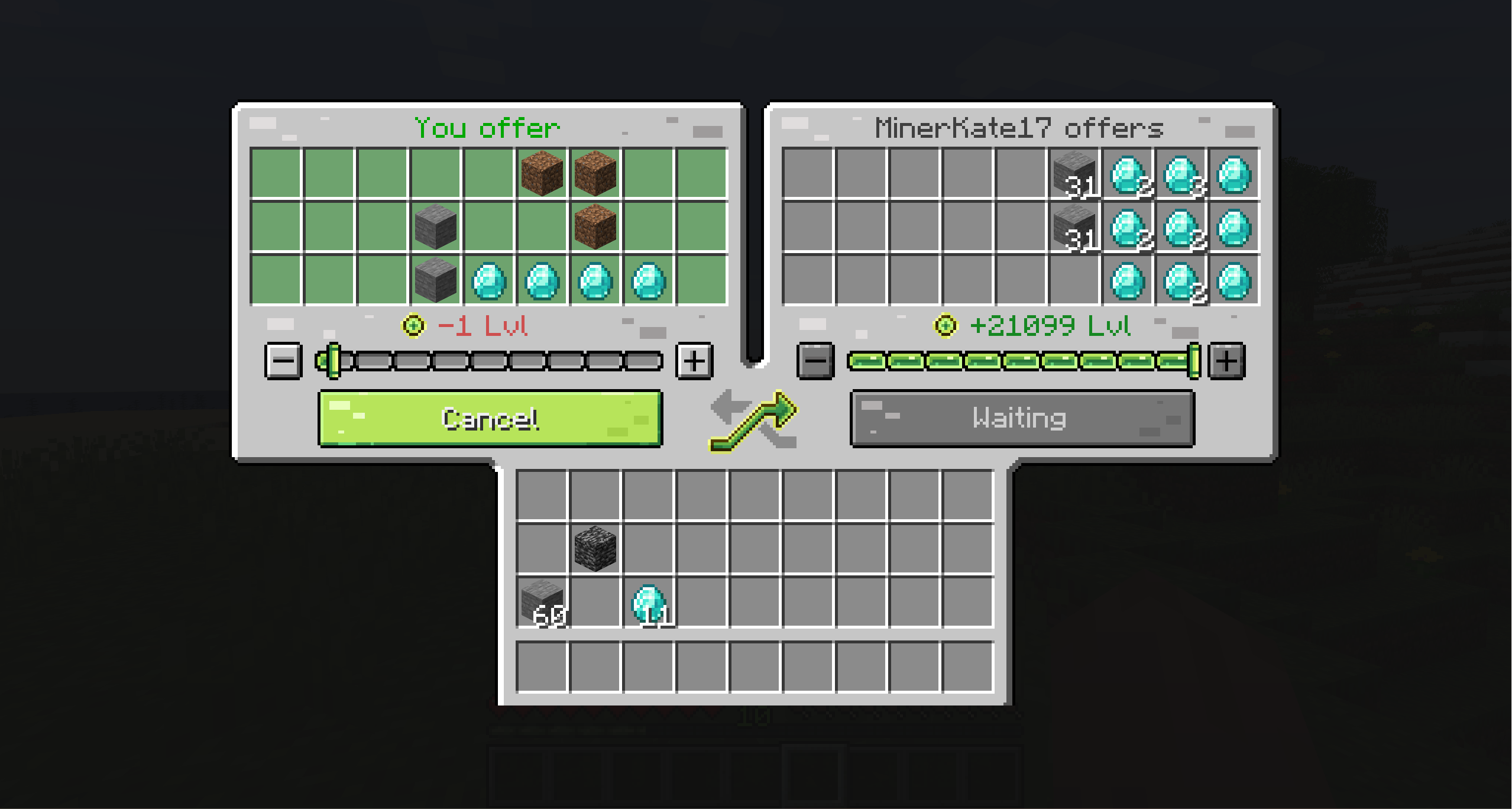
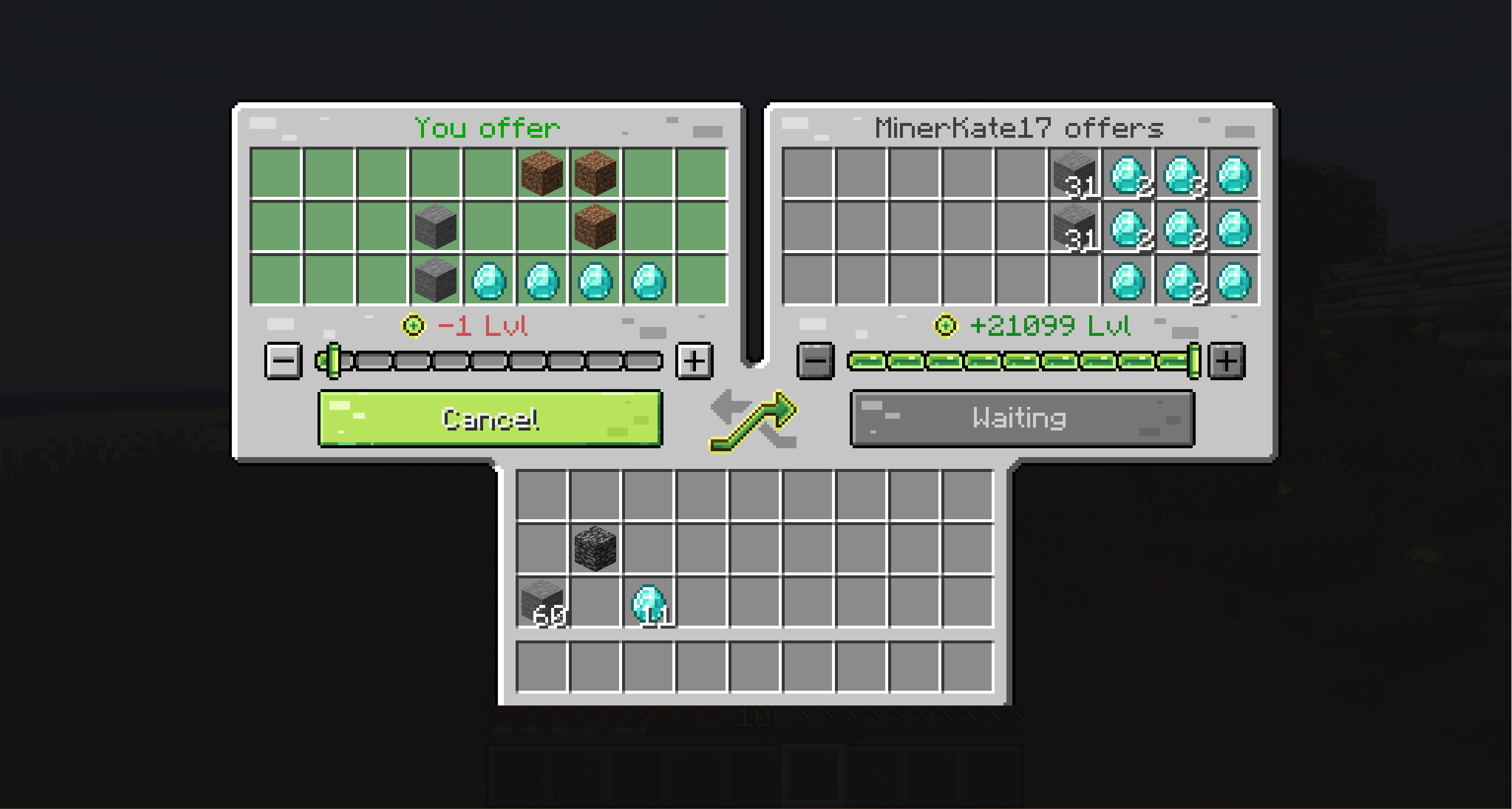
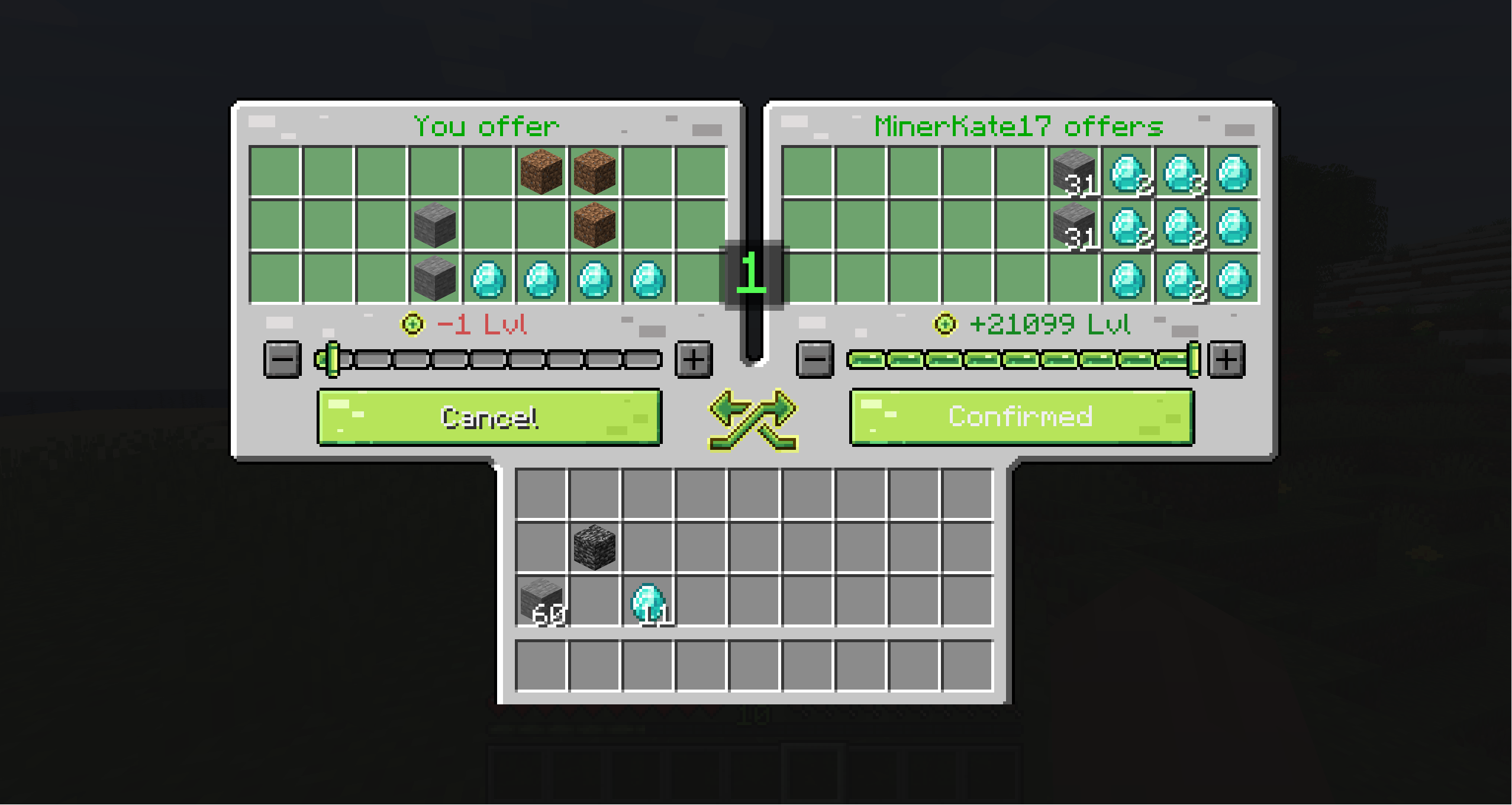
- Both players receive a shared trade screen.
- Each side adds items and/or XP.
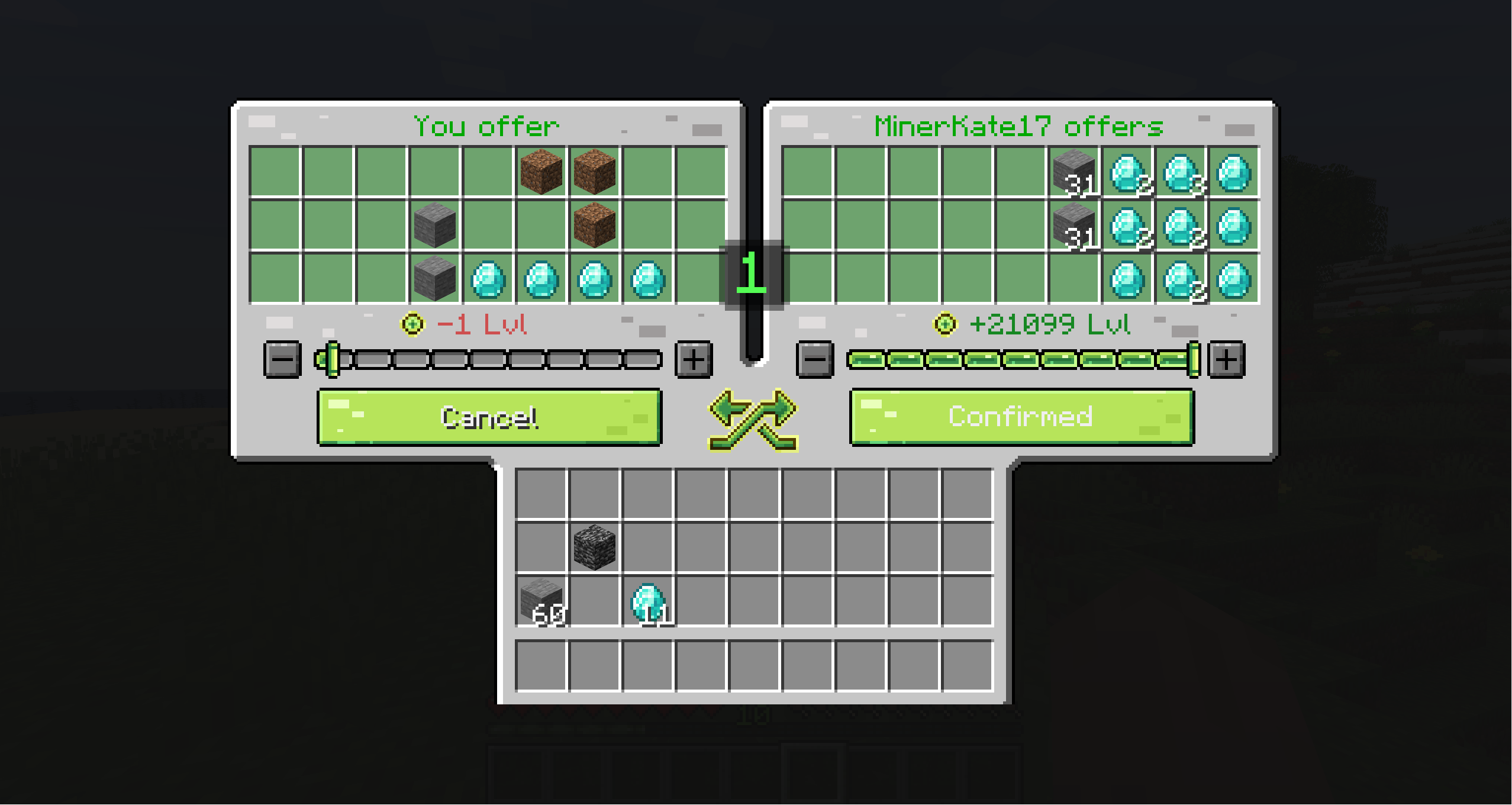
- Both players confirm their offers.
- A short countdown starts, then the exchange completes.
Changing offered items or XP after confirming automatically resets readiness so both players can review the updated trade.
Features
- Player trading from anywhere by default
- Cross-dimension trading between vanilla and modded dimensions
- Item and XP exchange in the same trade session
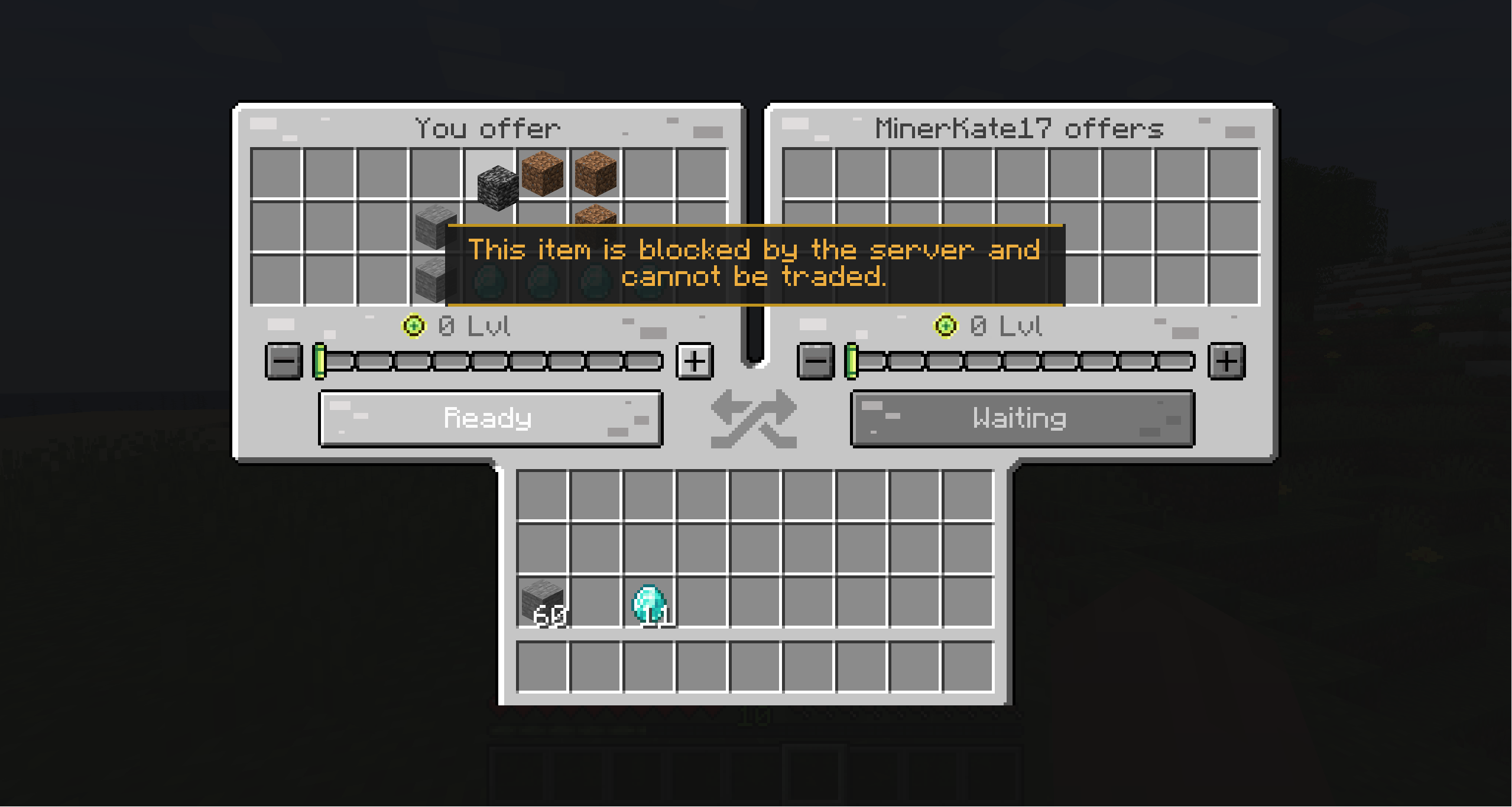
- Shared custom trade GUI with 27 offer slots per player
- Clickable chat requests with accept and deny actions
- Clear confirmation states and countdown before completion
- Custom sounds for requests, countdown, blocked items, cancellation, and successful trades
- Automatic readiness reset when an offer changes
- Inventory-space validation before confirmation
- Persistent do-not-disturb mode
- Persistent per-player trade blocking
- Optional distance and cross-dimension restrictions
- Optional dimension allowlist or blocklist
- Item blacklist with recursive checks for supported containers
- Datapack support through the
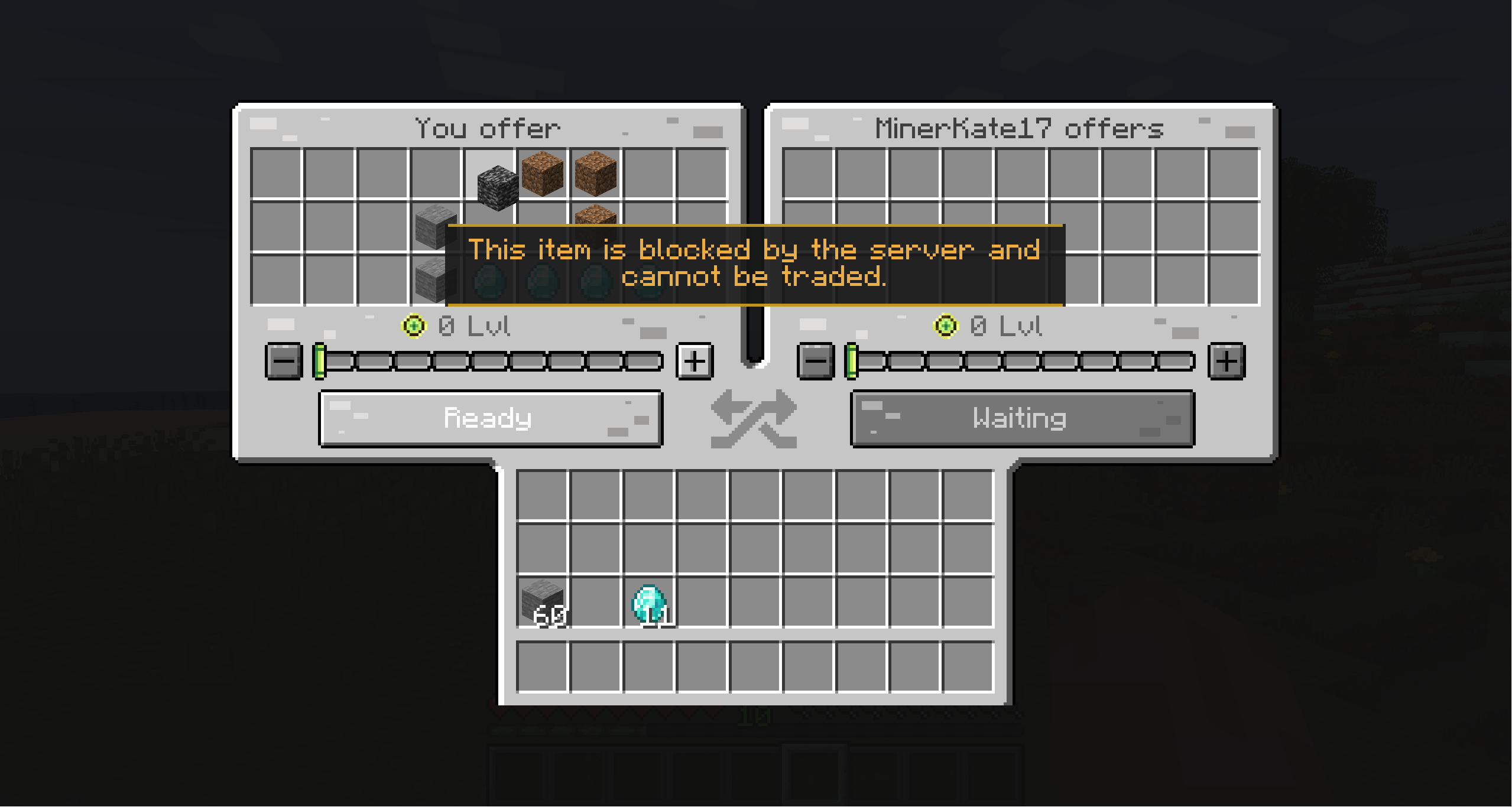
#securetrade:untradeableitem tag - In-GUI warnings for blocked items and insufficient inventory space
- Request cooldowns and one active request or trade per player
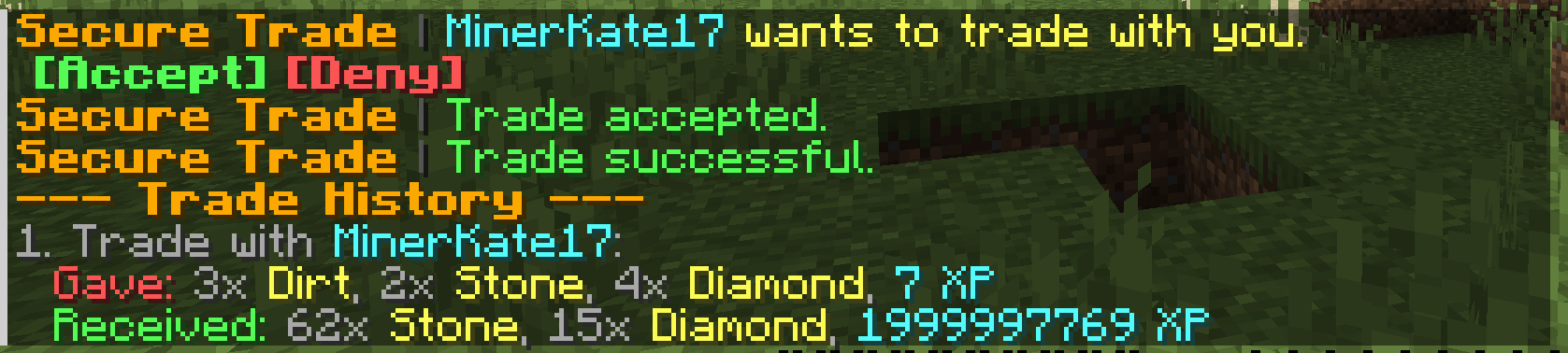
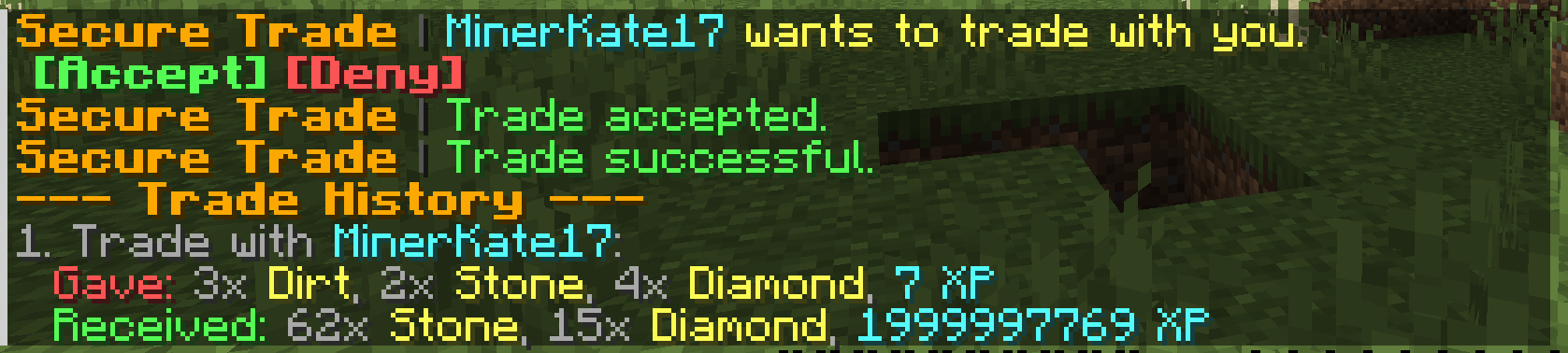
- Trade history with grouped items, XP, and item hover tooltips
- Optional async transaction logging to
logs/securetrade.log - Disconnect-safe item return and full-inventory handling
- Localization for 23 languages
Supported Versions
| Minecraft | Loaders |
|---|---|
| 26.2 | Fabric, NeoForge |
| 26.1.x | Fabric, NeoForge |
| 1.21.1 | Fabric, NeoForge |
| 1.20.1 | Fabric, Forge |
| 1.19.2 | Fabric, Forge |
| 1.18.2 | Fabric, Forge |
| 1.16.5 | Fabric, Forge |
Use the file that matches your Minecraft version and mod loader.
Commands
| Command | Description |
|---|---|
/trade <player> |
Sends a trade request. Mutual requests open the trade immediately. |
/trade accept |
Accepts the current pending trade request. |
/trade deny |
Denies the current pending trade request. |
/trade history |
Shows recent trades, including items and XP. |
/trade dnd |
Enables or disables incoming trade requests. |
/trade block <player> |
Blocks a player from sending you trade requests. |
/trade unblock <player> |
Removes a player from your trade block list. |
/trade blocked |
Shows your trade block list. |
Configuration
The server configuration file is created at:
config/securetrade-server.tomlServer owners can configure request timeouts, cooldowns, countdown duration, maximum trade distance, cross-dimension trading, dimension restrictions, item blacklists, trade history size, and transaction logging.
Modpacks can also restrict items through the #securetrade:untradeable item tag. Tagged items follow the same recursive container checks as IDs listed in blacklistedItems.
Safety
Both players must confirm before a trade completes. Offered items and XP are validated again during the exchange, readiness resets when an offer changes, and players cannot confirm without enough inventory space for incoming items.
If a player disconnects during a trade, their offered items are safely returned. Items that cannot fit into an inventory are dropped instead of being deleted.
Support
Found a bug or compatibility issue? Please include your Minecraft version, mod loader, Secure Trade version, steps to reproduce, and latest.log.
Secure Trade
Secure Trade adds a direct player-to-player trade menu for multiplayer worlds, co-op servers, and modpacks.
Trade items and experience with another player from anywhere: across a base, across the map, or even across dimensions. No more running back home just to hand over ores, tools, drops, or XP.
Why Use It?
Minecraft multiplayer often splits players across different jobs and locations. One player may be mining, another crafting at base, and someone else exploring the Nether or a modded dimension.
Secure Trade keeps that flow intact: send a trade request, review both offers, confirm the exchange, and keep playing.
By default, trades are not limited by distance or dimension. Server owners can keep that freedom or configure stricter rules for distance, dimensions, item restrictions, cooldowns, logging, and trade history.
How It Works
- Run
/trade <player>. - The other player accepts the request from chat.
- Both players receive a shared trade screen.
- Each side adds items and/or XP.
- Both players confirm their offers.
- A short countdown starts, then the exchange completes.
Changing offered items or XP after confirming automatically resets readiness so both players can review the updated trade.
Features
- Player trading from anywhere by default
- Cross-dimension trading between vanilla and modded dimensions
- Item and XP exchange in the same trade session
- Shared custom trade GUI with 27 offer slots per player
- Clickable chat requests with accept and deny actions
- Clear confirmation states and countdown before completion
- Custom sounds for requests, countdown, blocked items, cancellation, and successful trades
- Automatic readiness reset when an offer changes
- Inventory-space validation before confirmation
- Persistent do-not-disturb mode
- Persistent per-player trade blocking
- Optional distance and cross-dimension restrictions
- Optional dimension allowlist or blocklist
- Item blacklist with recursive checks for supported containers
- Datapack support through the
#securetrade:untradeableitem tag - In-GUI warnings for blocked items and insufficient inventory space
- Request cooldowns and one active request or trade per player
- Trade history with grouped items, XP, and item hover tooltips
- Optional async transaction logging to
logs/securetrade.log - Disconnect-safe item return and full-inventory handling
- Localization for 23 languages
Supported Versions
| Minecraft | Loaders |
|---|---|
| 26.2 | Fabric, NeoForge |
| 26.1.x | Fabric, NeoForge |
| 1.21.1 | Fabric, NeoForge |
| 1.20.1 | Fabric, Forge |
| 1.19.2 | Fabric, Forge |
| 1.18.2 | Fabric, Forge |
| 1.16.5 | Fabric, Forge |
Use the file that matches your Minecraft version and mod loader.
Commands
| Command | Description |
|---|---|
/trade <player> |
Sends a trade request. Mutual requests open the trade immediately. |
/trade accept |
Accepts the current pending trade request. |
/trade deny |
Denies the current pending trade request. |
/trade history |
Shows recent trades, including items and XP. |
/trade dnd |
Enables or disables incoming trade requests. |
/trade block <player> |
Blocks a player from sending you trade requests. |
/trade unblock <player> |
Removes a player from your trade block list. |
/trade blocked |
Shows your trade block list. |
Configuration
The server configuration file is created at:
config/securetrade-server.toml
Server owners can configure request timeouts, cooldowns, countdown duration, maximum trade distance, cross-dimension trading, dimension restrictions, item blacklists, trade history size, and transaction logging.
Modpacks can also restrict items through the #securetrade:untradeable item tag. Tagged items follow the same recursive container checks as IDs listed in blacklistedItems.
Safety
Both players must confirm before a trade completes. Offered items and XP are validated again during the exchange, readiness resets when an offer changes, and players cannot confirm without enough inventory space for incoming items.
If a player disconnects during a trade, their offered items are safely returned. Items that cannot fit into an inventory are dropped instead of being deleted.
Support
Found a bug or compatibility issue? Please include your Minecraft version, mod loader, Secure Trade version, steps to reproduce, and latest.log.
Screenshots
Gallery
-
 2 2
2 2 -
 4 4
4 4 -
 3 3
3 3 -
 1 1
1 1 -
 5 5
5 5
Versions
Files
Relations
Project Relations
More like this
Similar Mods
Suggestions use data such as tags, dependencies, dependents, descriptions, titles, and more to rank how much they overlap with this mod.
On ModDex
Community snapshot
By the numbers
Statistics
Want to reach Minecraft players?
We're looking for a server hosting partner to feature here and other parts of the site. Interested? Send us a message!
Get in touchGet it on
Available Platforms
On ModDex
Community snapshot
By the numbers
Statistics
Resources