
Community listing page, reviews here may not be monitored by the author.
ServerEye

No reviews yet
A mod that monitors player behavior in real-time and collects data.
Community voices
Reviews
No reviews yet. Be the first to review this project!
Get it on
Available Platforms
About
Project Details
For authors
Embed Badge
If you're the author of this project, you can embed a live badge anywhere that supports HTML or Markdown. It updates automatically whenever ratings change.
Use HTML for any page that supports it, or Markdown for README files and Markdown-based descriptions.
Identifiers
Platform IDs
About
Description
🛡️ ServerEye: Behavior Monitoring Mod for Minecraft Servers
ServerEye is a powerful behavior tracking mod built specifically for Minecraft servers. It records player actions in real time and displays them through a built-in web interface — giving you clear insight into everything happening on your server.
Whether you're a server owner, administrator, or a data-savvy player, ServerEye provides valuable tools to understand and manage player activity.
🔍 What Can You See?
ServerEye captures and displays a wide range of in-game player activities, including:
- Player join/leave events
- Chat messages (optional sensitive-word filtering)
- Block breaking and placing (with coordinates)
- Game mode changes (Old ↔ New)
- Detailed command execution logs (including output)
With this data, you can:
✅ Quickly investigate suspicious activity
✅ Analyze player behavior patterns and playtimes
✅ Audit commands and catch misuse or abuse
✅ Get full command output logs for better moderation
💡 How to Use
No complex setup needed — just drop the mod into your server and you're good to go!
Once the server is running, open your browser and go to:
http://localhost:8080You'll see a clean, intuitive dashboard featuring:
- ✅ Real-time event feed
- ✅ Event type filtering
- ✅ Player name search
- ✅ Summary statistics and analytics
If remote upload is enabled in the config file, you’ll need to set your remote upload URL, for example:
https://your-server.example.com/api/receive🧪 Sample Event
Each event includes full context. For example, when a player breaks a diamond ore block:
{
  "timestamp": "2025-05-24T12:34:56Z",
  "player": "Notch",
  "event": "block_break",
  "details": {
    "Block": "minecraft:diamond_ore",
    "Coordinates": "X: 123, Y: 64, Z: -45"
  },
  "serverIp": "127.0.0.1"
}
You’ll know exactly who did what, when, and where.
🧭 Perfect For
- Monitoring activity on public or large-scale servers
- Tracking player behavior in survival/RPG-style servers
- Auditing commands and actions in technical or teaching environments
- Collecting gameplay data for private servers or research purposes
📌 Notes & Reminders
Not a fan of the built-in web UI? No problem — there's a detailed Web Developer Guide available on GitHub. (Though honestly, the default works just fine for most cases.)
Think the mod is too limited or missing features? Open an Issue — if you can suggest it, I’ll consider building it. (No promises, but I’m always open to ideas!)
This mod is closed-source. Redistribution and reverse engineering are strictly prohibited.
Need help or confused about a setting? Check the in-game config screen — most options come with helpful explanations.
Screenshots
Gallery
-
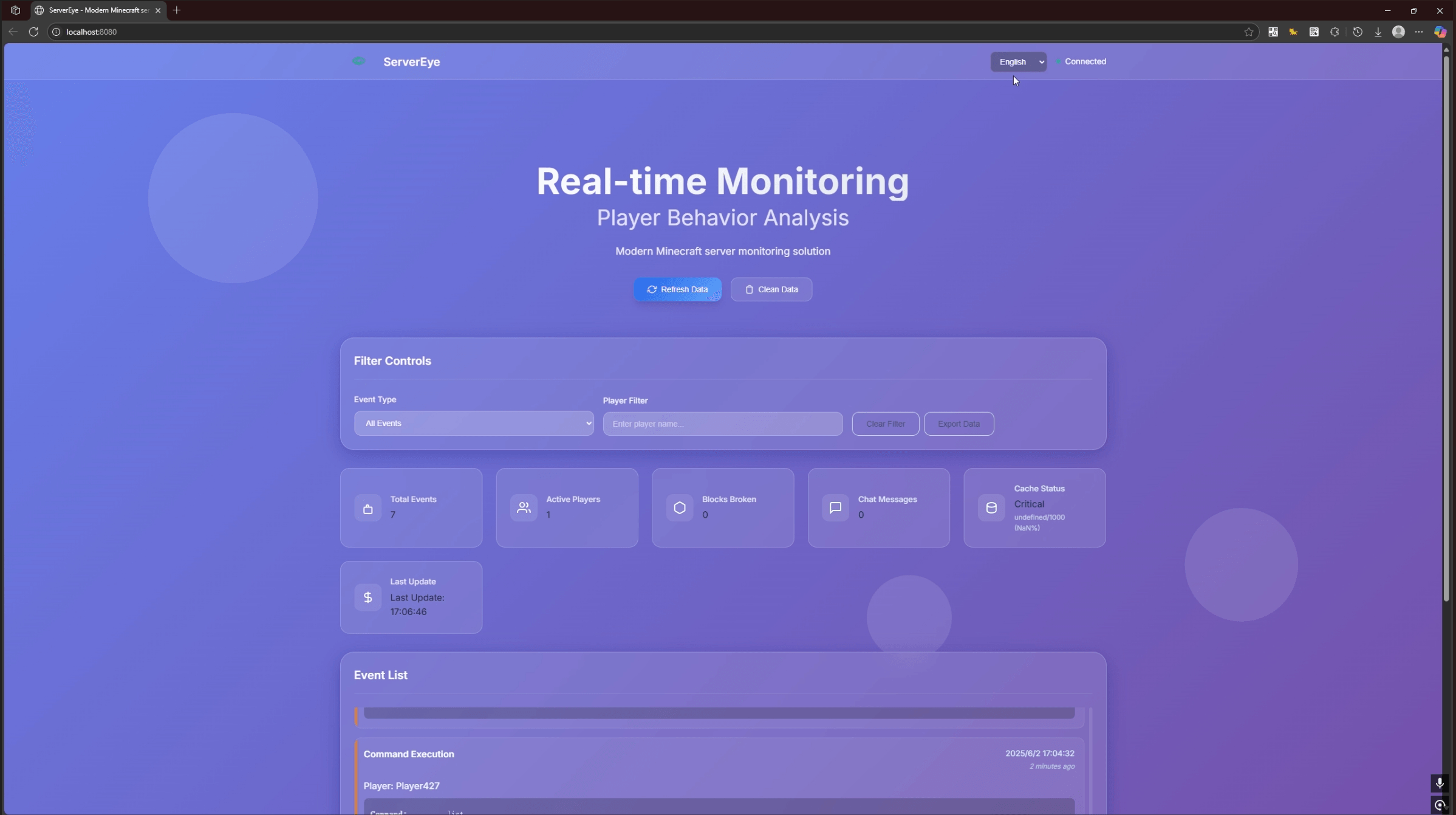 20250602172810.png 20250602172810.png
Versions
Files
Relations
Project Relations
More like this
Similar Mods
Suggestions use data such as tags, dependencies, dependents, descriptions, titles, and more to rank how much they overlap with this mod.
On ModDex
Community snapshot
By the numbers
Statistics
Want to reach Minecraft players?
We're looking for a server hosting partner to feature here and other parts of the site. Interested? Send us a message!
Get in touchGet it on
Available Platforms
On ModDex
Community snapshot
By the numbers