Community listing page, reviews here may not be monitored by the author.
ServerPresets


No reviews yet
Pin preset servers to the top of your multiplayer list. Locked from editing, deletion, and reordering.
Community voices
Reviews
No reviews yet. Be the first to review this project!
Get it on
Available Platforms
Compatibility
Supported Environments
Runs entirely on the client. Works on vanilla servers.
About
Project Details
For authors
Embed Badge
If you're the author of this project, you can embed a live badge anywhere that supports HTML or Markdown. It updates automatically whenever ratings change.
Use HTML for any page that supports it, or Markdown for README files and Markdown-based descriptions.
Identifiers
Platform IDs
About
Description
ServerPresets
A Minecraft Fabric mod that pins preset servers to the top of your multiplayer server list. These servers are locked and cannot be edited, deleted, or moved by players.
Features
- Load preset servers from a configuration file
- Preset servers are always pinned to the top of the server list
- Preset servers cannot be edited, deleted, or moved
- Automatic deduplication: duplicate servers with the same IP are removed
- Players can freely manage their own servers (but cannot move them above preset servers)
- Configure server resource pack policy (Prompt/Enabled/Disabled)
- Load preset servers from a remote URL (HTTP/HTTPS), with automatic merging of local and remote lists
Usage
- Launch the game with the mod installed
- The mod will automatically create
config/serverpresets.json - Edit the configuration file to add your preset servers
- Restart the game to see the preset servers at the top of your multiplayer list
Configuration
Configuration file location: config/serverpresets.json
Example Configuration
{
  "presetServers": [
    {
      "name": "Example Server 1",
      "ip": "mc.example.com",
      "resourcePackPolicy": "PROMPT"
    },
    {
      "name": "Example Server 2",
      "ip": "play.example.net:25565",
      "resourcePackPolicy": "ENABLED"
    }
  ]
}
Configuration Fields
name: Server display nameip: Server address (can include port)resourcePackPolicy: Server resource pack behaviorPROMPT: Ask the player (default)ENABLED: Always accept resource packsDISABLED: Always decline resource packs
Remote Server List
Preset servers can also be loaded from a remote URL, which is useful for managing the server list across multiple clients from a single source.
Enabling Remote Loading
Add the remoteUrl and enableRemote fields to config/serverpresets.json:
{
  "presetServers": [
    {
      "name": "Local Server",
      "ip": "localhost",
      "resourcePackPolicy": "PROMPT"
    }
  ],
  "remoteUrl": "https://example.com/servers.json",
  "enableRemote": true
}remoteUrl: The URL of the remote server list (HTTP or HTTPS). Leave empty to disable.enableRemote: Set to true to enable remote loading, false to disable (default).
Remote JSON Format
The remote URL must return JSON in the following format:
{
  "servers": [
    {
      "name": "Remote Server 1",
      "ip": "play.example.net",
      "resourcePackPolicy": "ENABLED"
    },
    {
      "name": "Remote Server 2",
      "ip": "mc.example.com",
      "resourcePackPolicy": "PROMPT"
    }
  ]
}
ServerPresets
A Minecraft Fabric mod that pins preset servers to the top of your multiplayer server list. These servers are locked and cannot be edited, deleted, or moved by players.
Features
- Load preset servers from a configuration file
- Preset servers are always pinned to the top of the server list
- Preset servers cannot be edited, deleted, or moved
- Automatic deduplication: duplicate servers with the same IP are removed
- Players can freely manage their own servers (but cannot move them above preset servers)
- Configure server resource pack policy (Prompt/Enabled/Disabled)
- Load preset servers from a remote URL (HTTP/HTTPS), with automatic merging of local and remote lists
Usage
- Launch the game with the mod installed
- The mod will automatically create
config/serverpresets.json - Edit the configuration file to add your preset servers
- Restart the game to see the preset servers at the top of your multiplayer list
Configuration
Configuration file location: config/serverpresets.json
Example Configuration
{
  "presetServers": [
    {
      "name": "Example Server 1",
      "ip": "mc.example.com",
      "resourcePackPolicy": "PROMPT"
    },
    {
      "name": "Example Server 2",
      "ip": "play.example.net:25565",
      "resourcePackPolicy": "ENABLED"
    }
  ]
}
Configuration Fields
name: Server display nameip: Server address (can include port)resourcePackPolicy: Server resource pack behaviorPROMPT: Ask the player (default)ENABLED: Always accept resource packsDISABLED: Always decline resource packs
Remote Server List
Preset servers can also be loaded from a remote URL, which is useful for managing the server list across multiple clients from a single source.
Enabling Remote Loading
Add the remoteUrl and enableRemote fields to config/serverpresets.json:
{
  "presetServers": [
    {
      "name": "Local Server",
      "ip": "localhost",
      "resourcePackPolicy": "PROMPT"
    }
  ],
  "remoteUrl": "https://example.com/servers.json",
  "enableRemote": true
}
remoteUrl: The URL of the remote server list (HTTP or HTTPS). Leave empty to disable.enableRemote: Set to true to enable remote loading, false to disable (default).
Remote JSON Format
The remote URL must return JSON in the following format:
{
  "servers": [
    {
      "name": "Remote Server 1",
      "ip": "play.example.net",
      "resourcePackPolicy": "ENABLED"
    },
    {
      "name": "Remote Server 2",
      "ip": "mc.example.com",
      "resourcePackPolicy": "PROMPT"
    }
  ]
}
Screenshots
Gallery
-
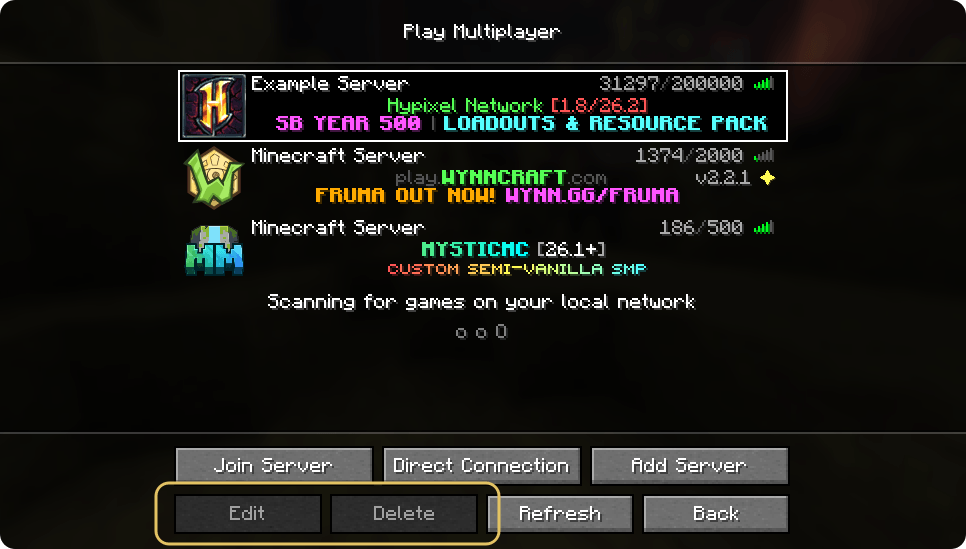 Servers at the top are defined in the config. Cannot be deleted, edited, or reordered.
-
 Servers at the top are defined in the config. Cannot be deleted, edited, or reordered.
Versions
Files
Relations
Project Relations
More like this
Similar Mods
Suggestions use data such as tags, dependencies, dependents, descriptions, titles, and more to rank how much they overlap with this mod.
On ModDex
Community snapshot
By the numbers
Statistics
Want to reach Minecraft players?
We're looking for a server hosting partner to feature here and other parts of the site. Interested? Send us a message!
Get in touchGet it on
Available Platforms
On ModDex
Community snapshot
By the numbers