Community listing page, reviews here may not be monitored by the author.
Set Home & Waypoints

No reviews yet
Want to be abble to come back after your journey ? Adding /home & /wp commands with enhanced UX

Community voices
Reviews
No reviews yet. Be the first to review this project!
Get it on
Available Platforms
About
Project Details
For authors
Embed Badge
If you're the author of this project, you can embed a live badge anywhere that supports HTML or Markdown. It updates automatically whenever ratings change.
Use HTML for any page that supports it, or Markdown for README files and Markdown-based descriptions.
Identifiers
Platform IDs
About
Description
Set Home & Waypoints
Set Home & Waypoints allows players to set a home and waypoints. The development was focused on user experience (autocomplete, key bind, command feedback, colors…). This mod is configurable on both client and server side.
For 1.12.2 version, check this documentation on GitHub
4 commands to master the mod
- /shw List all available commands,
- /sethome Create or update your home,
- /home Teleport to your home,
- /wp Set, use, update, remove your waypoints.

Supported languages
- 🇬🇧 English
- 🇫🇷 French
- 🇩🇪 German
- 🇹🇼 Republic of China (Taiwan)
If your language is missing, you can contribute to this mod on GitHub by submitting a pull request.
Follow project development
You can follow working issues/features on Trello.
Installation
First of all, download Set Home & Waypoints.
Then add downloaded .jar in mods/ folder on both client and server side.
That's it!
Configuration
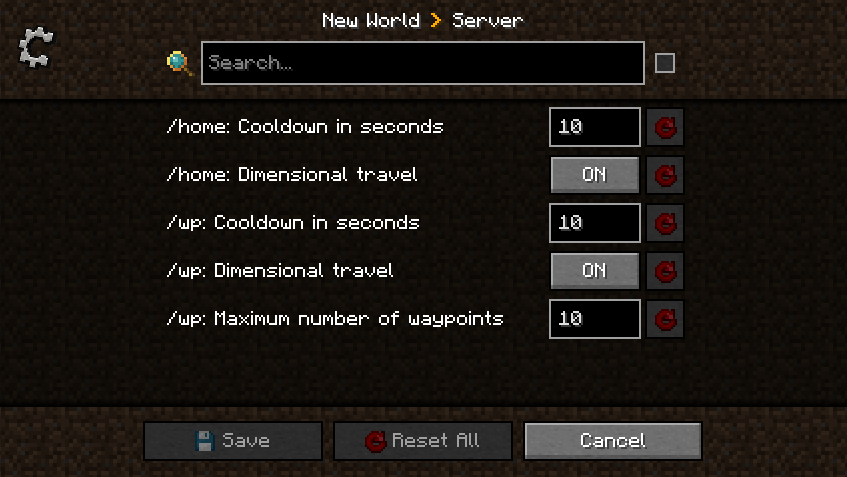
Set Home & Waypoints allows you to configure cooldown, dimensional travel and number of waypoints using commands (solo + multiplayer) or GUI (only solo) for client and config file for server.
All players can display current home and waypoints configuration by executing /home config for home configuration and /wp config for waypoints configuration.

A player with admin permission (3) can configure the server in game using /home config <…> and /wp config <…> commands without restarting the server ✅ Suggestions will guide players with sufficient permissions.
Client side using GUI
This menu was generated using Configured mod. Configured is a simple and lightweight mod that dynamically creates a configuration menu for every mod.
Client side using commands
Example of updating dimensionalTravel for Home using command:

Server side using config file
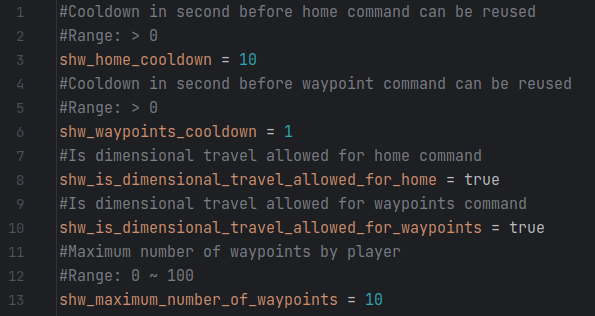
This configuration file is generated at server initialization in world/serverconfig/shw-server.toml.
Setting a new value will take instantly effect. Restarting the server is not necessary.
Updating configuration while the server is running will not notify players.
Commands usage
All commands have suggestions to guide players in game. /shw command will list all available commands.
/sethome and /home commands
Home is unique, set your home in any dimension by executing /sethome. Then, executing /home or pressing H key will teleport you on your home.
Yes, this mod come with a configurable shortcut (H key by default) to fast tp to your home. This will certainly save life.
Note that, re-executing /sethome will update home position with player location.

/wp command
Waypoints are used to save additional locations. By default, 10 waypoints are allowed.
Admins can configure this setting using /wp config maximumWaypointsNumber <count>.
Set, Use, List waypoints
Create waypoints with /wp set <waypoint name> and then teleport to them using /wp use <waypoint name>.

Executing /wp list will show all player waypoints and available space.
Update, Remove, Undo waypoints
Waypoints can be updated by executing /wp update <waypoint name> or removed by executing /wp remove <waypoint name>.
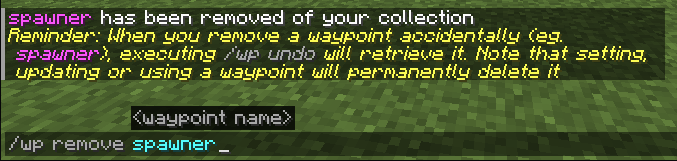
Last removed waypoint can be rollback by executing /wp undo. Note that this action will not be permitted after setting, updating or using another waypoint.

Waypoints can be cleared by executing /wp clear. Be careful, this action will remove all player waypoints and cannot be rollback.
Screenshots
Gallery
Versions
Files
Relations
Project Relations
More like this
Similar Mods
Suggestions use data such as tags, dependencies, dependents, descriptions, titles, and more to rank how much they overlap with this mod.
On ModDex
Community snapshot
By the numbers
Statistics
 (opens in a new tab)
Get it on
Available Platforms
On ModDex
Community snapshot
By the numbers