
Community listing page, reviews here may not be monitored by the author.
Settings Hotkey

No reviews yet
Fabric mod for Minecraft 26.1.2: bind hotkeys to instantly set client settings (render distance, FOV, and more) to chosen values, configured via Mod Menu.
Community voices
Reviews
No reviews yet. Be the first to review this project!
Get it on
Available Platforms
Compatibility
Supported Environments
Runs entirely on the client. Works on vanilla servers.
About
Project Details
For authors
Embed Badge
If you're the author of this project, you can embed a live badge anywhere that supports HTML or Markdown. It updates automatically whenever ratings change.
Use HTML for any page that supports it, or Markdown for README files and Markdown-based descriptions.
Identifiers
Platform IDs
About
Description
DESCRIPTION:
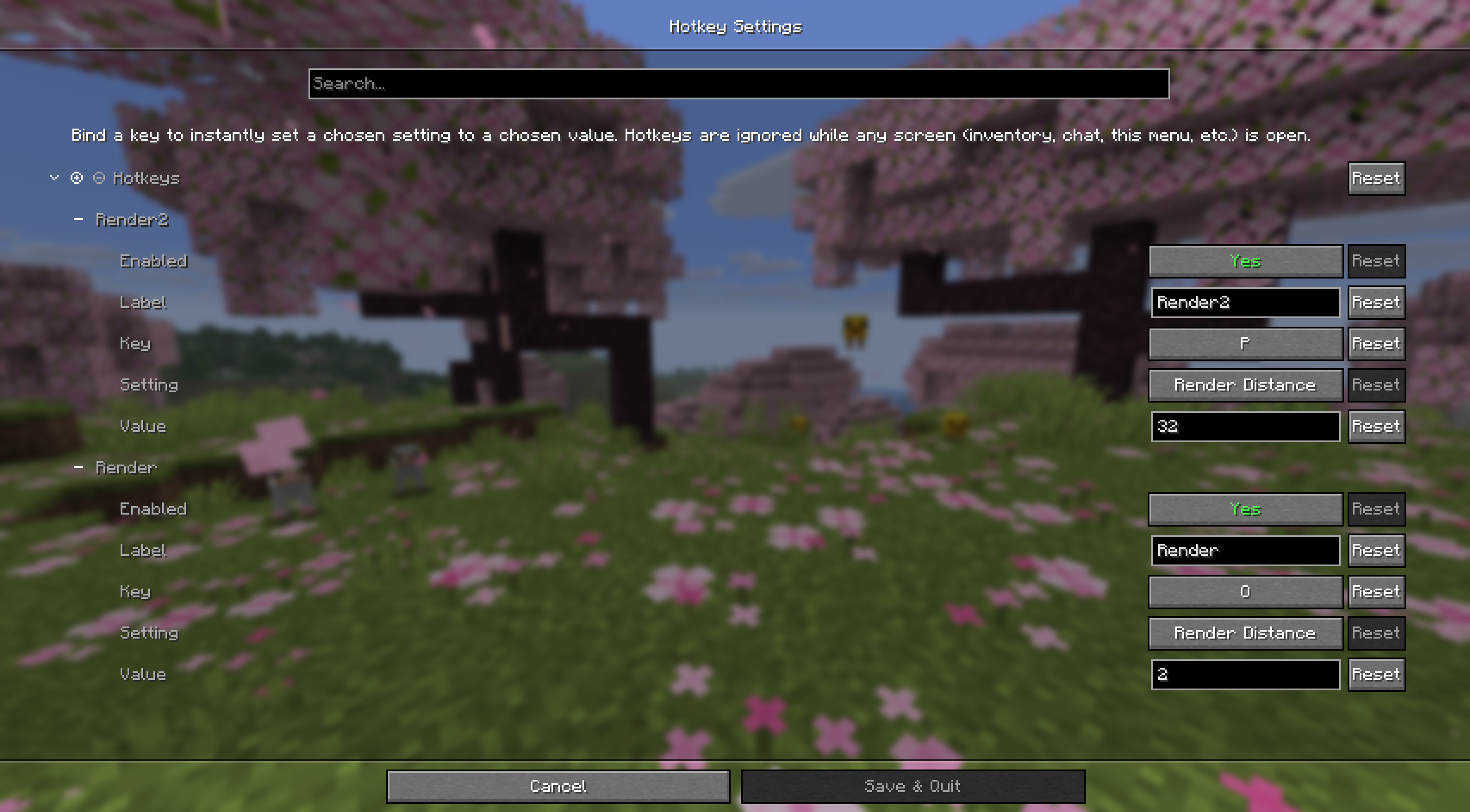
A Fabric mod for Minecraft 26.1.2 that lets you bind keys to instantly set a chosen client setting to a chosen value - e.g. press 9 to set render distance to 32, press 0 to drop it back to 2.
Everything is configured in-game through Mod Menu (the screen is built with Cloth Config).
Supported settings: Render Distance, Simulation Distance, Field of View, Brightness, GUI Scale, Max Framerate, Particles.
This mod can be used for basehunting on servers like DonutSMP, making use of the render distance exploit.
REQUIREMENTS:
- Fabric API for 26.1.2
- Mod Menu 18.0.0+ for 26.1.2
- Cloth Config API 26.1.154+fabric
USAGE:
1: Launch the game with the mods installed, open Mods (Mod Menu replaces the vanilla screen), find Hotkey Settings, and click the config gear.
2: There's always a blank hotkey waiting at the bottom of the list. Fill it in:
- Enabled - turn it on/off without deleting it
- Label - just for your own reference in the list
- Key - click and press the key (or mouse button) you want to bind
- Setting - which option this hotkey controls
- Value - the value to set it to (see the tooltip on that field for the valid range per setting)
- Chat Feedback - show a chat message with what changed each time this hotkey fires
3: Click Save. Hotkeys are live immediately and are ignored whenever any screen is open (inventory, chat, this config screen, etc.) so they never fire while you're typing.
(Config is stored at config/hotkeysettings.json.)
Screenshots
Gallery
Versions
Files
Relations
Project Relations
More like this
Similar Mods
Suggestions use data such as tags, dependencies, dependents, descriptions, titles, and more to rank how much they overlap with this mod.
On ModDex
Community snapshot
By the numbers
Statistics

Want to reach Minecraft players?
We're looking for a server hosting partner to feature here and other parts of the site. Interested? Send us a message!
Get in touchGet it on
Available Platforms
On ModDex
Community snapshot
By the numbers