Community listing page, reviews here may not be monitored by the author.


Community voices
Reviews
No reviews yet. Be the first to review this project!
Get it on
Available Platforms
About
Project Details
For authors
Embed Badge
If you're the author of this project, you can embed a live badge anywhere that supports HTML or Markdown. It updates automatically whenever ratings change.
Use HTML for any page that supports it, or Markdown for README files and Markdown-based descriptions.
Identifiers
Platform IDs
About
Description
Description:
Adds in commands that can be used in conjunction with World Primer & Just Enough Dimensions to pre-generate Stargates in specified dimensions along with being to obtain these Stargate addresses as loot or via command.
Will create a json file in world-save\sgextras called SGGateAddress.json
{
  "SGAddress": [
    {
      "CustomName": "Earth",
      "Address": "RFR2Z70RO",
      "DimID": 0,
      "AllowAsLoot": false,
      "AllowProtection": false,
      "BlockPos": [
        {
          "X": -12,
          "Y": 65,
          "Z": 255
        }
      ],
      "Orientation": 1,
      "Facing": 0
    },
    {
      "CustomName": "Abydos",
      "Address": "S56UCXTUB",
      "DimID": 8,
      "AllowAsLoot": true,
      "AllowProtection": true,
      "BlockPos": [
        {
          "X": 706,
          "Y": 65,
          "Z": -18
        }
      ],
      "Orientation": 2,
      "Facing": 0
    },
    {
      "CustomName": "Netu",
      "Address": "LJ292GYAY",
      "DimID": 10,
      "AllowAsLoot": true,
      "AllowProtection": true,
      "BlockPos": [
        {
          "X": -1057,
          "Y": 94,
          "Z": -2055
        }
      ],
      "Orientation": 1,
      "Facing": 0
    },
    {
      "CustomName": "End",
      "Address": "O1LASQ4YS",
      "DimID": 11,
      "AllowAsLoot": false,
      "AllowProtection": true,
      "BlockPos": [
        {
          "X": -10000,
          "Y": 64,
          "Z": -3870
        }
      ],
      "Orientation": 1,
      "Facing": 0
    },
    {
      "CustomName": "MiningDim",
      "Address": "RFR2Z7008",
      "DimID": -9999,
      "AllowAsLoot": true,
      "AllowProtection": true,
      "BlockPos": [
        {
          "X": -12,
          "Y": 66,
          "Z": 255
        }
      ],
      "Orientation": 1,
      "Facing": 0
    },
    {
      "CustomName": "Moon",
      "Address": "RFR2Z70FX",
      "DimID": -28,
      "AllowAsLoot": true,
      "AllowProtection": true,
      "BlockPos": [
        {
          "X": -12,
          "Y": 65,
          "Z": 255
        }
      ],
      "Orientation": 1,
      "Facing": 0
    },
    {
      "CustomName": "TwilightForest",
      "Address": "RFR2Z706E",
      "DimID": 7,
      "AllowAsLoot": true,
      "AllowProtection": true,
      "BlockPos": [
        {
          "X": -12,
          "Y": 65,
          "Z": 255
        }
      ],
      "Orientation": 1,
      "Facing": 0
    },
    {
      "CustomName": "Betweenlands",
      "Address": "RFR2Z70WU",
      "DimID": 20,
      "AllowAsLoot": true,
      "AllowProtection": true,
      "BlockPos": [
        {
          "X": -12,
          "Y": 65,
          "Z": 255
        }
      ],
      "Orientation": 1,
      "Facing": 0
    }
  ]
}
Currently only working with forge SP/MP & forge server, not working yet with Spongeforge.
Items Added:
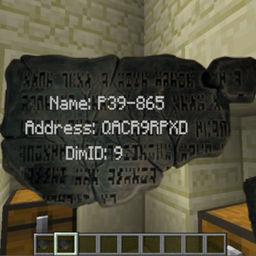
- Ancient Tablet
- Activator Block
-
- This block is just a fake player that right-clicks on loop, was using to activate chunkloader (The Weirding Gadget) when chunk loader is placed using the setblock command.
- The activator block is not required for small structures but may be useful for large structures if the structure is not being completed by the time the chunk unloads.
- see example worldprimer.cfg dim 9
-
Commands:
- sgloaddim <dimid>
- used to load dimension to allow dimension loading commands in World Primer to run.
- sgunloaddim <dimid>
- used to add the dimension to the unload queue.
- sgaddress <customname> <dimid> <allowasloot> <allowProtection> <x> <y> <z> {}
- used to add the given gate address & info to the SGGateAddress.json file.
- sgtablet <player> <item> <dimid> <customname>
- used to give player an Ancient Tablet with gate address for the specified gate.
- useful for progression based pack, IE can use with something like better questing to give player specific address for completing task.
- sgsetrandomspawn <dimid> <type> <containsliquid>
- sets a new spawn point.
- type can be OVERWORLD, NETHER, END.
- containsliquid is weather spawn-point pos can contain liquid, checks a 7x7 area with the spawn-point at the center.
- sgdelete <address>
- will remove the given entry from the SGGateAddress.json file.
- this will not remove the structure or loot already generated with this address.
- sggetworldprovider <id>
- added this so I could get the full name of world provider to use with JED dimensions.json
- sggetdata <x> <y> <z> {}
- added this to get all nbt data from SG base Block, useful to see any other nbt tags you may want to change.
Config Options:
- allowBreakGate
- true/false – false by default, if false only players with OP can break gates added in the SGGateAddress.json that have allowProtection set to true.
- allowExplodeGate
- true/false – false by default, if false explosions cannot destroy gates added in the SGGateAddress.json that have allowProtection set to true.
- allowBelowGate
- true/false – true by default, if true 1 block down directly below the bottom of the gate will also be protected by breaking/explosions if those options are set to true.
- allowAccessBelowGate
- true/false – false by default, if false only players with OP can access the right-click gui of blocks 1 block below the gate.
- allowControllerAccess
- true/false – false by default, if false only players with OP can access the fuel panel part of the linked controller.
- allowLoot
- true/false – true by default, if true gate entry's in the SGGateAddress.json will be added as loot to the specified loot tables if the entry's allowasloot is set to true.
- lootTables
- a list of loot tables to add ancient tablets to as loot.
- use string name of the registered loot table, IE minecraft:chests/desert_pyramid
- randomChance
- random change for an Ancient Tablet to spawn as loot, 50% by default.
Note on loot:
Loot will not generate on first world load as it is created from the entry's in the SGGateAddress.json which is created on first world/server load.
So once all pre-gen commands have completed you will need to re-start world/server for loot to generate.
Method to pre-generate Stargates:
Create an instance of MC and run once to generate the config files for the mods below.
Mods used:
- Stargate Network - version 2.0.0+
- World Primer - version worldprimer-1.12.2-0.6.0-dev.20190309.202458
- Just Enough Dimensions - version justenoughdimensions-1.12.2-1.6.0-dev.20190319.214431
- SG Extras
In the below examples I am also creating Stargates in Galacticraft, Betweenlands, TwilightForest & ExtraUtilities dimensions.
You should be able to use any mod you prefer to create your structures but in this example I am using World Primer and creating a schematic file.
Create a structure:
- The stargate must not be complete in the structure or all will have the same address and not work, so leave 1 block out when creating your structure - make this a ring or chevron block not the base block or it will also not work. - see images
Structures can be created with the following command:
- worldprimer create-structure <x1> <y1> <z1> <x2> <y2> <z2> schematic <structurenamehere>
this will create the a structure file in config\worldprimer\structures
Once you have created your structures for each dimension you will need to work out x,y,z offsets accordingly, I suggest using the place structure command to figure out the offsets needed to get the positions of
- the offset for sg base block.
- the offset for the missing chevron/ring block.
- the offset of where you want the controller to go.
- worldprimer place-structure <x> <y> <z> <structurename> <rotation> <mirror> <centered>
Structures used in examples:
World primer config:
We be using DimensionLoadingCommands, postWorldCreationCommands & TimedCommands to pre-gen the structures.
So set the following to true in the config file.
- enableDimensionLoadingCommands=true
- enablePostWorldCreationCommands=true
- enableTimedCommands=true
Create and save your dimensions.json to config\justenoughdimensions folder. You can use the example one below to test.
Example dimensions.json
Next is adding all commands needed to the worldprimer.cfg
-
Commands are run over a number of dimensions loads
-
IE, dim loads 1st time and 1st load cmds are run then unloads, dim gets reloaded then 2nd load cmds are run.
-
Copy the DimensionLoadingCommands, postWorldCreationCommands & TimedCommands from below example to your worldprimer.cfg
Example worldprimer.cfg
Run MC and create a new world
-
wait for all commands to complete, if using the example wait for "Loading Dims Third Time!" to display as this is last set of timed commands in worldprimer.cfg
-
check the SGGateAddress.json to confirm all gate entry's have been added ok.
Example of generated SGGateAddress.json
Explanation of commands used:
worldprimer place-structure {SPAWN_POINT_X} {SPAWN_POINT_Y}-1 {SPAWN_POINT_Z} stargate none none centered
- this command is used to place the structure at spawn-point
- I minus 1 on the y pos to set the structure at ground level
setblock {SPAWN_POINT_X} {SPAWN_POINT_Y}+5 {SPAWN_POINT_Z}-1 sgcraft:stargatering
- I am placing the structure centered with no rotation or mirror - in my structures case the centre pos is 1 block off on the z-axis from the sg base block and I've added 5 to the y as I minused 1 when placing the structure, this is now the pos of the missing chevron block in the structure, so this command adds the top chevron block to complete the gate.
blockdata {SPAWN_POINT_X} {SPAWN_POINT_Y}+1 {SPAWN_POINT_Z}-1 {hasChevronUpgrade:1b}
- so again we need the pos of the base block, 1 off from the placment pos on the z and 1 up on the y to get the sg base pos in this case and modify the nbt.
blockdata {SPAWN_POINT_X} {SPAWN_POINT_Y}+1 {SPAWN_POINT_Z}-1 {inventory:[{slot:0,id:"minecraft:stone_slab",Count:1b,Damage:5s},{slot:1,id:"minecraft:stone_slab",Count:1b,Damage:5s},{slot:2,id:"minecraft:stone_slab",Count:1b,Damage:5s},{slot:3,id:"minecraft:stone_slab",Count:1b,Damage:5s},{slot:4,id:"minecraft:stone_slab",Count:1b,Damage:5s}]}
- adding the chamoflage to sg base block.
setblock {SPAWN_POINT_X}-3 {SPAWN_POINT_Y} {SPAWN_POINT_Z}+5 sgcraft:stargatecontroller 3
- then adding the controller, you just need work out your x,y,z offsets and facing direction depending on your structure placment
Note:
- commands used & order may be slightly different depending on weather the dim is set to keep spwan loaded/keep dim loaded.
- Some dims may/will require the default/initial spawn-point to be changed so that the structure don’t spawn underground as I found with GC dims.
- it is just a bit of trial and error depending on the dim, so suggest just testing with each dim you want to pregen a gate in.
- you can check if a dims loaded status with below commands and check lagest.log
- jed list-loaded-dimensions
- jed list-registered-dimensions
Once all commands have completed I would check the SGGateAddress.json to confirm all Stargate entry's have been added.
Screenshots
Gallery
-
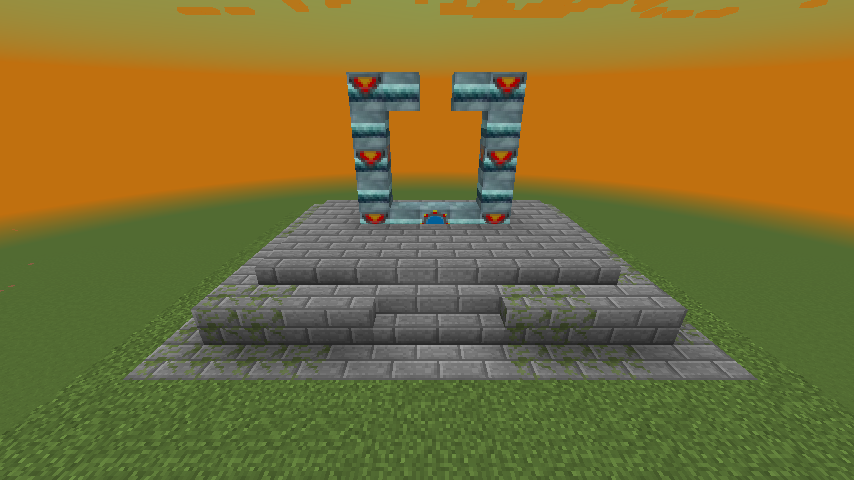 Example Structure
 -
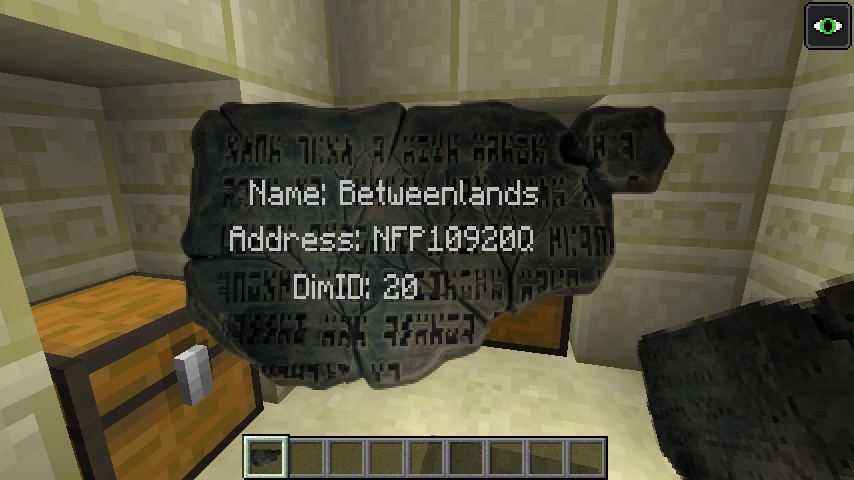 Ancient Tablet
Versions
Files
Relations
Project Relations
More like this
Similar Mods
Suggestions use data such as tags, dependencies, dependents, descriptions, titles, and more to rank how much they overlap with this mod.
On ModDex
Community snapshot
By the numbers
Statistics
 (opens in a new tab)
Get it on
Available Platforms
On ModDex
Community snapshot
By the numbers