
Community listing page, reviews may not be monitored by the author.
ShelfSight

No reviews yet
See which bookshelves power your enchanting table, which are blocked and by what, and where the missing shelves for level 30 go.

Community voices
Reviews
No reviews yet. Be the first to review this project!
Get it on
Available Platforms
About
Project Details
For authors
Embed Badge
If you're the author of this project, you can embed a live badge anywhere that supports HTML or Markdown. It updates automatically whenever ratings change.
Use HTML for any page that supports it, or Markdown for README files and Markdown-based descriptions.
Identifiers
Platform IDs
Resources
External Links
About
Description
ShelfSight shows which bookshelves power your enchanting table, which ones are blocked and by what, and exactly where the missing shelves for level 30 go.
Ever built an enchanting room and only got level 24 offers? A torch, a carpet or a candle in the wrong spot silently cuts the bookshelf power, and vanilla gives you no hint which shelf is affected. ShelfSight makes the invisible rules visible.
Features
- Green outline: bookshelves that currently power the table.
- Red outline: bookshelves whose path to the table is blocked.
- Orange box: the exact block that causes the blockage (torch, carpet, candle, slab, …). Remove it and the red shelves turn green.
- Blue placement plan: small blue cubes mark the free slots where bookshelves are still missing to reach power 15 (level 30 offers). The plan only uses slots with a clear path and prefers free spots on the layer of the table, so you don't have to dig.
- Floating counter above every table: "Power 8/15", "6 blocked by 2 block(s)", "7 more for level 30". Spare shelves beyond 15 are shown too ("+1 spare").
- Enchanting screen info: "Shelves 8/15" in the title row of the enchanting screen, plus a red warning when shelves are blocked.
- Toggle key: press B (rebindable under Controls > ShelfSight) to switch the overlay on or off.
- Client commands:
/shelfsight toggleand/shelfsight reload(reloads the config file). - Uses the vanilla block tags
#minecraft:enchantment_power_providerand#minecraft:enchantment_power_transmitter, so it follows exactly the same rules as the game, including datapacks and mods that change those tags. - Lightweight: tables are found through loaded block entities, and nothing is scanned when the overlay is off.
Screenshots
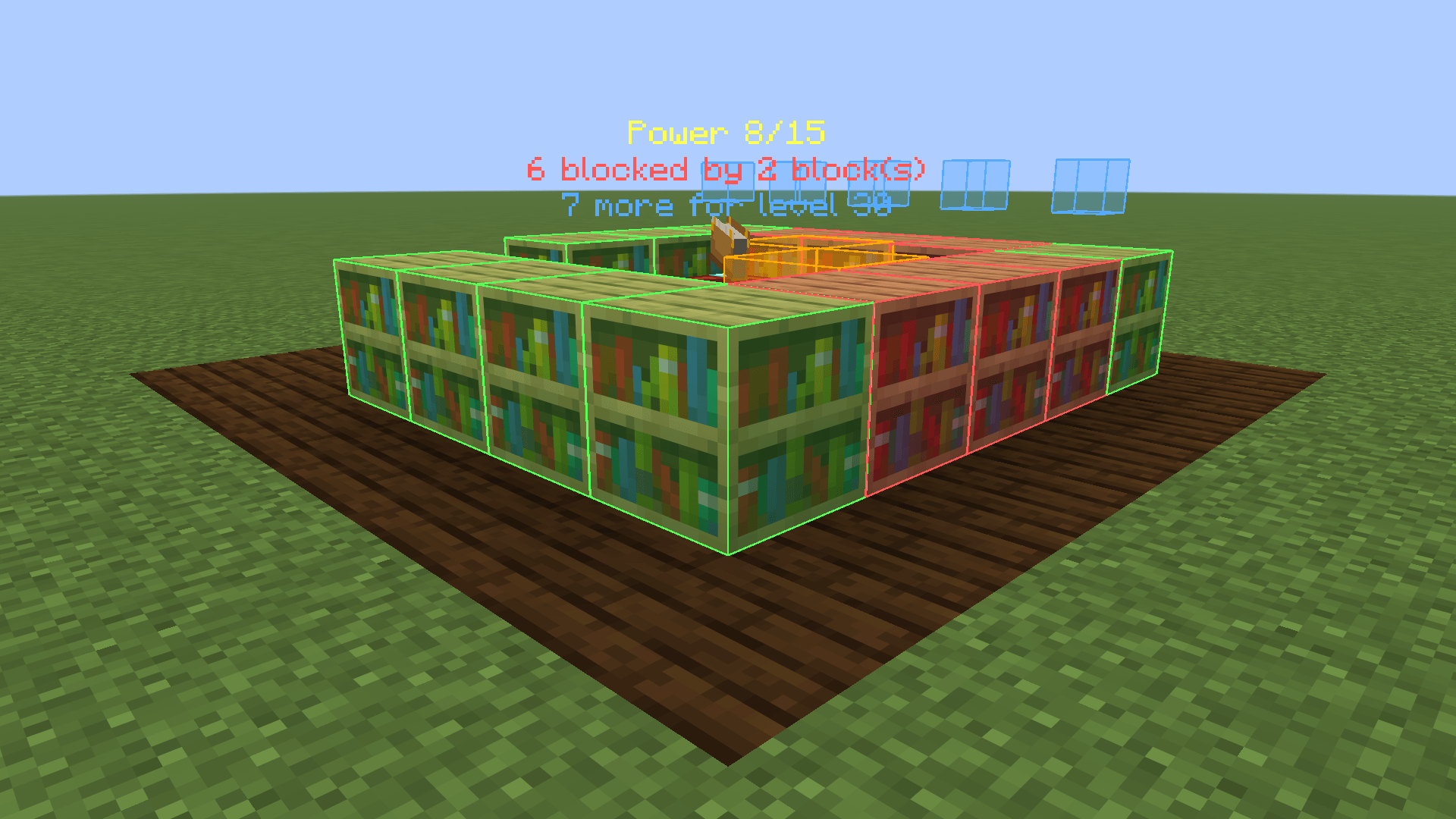
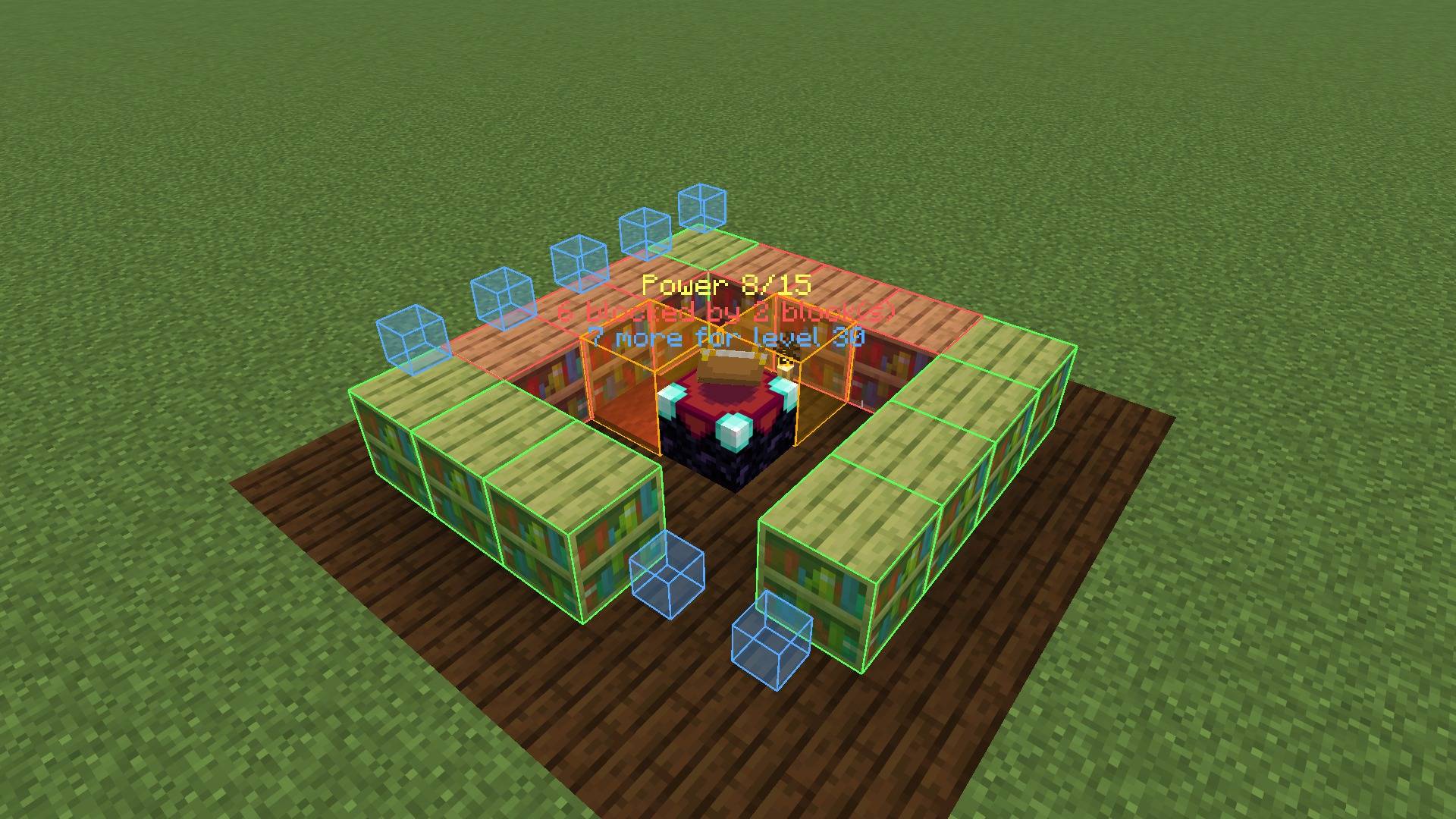
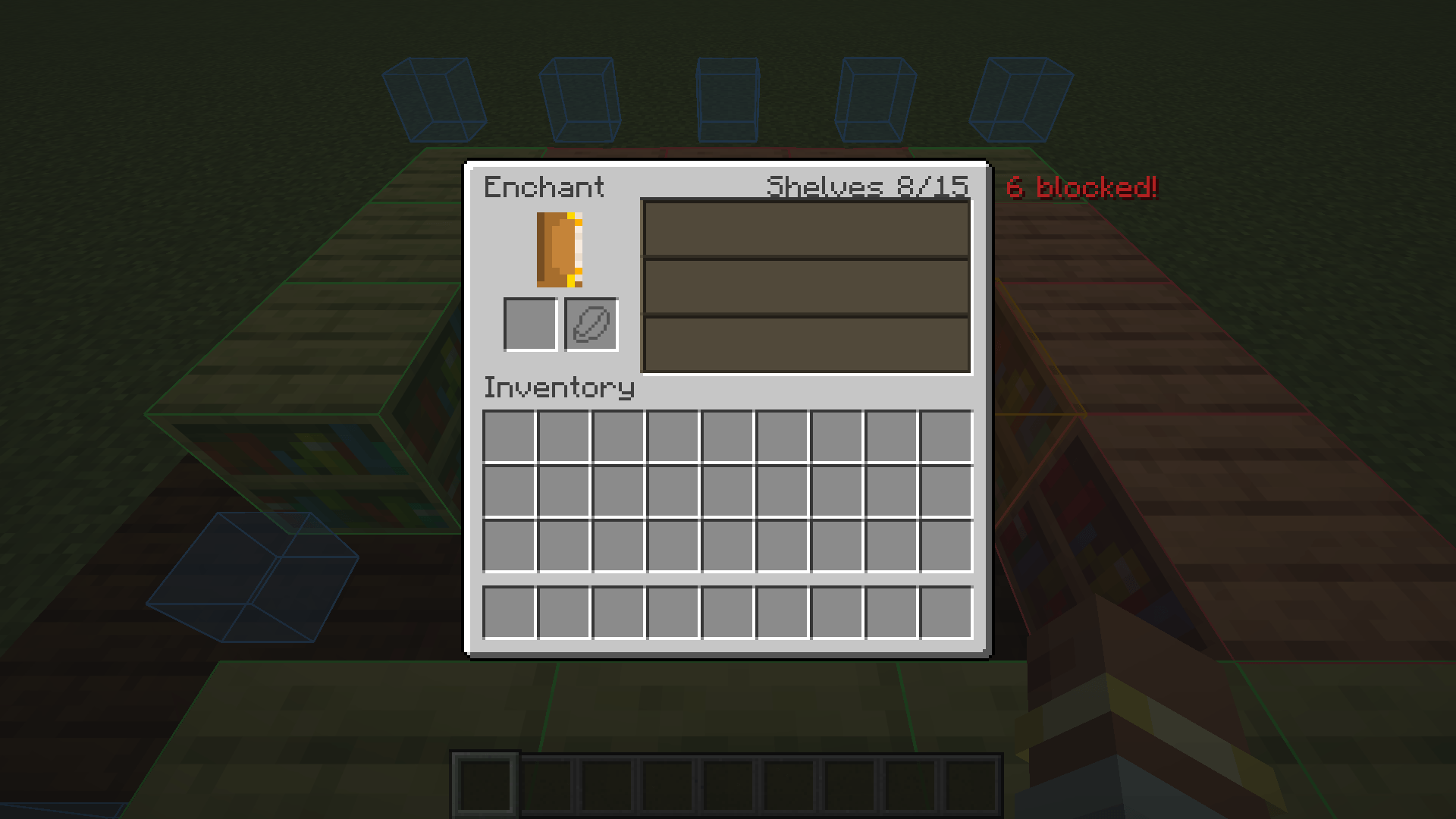
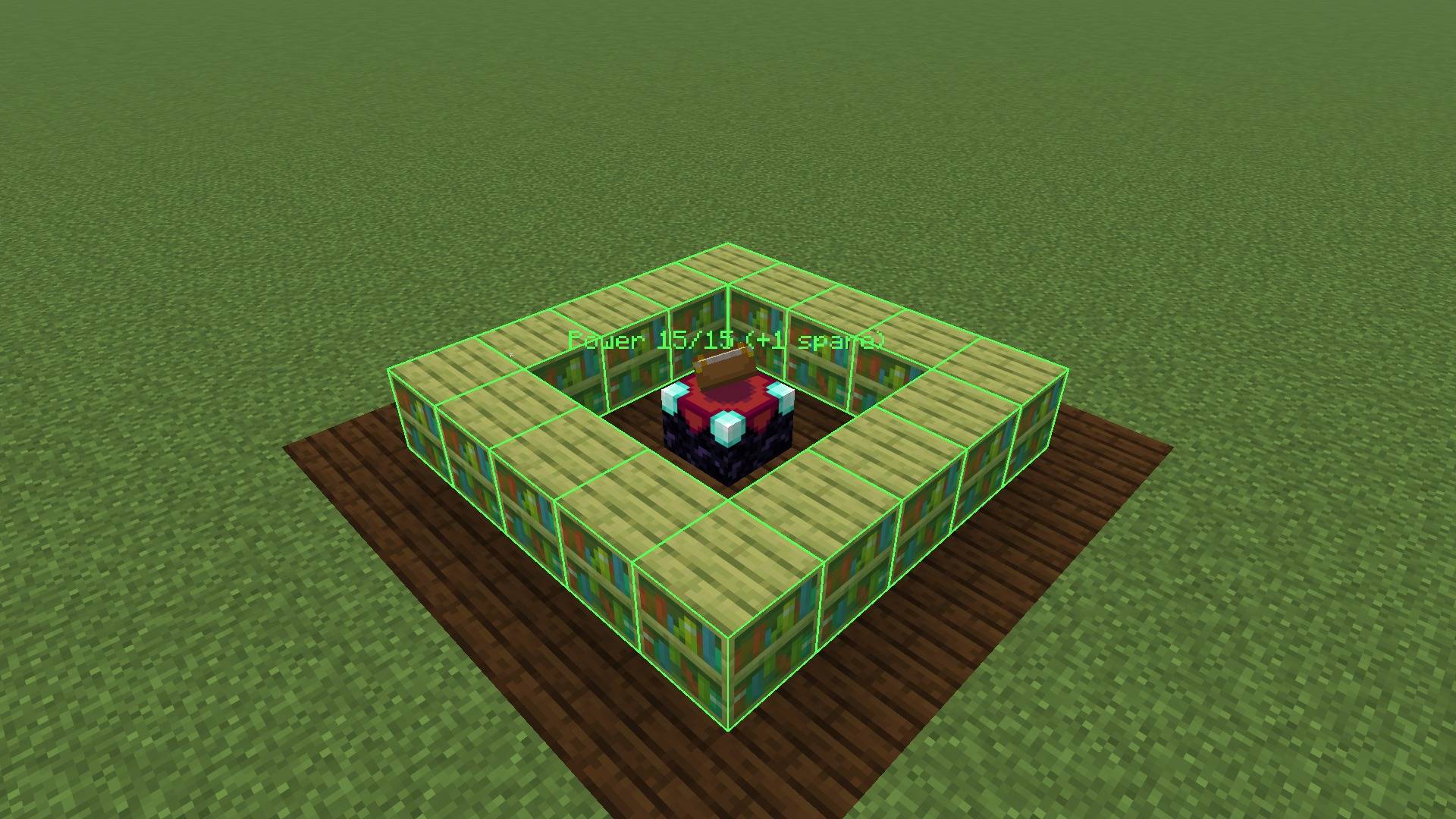
All screenshots are unedited in-game captures.
Compatibility
- Minecraft 26.3, Fabric Loader 0.19.5 or newer, requires Fabric API.
- Client-side only. Works on vanilla servers, Realms and modded servers. Nothing needs to be installed on the server, and installing it on a server does nothing.
- Adds no blocks, items or recipes, so it is safe to add to or remove from existing worlds and modpacks.
- Works with modded bookshelves that are added to the vanilla enchanting tags.
Configuration
The config file is config/shelfsight.json. It is created on first launch; after editing, use /shelfsight reload.
| Option | Default | Description |
|---|---|---|
enabled |
true |
Master switch (also toggled with the key) |
scanRadius |
8 |
Tables within this many blocks are analyzed (1-32) |
showPoweringShelves |
true |
Green outlines on working shelves |
showBlockedShelves |
true |
Red outlines on blocked shelves |
showObstructions |
true |
Orange boxes on the blocking blocks |
showPlacementPlan |
true |
Blue cubes where shelves are missing |
showTableLabel |
true |
Floating counter above the table |
showInEnchantingScreen |
true |
Shelf count in the enchanting screen |
seeThroughBlocks |
false |
Draw outlines through walls |
poweringColor, blockedColor, obstructionColor, planColor |
green, red, orange, blue | Colors as #AARRGGBB or #RRGGBB |
FAQ
Does this change how enchanting works? No. ShelfSight only displays information. Enchanting stays 100% vanilla.
Is this a cheat? Is it allowed on servers? It only shows the bookshelf layout you can already see and the counting rules the game already uses. It does not reveal enchantment offers, seeds or anything hidden.
Why is a shelf red even though there is nothing in between? Some blocks count as obstructions although they look harmless: torches, carpets, candles, slabs, buttons, glass and so on. Only air and replaceable blocks such as grass, fern, vines or snow layers let the power through. The orange box shows exactly which block it is.
Why do I only need 15 shelves when there are 32 slots? The game caps bookshelf power at 15. More shelves don't help, and ShelfSight tells you how many you have to spare.
Do chiseled bookshelves count?
Not in vanilla, so ShelfSight shows them as empty slots. If a mod or datapack adds them to #minecraft:enchantment_power_provider, ShelfSight counts them automatically.
Forge/NeoForge version? Currently Fabric only.
ShelfSight was developed with the help of AI tools. Licensed under MIT.
Screenshots
Gallery
-
shelfsight_4_full_power.jpg shelfsight_4_full_power.jpg
-
shelfsight_1_blocked_shelves.png shelfsight_1_blocked_shelves.png
-
shelfsight_3_enchanting_screen.png shelfsight_3_enchanting_screen.png
-
shelfsight_2_placement_plan.jpg shelfsight_2_placement_plan.jpg
Versions
Files
Relations
Project Relations
More like this
Similar Mods
Suggestions use data such as tags, dependencies, dependents, descriptions, titles, and more to rank how much they overlap with this mod.
On ModDex
Community snapshot
By the numbers
Statistics

Get it on
Available Platforms
On ModDex
Community snapshot
By the numbers
Statistics
Resources