Community listing page, reviews here may not be monitored by the author.

Community voices
Reviews
No reviews yet. Be the first to review this project!
Get it on
Available Platforms
About
Project Details
For authors
Embed Badge
If you're the author of this project, you can embed a live badge anywhere that supports HTML or Markdown. It updates automatically whenever ratings change.
Use HTML for any page that supports it, or Markdown for README files and Markdown-based descriptions.
Identifiers
Platform IDs
Resources
External Links
About
Description
Paint your own design onto any shield, pixel by pixel, with a spray can and a painting table.
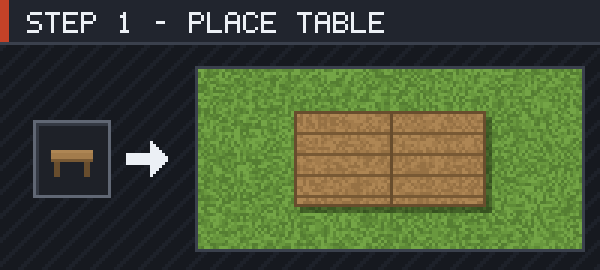
Craft a Painting Table and put it down. It takes up 2×1 blocks and extends in the direction you are facing, so leave a block of room in front of you.
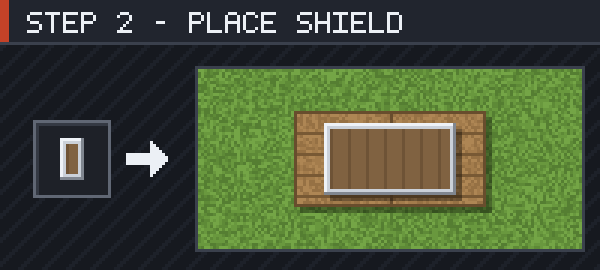
Right-click the table holding a shield. It leaves your hand and lies flat on the table at its real size — either half of the table works.
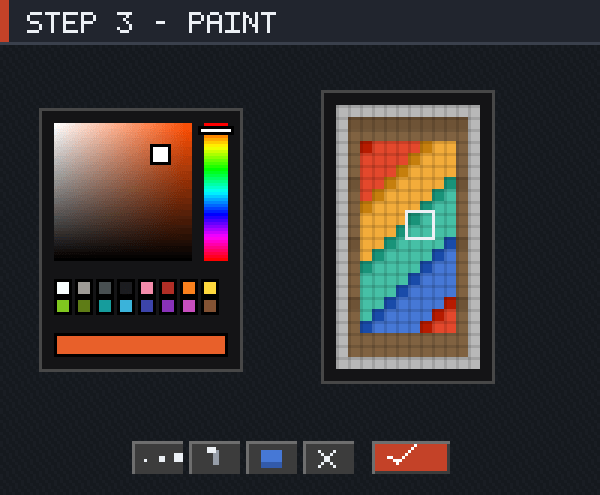
Right-click with a Spray Can and the editor opens on the shield's 12×22 face. Left-click paints, right-click erases, the scroll wheel changes brush size, and Ctrl+Z undoes. Press Done or Esc to save.
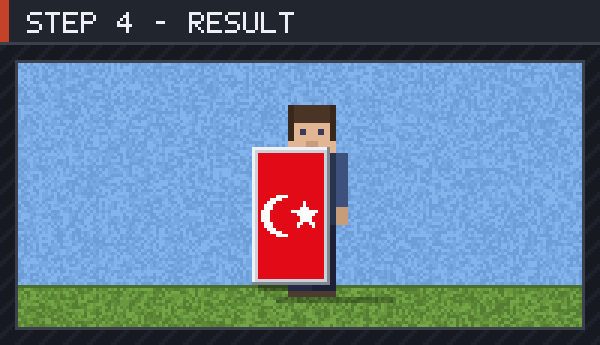
Take the shield back and the picture stays on it — in your hand, in the inventory, in item frames and lying on the ground. It is still an ordinary shield, so it blocks and enchants exactly as before.
Screenshots
Gallery
Versions
Files
Relations
Project Relations
More like this
Similar Mods
Suggestions use data such as tags, dependencies, dependents, descriptions, titles, and more to rank how much they overlap with this mod.
On ModDex
Community snapshot
By the numbers
Statistics
Want to reach Minecraft players?
We're looking for a server hosting partner to feature here and other parts of the site. Interested? Send us a message!
Get in touchGet it on
Available Platforms
On ModDex
Community snapshot
By the numbers
Statistics
Resources