
Community listing page, reviews may not be monitored by the author.
shield slam

No reviews yet
A client-side stunslam and shield disable macro . When someone raises a shield at you, left-click and it swaps to your axe, knocks the shield down, and switches back. If you're falling, it goes further and follows the axe hit with a mace smash.

Community voices
Reviews
No reviews yet. Be the first to review this project!
Get it on
Available Platforms
About
Project Details
For authors
Embed Badge
If you're the author of this project, you can embed a live badge anywhere that supports HTML or Markdown. It updates automatically whenever ratings change.
Use HTML for any page that supports it, or Markdown for README files and Markdown-based descriptions.
Identifiers
Platform IDs
Resources
External Links
About
Description
⚔️ ShieldSlam
Break the shield. Land the smash.
A client-side Fabric macro for Minecraft 1.21.11. When someone raises a shield at you, left-click and it swaps to your axe, knocks the shield down, and switches back. If you're falling, it goes further and follows the axe hit with a mace smash.
Client-side only. Works in singleplayer and LAN with no setup. On dedicated servers, check the server's rules first.
⚔️ Two macros, one click
🪓 Stun Slam
- Axe hit to drop the shield, then a mace hit.
- Needs a mace: ✅
- Needs a fall: ✅ (≥
Min fall) - Best for: finishing a shielding opponent from the air.
🛡️ Shield Break
- Axe hit only.
- Needs a mace: ❌
- Needs a fall: ❌
- Best for: breaking a shield from the ground.
Both have their own switch, and the fall distance picks between them:
left-click on a shielding player
│
├─ falling ≥ Min fall and Stun Slam is on → 🪓 Stun Slam
├─ otherwise and Shield Break is on → 🛡️ Shield Break
└─ neither → vanilla handles it
So the pair covers the whole exchange: break the shield on the ground, then jump and slam.
🤔 Why the mace needs height
The mace only awards its smash bonus above 1.5 blocks of fall — that's vanilla's rule, not a mod limitation. Min fall defaults to 1.5 for that reason. It also doubles as the divider between the two macros, so keep it above 0.
🎛️ The panel
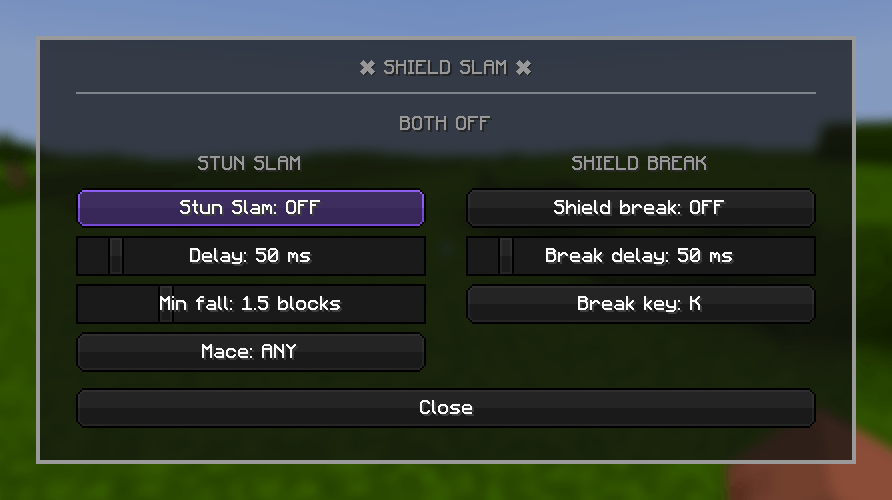
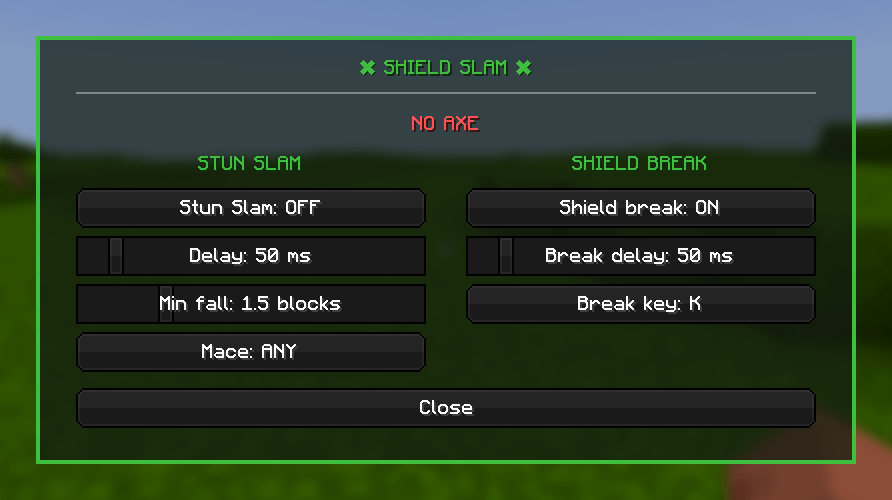
Press Right Shift in game. Everything is set here — no config editing, no commands.

The status line tells you which macro would fire right now, so if a click does nothing, that's usually where the answer is. 🔴 Red means something is missing — no axe, no mace, or not enough fall.

With both switches off the whole panel goes grey, so you can tell at a glance that nothing is armed.
📦 Install
- Install Fabric Loader for 1.21.11.
- Drop Fabric API into your
mods/folder. - Drop
shieldslam.jarintomods/. - Launch 🚀
🧩 Requirements
- 🎮 Minecraft: 1.21.11
- 🧵 Fabric Loader: 0.19.5+
- 📚 Fabric API: Required
- ☕ Java: 21+
⏱️ About the millisecond sliders
Minecraft runs its game logic in whole ticks at 20 per second, so 50 ms is the smallest step that exists. The delay sliders move in 50 ms increments for that reason — anything finer would be a lie about what the engine can do.
0: 2 ticks — 100 ms100: 4 ticks — 200 ms500: 12 ticks — 600 ms
⚠️ Keep the sliders at 50 or above if you want to see the axe swap. At
0both hits land in the same tick and the axe is never visible.
⌨️ Controls
- 🖱️ Left click — Runs macro
- Right Shift — Opens panel
- V — Shield break
Only Right Shift appears in Options → Controls. The shield-break key is set inside the panel (click Break key). Esc unbinds it.

⚙️ Settings
Saved to config/stunslam.json, all editable from the panel.
stunSlamEnabled(Default:true) — 🪓 Stun Slam on/offdelayMs(Default:100) — Gap between the axe hit and the mace hitminFall(Default:1.5) — Fall needed to start Stun Slam — also the macro dividermaceType(Default:ANY) — Restrict it to aDENSITYorBREACHmaceshieldBreakEnabled(Default:false) — 🛡️ Shield Break on/offshieldBreakKey(Default:V) — Key that toggles Shield BreakshieldBreakDelayMs(Default:100) — Gap between the shield-break hit and swapping back
📄 License
MIT — see LICENSE.
Screenshots
Gallery
-
 3a905760cc2caacb81a072bc6d95fd509b61ed50.png 3a905760cc2caacb81a072bc6d95fd509b61ed50.png
 -
 55bdca8b3edc0da9c53df14bc747f20e2fcc051d.png 55bdca8b3edc0da9c53df14bc747f20e2fcc051d.png
 -
 5eb24e2397715f7adf46091b462153a61e8d204f.png 5eb24e2397715f7adf46091b462153a61e8d204f.png
Versions
Files
Relations
Project Relations
More like this
Similar Mods
Suggestions use data such as tags, dependencies, dependents, descriptions, titles, and more to rank how much they overlap with this mod.
On ModDex
Community snapshot
By the numbers
Statistics

Get it on
Available Platforms
On ModDex
Community snapshot
By the numbers
Statistics
Resources