Community listing page, reviews here may not be monitored by the author.
ShoulderCheck+

No reviews yet
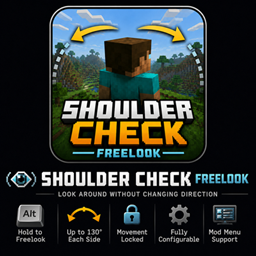
Hold a hotkey while moving and your character will continue that movement path, and allow you to look over your shoulder 130° to the left and to the right
Community voices
Reviews
No reviews yet. Be the first to review this project!
Get it on
Available Platforms
About
Project Details
For authors
Embed Badge
If you're the author of this project, you can embed a live badge anywhere that supports HTML or Markdown. It updates automatically whenever ratings change.
Use HTML for any page that supports it, or Markdown for README files and Markdown-based descriptions.
Identifiers
Platform IDs
Resources
External Links
About
Description
Shoulder Check+ — Freelook
Shoulder Check+ is a lightweight client-side freelook mod that lets you check your surroundings without changing the direction your character is facing or moving.
Hold the freelook key to rotate the camera independently while your movement remains locked in its original direction. Release the key to return smoothly to your normal view.
The default camera limit allows you to look up to 130 degrees in either direction, giving you a wide view over both shoulders without allowing you to look directly behind yourself.
Features
- Hold Left Alt to activate freelook
- Look up to 130° left or right
- Continue walking and sprinting in your original direction
- Smoothly return to your forward view when the key is released
- Prevents full rear-facing camera rotation
- Automatically cancels freelook when attacking or interacting
- Rebindable through Minecraft’s normal Controls menu
- Optional Mod Menu configuration screen
- Works on multiplayer servers without server installation
- No gameplay, movement-speed, reach, or server-side rotation changes
Installation
Shoulder Check+ is completely client-side.
You can use it on vanilla servers and Fabric servers that do not have the mod installed.
Default Controls
- Freelook: Left Alt
The key can be changed through:
- Minecraft Controls
- Mod Menu, when installed
Configuration
With Mod Menu installed, you can adjust settings such as:
- Freelook key
- Horizontal look range
- Vertical camera limits
- Camera sensitivity
- Smooth or instant return
- Return speed
- Crosshair visibility
- First-person hand visibility
- Third-person support
Dependencies
Required
- Fabric Loader
- Fabric API
Optional
- Mod Menu
Screenshots
Gallery
Versions
Files
Relations
Project Relations
More like this
Similar Mods
Suggestions use data such as tags, dependencies, dependents, descriptions, titles, and more to rank how much they overlap with this mod.
On ModDex
Community snapshot
By the numbers
Statistics
Want to reach Minecraft players?
We're looking for a server hosting partner to feature here and other parts of the site. Interested? Send us a message!
Get in touchGet it on
Available Platforms
On ModDex
Community snapshot
By the numbers
Statistics
Resources