Community listing page, reviews here may not be monitored by the author.
SideChat


No reviews yet
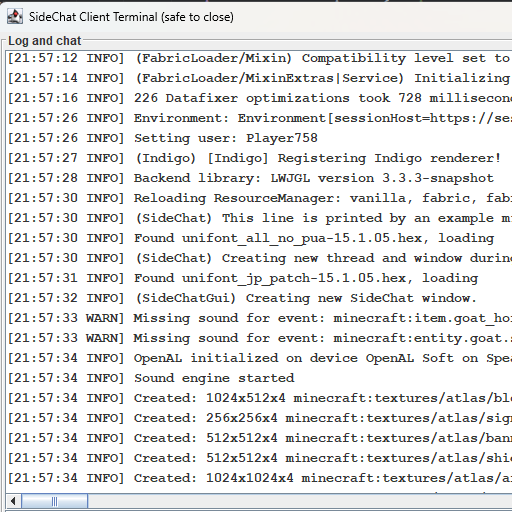
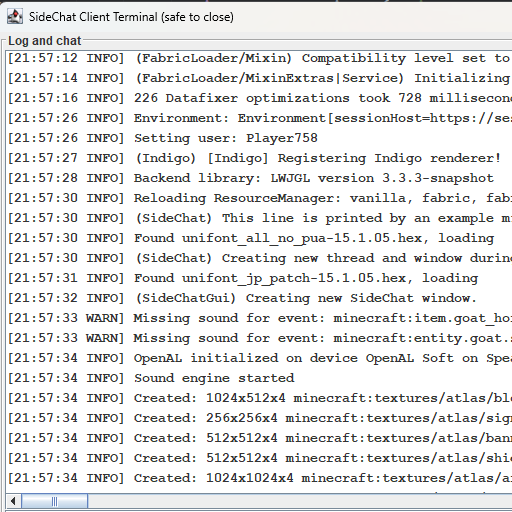
Creates a client console / client terminal to monitor and respond to in-game Chat!

Community voices
Reviews
No reviews yet. Be the first to review this project!
Get it on
Available Platforms
Compatibility
Supported Environments
Runs entirely on the client. Works on vanilla servers.
About
Project Details
For authors
Embed Badge
If you're the author of this project, you can embed a live badge anywhere that supports HTML or Markdown. It updates automatically whenever ratings change.
Use HTML for any page that supports it, or Markdown for README files and Markdown-based descriptions.
Identifiers
Platform IDs
Resources
External Links
About
Description
Hi! Welcome to SideChat. I play on a LAN world with my brother often, and sometimes we ALT-Tab out of the game but still want an easy way to monitor chat; this was my solution.
Re-open the window with CTRL+ALT+SHIFT+L
Need to commission a mod? add me on discord: jason13
Configuration (sidechat.json)
| Option | Description | Default |
|---|---|---|
enabled |
Whether the mod should function at all | true |
fontStyle |
0 = PLAIN, 1 = BOLD, 2 = ITALIC |
0 |
fontSize |
Size of the terminal text | 12 |
openEarly |
Open the window as soon as the mod loads | true |
onlyInWorld |
Open/close the window based on whether you're in-game | false |
startWidth |
Initial window width before resizing | 896 |
startHeight |
Initial window height before resizing | 504 |
Terminal Commands
All commands are prefixed with #/ (e.g. #/stop).
Window
| Command | Description |
|---|---|
#/stop |
Close the SideChat window |
#/stop game |
Close Minecraft entirely |
#/close |
Alias for stop |
#/shutdown |
Alias for stop |
Audio
| Command | Description |
|---|---|
#/mute |
Set master volume to 0 |
#/mute <source> |
Mute a specific sound source |
Sources: master music record weather block hostile neutral player ambient voice
Terminal Appearance
| Command | Description |
|---|---|
#/font size <n> |
Set terminal font size (e.g. 12) |
#/font style <n> |
Set terminal font style: 0=PLAIN, 1=BOLD, 2=ITALIC |
Game Settings
| Command | Values | Notes |
|---|---|---|
#/gamma <n> |
0.0 – 1.0 |
Screen brightness. 0.0=moody, 1.0=bright. Default: 0.5 |
#/fov <n> |
30 – 110 |
Field of view. Default: 70 |
#/render <n> |
2 – 32 |
Render distance in chunks. Default: 10 |
#/fps <n> |
10 – 260 |
Framerate limit. 260=unlimited |
#/narrator <mode> |
off all chat system |
Narrator mode |
#/chat <mode> |
full system hidden |
Chat visibility filter |
#/graphics <mode> |
fast fancy fabulous |
Graphics quality |
#/particles <mode> |
all decreased minimal |
Particle density |
Hi! Welcome to SideChat. I play on a LAN world with my brother often, and sometimes we ALT-Tab out of the game but still want an easy way to monitor chat; this was my solution.
Re-open the window with CTRL+ALT+SHIFT+L
Need to commission a mod? add me on discord: jason13
Configuration (sidechat.json)
| Option | Description | Default |
|---|---|---|
enabled |
Whether the mod should function at all | true |
fontStyle |
0 = PLAIN, 1 = BOLD, 2 = ITALIC |
0 |
fontSize |
Size of the terminal text | 12 |
openEarly |
Open the window as soon as the mod loads | true |
onlyInWorld |
Open/close the window based on whether you're in-game | false |
startWidth |
Initial window width before resizing | 896 |
startHeight |
Initial window height before resizing | 504 |
Terminal Commands
All commands are prefixed with #/ (e.g. #/stop).
Window
| Command | Description |
|---|---|
#/stop |
Close the SideChat window |
#/stop game |
Close Minecraft entirely |
#/close |
Alias for stop |
#/shutdown |
Alias for stop |
Audio
| Command | Description |
|---|---|
#/mute |
Set master volume to 0 |
#/mute <source> |
Mute a specific sound source |
Sources: master music record weather block hostile neutral player ambient voice
Terminal Appearance
| Command | Description |
|---|---|
#/font size <n> |
Set terminal font size (e.g. 12) |
#/font style <n> |
Set terminal font style: 0=PLAIN, 1=BOLD, 2=ITALIC |
Game Settings
| Command | Values | Notes |
|---|---|---|
#/gamma <n> |
0.0 – 1.0 |
Screen brightness. 0.0=moody, 1.0=bright. Default: 0.5 |
#/fov <n> |
30 – 110 |
Field of view. Default: 70 |
#/render <n> |
2 – 32 |
Render distance in chunks. Default: 10 |
#/fps <n> |
10 – 260 |
Framerate limit. 260=unlimited |
#/narrator <mode> |
off all chat system |
Narrator mode |
#/chat <mode> |
full system hidden |
Chat visibility filter |
#/graphics <mode> |
fast fancy fabulous |
Graphics quality |
#/particles <mode> |
all decreased minimal |
Particle density |
Screenshots
Gallery
-
 Screenshot_40.png Screenshot_40.png
Versions
Files
Relations
Project Relations
More like this
Similar Mods
Suggestions use data such as tags, dependencies, dependents, descriptions, titles, and more to rank how much they overlap with this mod.
On ModDex
Community snapshot
By the numbers
Statistics
 (opens in a new tab)
Get it on
Available Platforms
On ModDex
Community snapshot
By the numbers
Statistics
Resources