
Community listing page, reviews here may not be monitored by the author.
Simple Panic Button

No reviews yet
Hide selected mods and keybinds instantly with one key press.
Community voices
Reviews
No reviews yet. Be the first to review this project!
Get it on
Available Platforms
Compatibility
Supported Environments
Runs entirely on the client. Works on vanilla servers.
About
Project Details
For authors
Embed Badge
If you're the author of this project, you can embed a live badge anywhere that supports HTML or Markdown. It updates automatically whenever ratings change.
Use HTML for any page that supports it, or Markdown for README files and Markdown-based descriptions.
Identifiers
Platform IDs
Resources
External Links
About
Description
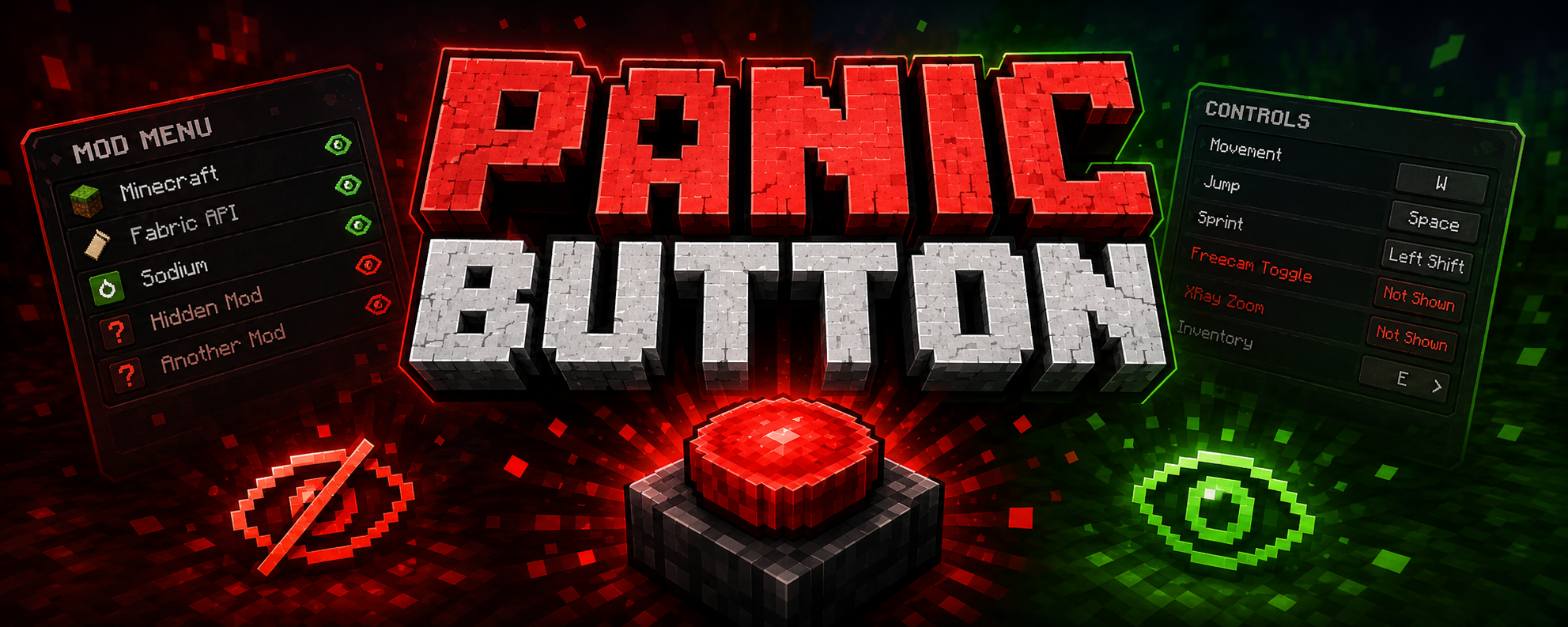
🚨 Panic Button
Hide selected mods and keybinds instantly with one key press.
📖 What Is Panic Button?
Panic Button is a lightweight client-side Fabric mod that lets you hide selected mods from Mod Menu and selected keybinds from Minecraft's Controls menu.
No uninstalling, disabling, or restarting is required. Press your Panic key once to activate Panic Mode. Press it three times quickly to restore everything.
Perfect for harmless trolling or whenever you need to hide selected UI entries quickly.
✨ Features
- 🔴 Panic Mode – press once to hide selected mods and keybinds
- 🟢 Quick Restore – press three times quickly to show everything again
- ⌨️ Custom Keybind – assign any key to toggle Panic Mode
- 🗂️ Mod Hiding – choose which mods remain visible in Mod Menu
- 🎮 Keybind Hiding – hide selected keybinds from Minecraft's Controls menu
- 📂 Category Hiding – empty keybind categories disappear automatically
- 🔗 Multi Key Bindings Support – additional Multi Key Bindings entries can also be hidden
- 🔍 Search Bars – quickly find mods and keybinds
- 👁️ Shown Filter – display only entries currently marked as shown
- 💾 Persistent Config – your settings remain saved after restarting
- 🖥️ Optional HUD Indicator – shows when Panic Mode is active
- ⚙️ Clean Configuration Menu – separate sections for mod and keybind hiding
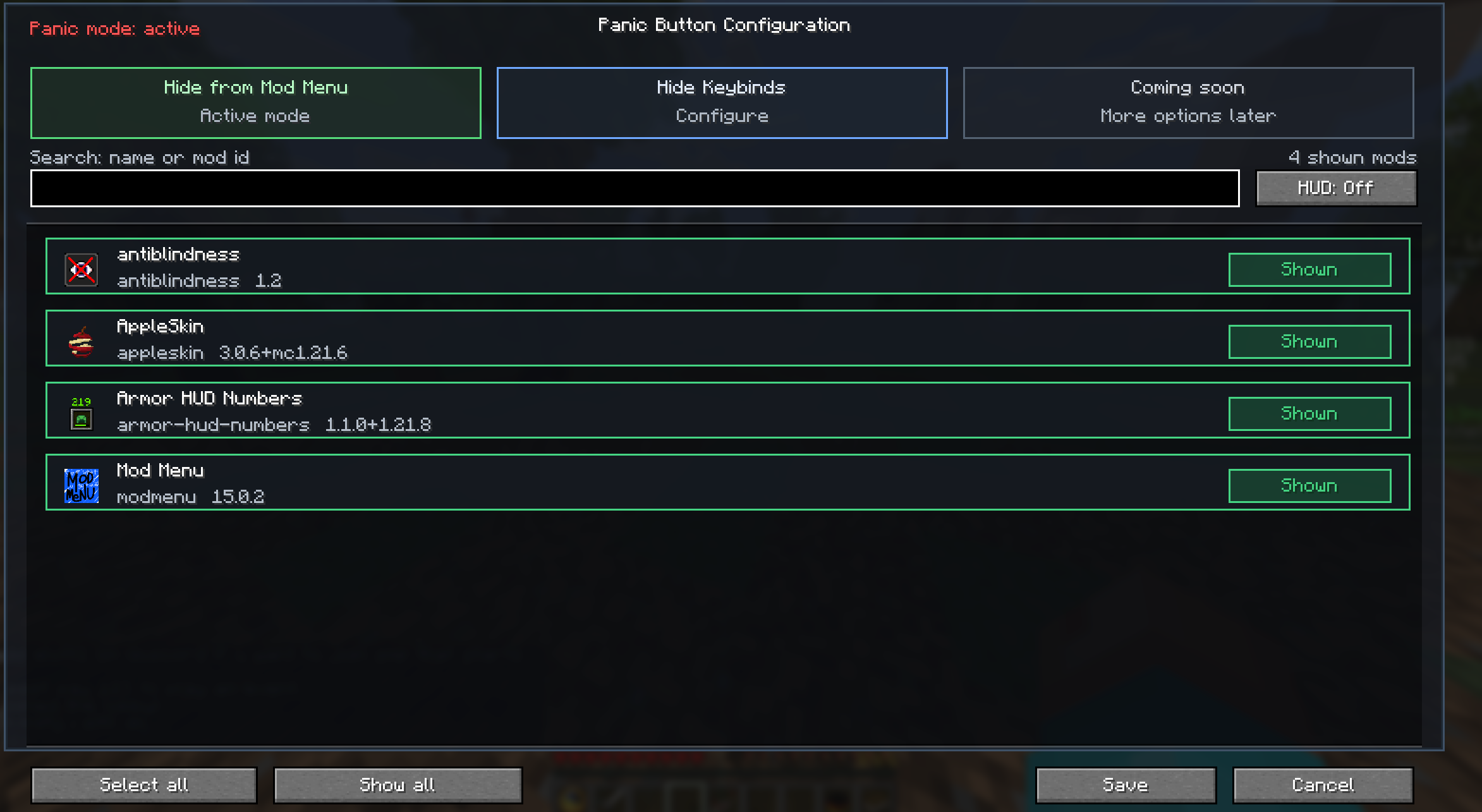
⚙️ How Does It Work?
1. Bind Your Keys
Go to:
Options → Controls → Panic Button
Assign a key for activating Panic Mode. You can also assign a separate key for opening the configuration menu.
2. Configure Mod Hiding
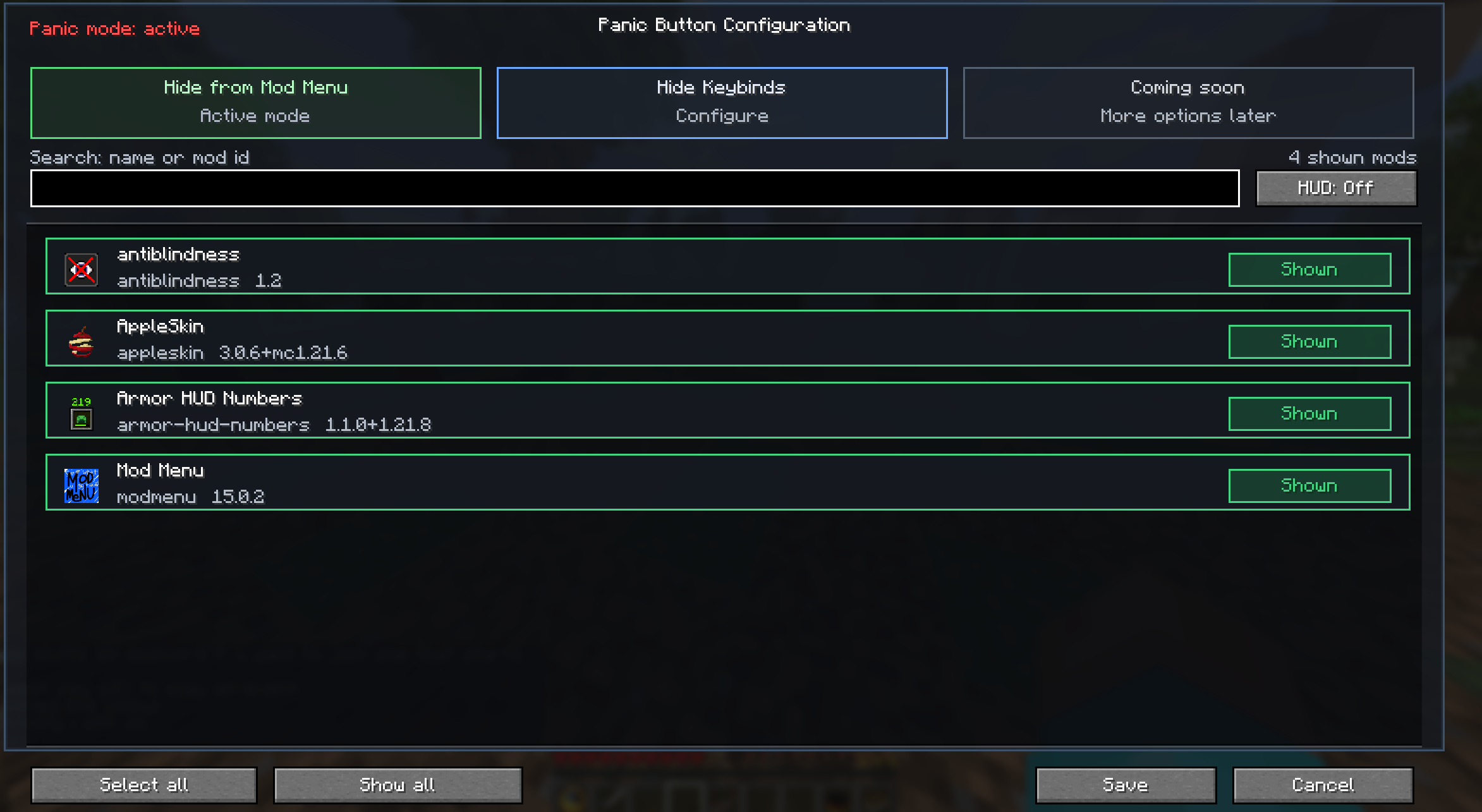
Open the Panic Button configuration and select Hide from Mod Menu.
Click a mod to switch between:
| Status | Meaning |
|---|---|
| 🟢 Shown | The mod stays visible during Panic Mode |
| 🔴 Not Shown | The mod disappears during Panic Mode |
Use the search bar to find mods quickly or enable Shown Only to review everything that remains visible.
3. Configure Keybind Hiding
Select Hide Keybinds in the Panic Button configuration.
Keybinds are organized into clear categories. Click a keybind to switch between:
| Status | Meaning |
|---|---|
| 🟢 Shown | The keybind stays visible during Panic Mode |
| 🔴 Not Shown | The keybind disappears from the Controls menu |
If every keybind inside a category is hidden, the entire category disappears too.
4. Activate Panic Mode
- Press the Panic key once to activate Panic Mode
- Selected mods disappear from Mod Menu
- Selected keybinds disappear from the Controls menu
- Press the Panic key three times quickly to deactivate Panic Mode
- All mods, keybinds, and categories become visible again
🛠️ Technical Details
Panic Button uses Fabric Mixins to filter UI entries while Panic Mode is active.
Mod Menu Filtering
A Mixin filters the Mod Menu list before it is displayed. Only mods included in your personal visibleMods list remain visible.
Keybind Filtering
A separate Mixin filters Minecraft's Controls list using your hiddenKeybinds configuration.
The keybind filter also performs a second cleanup after the Controls list has been created. This allows Panic Button to remove additional entries inserted by compatible mods such as Multi Key Bindings.
When all keybinds belonging to a category are hidden, its empty category header is removed automatically.
Nothing is deleted, disabled, unbound, or uninstalled.
Panic Button only hides selected entries from the user interface. All mods and keybinds continue working normally.
Config File Location
.minecraft/config/panic_button.json
Config Structure
{
  "configVersion": 2,
  "keybinding": "key.keyboard.p",
  "configKeybinding": "NONE",
  "panicModeActive": false,
  "showPanicHudIndicator": true,
  "visibleMods": [
    "fabric-api",
    "minecraft",
    "modmenu",
    "sodium"
  ],
  "hiddenKeybinds": [
    "key.freecam.toggle",
    "key.example.action"
  ]
}
📦 Installation
- Install Fabric Loader
- Install Fabric API
- Install Mod Menu
- Place
panic_button.jarinside your.minecraft/modsfolder - Launch Minecraft
- Open
Options → Controls → Panic Buttonand assign your keys
🔧 Compatibility
| Minecraft | Fabric API | Mod Menu | Status |
|---|---|---|---|
| 1.21.x | ✅ | ✅ | ✅ Supported |
| 26.1.x | ✅ | ✅ | ✅ Supported |
⚠️ Mod Menu is required for mod-list hiding and the full configuration integration.
⚠️ Fair Use
Respect the rules of every server you play on. If this mod is not permitted, do not use it. Panic Button is intended for harmless trolling and UI customization.
#fabric #utility #client-side #mod-menu #privacy #keybind #lightweight #1.21 #26.1
More features
Additional Panic Mode options are planned for future updates.
Multi Key Bindings is a separate mod by kennybc. Panic Button only adds optional UI hiding compatibility and does not include its code.
Check out my other mod:
Screenshots
Gallery
-
-
 introduction
Versions
Files
Relations
Project Relations
More like this
Similar Mods
Suggestions use data such as tags, dependencies, dependents, descriptions, titles, and more to rank how much they overlap with this mod.
On ModDex
Community snapshot
By the numbers
Statistics

Want to reach Minecraft players?
We're looking for a server hosting partner to feature here and other parts of the site. Interested? Send us a message!
Get in touchGet it on
Available Platforms
On ModDex
Community snapshot
By the numbers
Statistics
Resources