
Community listing page, reviews may not be monitored by the author.
Simple Proximity Music

No reviews yet
Add configurable music player blocks that play custom local tracks when players are nearby. Each block supports its own playlist, range, priority, volume, resume position, and camouflage appearance for seamless integration into builds.

Community voices
Reviews
No reviews yet. Be the first to review this project!
Get it on
Available Platforms
About
Project Details
For authors
Embed Badge
If you're the author of this project, you can embed a live badge anywhere that supports HTML or Markdown. It updates automatically whenever ratings change.
Use HTML for any page that supports it, or Markdown for README files and Markdown-based descriptions.
Identifiers
Platform IDs
Resources
External Links
About
Description
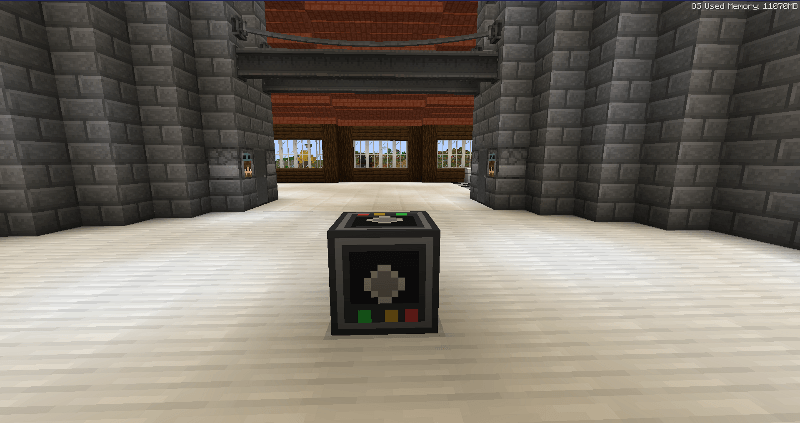
Simple Proximity Music adds a configurable music player block that plays custom local music whenever you are nearby.
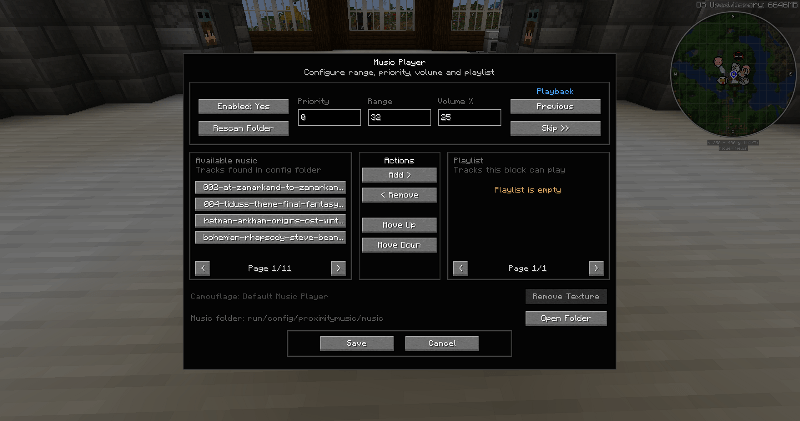
Each placed Music Player has its own playlist, playback range, priority and volume settings, making it useful for inns, taverns, towns, dungeons, bases, shops, themed areas, or anywhere else you want location-based music.
Features
- Play custom local music files
- Supports
.mp3,.oggand.wav - Per-block playlists
- Configurable hearing range
- Configurable priority for overlapping Music Players
- Per-block volume control
- Previous and skip controls
- Remembers playback position when you leave the area
- Each Music Player keeps its own independent resume position
- Responsive configuration UI
- Open the music folder directly from the UI
- Music Players can be camouflaged as other blocks
- Camouflage supports vanilla and many modded block models
- Remove camouflage at any time to restore the original Music Player appearance
- Compatible with standard recipe viewers such as JEI, REI and EMI
- Designed for Minecraft 1.21.1 and NeoForge
Using Custom Music
Music files are loaded from:
config/proximitymusic/music
You can also open this folder directly from the Music Player interface.
Add your music files to the folder, press Rescan Folder, then add the tracks you want to that Music Player's playlist.
Priority
If multiple Music Players overlap, the player with the highest priority takes control.
This makes it possible to create layered areas, for example:
- Town music with priority
1 - Tavern music with priority
10 - Special room music with priority
20
When you leave the higher-priority area, the previous Music Player resumes from where it left off.
Camouflage
Hold a block and right-click a Music Player to apply that block's appearance as camouflage.
This is useful for hiding Music Players inside floors, walls or ceilings without affecting their functionality.
For example, a Music Player hidden inside an oak floor can be made to look like an Oak Planks block while still playing music normally.
Notes
Music files are loaded locally from the player's own Minecraft installation and are not distributed through the world save or server.
You are responsible for ensuring that you have permission to use any music files you add.
Screenshots
Gallery
Versions
Files
Relations
Project Relations
More like this
Similar Mods
Suggestions use data such as tags, dependencies, dependents, descriptions, titles, and more to rank how much they overlap with this mod.
On ModDex
Community snapshot
By the numbers
Statistics

Get it on
Available Platforms
On ModDex
Community snapshot
By the numbers
Statistics
Resources