
Community listing page, reviews here may not be monitored by the author.
Simple Sorting


No reviews yet
A lightweight inventory sorting mod for Minecraft.
Community voices
Reviews
No reviews yet. Be the first to review this project!
Get it on
Available Platforms
Compatibility
Supported Environments
Runs entirely on the client. Works on vanilla servers.
About
Project Details
For authors
Embed Badge
If you're the author of this project, you can embed a live badge anywhere that supports HTML or Markdown. It updates automatically whenever ratings change.
Use HTML for any page that supports it, or Markdown for README files and Markdown-based descriptions.
Identifiers
Platform IDs
Resources
External Links
About
Description
📌 Simple Sorting
A lightweight, client-side, and multiplayer-safe inventory sorting mod for Minecraft. Keep your chests organized without risking server bans.
✨ Features
- 🖱️ Multiplayer Safe — Does not rely on custom network packets. It simulates real mouse clicks, making it fully legitimate and compatible with strict anti-cheat servers.
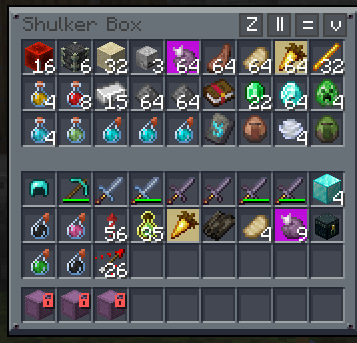
- 🔄 Four Sorting Modes — Adds dedicated buttons to your inventory and chests:
Z(Snake) — Sorts items in a continuous snake-like pattern.=(Rows) — Sorts items horizontally row by row.||(Columns) — Sorts items vertically column by column.v(Move All) — Quickly moves matching items from your inventory into the chest.
- ⚡ Adjustable Speed — Want instant sorting or a slower, human-like delay to bypass anti-cheats? You have full control.
- 🧠 Smart Filtering — Automatically ignores the crafting grid when sorting your personal inventory to prevent unwanted item shifting.
⚙️ How it works
Simple Sorting injects unobtrusive sorting buttons into container screens. When you click a sorting button, the mod runs a clean Selection Sort algorithm in the background and seamlessly queues up vanilla mouse click events (handleInventoryMouseClick). This means the server just sees a player organizing their inventory, ensuring maximum server compatibility.
🛠️ Configuration
- Config: Easily adjust settings in
config/simplesorting.jsonor directly in-game via ModMenu. clicksPerTick— Controls the sorting speed. Set it to1for a safe default (1 click per game tick), or crank it up to20for instant sorting.
🚀 Installation
- Install Fabric.
- Install the required dependencies:
Fabric API. - (Optional but recommended) Install
ModMenufor in-game configuration. - Place the downloaded
.jarfile into your.minecraft/modsfolder.
📩 For questions and bug reports: Telegram / Discord — @b1nt1n
📌 Simple Sorting
A lightweight, client-side, and multiplayer-safe inventory sorting mod for Minecraft. Keep your chests organized without risking server bans.
✨ Features
- 🖱️ Multiplayer Safe — Does not rely on custom network packets. It simulates real mouse clicks, making it fully legitimate and compatible with strict anti-cheat servers.
- 🔄 Four Sorting Modes — Adds dedicated buttons to your inventory and chests:
Z(Snake) — Sorts items in a continuous snake-like pattern.=(Rows) — Sorts items horizontally row by row.||(Columns) — Sorts items vertically column by column.v(Move All) — Quickly moves matching items from your inventory into the chest.
- ⚡ Adjustable Speed — Want instant sorting or a slower, human-like delay to bypass anti-cheats? You have full control.
- 🧠 Smart Filtering — Automatically ignores the crafting grid when sorting your personal inventory to prevent unwanted item shifting.
⚙️ How it works
Simple Sorting injects unobtrusive sorting buttons into container screens. When you click a sorting button, the mod runs a clean Selection Sort algorithm in the background and seamlessly queues up vanilla mouse click events (handleInventoryMouseClick). This means the server just sees a player organizing their inventory, ensuring maximum server compatibility.
🛠️ Configuration
- Config: Easily adjust settings in
config/simplesorting.jsonor directly in-game via ModMenu. clicksPerTick— Controls the sorting speed. Set it to1for a safe default (1 click per game tick), or crank it up to20for instant sorting.
🚀 Installation
- Install Fabric.
- Install the required dependencies:
Fabric API. - (Optional but recommended) Install
ModMenufor in-game configuration. - Place the downloaded
.jarfile into your.minecraft/modsfolder.
📩 For questions and bug reports: Telegram / Discord — @b1nt1n
Screenshots
Gallery
-
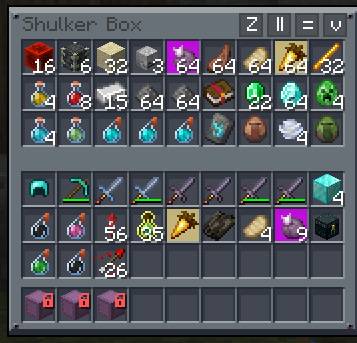 photo_2026-07-06_15-55-05.jpg photo_2026-07-06_15-55-05.jpg
Versions
Files
Relations
Project Relations
More like this
Similar Mods
Suggestions use data such as tags, dependencies, dependents, descriptions, titles, and more to rank how much they overlap with this mod.
On ModDex
Community snapshot
By the numbers
Statistics
Want to reach Minecraft players?
We're looking for a server hosting partner to feature here and other parts of the site. Interested? Send us a message!
Get in touchGet it on
Available Platforms
On ModDex
Community snapshot
By the numbers
Statistics
Resources