
Community listing page, reviews here may not be monitored by the author.
Simple Terminals


No reviews yet
A simple Crafting Terminal that lets you access and craft directly from connected storage.
Community voices
Reviews
No reviews yet. Be the first to review this project!
Get it on
Available Platforms
Compatibility
Supported Environments
Must be installed on both the client and the server.
About
Project Details
For authors
Embed Badge
If you're the author of this project, you can embed a live badge anywhere that supports HTML or Markdown. It updates automatically whenever ratings change.
Use HTML for any page that supports it, or Markdown for README files and Markdown-based descriptions.
Identifiers
Platform IDs
About
Description



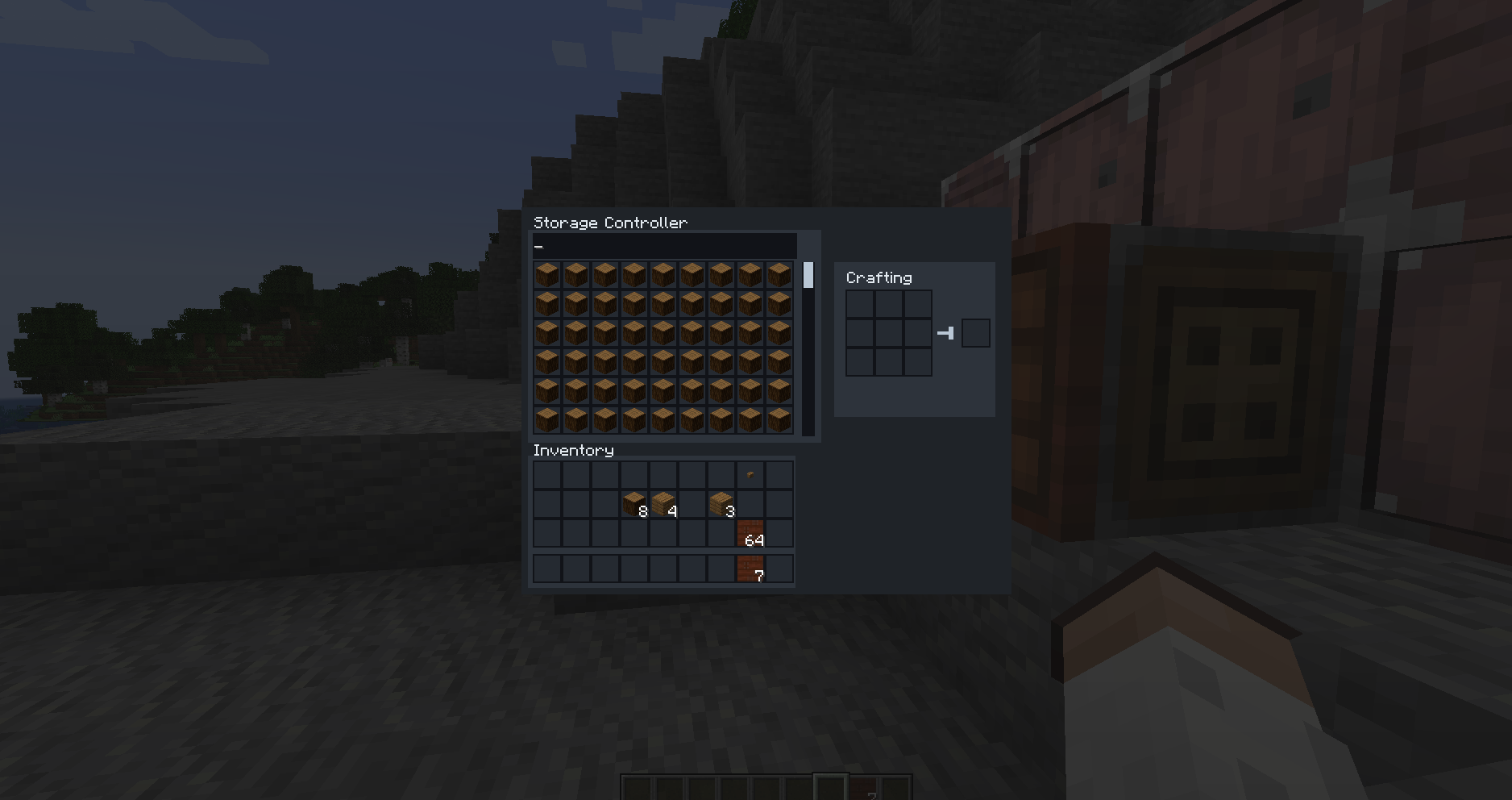
Crafting Terminal is a lightweight and powerful utility block designed to simplify storage interaction and crafting. Attach it to a storage block, browse everything through a clean scrollable interface, and craft directly using stored items with the built-in crafting grid.





Features
| Feature | Description |
|---|---|
| Unified Storage Access | Access attached storage from a single interface |
| Automatic Inventory Detection | Automatically detects compatible inventories, including modded storage |
| Scrollable Inventory | Browse large storage systems through a clean, scrollable interface |
| Built-In Crafting Grid | Craft directly from the terminal with real-time output |
| Stored Item Crafting | Use stored items while crafting through the terminal |
| Sophisticated Storage Support | Works with the Storage Controller from Sophisticated Storage |
| Simple Placement | Attach the terminal to a chest or compatible modded storage block |
| Minimal Design | Fast, intuitive, and focused interface |
Storage Access
Place the Crafting Terminal on a compatible storage block such as a chest or modded storage and right-click it to access the inventory through one clean interface.
The large, scrollable inventory makes browsing bigger storage systems easier.
Sophisticated Storage Integration
Crafting Terminal works seamlessly with the Storage Controller from Sophisticated Storage.
This allows the terminal to provide convenient access to storage setups managed through the Storage Controller.
Built-In Crafting
The terminal includes a built-in crafting grid with real-time output.
Browse stored items and craft directly through the same interface for a faster and cleaner storage workflow.
How It Works
- Place the Crafting Terminal attached to a storage block.
- Right-click the terminal to open the interface.
- Browse and scroll through stored items.
- Craft directly using the built-in crafting grid.
Recipe
Craft the terminal using:
- Crafting Table
- Redstone Torch
- Chest
- Diamond
Why Choose Crafting Terminal?
- One Storage Interface — Access compatible attached storage from one place.
- Built-In Crafting — Browse items and craft through the same interface.
- Large Storage Support — Scroll through inventories built for massive storage systems.
- Automatic Detection — Compatible inventories are detected automatically.
- Modded Storage Support — Works with compatible modded storage.
- Sophisticated Storage Integration — Works with the Storage Controller from Sophisticated Storage.
- Simple Workflow — Place, open, browse, and craft.
- Minimal Design — Focused on fast and intuitive storage management.
Community & Support
- Discord: https://discord.gg/TJc3CxR4jK
- GitHub: https://github.com/MeherBenSalem
- Website: https://nightbeam.dev
- Store: https://nightbeam.dev/store
- CurseForge: https://www.curseforge.com/members/nightbeamstudio/projects
- Modrinth: https://modrinth.com/organization/nightbeam


Crafting Terminal is a lightweight and powerful utility block designed to simplify storage interaction and crafting.
Works seamlessly with the Storage Controller from Sophisticated Storage
Place the terminal on any storage block (chests or modded storage) and access everything through a clean, scrollable interface.
Craft directly using stored items with the built-in crafting grid — faster, cleaner, and more efficient.

✨ Features
- 📦 Access attached storage from a single interface
- 🧠 Automatically detects compatible inventories (including modded storage)
- 🖱️ Large scrollable inventory for massive storage systems
- 🛠️ Built-in crafting grid with real-time output
- ⚡ Fast, intuitive, and minimal design
🧩 How It Works
- Place the Crafting Terminal attached to a storage block
- Right-click to open the interface
- Browse and scroll through stored items
- Craft directly using the built-in crafting grid
🛠️ Recipe
Craft the terminal using:
- Crafting Table
- Redstone Torch
- Chest
- Diamond
🔗 Support & Links
- 💬 Discord: https://discord.gg/TJc3CxR4jK
- 💻 GitHub: https://github.com/MeherBenSalem
- 🔥 CurseForge: https://www.curseforge.com/members/nightbeamstudio/projects
- 🌿 Modrinth: https://modrinth.com/organization/nightbeam

Screenshots
Gallery

Versions
Files
Relations
Project Relations
More like this
Similar Mods
Suggestions use data such as tags, dependencies, dependents, descriptions, titles, and more to rank how much they overlap with this mod.
On ModDex
Community snapshot
By the numbers
Statistics
Want to reach Minecraft players?
We're looking for a server hosting partner to feature here and other parts of the site. Interested? Send us a message!
Get in touchGet it on
Available Platforms
On ModDex
Community snapshot
By the numbers