
Community listing page, reviews here may not be monitored by the author.
Simple Voice Voice Changer


No reviews yet
Client-side live voice changer for Simple Voice Chat with presets, detailed tuning, saved profiles, self-listen, and native menu integration.
Community voices
Reviews
No reviews yet. Be the first to review this project!
Get it on
Available Platforms
Compatibility
Supported Environments
Runs entirely on the client. Works on vanilla servers.
Required on the client. Installing it on the server adds functionality.
Varies by version.
About
Project Details
For authors
Embed Badge
If you're the author of this project, you can embed a live badge anywhere that supports HTML or Markdown. It updates automatically whenever ratings change.
Use HTML for any page that supports it, or Markdown for README files and Markdown-based descriptions.
Identifiers
Platform IDs
About
Description


EN
Client-side Fabric and NeoForge addon for Simple Voice Chat. It processes outgoing microphone audio in real time and adds a native-looking Voice Changer Studio to the Simple Voice Chat menu.
✨ Features
- Built-in presets —
Man,Woman,Titan,Kid,Demon, andRadio. - Real outgoing processing — changes microphone samples before Simple Voice Chat encodes and sends them.
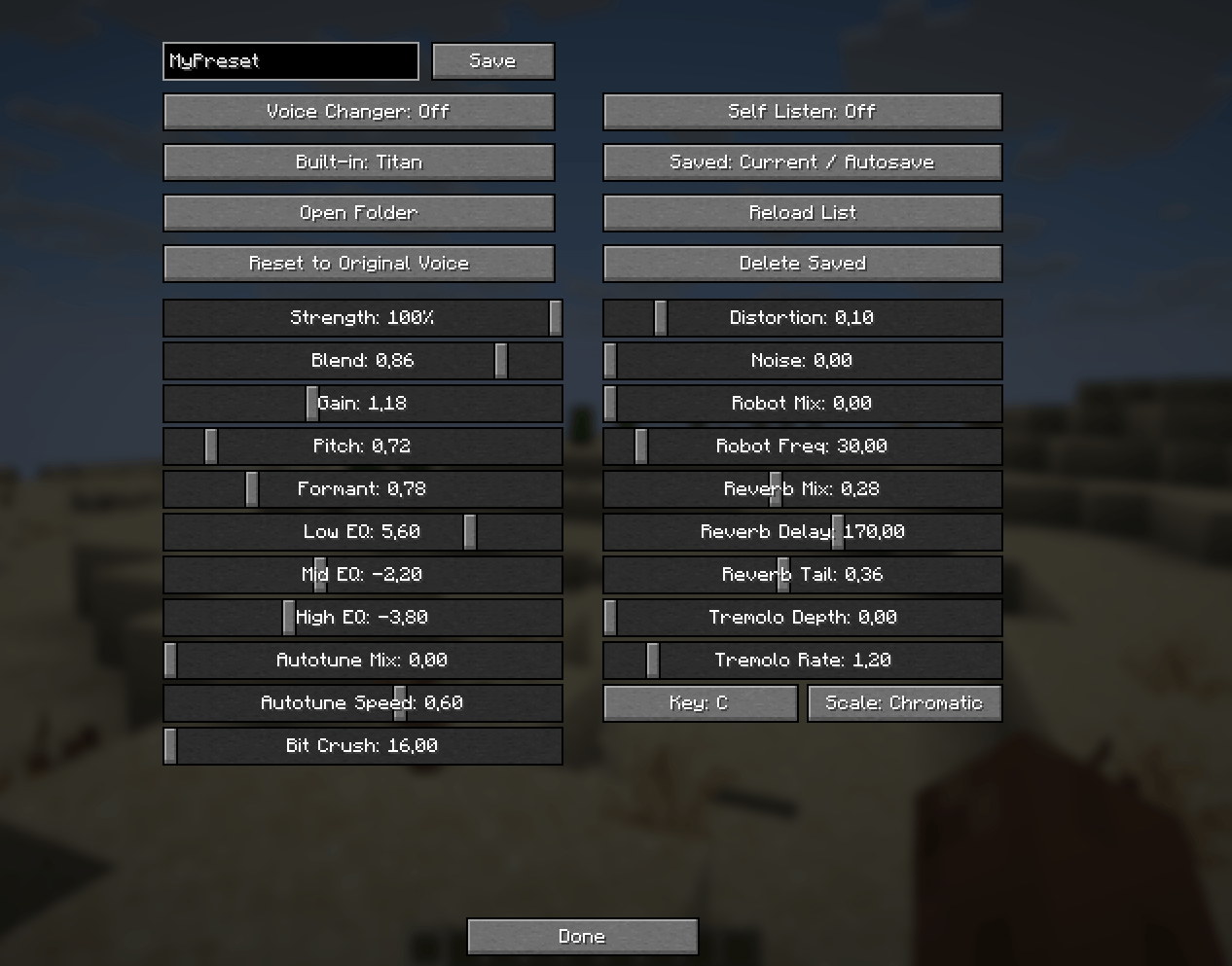
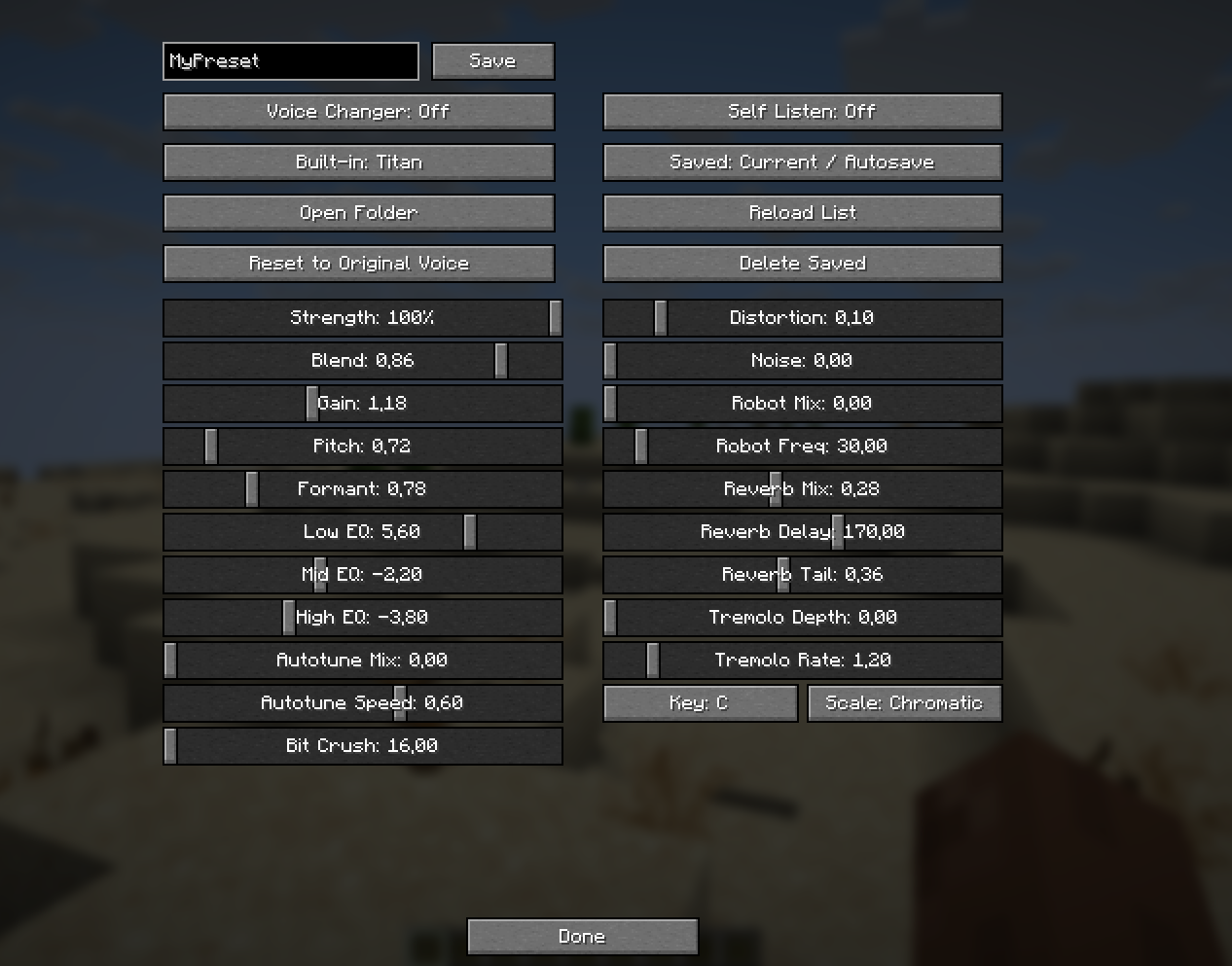
- Voice Changer Studio — pitch, formant, EQ, distortion, echo, tremolo, robot layer, autotune, and more.
- Saved profiles — create, load, delete, and share custom presets.
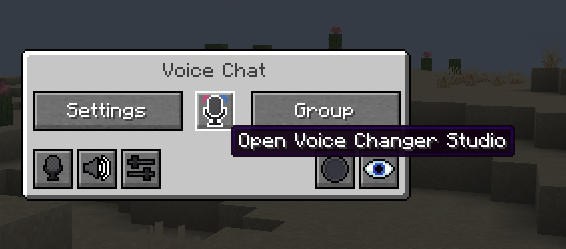
- Native menu integration — opens from the Simple Voice Chat menu and changes the talking HUD microphone while enabled.
- Client-side addon — no additional server-side addon is required beyond the server's normal Simple Voice Chat installation.
📦 Dependencies
- Simple Voice Chat for the installed Minecraft version — required.
- Fabric API — required only for Fabric builds.
- NeoForge — required only for NeoForge builds.
🔗 Links
- GitHub: imsawiq/sv-voice-changer
- Discord: Preset sharing server
RU
Клиентский аддон для Fabric и NeoForge под Simple Voice Chat. Он в реальном времени обрабатывает исходящий звук микрофона и аккуратно добавляет Voice Changer Studio прямо в меню Simple Voice Chat.
✨ Особенности
- Готовые пресеты —
Man,Woman,Titan,Kid,DemonиRadio. - Реальная обработка исходящего голоса — микрофон меняется до кодирования и отправки через Simple Voice Chat.
- Студия войсченджера — pitch, formant, EQ, distortion, echo, tremolo, robot layer, autotune и другие параметры.
- Сохранение профилей — создание, загрузка, удаление и обмен кастомными пресетами.
- Нативная интеграция — студия открывается из меню Simple Voice Chat, а при включённом эффекте меняется HUD-иконка микрофона.
- Клиентский аддон — серверу не нужен дополнительный аддон, достаточно его обычной установки Simple Voice Chat.
📦 Зависимости
- Simple Voice Chat под установленную версию Minecraft — обязательно.
- Fabric API — только для Fabric-сборок.
- NeoForge — только для NeoForge-сборок.
🔗 Ссылки
- GitHub: imsawiq/sv-voice-changer
- Discord: Сервер для обмена пресетами
EN
Fabric and NeoForge addon for Simple Voice Chat. It processes outgoing microphone audio in real time and adds a native-looking Voice Changer Studio to the Simple Voice Chat menu. The voice is changed on your own client; install it on the server as well to set a policy for everyone and to hand out your own voices.
✨ Features
- Built-in presets —
Man,Woman,Titan,Kid,Demon, andRadio. - Real outgoing processing — changes microphone samples before Simple Voice Chat encodes and sends them.
- Voice Changer Studio — pitch, formant, EQ, distortion, echo, tremolo, robot layer, autotune, and more.
- Saved profiles — create, load, delete, and share custom presets.
- Native menu integration — opens from the Simple Voice Chat menu and changes the talking HUD microphone while enabled.
- API for other mods — a radio, a mask or a machine can apply a voice while it is in use and hand it back; mods can also add their own voices to the studio. See docs/API.md
- Server side — install it on the server too, to allow or deny the voice changer, mute individual players by command, and hand out your own voices to everyone connected
- Works without a server — everything except the server policy runs on your client alone
📦 Dependencies
- Simple Voice Chat for the installed Minecraft version — required.
- Fabric API — required only for Fabric builds.
- NeoForge — required only for NeoForge builds.
🎮 Getting started
- Install Simple Voice Chat and this mod on your client. On Fabric you also need Fabric API.
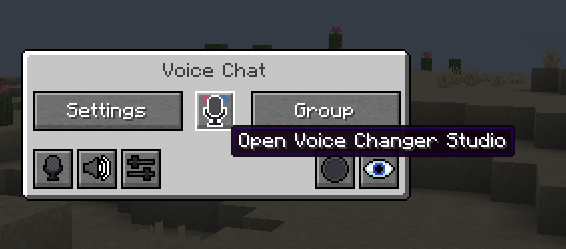
- Open the Simple Voice Chat menu and press the voice changer button at the top.
- Pick a voice from the grid and set the strength. Self Listen plays your own processed voice back so you can hear what everyone else hears.
- J switches the effect on and off without opening anything. There is a second, unbound key for opening the studio directly; both are in Minecraft's controls.
Nothing here needs a server: on a server without the mod, everything except the server policy still works.
🛠️ For server operators
Install the mod on the server as well. It writes config/sv-voice-changer/server.properties on first start, with every key documented inside the file.
Worth being clear first: the voice is changed on the speaker's own machine before it is sent. Everything below is a policy an unmodified client obeys, not something a server can enforce.
Commands - /svvoicechanger, or /svc for short. Operators only by default.
| Command | What it does |
|---|---|
status |
Current policy, how many players are muted, how many voices are shared |
on / off |
Allows or denies the voice changer for everyone here |
restrict <all|presets|server-only> |
How much freedom players have over their voice |
mute <player> / unmute <player> |
Switches one player's voice changer off, and back on |
mutelist |
Who is currently muted |
voices |
The voices this server shares |
reload |
Re-reads the config, the mute list and the shared voices |
Restrictions - all lets players tune freely. presets allows ready-made voices only: built-in, added by another mod, or shared by this server; no hand tuning and no personal preset files. server-only allows nothing but the voices this server shares. A voice another mod is holding, such as a radio, is never affected.
Permissions - on NeoForge, sv-voice-changer:use decides who may change their voice and sv-voice-changer:command who may run the command, so any permission manager can pick them up. Fabric has no equivalent permission API, so nobody is refused on that ground there and the mute list is what a moderator uses instead.
Sharing your own voices - save a voice in the studio, press Open Folder, copy the file into config/sv-voice-changer/shared-voices/ on the server, then run /svvoicechanger reload. It appears in every connected player's studio and disappears when they leave. Only numbers are read from those files and every value is clamped to its own range, so this cannot make a client load or run anything.
The full reference, including the API for other mods, is in docs/API.md.
🔗 Links
- GitHub: imsawiq/sv-voice-changer
- Discord: Preset sharing server
RU
Аддон для Fabric и NeoForge под Simple Voice Chat. Он в реальном времени обрабатывает исходящий звук микрофона и аккуратно добавляет Voice Changer Studio прямо в меню Simple Voice Chat. Голос меняется на твоём клиенте; поставь аддон ещё и на сервер, чтобы задавать правила для всех и раздавать свои голоса.
✨ Особенности
- Готовые пресеты —
Man,Woman,Titan,Kid,DemonиRadio. - Реальная обработка исходящего голоса — микрофон меняется до кодирования и отправки через Simple Voice Chat.
- Студия войсченджера — pitch, formant, EQ, distortion, echo, tremolo, robot layer, autotune и другие параметры.
- Сохранение профилей — создание, загрузка, удаление и обмен кастомными пресетами.
- Нативная интеграция — студия открывается из меню Simple Voice Chat, а при включённом эффекте меняется HUD-иконка микрофона.
- API для других модов — рация, маска или машина могут подменить голос на время и вернуть обратно; моды могут добавлять свои голоса в студию. См. docs/API.md
- Серверная часть — мод ставится и на сервер: разрешить или запретить изменение голоса, замутить игрока командой, раздавать свои голоса всем, кто зашёл
- Работает и без сервера — всё, кроме серверной политики, живёт на клиенте
📦 Зависимости
- Simple Voice Chat под установленную версию Minecraft — обязательно.
- Fabric API — только для Fabric-сборок.
- NeoForge — только для NeoForge-сборок.
`### 🎮 С чего начать
- Поставь Simple Voice Chat и этот мод на клиент. На Fabric нужен ещё Fabric API.
- Открой меню Simple Voice Chat и нажми кнопку войсченджера сверху.
- Выбери голос из сетки и задай силу. Self Listen проигрывает тебе твой же обработанный голос — слышно ровно то, что слышат другие.
- J включает и выключает эффект, ничего не открывая. Есть и вторая клавиша, для открытия студии напрямую, — по умолчанию не назначена; обе лежат в управлении Minecraft.
Сервер для этого не нужен: на сервере без мода работает всё, кроме серверных правил.
🛠️ Для владельцев серверов
Поставь мод и на сервер. При первом запуске он создаст config/sv-voice-changer/server.properties, где каждый ключ описан прямо в файле.
Сразу честно: голос меняется на машине говорящего до отправки. Всё ниже — правило, которому следует неизменённый клиент, а не то, что сервер может навязать.
Команды — /svvoicechanger, коротко /svc. По умолчанию только для операторов.
| Команда | Что делает |
|---|---|
status |
Текущие правила, сколько игроков заглушено, сколько голосов раздаётся |
on / off |
Разрешает или запрещает войсченджер всем здесь |
restrict <all|presets|server-only> |
Насколько свободно игроки распоряжаются голосом |
mute <игрок> / unmute <игрок> |
Выключает войсченджер одному игроку и включает обратно |
mutelist |
Кто сейчас заглушён |
voices |
Голоса, которые раздаёт этот сервер |
reload |
Перечитывает конфиг, список мутов и раздаваемые голоса |
Ограничения — all разрешает настраивать что угодно. presets оставляет только готовые голоса: встроенные, добавленные другим модом или раздаваемые сервером; ручной настройки и личных файлов пресетов нет. server-only — только голоса этого сервера. Голос, который держит другой мод, например рация, под ограничения не попадает никогда.
Права — на NeoForge sv-voice-changer:use решает, кому можно менять голос, а sv-voice-changer:command — кому можно выполнять команду; их подхватит любой менеджер прав. На Fabric такого API нет, поэтому по этому признаку там никому не отказывают, и модератор пользуется списком мутов.
Раздача своих голосов — сохрани голос в студии, нажми Открыть папку, скопируй файл в config/sv-voice-changer/shared-voices/ на сервере и выполни /svvoicechanger reload. Он появится в студии у всех подключённых и пропадёт, когда они выйдут. Из этих файлов читаются только числа, и каждое значение ограничено своим диапазоном, так что заставить клиент что-то загрузить или выполнить через это нельзя.
Полный справочник, включая API для других модов, — в docs/API.md.
🔗 Ссылки
- GitHub: imsawiq/sv-voice-changer
- Discord: Сервер для обмена пресетами
Screenshots
Gallery
-
 Button Button
 -
 Voice Changer Studio Voice Changer Studio
-
-
 Voice Changer Studio
Versions
Files
Relations
Project Relations
More like this
Similar Mods
Suggestions use data such as tags, dependencies, dependents, descriptions, titles, and more to rank how much they overlap with this mod.
On ModDex
Community snapshot
By the numbers
Statistics
Want to reach Minecraft players?
We're looking for a server hosting partner to feature here and other parts of the site. Interested? Send us a message!
Get in touchGet it on
Available Platforms
On ModDex
Community snapshot
By the numbers