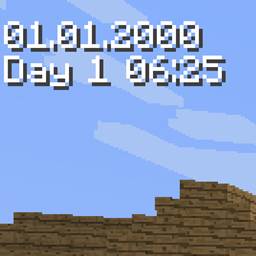
Community listing page, reviews here may not be monitored by the author.
Simple World Timer

No reviews yet
Minecraft mod of configurable timer for displaying world, in-game or system time.
Forge is a popular mod loader for versions 1.1+ of Minecraft.
Community voices
Reviews
Filters
Click once to include, again to exclude, again to clear
No reviews yet. Be the first to review this project!
Get it on
Available Platforms
About
Project Details
For authors
Embed Badge
If you're the author of this project, you can embed a live badge anywhere that supports HTML or Markdown. It updates automatically whenever ratings change.
Use HTML for any page that supports it, or Markdown for README files and Markdown-based descriptions.
Identifiers
Platform IDs
About
Description
This configurable timer will let you display:
- Total World Time (from getTotalWorldTime() function)
- Minecraft Time used for day/night cycle (from getWorldTime() function)
- Stopwatch
- System time
It could be useful for speedrun measurements or just as reminder of current real life time if you are in fullscreen mode and don't want to Alt-TAB.
You can choose what source of time is used and setup patterns for date/time formatting. Or use preconfigured presets.
On-screen position of timer can be freely adjusted.
There is in-game configuration screen bound to H key by default. Or you can alter SimpleWorldTimer.cfg file. Sneaking + H key toggles timer visibility. The chat command /swt is also available in case you want to free the key binding.
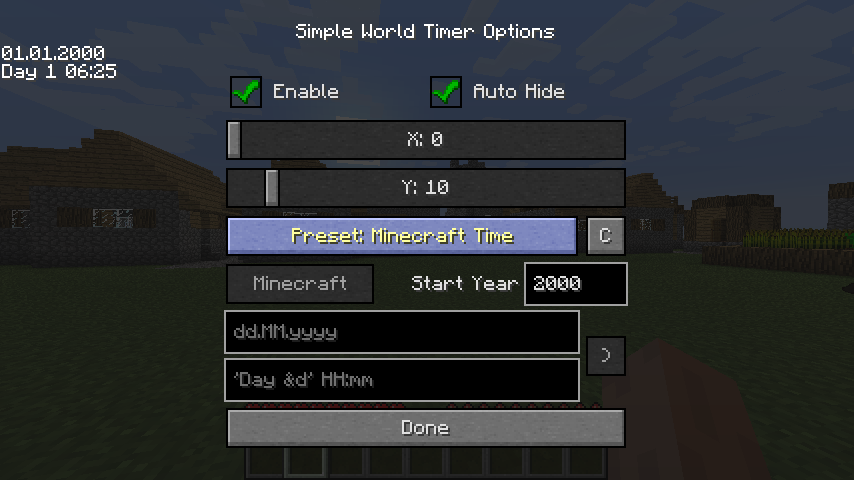
Simple syntax of java.text.SimpleDateFormat class used.
https://docs.oracle.com/javase/7/docs/api/java/text/SimpleDateFormat.html
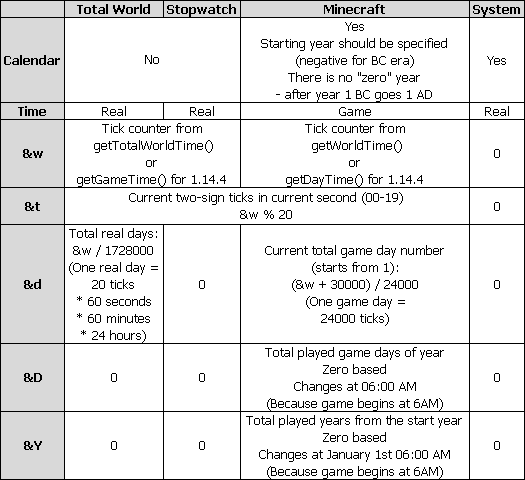
Additional syntax take effect after:
&w - total ticks
&t - current two-sign ticks in current second (00-19)
&d - total days
&D - Total played game days of year. Zero based. Changes at 06:00 AM (because game begins at 6AM). Relevant only for Minecraft time. Should be used in conjunction with &Y.
&Y - Total played game years from the start year. Zero based. Changes at January 1st 06:00 AM (because game begins at 6AM). Relevant only for Minecraft time.
If you additionally put it in [ square brackets ] then everything within will output only if included values are non-zero
All this additions should be quoted using ' single quotes ' to avoid initial interpretation by SimpleDateFormat
Here is comparison table:
Examples:
dd MMMM yyyy
- will display day, month name and year. Like so: 01 January 2000.
'[&dd ]'HH:mm:ss
- will display total days and letter d with space only if total days are not zero. And time to the right. Like so: 1d 02:03:04.
'Year &Y, day &D'
- this is relevant only for Minecraft time and will display total played game years since start year and played days in year as a remainder.
Like so: Year 2, day 15.
This starts from zero as Year 0, day 0 and changes every 06:00AM. That is to match the value on debug screen (F3) in modern versions of Minecraft which is calculated simply by dividing ticks by 24000 despite the fact that the day in the game starts at 6 in the morning.
After Year 0, day 364 it will become Year 1, day 0 if previous year was not a leap year. Or Year 0, day 365 otherwise.
Disclaimers:
Please note that some parameters do not make sense in certain configurations. For example, it makes no sense to display a month or year for the total world time. Because it is uncertain how much days are in one month and what year it is. To avoid this uncertainty for Minecraft time the start year is specified. In this way Minecraft time can have clear calendar representation.
This mod is currently for 1.6.4, 1.7.10, 1.8.9, 1.10.2, 1.12.2, 1.14.4, 1.15.2, 1.16.5, 1.18.1, 1.19.2, 1.19.3, 1.20.1 and 1.20.2 versions. But if players are interested I could try to port it to other game versions.
Serene Seasons mod support (only 1.12.2)
Since version 1.12.2-1.1.3 it is possible to display some information from Serene Season mod. Two more parameters added:
&S - season name
&B - subseason name
They are available in all clockType modes.
Additionally with clockType = Serene, date and time are set according to Serene Seasons internal timer with respect to mods settings: Day Duration in ticks and Sub Season Duration in days. This is a simple approximation without calendar restrictions. So here you can achieve 30 of February or even more, depending on the settings in seasons.cfg.
There is no years in Serene Seasons, so it will always be 1.
Screenshots
Gallery
-
Table
-
Configuration screen
Versions
Files
Relations
Project Relations
More like this
Similar Mods
Suggestions use data such as tags, dependencies, dependents, descriptions, titles, and more to rank how much they overlap with this mod.
On ModDex
Community snapshot
By the numbers
Statistics
Want to reach Minecraft players?
We're looking for a server hosting partner to feature here and other parts of the site. Interested? Send us a message!
Get in touchGet it on
Available Platforms
On ModDex
Community snapshot
By the numbers