Community listing page, reviews here may not be monitored by the author.
Simpler keybinds


No reviews yet
Condense 12 keybinds to one key to save keyboard space through the use of a menu.
Community voices
Reviews
No reviews yet. Be the first to review this project!
Get it on
Available Platforms
Compatibility
Supported Environments
Runs entirely on the client. Works on vanilla servers.
About
Project Details
For authors
Embed Badge
If you're the author of this project, you can embed a live badge anywhere that supports HTML or Markdown. It updates automatically whenever ratings change.
Use HTML for any page that supports it, or Markdown for README files and Markdown-based descriptions.
Identifiers
Platform IDs
About
Description
Simpler keybinds
A radial menu system for triggering keybinds without needing a free key for each one. Designed for heavily modded packs (e.g. Create, Botania, etc.) where you run out of keyboard space.
Works with any mod that registers standard keybinds, since actions are dispatched directly to the keybind rather than through simulated key input.
How it works
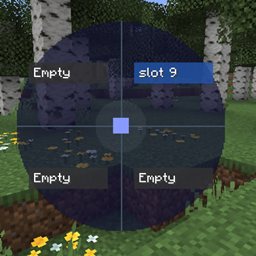
Press the open key (default: R) to bring up a radial wheel. Move your mouse into one of the four quadrants and release R (or left-click) to fire that slot's assigned action. The action is triggered directly — it does not simulate a keypress, so it works even if the underlying action has no key bound.
You can configure up to 3 wheels, each with 4 slots (top-right, bottom-right, bottom-left, top-left).
Controls
| Key | Action |
|---|---|
R |
Open / close the radial wheel |
| Move mouse | Highlight a quadrant |
Release R or left-click |
Fire the highlighted slot |
1 / 2 / 3 |
Switch between wheels while open |
C |
Open the config screen while the wheel is open |
ESC |
Close without firing |
Configuring your binds
- Press
Rto open the wheel, thenCto open the config screen (or bind a separate config key in Controls). - Click a slot (Top-Right, Bottom-Right, Bottom-Left, Top-Left) to select it.
- A list of all registered keybinds appears on the right — includes vanilla and all mod keybinds. Click one to assign it.
- Optionally type a custom display name in the text box that appears below the slot. If left blank the binding's own name is shown on the wheel.
- Press
Delto clear a slot's binding. - Press
ESCto go back to the wheel.
Changes save automatically to your config folder.
Compatibility
Fabric: 1.20.4, 1.21.5, 1.21.6, 1.21.8, 1.21.9, 1.21.11, 26.1–26.1.2, 26.2. Requires Java 21.
NeoForge: 1.21.1, 1.21.5, 1.21.8, 1.21.11, 26.1, 26.2. Requires Java 21 (1.21.x) or Java 25 (26.1+). The 26.2 build depends on a beta NeoForge release, since no stable NeoForge build exists for that version yet.
Forge: 1.8.9–1.20.6. Requires Java 8 (1.8.9–1.16.5) or Java 17 (1.17–1.20.6). Grab the file for your exact version — Modrinth's compatibility detection covers the full range even though each file targets one anchor version internally.
Not supported: versions before 1.8.9 on Forge, or 26.3+ on Fabric/NeoForge (Mojang replaced GLFW with SDL3 that version).
Grab the file matching your Minecraft version and mod loader from the versions list.
Radial Keybind Menu
A radial menu system for triggering keybinds without needing a free key for each one. Designed for heavily modded packs (e.g. Create, Botania, etc.) where you run out of keyboard space.
Works with any mod that registers standard keybinds, since actions are dispatched directly to the keybind rather than through simulated key input.
How it works
Press the open key (default: R) to bring up a radial wheel. Move your mouse into one of the four quadrants and release R (or left-click) to fire that slot's assigned action. The action is triggered directly — it does not simulate a keypress, so it works even if the underlying action has no key bound.
You can configure up to 3 wheels, each with 4 slots (top-right, bottom-right, bottom-left, top-left).
Controls
| Key | Action |
|---|---|
R |
Open / close the radial wheel |
| Move mouse | Highlight a quadrant |
Release R or left-click |
Fire the highlighted slot |
1 / 2 / 3 |
Switch between wheels while open |
C |
Open the config screen while the wheel is open |
ESC |
Close without firing |
Configuring your binds
- Press
Rto open the wheel, thenCto open the config screen (or bind a separate config key in Controls). - Click a slot (Top-Right, Bottom-Right, Bottom-Left, Top-Left) to select it.
- A list of all registered keybinds appears on the right — includes vanilla and all mod keybinds. Click one to assign it.
- Optionally type a custom display name in the text box that appears below the slot. If left blank the binding's own name is shown on the wheel.
- Press
Delto clear a slot's binding. - Press
ESCto go back to the wheel.
Changes save automatically to your config folder.
Compatibility
Fabric: 1.20.4, 1.21.5, 1.21.6, 1.21.8, 1.21.9, 1.21.11, 26.1–26.1.2, 26.2. Requires Java 21.
NeoForge: 1.21.1, 1.21.5, 1.21.8, 1.21.11, 26.1, 26.2. Requires Java 21 (1.21.x) or Java 25 (26.1+). The 26.2 build depends on a beta NeoForge release, since no stable NeoForge build exists for that version yet.
Forge: 1.8.9–1.20.6. Requires Java 8 (1.8.9–1.16.5) or Java 17 (1.17–1.20.6). Grab the file for your exact version — Modrinth's compatibility detection covers the full range even though each file targets one anchor version internally.
Not supported: versions before 1.8.9 on Forge, or 26.3+ on Fabric/NeoForge (Mojang replaced GLFW with SDL3 that version).
Grab the file matching your Minecraft version and mod loader from the versions list.
Screenshots
Gallery
-
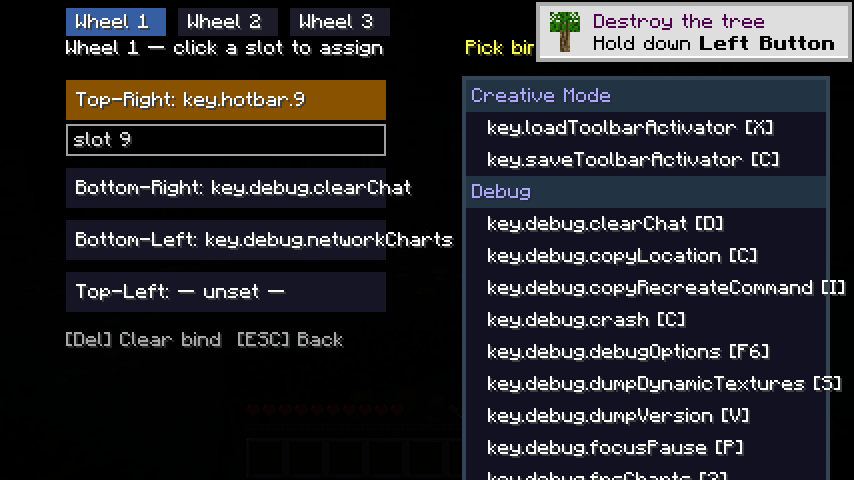 config ui config ui
 -
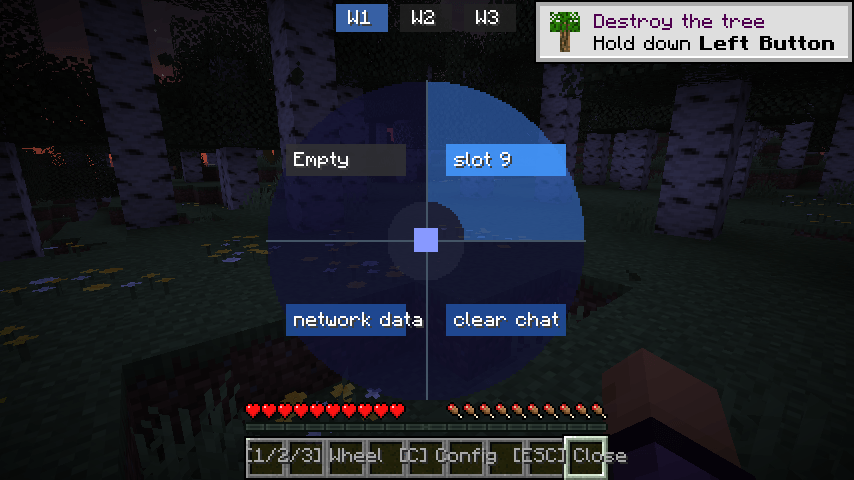 wheel ui wheel ui
-
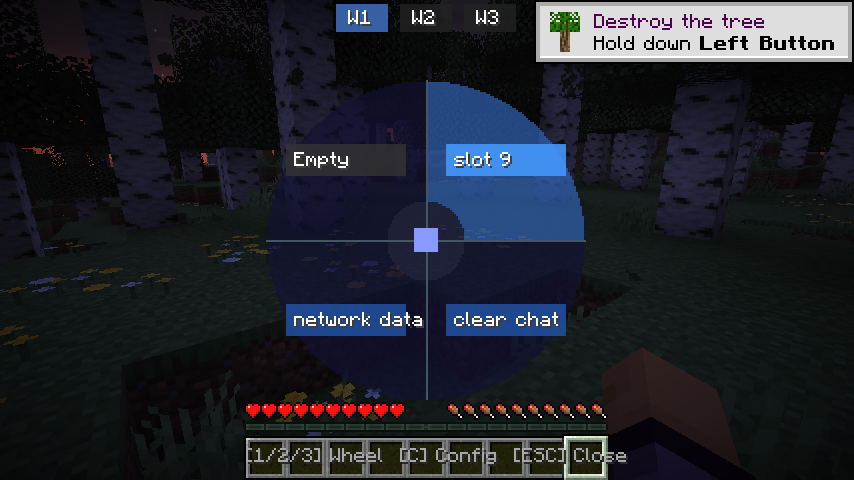 wheel GUI
 -
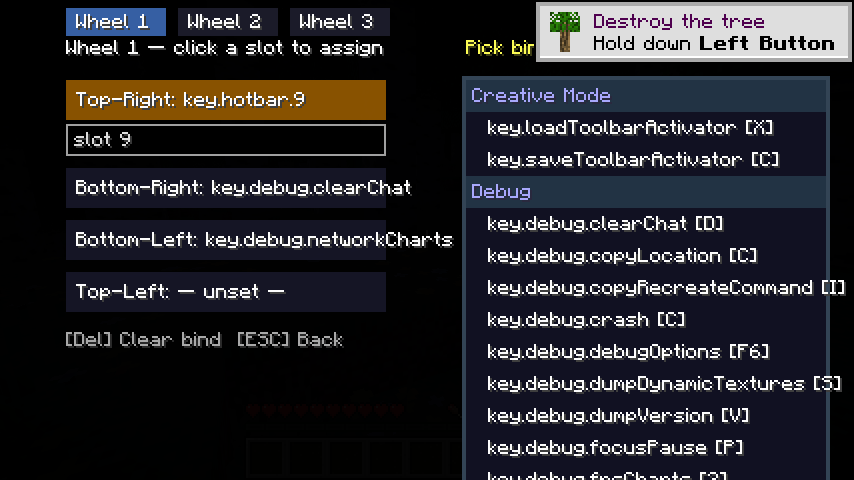 config GUI
Versions
Files
Relations
Project Relations
More like this
Similar Mods
Suggestions use data such as tags, dependencies, dependents, descriptions, titles, and more to rank how much they overlap with this mod.
On ModDex
Community snapshot
By the numbers
Statistics
Want to reach Minecraft players?
We're looking for a server hosting partner to feature here and other parts of the site. Interested? Send us a message!
Get in touchGet it on
Available Platforms
On ModDex
Community snapshot
By the numbers