
Community listing page, reviews here may not be monitored by the author.
Skin Sync


No reviews yet
A Fabric client mod for downloading and managing player skins in multiplayer.
Community voices
Reviews
No reviews yet. Be the first to review this project!
Get it on
Available Platforms
Compatibility
Supported Environments
Runs entirely on the client. Works on vanilla servers.
About
Project Details
For authors
Embed Badge
If you're the author of this project, you can embed a live badge anywhere that supports HTML or Markdown. It updates automatically whenever ratings change.
Use HTML for any page that supports it, or Markdown for README files and Markdown-based descriptions.
Identifiers
Platform IDs
Resources
External Links
About
Description
🎭 SkinSync
A Fabric client mod for downloading and managing player skins in multiplayer.
English · Русский
English
✨ Features
- 📥 Download skins — Save any player's skin to your local files with a single command
- 🎯 Auto-set skins — Automatically apply downloaded skins via server-specific commands
- 🔧 Multi-server support — Configure different command templates for each server
- ⌨️ Smart suggestions — Tab-complete with online player names out of the box
- 🖱️ Clickable links — Copy file paths and skin names directly from chat
💻 Usage
/getskin <player> [auto set]
| Argument | Required | Description |
|---|---|---|
player |
✅ | Username of the player whose skin you want to save |
auto set |
❌ | Set to true to automatically apply the skin via server command |
Example:
/getskin Notch
/getskin Notch true
⚙️ Configuration
Server-specific configuration is stored in config/skin-sync/server-configurator.json:
{
  "default": {
    "auto-set-skin-command": "skin set {skin}"
  },
  "mc.example.com": {
    "auto-set-skin-command": "/setskin {skin}"
  }
}
| Field | Description |
|---|---|
default |
Fallback command template used when no server-specific config exists |
| Server address | Per-server command template (format: host) |
{skin} |
Placeholder replaced with the player's nickname |
Downloaded skins are saved to config/skin-sync/skins/<player>_<uuid>.png
⚠️ Notes
- This mod works only in multiplayer — singleplayer is not supported
- All commands are client-side only — other players don't need this mod
Russian
✨ Возможности
- 📥 Скачивание скинов — Сохраняйте скины любых игроков одной командой
- 🎯 Авто-применение — Автоматическая установка скинов через команды сервера
- 🔧 Несколько серверов — Разные шаблоны команд для каждого сервера
- ⌨️ Умные подсказки — Автодополнение с никами игроков онлайн
- 🖱️ Кликабельные ссылки — Копируйте пути и названия прямо из чата
💻 Использование
/getskin <игрок> [авто установка]
| Аргумент | Обязателен | Описание |
|---|---|---|
игрок |
✅ | Ник игрока, чей скин нужно сохранить |
авто установка |
❌ | Укажите true для автоматической установки через команду сервера |
Пример:
/getskin Notch
/getskin Notch true
⚙️ Настройка
Конфигурация хранится в config/skin-sync/server-configurator.json:
{
  "default": {
    "auto-set-skin-command": "skin set {skin}"
  },
  "mc.example.com": {
    "auto-set-skin-command": "/setskin {skin}"
  }
}
| Поле | Описание |
|---|---|
default |
Шаблон команды по умолчанию |
| Адрес сервера | Шаблон для конкретного сервера (формат: host) |
{skin} |
Заменяется на ник игрока |
Скачанные скины сохраняются в config/skin-sync/skins/<игрок>_<uuid>.png
⚠️ Примечания
- Мод работает только на мультиплеере — одиночная игра не поддерживается
- Все команды на стороне клиента — другим игрокам мод не нужен
🎭 SkinSync
A Fabric client mod for downloading and managing player skins in multiplayer.
English · Русский
English
✨ Features
- 📥 Download skins — Save any player's skin to your local files with a single command
- 🎯 Auto-set skins — Automatically apply downloaded skins via server-specific commands
- 🔧 Multi-server support — Configure different command templates for each server
- ⌨️ Smart suggestions — Tab-complete with online player names out of the box
- 🖱️ Clickable links — Copy file paths and skin names directly from chat
💻 Usage
/getskin <player> [auto set]
| Argument | Required | Description |
|---|---|---|
player |
✅ | Username of the player whose skin you want to save |
auto set |
❌ | Set to true to automatically apply the skin via server command |
Example:
/getskin Notch
/getskin Notch true
⚙️ Configuration
Server-specific configuration is stored in config/skin-sync/server-configurator.json:
{
  "default": {
    "auto-set-skin-command": "skin set {skin}"
  },
  "mc.example.com": {
    "auto-set-skin-command": "/setskin {skin}"
  }
}
| Field | Description |
|---|---|
default |
Fallback command template used when no server-specific config exists |
| Server address | Per-server command template (format: host) |
{skin} |
Placeholder replaced with the player's nickname |
Downloaded skins are saved to config/skin-sync/skins/<player>_<uuid>.png
⚠️ Notes
- This mod works only in multiplayer — singleplayer is not supported
- All commands are client-side only — other players don't need this mod
Russian
✨ Возможности
- 📥 Скачивание скинов — Сохраняйте скины любых игроков одной командой
- 🎯 Авто-применение — Автоматическая установка скинов через команды сервера
- 🔧 Несколько серверов — Разные шаблоны команд для каждого сервера
- ⌨️ Умные подсказки — Автодополнение с никами игроков онлайн
- 🖱️ Кликабельные ссылки — Копируйте пути и названия прямо из чата
💻 Использование
/getskin <игрок> [авто установка]
| Аргумент | Обязателен | Описание |
|---|---|---|
игрок |
✅ | Ник игрока, чей скин нужно сохранить |
авто установка |
❌ | Укажите true для автоматической установки через команду сервера |
Пример:
/getskin Notch
/getskin Notch true
⚙️ Настройка
Конфигурация хранится в config/skin-sync/server-configurator.json:
{
  "default": {
    "auto-set-skin-command": "skin set {skin}"
  },
  "mc.example.com": {
    "auto-set-skin-command": "/setskin {skin}"
  }
}
| Поле | Описание |
|---|---|
default |
Шаблон команды по умолчанию |
| Адрес сервера | Шаблон для конкретного сервера (формат: host) |
{skin} |
Заменяется на ник игрока |
Скачанные скины сохраняются в config/skin-sync/skins/<игрок>_<uuid>.png
⚠️ Примечания
- Мод работает только на мультиплеере — одиночная игра не поддерживается
- Все команды на стороне клиента — другим игрокам мод не нужен
Screenshots
Gallery
-
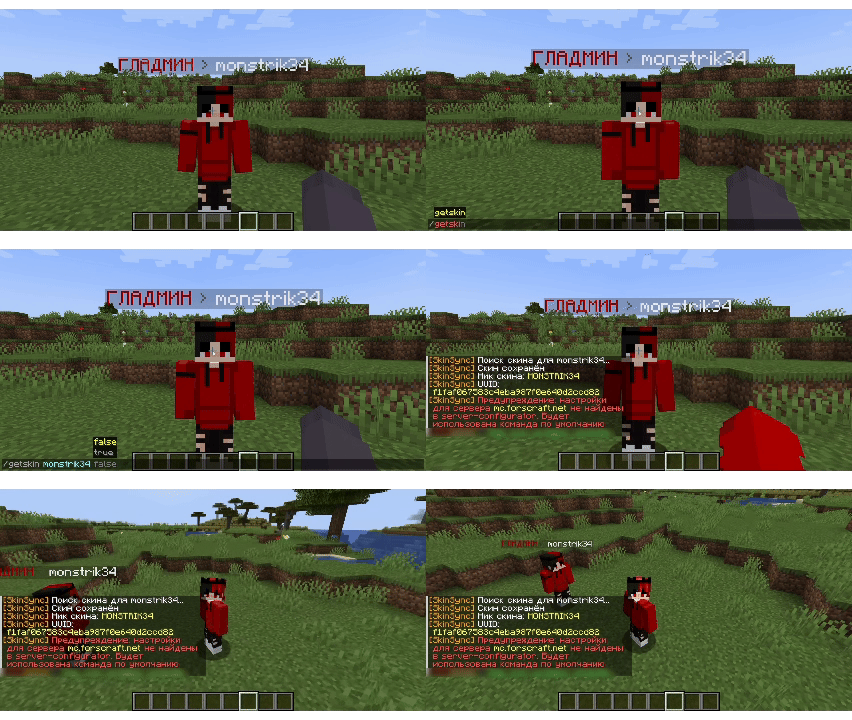 An example of how SkinSync works
Versions
Files
Relations
Project Relations
More like this
Similar Mods
Suggestions use data such as tags, dependencies, dependents, descriptions, titles, and more to rank how much they overlap with this mod.
On ModDex
Community snapshot
By the numbers
Statistics
Want to reach Minecraft players?
We're looking for a server hosting partner to feature here and other parts of the site. Interested? Send us a message!
Get in touchGet it on
Available Platforms
On ModDex
Community snapshot
By the numbers
Statistics
Resources