Community listing page, reviews may not be monitored by the author.
Smart Auto-Trash

No reviews yet
Lightweight, client-side: Alt-click the junk you never want – cobblestone, gravel, rotten flesh – and it gets thrown out of your inventory automatically.

Community voices
Reviews
No reviews yet. Be the first to review this project!
Get it on
Available Platforms
About
Project Details
For authors
Embed Badge
If you're the author of this project, you can embed a live badge anywhere that supports HTML or Markdown. It updates automatically whenever ratings change.
Use HTML for any page that supports it, or Markdown for README files and Markdown-based descriptions.
Identifiers
Platform IDs
Resources
External Links
About
Description
# Smart Auto-Trash
Every mining trip ends the same way: a full inventory of cobblestone, diorite, gravel and dirt, and the iron you actually came for can't fit. Smart Auto-Trash lets you tell the game once what you never want to carry – after that, it's thrown out for you automatically.
## How it works
1. Open your inventory (or any chest).
2. Hold **Alt** and **left-click** an item you don't want, for example cobblestone.
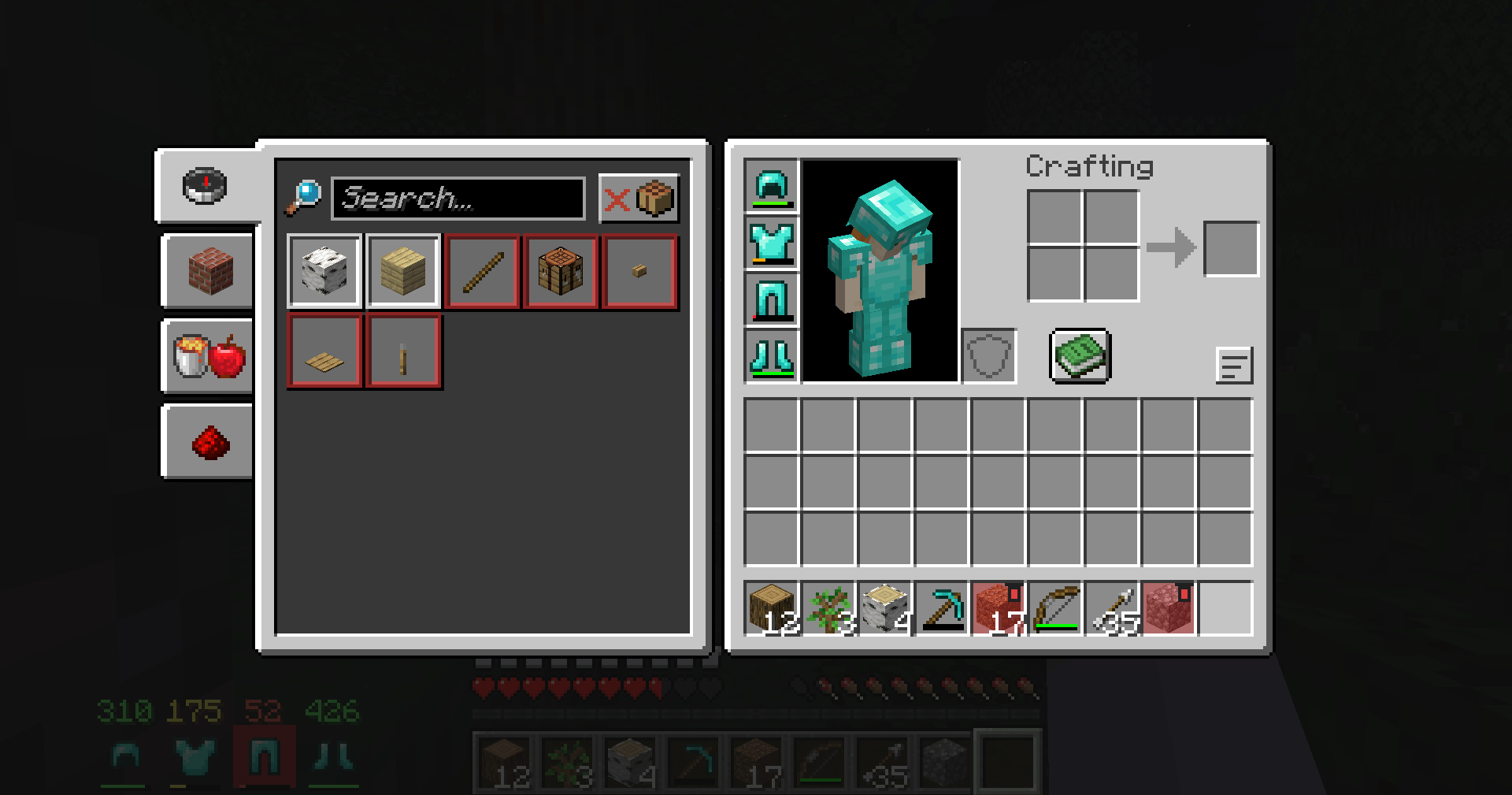
3. That item is now on your **trash list**: its slots get a red tint and a small trash-can mark.
4. Close the inventory and play. Whenever that item lands in your inventory, it is **thrown out automatically**.
Alt + left-click the same item again to take it off the list.
## Trash list screen
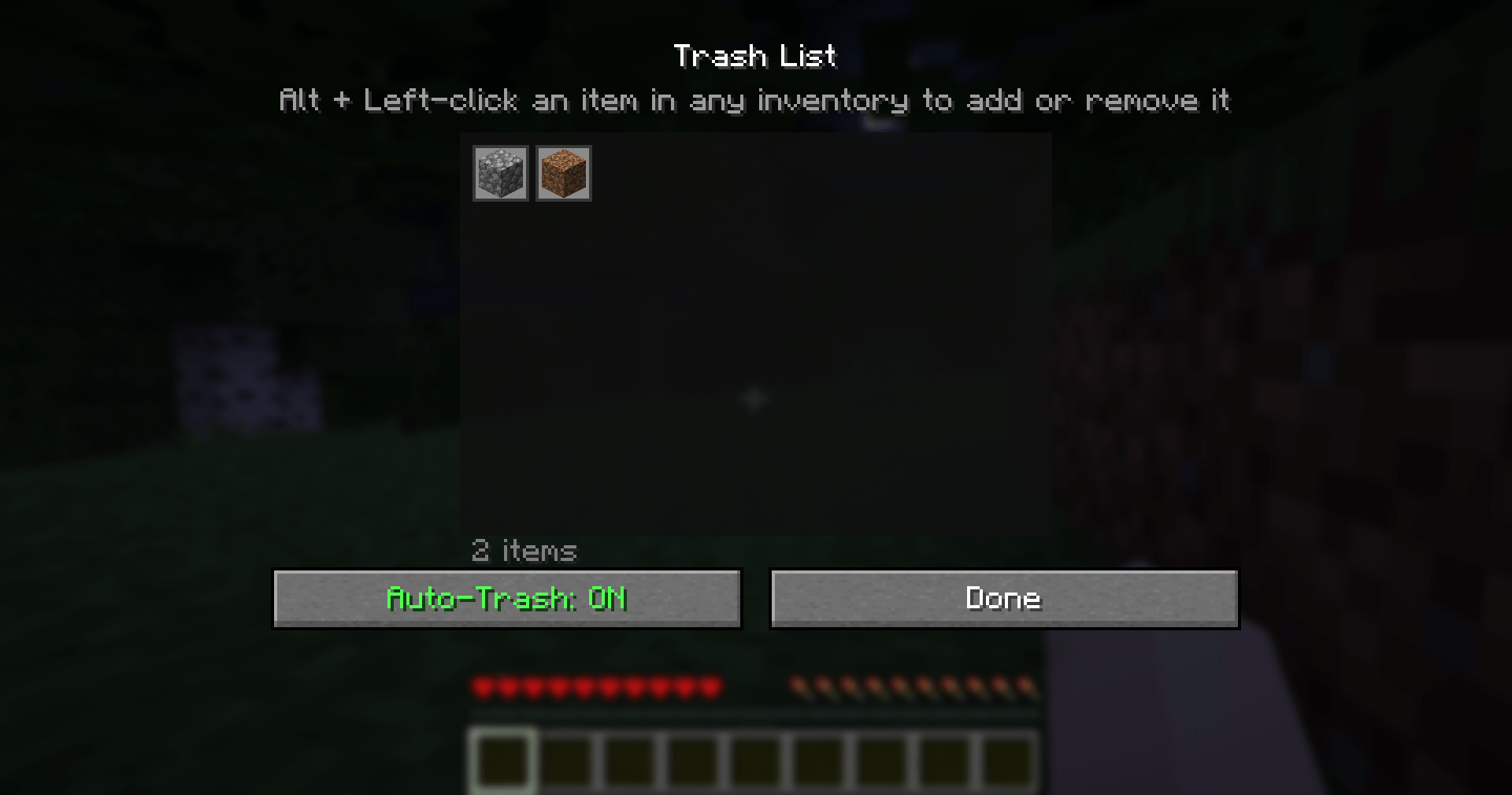
Press **J** to open your trash list:
- See every item you've marked, as a grid of icons.
- **Click an item** to remove it from the list.
- Turn auto-trash **ON/OFF** with one button (handy when you actually need some cobblestone for building).
## Built-in safety
Valuable items **can never be added to the trash list**, even by accident:
- anything diamond or netherite (including ores and ancient debris),
- shulker boxes, ender chests and bundles,
- elytra, totems, tridents, maces, nether stars, beacons, dragon eggs, golden apples, emeralds, enchanted books and other rare or epic items.
On top of that, the mod **never throws away**:
- enchanted items,
- renamed items,
- items that contain other items,
- your armor.
So even if you trash plain stone swords, your Sharpness V stone sword is safe.
## Good to know
- **Client-side only:** items are thrown out with the normal "throw stack" action (the same as pressing Ctrl+Q on an item), so it works in singleplayer and on any server without the server needing the mod. It can't stop the server from picking items up – thrown items land a short way in front of you, and if you walk back over them they will simply be thrown out again.
- Auto-trash pauses while any inventory or chest is open, so you can move things around in peace.
- Disabled in Creative mode.
- Your list is saved in `config/smart_auto_trash.json`, so you can copy it to another computer or share it.
## Controls
| Input | Action |
|-------|--------|
| **Alt + Left-click** an item | Add / remove it from the trash list |
| **J** | Open the trash list |
The J key can be changed in **Options → Controls → Key Binds → Smart Auto-Trash**.
## Requirements
- Minecraft **1.21 or 1.21.1**
- **Fabric Loader** 0.15.11 or newer
- **Fabric API**
- Java 21 (included with the official Minecraft launcher)
## Installation
1. Install Fabric Loader for Minecraft 1.21.1 (with the CurseForge app or the official Fabric installer).
2. Install **Fabric API** for 1.21.1 (listed as a required dependency; the CurseForge app installs it automatically).
3. Put the `smart-auto-trash` .jar file in your `.minecraft/mods` folder.
4. Start the game with the Fabric profile.
## Modpacks
You are free to include Smart Auto-Trash in any modpack, no need to ask. The trash list starts empty, so it never throws anything away until the player chooses to.
## Also by this author
- **Smart Chest Organizer** – one-click chest sorting and quick deposit.
- **Smart Tool Safety** – stops nearly broken tools from being used up.
- **Dynamic Armor HUD** – armor and weapon durability always on screen.
- **Floating Damage Indicators** – damage numbers above mobs.
*The project logo is an illustration created with AI assistance; it is not an in-game screenshot. The screenshots in the gallery are real, unedited in-game captures.*
Screenshots
Gallery
-
 2026-10-31_23.34.43.png 2026-10-31_23.34.43.png
-
 2026-10-31_23.33.25.png 2026-10-31_23.33.25.png
Versions
Files
Relations
Project Relations
More like this
Similar Mods
Suggestions use data such as tags, dependencies, dependents, descriptions, titles, and more to rank how much they overlap with this mod.
On ModDex
Community snapshot
By the numbers
Statistics

Get it on
Available Platforms
On ModDex
Community snapshot
By the numbers
Statistics
Resources