
Community listing page, reviews may not be monitored by the author.
Smart Chest Organizer

No reviews yet
Lightweight, client-side: Sort any chest or your inventory with one click, and dump matching items into storage instantly – no server install needed.

Community voices
Reviews
No reviews yet. Be the first to review this project!
Get it on
Available Platforms
About
Project Details
For authors
Embed Badge
If you're the author of this project, you can embed a live badge anywhere that supports HTML or Markdown. It updates automatically whenever ratings change.
Use HTML for any page that supports it, or Markdown for README files and Markdown-based descriptions.
Identifiers
Platform IDs
Resources
External Links
About
Description
# Smart Chest Organizer
You come home from a mining trip with an inventory full of cobblestone, iron, redstone and random junk. Your storage room is a wall of chests that look like someone threw everything in blindfolded. Smart Chest Organizer turns that chore into two clicks: one to sort, one to put everything where it belongs.
## Features
### One-click sorting
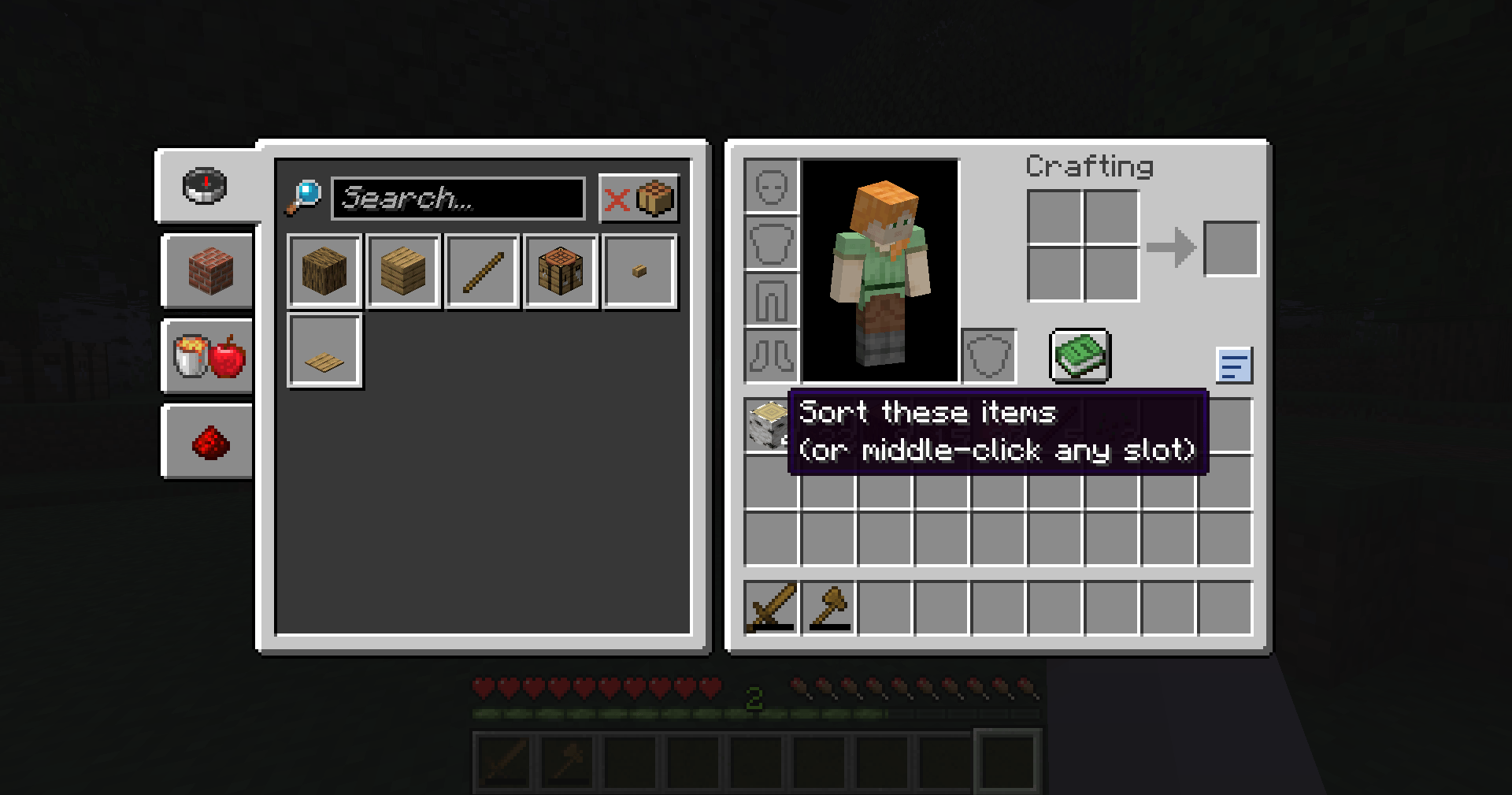
- A small **Sort** button appears in the top-right corner of every chest, double chest, ender chest, barrel and shulker box.
- A second **Sort** button sits next to your own inventory, both in containers and in your normal inventory screen (E).
- Sorting:
- **combines incomplete stacks** (three stacks of 20 cobblestone become one stack of 60),
- **groups identical items together**,
- puts everything in **alphabetical order**, with empty slots at the end.
- Items with different enchantments, names or contents stay as separate stacks, so nothing gets merged that shouldn't be.
- Your **hotbar is left alone** by default, so your tools stay where you put them.
### Middle-click to sort
- **Middle-click** (press the mouse wheel) on any slot to sort that part of the screen – the chest if you click a chest slot, your inventory if you click an inventory slot.
- Disabled in Creative mode, where middle-click copies items in vanilla.
### Quick Deposit
- Click the **Quick Deposit** button (the arrow into a tray) to move items from your inventory into the open chest – **but only item types that chest already contains**.
- Example: a chest with some cobblestone and iron gets all your cobblestone and iron, and nothing else.
- **Shift + click** Quick Deposit to only **top up stacks that aren't full yet**, without using any empty slots in the chest.
- Your hotbar is never emptied into chests (unless you turn that on).
## Works on every server
This is a **client-side only** mod. All sorting and depositing is done with normal inventory clicks – exactly what you'd do by hand, just faster – so it works in singleplayer and on multiplayer servers without the server needing the mod. It does not add items, look inside closed chests or do anything a player couldn't do by clicking.
(Some servers have their own rules about inventory mods; please follow them.)
## Settings
`config/smartchestorganizer.properties` is created the first time you start the game:
- `sortMode` – `name` (alphabetical, default) or `id` (Minecraft's own item order, similar to the Creative menu)
- `sortHotbar` – also sort the hotbar (default false)
- `depositHotbar` – also deposit from the hotbar (default false)
- `middleClickSort` – middle-click sorting on/off (default true)
- `showButtons` – show the buttons (default true)
Restart the game after editing the file.
## Requirements
- Minecraft **1.21 or 1.21.1**
- **Fabric Loader** 0.15.11 or newer
- **Fabric API**
- Java 21 (included with the official Minecraft launcher)
## Installation
1. Install Fabric Loader for Minecraft 1.21.1 (with the CurseForge app or the official Fabric installer).
2. Install **Fabric API** for 1.21.1 (listed as a required dependency; the CurseForge app installs it automatically).
3. Put the `smart-chest-organizer` .jar file in your `.minecraft/mods` folder.
4. Start the game with the Fabric profile and open a chest.
## Modpacks
You are free to include Smart Chest Organizer in any modpack, no need to ask.
## Also by this author
- **Floating Damage Indicators** – see damage, healing and critical hits as floating numbers.
- **Smart Tool Safety** – get warned before your tools break and pick the right tool with one key.
*The project logo is an illustration created with AI assistance; it is not an in-game screenshot. The screenshots in the gallery are real, unedited in-game captures.*
AI DISCLOSURE NOTICE (already at the end of the description; keep it there)
--------------------
Note: The project logo was created with AI assistance. All gallery screenshots are real in-game captures.
Screenshots
Gallery
-
 2026-10-31_20.06.23.png 2026-10-31_20.06.23.png
Versions
Files
Relations
Project Relations
More like this
Similar Mods
Suggestions use data such as tags, dependencies, dependents, descriptions, titles, and more to rank how much they overlap with this mod.
On ModDex
Community snapshot
By the numbers
Statistics

Get it on
Available Platforms
On ModDex
Community snapshot
By the numbers
Statistics
Resources