
Community listing page, reviews here may not be monitored by the author.
Smart Inventory by DntFold

No reviews yet
A quiet inventory helper for space warnings, worn gear, matching items, and putting matching materials away when you choose to.
Community voices
Reviews
No reviews yet. Be the first to review this project!
Get it on
Available Platforms
About
Project Details
For authors
Embed Badge
If you're the author of this project, you can embed a live badge anywhere that supports HTML or Markdown. It updates automatically whenever ratings change.
Use HTML for any page that supports it, or Markdown for README files and Markdown-based descriptions.
Identifiers
Platform IDs
Resources
External Links
About
Description
Smart Inventory
What does it do?
You know when you head out, fill your inventory, and only notice your gear is nearly broken once you’re already busy? Smart Inventory helps you keep track of that stuff without taking over your inventory.
It can warn you when space is getting tight, check your gear, highlight matching items, and help put matching materials into the storage you have open. You decide which parts stay on.
It won’t delete your items or start moving them around on its own. Marking something as junk is a preference, not permission to throw it away.
Quick inventory check
Press I for a quick inventory check. You can choose whether it includes space, worn gear, junk, food, and armor-slot checks. It’s there when you need a quick look at what you’re carrying instead of another menu to manage.
Space warnings & worn gear
Space warnings let you know when your inventory is getting full. You can change the warning levels and the wait between tips, so it doesn’t have to keep interrupting you.
There’s a separate Worn gear option for durability warnings. Worn-gear warnings are off by default in this build; turn them on in the settings to use them. The quick check has its own worn-gear setting.
Put matching items away
Open supported storage and use Put matching items away to deposit eligible items that match what’s already stored there. Nothing moves until you click the button.
Matching items in your hotbar count too, so keep that in mind before clicking. This is a matching-materials action, not a button that sorts your entire inventory or empties everything into a chest.
The storage menu has to pass the mod’s checks, and the server must allow the action. It doesn’t force transfers through every custom storage screen.
Junk & skipped tips
You can mark an item as junk, remove that mark, or skip tips for a particular item. There are also tips for materials you keep picking up and dropping. The point is to help you notice clutter, not make the decision for you.
Settings & customization
Press O to open Smart Inventory Settings. Space warnings, Worn gear, Show matching items, the Storage button, Junk tips, and Junk marking all have their own controls.
You can also adjust warning levels, time between tips, notice size and position, and what gets included in the quick check. Keep the parts you find useful and turn off the ones you don’t need.
I and O are the defaults in this build. Check Minecraft’s keybinds under Smart Inventory when another mod uses those keys or you prefer different ones.
Installation
This 1.0.0 build is for Minecraft Java Edition 1.21.1 on NeoForge 21.1.248 or newer within the 21.1 series. Put smart-inventory-1.21.1-1.0.0.jar in that profile’s mods folder, launch the game, and open the settings to choose your options.
The matching-deposit action is server-handled. For that feature in multiplayer, the server needs the mod and must allow Deposit Matching. Don’t expect client-side installation alone to add that action to an unmodded server.
FAQ
Will it automatically delete junk?
No. Marking an item as junk doesn’t delete it. It’s there for the checks and tips.
Does it automatically sort or move my items?
No. Putting matching materials away is an action you choose by clicking the storage button. It isn’t background sorting.
Will it leave my hotbar alone?
Not for that deposit action. Eligible matching hotbar items can be included, so check what you’re carrying before using it.
Does the storage button work with every storage mod?
Don’t assume every custom menu is supported. The mod checks the storage screen before allowing a transfer. Report the exact storage block and mod when the button doesn’t appear or the action is rejected.
Support / bug reports
Found something weird? Tell me what happened, which feature you were using, and your Minecraft, NeoForge, and Smart Inventory versions. For storage issues, include the storage mod, the block you opened, and whether you’re on a server.
A screenshot or short clip helps, especially when something highlights incorrectly or a warning doesn’t match what you’re carrying. Check crash reports for personal information before sharing them.
That’s pretty much the idea. Get the reminders you need, put your materials away when you choose to, and get back to playing.
Screenshots
Gallery
-
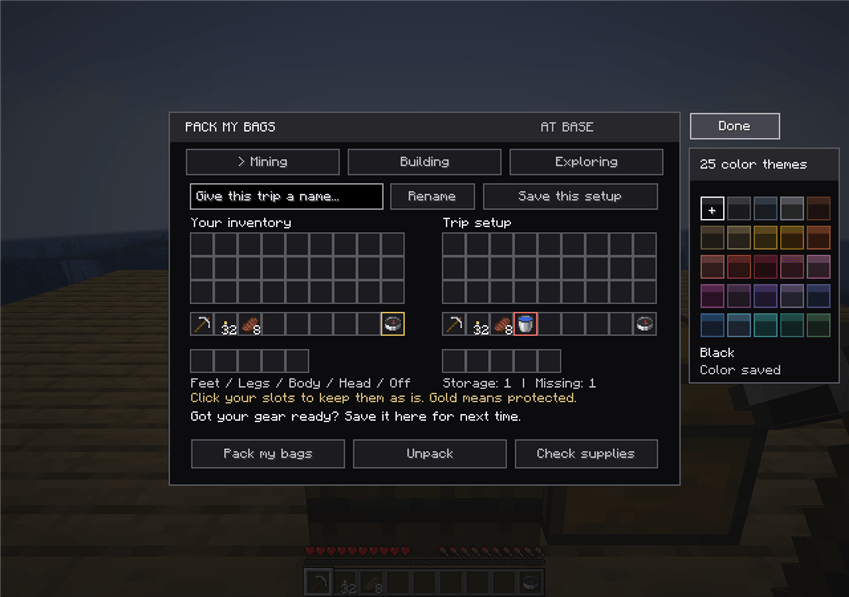 Smart Inventory UI and gameplay Smart Inventory Pack My Bags interface with trip presets, gear slots, storage counts, and color-theme panel.
Versions
Files
Relations
Project Relations
More like this
Similar Mods
Suggestions use data such as tags, dependencies, dependents, descriptions, titles, and more to rank how much they overlap with this mod.
On ModDex
Community snapshot
By the numbers
Statistics
Want to reach Minecraft players?
We're looking for a server hosting partner to feature here and other parts of the site. Interested? Send us a message!
Get in touchGet it on
Available Platforms
On ModDex
Community snapshot
By the numbers
Statistics
Resources