
Community listing page, reviews here may not be monitored by the author.
Smart Inventory Manager


No reviews yet
A lightweight Fabric client mod that adds safe icon buttons and keybinds to quickly sort inventories and common containers.
Community voices
Reviews
No reviews yet. Be the first to review this project!
Get it on
Available Platforms
Compatibility
Supported Environments
Runs entirely on the client. Works on vanilla servers.
About
Project Details
For authors
Embed Badge
If you're the author of this project, you can embed a live badge anywhere that supports HTML or Markdown. It updates automatically whenever ratings change.
Use HTML for any page that supports it, or Markdown for README files and Markdown-based descriptions.
Identifiers
Platform IDs
Resources
External Links
About
Description
# Smart Inventory Manager
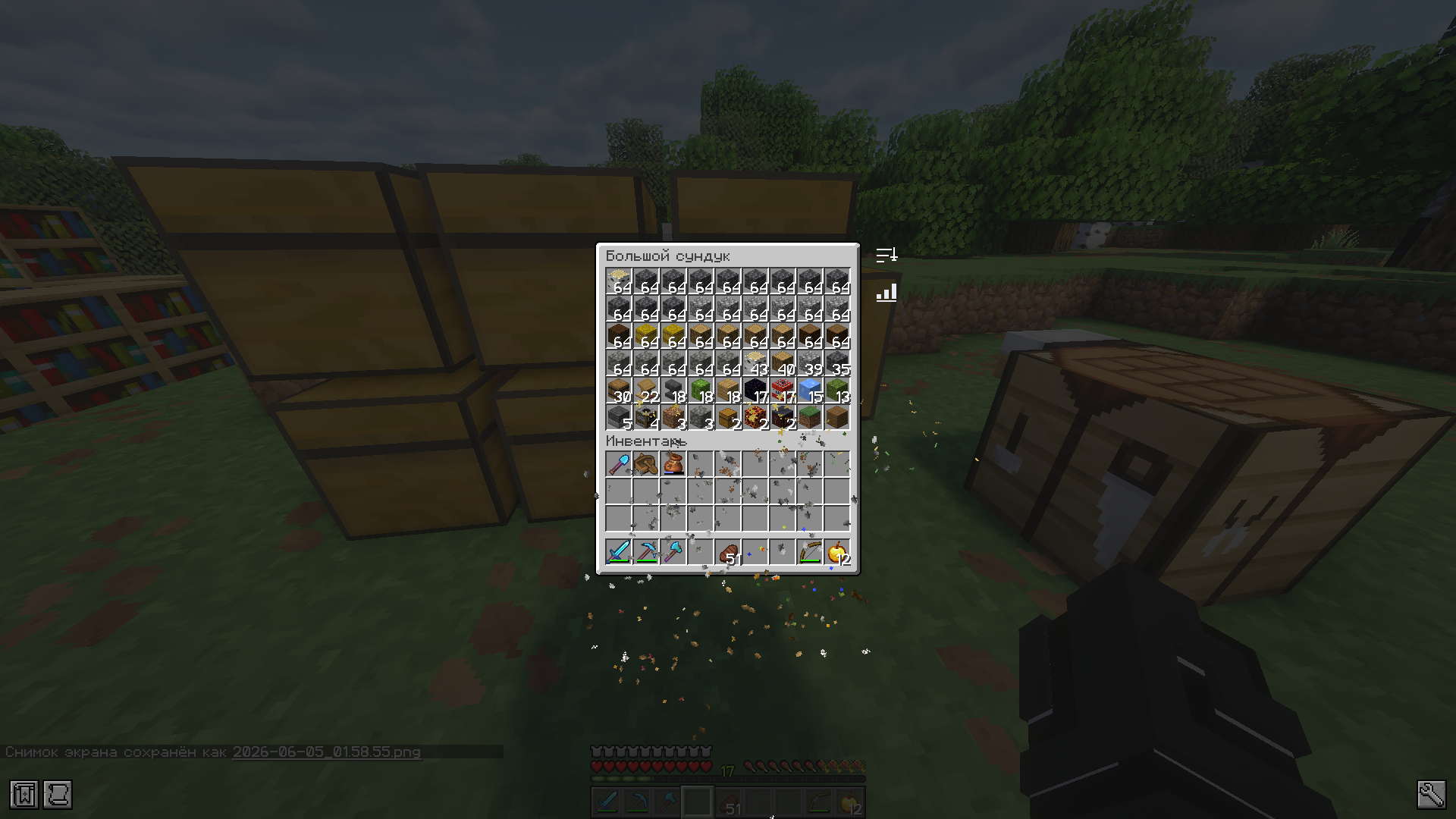
Smart Inventory Manager is a client-side Fabric mod that adds fast, safe inventory sorting with clean icon buttons, keybinds, multiple sort modes, JSON config recovery, Mod Menu support, and broad localization.
Author: Matfi1
## Features
- Sort the player inventory from the inventory screen.
- Sort common containers: chest, barrel, shulker box, hopper, dispenser, and dropper.
- Use compact icon buttons instead of large text buttons.
- Switch sorting mode from an in-game icon button.
- The mode icon changes to match the selected sort mode.
- Long hover tooltips explain each icon.
- Settings are available from the main/pause menu and with a keybind.
- Sorting respects protected hotbar slots when `ignoreHotbar` is enabled.
- Sorting respects configured `lockedSlots`.
- Invalid config files are backed up and replaced with defaults.
- No mixins in the MVP.
## Sort Modes
- Item ID
- Category
- Count
- Durability
- Name A-Z
- Name Z-A
## Controls
Default keybinds:
- `I`: sort player inventory
- `O`: sort opened container
- `K`: open Smart Inventory Manager settings
You can change these in Minecraft's controls menu.
## Supported Versions
Built Modrinth jars are saved in `dist/modrinth/`.
| Minecraft | Jar |
| --- | --- |
| 1.21 | `SmIm-1.21.jar` |
| 1.21.1 | `SmIm-1.21.1.jar` |
| 1.21.2 | `SmIm-1.21.2.jar` |
| 1.21.3 | `SmIm-1.21.3.jar` |
| 1.21.4 | `SmIm-1.21.4.jar` |
| 1.21.5 | `SmIm-1.21.5.jar` |
| 1.21.6 | `SmIm-1.21.6.jar` |
| 1.21.7 | `SmIm-1.21.7.jar` |
| 1.21.8 | `SmIm-1.21.8.jar` |
| 1.21.9 | `SmIm-1.21.9.jar` |
| 1.21.10 | `SmIm-1.21.10.jar` |
| 1.21.11 | `SmIm-1.21.11.jar` |
| 26.1 | `SmIm-26.1.jar` |
| 26.1.2 | `SmIm-26.1.2.jar` |
Minecraft `26.1` and `26.1.2` require Java 25.
## Installation
1. Install Fabric Loader for your Minecraft version.
2. Install Fabric API for your Minecraft version.
3. Put the matching `SmIm-*.jar` file into your `mods` folder.
4. Optional: install Mod Menu to open the config screen from the mods list.
This is a client-only mod. It is not required on servers.
## Config
The config file is created here:
```text
config/smartinventorymanager.json
```
Config keys:
- `enableInventorySort`
- `enableContainerSort`
- `buttonSide`
- `buttonScale`
- `animationEnabled`
- `sortMode`
- `ignoreHotbar`
- `lockedSlots`
If the JSON is broken, Smart Inventory Manager renames it to a timestamped `.broken` backup and creates a new default config.
## Localization
Included languages:
- English (`en_us`)
- Russian (`ru_ru`)
- German (`de_de`)
- French (`fr_fr`)
- Spanish (`es_es`)
- Portuguese, Brazil (`pt_br`)
- Italian (`it_it`)
- Polish (`pl_pl`)
- Ukrainian (`uk_ua`)
- Turkish (`tr_tr`)
- Dutch (`nl_nl`)
- Czech (`cs_cz`)
- Hungarian (`hu_hu`)
- Chinese, Simplified (`zh_cn`)
- Chinese, Traditional (`zh_tw`)
- Japanese (`ja_jp`)
- Korean (`ko_kr`)
## Compatibility
Smart Inventory Manager uses Fabric screen events and avoids unsafe widget-list indexes. If a screen is not recognized, the feature path fails softly instead of crashing the client.
Manual compatibility test targets:
- Sodium
- Iris
- Mod Menu
- Mouse Tweaks
- Shulker Box Tooltip
- JEI
- libIPN
These are manual test targets, not full compatibility certifications. Mods that also move inventory slots may conflict if both mods sort at the same time.
## Building
Build all supported Modrinth files:
```bash
./scripts/build-modrinth.sh
```
Build one Minecraft version:
```bash
./gradlew clean build -PmcVersion=1.21.11
```
Build `26.x` with Java 25:
```bash
JAVA_HOME="$PWD/.jdks/jdk-25" ./gradlew clean build -PmcVersion=26.1
JAVA_HOME="$PWD/.jdks/jdk-25" ./gradlew clean build -PmcVersion=26.1.2
```
Successful jars are copied to:
```text
dist/modrinth/
```
## Manual Test Plan
- Open the player inventory.
- Confirm the sort and mode icons are outside the inventory GUI, not in the center.
- Open chest, barrel, shulker box, hopper, dispenser, and dropper.
- Click Sort in every supported screen.
- Switch sort modes and confirm the mode icon changes.
- Use keybinds for player inventory and container sorting.
- Change GUI scale and reopen screens.
- Corrupt the config JSON and confirm backup plus default regeneration.
- Launch with Mod Menu and confirm the config screen opens.
- Launch with Sodium/Iris and confirm the GUI still renders.
## Roadmap
Planned ideas for future releases:
- Quick Stack
- Restock Hotbar
- Auto Refill
- Interactive Slot Locking UI
- Clean Inventory
## License
MIT
Smart Inventory Manager
Smart Inventory Manager is a client-side Fabric mod that adds fast, safe inventory sorting with clean icon buttons, keybinds, multiple sort modes, JSON config recovery, Mod Menu support, and broad localization.
Author: Matfi1
Features
- Sort the player inventory from the inventory screen.
- Sort common containers: chest, barrel, shulker box, hopper, dispenser, and dropper.
- Use compact icon buttons instead of large text buttons.
- Switch sorting mode from an in-game icon button.
- The mode icon changes to match the selected sort mode.
- Long hover tooltips explain each icon.
- Settings are available from the main/pause menu and with a keybind.
- Sorting respects protected hotbar slots when
ignoreHotbaris enabled. - Sorting respects configured
lockedSlots. - Invalid config files are backed up and replaced with defaults.
- No mixins in the MVP.
Sort Modes
- Item ID
- Category
- Count
- Durability
- Name A-Z
- Name Z-A
Controls
Default keybinds:
I: sort player inventoryO: sort opened containerK: open Smart Inventory Manager settings
You can change these in Minecraft's controls menu.
Supported Versions
Built Modrinth jars are saved in dist/modrinth/.
| Minecraft | Jar |
|---|---|
| 1.21 | SmIm-1.21.jar |
| 1.21.1 | SmIm-1.21.1.jar |
| 1.21.2 | SmIm-1.21.2.jar |
| 1.21.3 | SmIm-1.21.3.jar |
| 1.21.4 | SmIm-1.21.4.jar |
| 1.21.5 | SmIm-1.21.5.jar |
| 1.21.6 | SmIm-1.21.6.jar |
| 1.21.7 | SmIm-1.21.7.jar |
| 1.21.8 | SmIm-1.21.8.jar |
| 1.21.9 | SmIm-1.21.9.jar |
| 1.21.10 | SmIm-1.21.10.jar |
| 1.21.11 | SmIm-1.21.11.jar |
| 26.1 | SmIm-26.1.jar |
| 26.1.2 | SmIm-26.1.2.jar |
Minecraft 26.1 and 26.1.2 require Java 25.
Installation
- Install Fabric Loader for your Minecraft version.
- Install Fabric API for your Minecraft version.
- Put the matching
SmIm-*.jarfile into yourmodsfolder. - Optional: install Mod Menu to open the config screen from the mods list.
This is a client-only mod. It is not required on servers.
Config
The config file is created here:
config/smartinventorymanager.json
Config keys:
enableInventorySortenableContainerSortbuttonSidebuttonScaleanimationEnabledsortModeignoreHotbarlockedSlots
If the JSON is broken, Smart Inventory Manager renames it to a timestamped .broken backup and creates a new default config.
Localization
Included languages:
- English (
en_us) - Russian (
ru_ru) - German (
de_de) - French (
fr_fr) - Spanish (
es_es) - Portuguese, Brazil (
pt_br) - Italian (
it_it) - Polish (
pl_pl) - Ukrainian (
uk_ua) - Turkish (
tr_tr) - Dutch (
nl_nl) - Czech (
cs_cz) - Hungarian (
hu_hu) - Chinese, Simplified (
zh_cn) - Chinese, Traditional (
zh_tw) - Japanese (
ja_jp) - Korean (
ko_kr)
Compatibility
Smart Inventory Manager uses Fabric screen events and avoids unsafe widget-list indexes. If a screen is not recognized, the feature path fails softly instead of crashing the client.
Manual compatibility test targets:
- Sodium
- Iris
- Mod Menu
- Mouse Tweaks
- Shulker Box Tooltip
- JEI
- libIPN
These are manual test targets, not full compatibility certifications. Mods that also move inventory slots may conflict if both mods sort at the same time.
Building
Build all supported Modrinth files:
./scripts/build-modrinth.sh
Build one Minecraft version:
./gradlew clean build -PmcVersion=1.21.11
Build 26.x with Java 25:
JAVA_HOME="$PWD/.jdks/jdk-25" ./gradlew clean build -PmcVersion=26.1
JAVA_HOME="$PWD/.jdks/jdk-25" ./gradlew clean build -PmcVersion=26.1.2
Successful jars are copied to:
dist/modrinth/
Manual Test Plan
- Open the player inventory.
- Confirm the sort and mode icons are outside the inventory GUI, not in the center.
- Open chest, barrel, shulker box, hopper, dispenser, and dropper.
- Click Sort in every supported screen.
- Switch sort modes and confirm the mode icon changes.
- Use keybinds for player inventory and container sorting.
- Change GUI scale and reopen screens.
- Corrupt the config JSON and confirm backup plus default regeneration.
- Launch with Mod Menu and confirm the config screen opens.
- Launch with Sodium/Iris and confirm the GUI still renders.
Roadmap
Planned ideas for future releases:
- Quick Stack
- Restock Hotbar
- Auto Refill
- Interactive Slot Locking UI
- Clean Inventory
License
MIT
Screenshots
Gallery
-
 smart-inventory-manager.gif smart-inventory-manager.gif

Versions
Files
Relations
Project Relations
More like this
Similar Mods
Suggestions use data such as tags, dependencies, dependents, descriptions, titles, and more to rank how much they overlap with this mod.
On ModDex
Community snapshot
By the numbers
Statistics
Want to reach Minecraft players?
We're looking for a server hosting partner to feature here and other parts of the site. Interested? Send us a message!
Get in touchGet it on
Available Platforms
On ModDex
Community snapshot
By the numbers
Statistics
Resources