Community listing page, reviews may not be monitored by the author.
Smart Keybinds

No reviews yet
Find conflicting keybinds, inspect every assignment on a key, and choose an unused key in one Minecraft-native screen.

Community voices
Reviews
No reviews yet. Be the first to review this project!
Get it on
Available Platforms
About
Project Details
For authors
Embed Badge
If you're the author of this project, you can embed a live badge anywhere that supports HTML or Markdown. It updates automatically whenever ratings change.
Use HTML for any page that supports it, or Markdown for README files and Markdown-based descriptions.
Identifiers
Platform IDs
Resources
External Links
About
Description
See what shares a key.
You press G to open a menu, and another mod reacts too. Smart Keybinds helps you find the actions sharing that key and choose a free one from a single Minecraft-native screen.
Find the conflict
Search registered keybinds by action, mod or key name. Highlight conflicts, inspect the details, or select Same key to see every assignment on the selected key—even when other filters hide it.
Make the change yourself
Rebind an action to a keyboard key or mouse button. Or request a Free key suggestion and click Apply when you want to use it. Changes are saved through Minecraft's normal controls settings.
On NeoForge, conflict checks take key contexts and modifier overlaps into account. Existing Ctrl, Shift and Alt modifiers are retained when you change an action's base key.
Open it your way
Press F8 while playing, or open Options → Controls → Key Binds → Key Inspector. The button provides a way in even if F8 is already assigned elsewhere.
The searchable settings screen includes conflict highlighting, suggestion options, row count, and mod allow/deny lists. English and Russian are included.
Installation
- Minecraft Java Edition 1.21.1 · Java 21 · client only
- Fabric: Fabric Loader 0.20.1+ and Fabric API 0.116.17+1.21.1 or later for Minecraft 1.21.1.
- NeoForge: NeoForge 21.1.265+ within the 21.1 series.
Download the file for your loader and place it in your client's mods folder. Install one build. The server does not need this mod.
The inspector refreshes when opened or explicitly refreshed; it does not scan your world or poll bindings while idle. Everything runs locally.
A note on mod names
Minecraft has no universal registry connecting each keybind to its owning mod. Smart Keybinds uses recognizable namespaces and labels uncertain cases Unknown mod. You can add ownership overrides in the configuration. Free-key suggestions cover ordinary letter keys, with an optional letters-and-numbers mode.
Русское описание
Узнайте, какие действия делят одну клавишу.
Smart Keybinds показывает конфликты назначений в одном окне Minecraft. Ищите действие по названию, моду или клавише, смотрите все назначения на выбранную кнопку и меняйте привязки прямо в инспекторе.
Кнопка «Свободная клавиша» предлагает незанятую букву, а применение остаётся за вами. Можно включить предложения с цифрами, настроить подсветку и списки отображаемых модов. Изменения привязок сохраняются в обычных настройках Minecraft.
Открытие: F8 в игре или Настройки → Управление → Назначение клавиш → Инспектор клавиш. Если принадлежность действия определить нельзя, оно помечается как неизвестное; для таких случаев доступны ручные уточнения в конфигурации.
Minecraft 1.21.1, Java 21, Fabric или NeoForge. Устанавливается только на клиент. Для Fabric требуется Fabric API. Интерфейс доступен на русском и английском.
Screenshots
Gallery
-
Smart Keybinds — Find conflicts. Choose a free key. Project cover for Smart Keybinds 0.1.0. A client-side keybind inspector for Minecraft 1.21.1, available for Fabric and NeoForge.
-
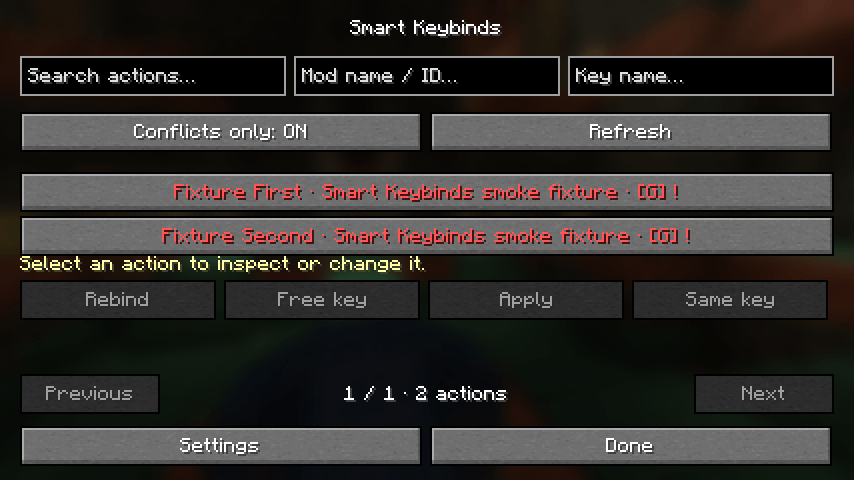 Key Inspector — conflict highlighting Real in-game inspector on Fabric. Two deliberately conflicting test bindings demonstrate the conflict filter and highlighting.
-
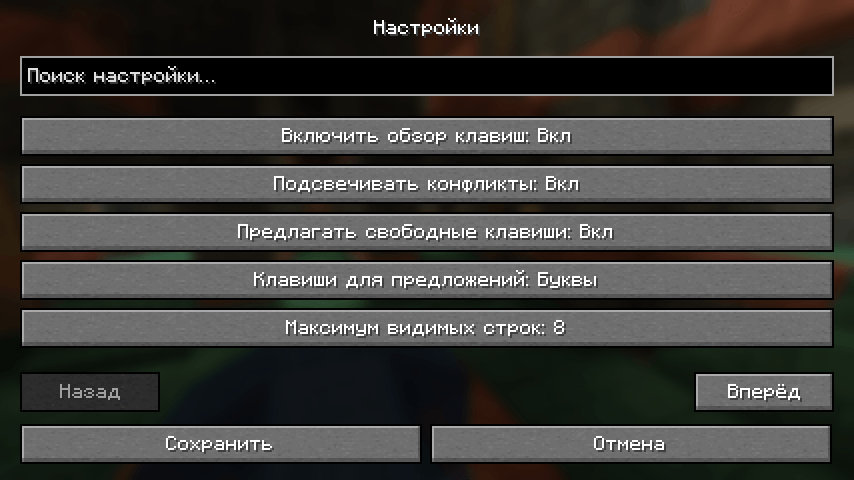 Searchable settings — Russian interface Real in-game settings screen on NeoForge with Russian localization. Configure conflict highlighting, free-key suggestions, and the number of visible rows.
Versions
Files
Relations
Project Relations
More like this
Similar Mods
Suggestions use data such as tags, dependencies, dependents, descriptions, titles, and more to rank how much they overlap with this mod.
On ModDex
Community snapshot
By the numbers
Statistics

Get it on
Available Platforms
On ModDex
Community snapshot
By the numbers
Statistics
Resources