Community listing page, reviews may not be monitored by the author.
Smart Tool Safety

No reviews yet
Lightweight, client-side: Never lose a diamond pickaxe again: get warned before your gear breaks, stop nearly broken tools from being used up, and hold G to grab the right tool.

Community voices
Reviews
No reviews yet. Be the first to review this project!
Get it on
Available Platforms
About
Project Details
For authors
Embed Badge
If you're the author of this project, you can embed a live badge anywhere that supports HTML or Markdown. It updates automatically whenever ratings change.
Use HTML for any page that supports it, or Markdown for README files and Markdown-based descriptions.
Identifiers
Platform IDs
Resources
External Links
About
Description
# Smart Tool Safety
You've been strip-mining for an hour, your enchanted diamond pickaxe is doing its job... and then it snaps. Gone, along with Efficiency V and Mending. Smart Tool Safety watches your gear for you, so the only time a tool breaks is when you decide it should.
## Features
### Low durability warning
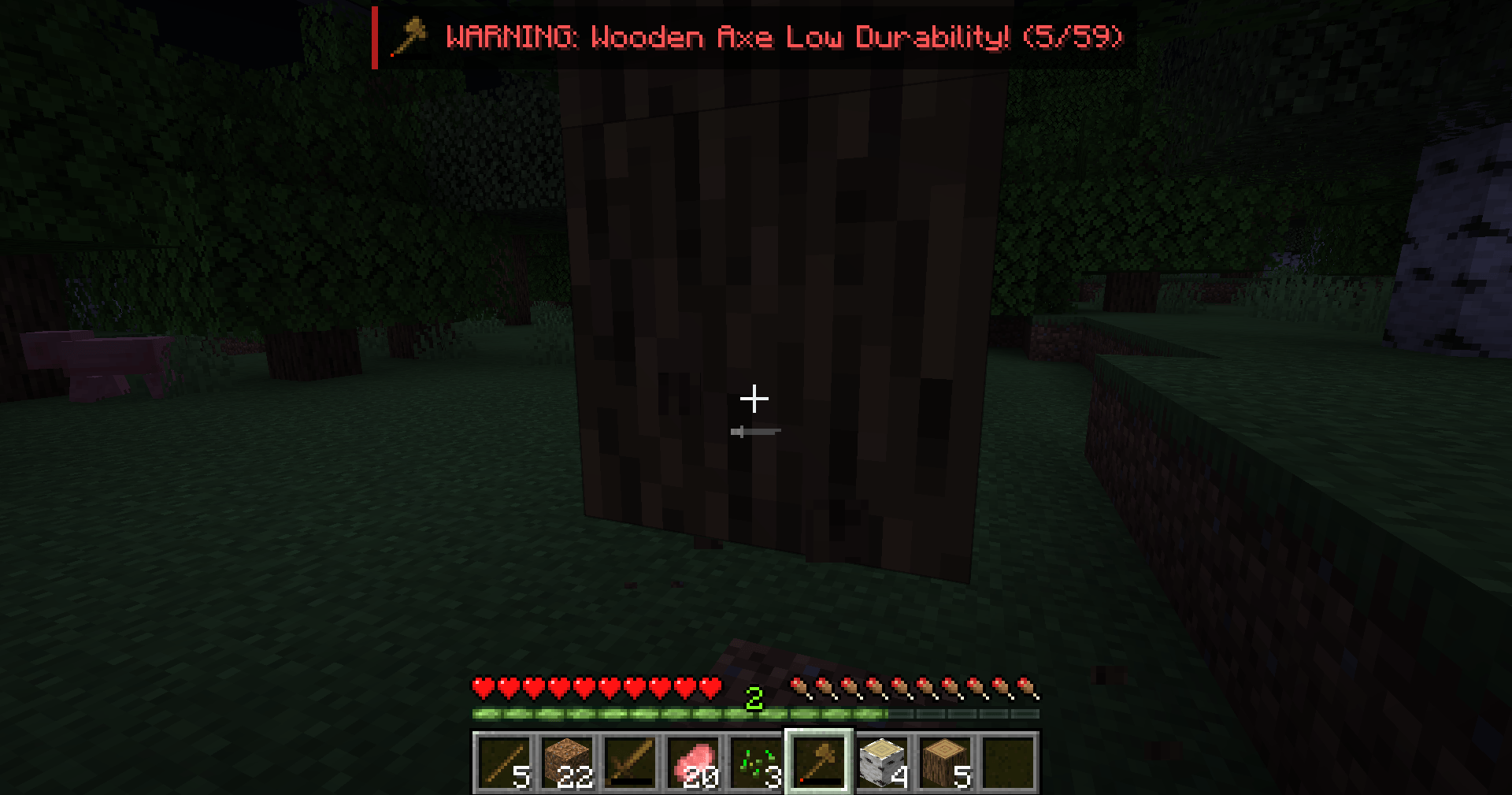
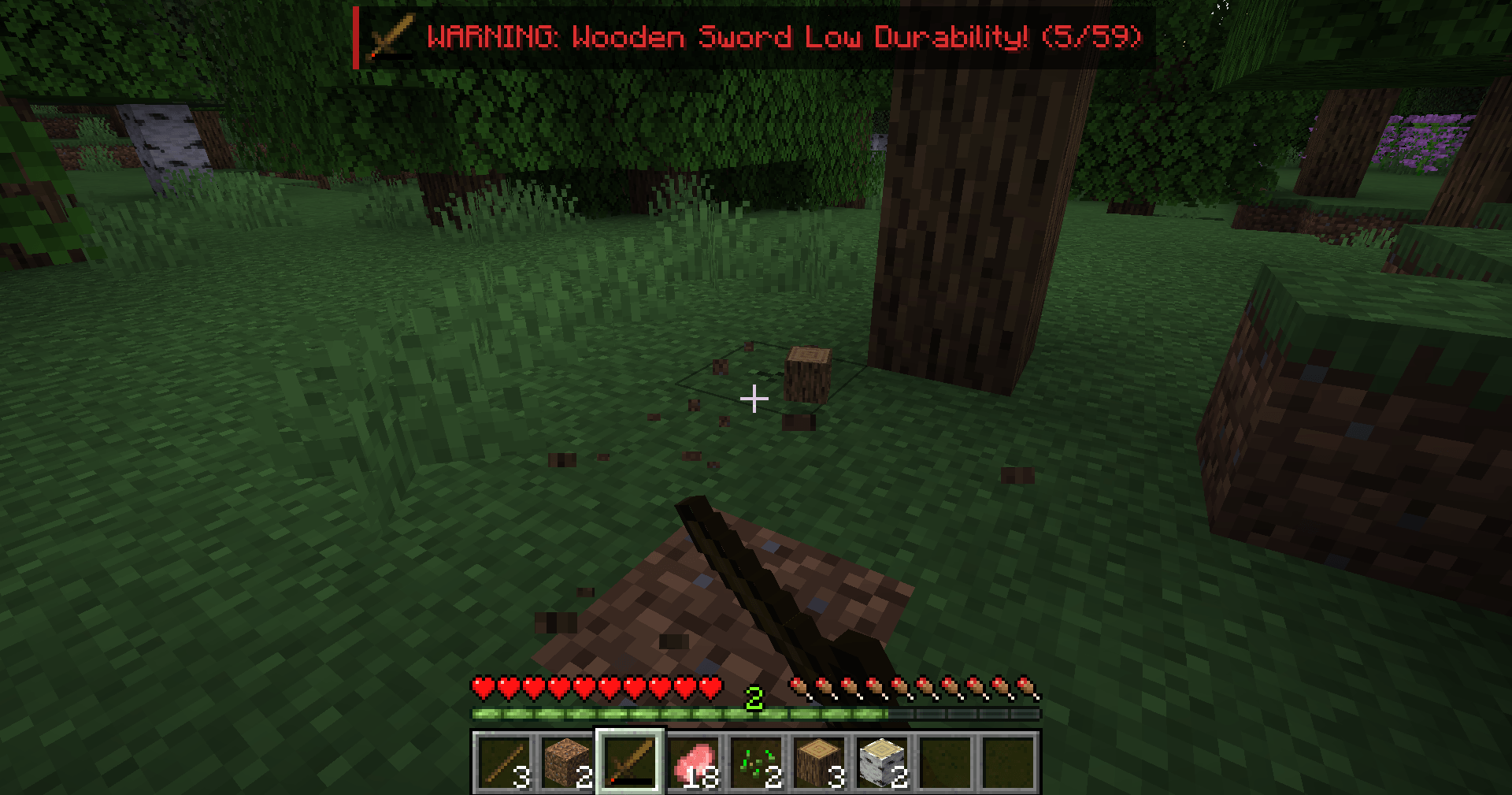
- When a tool, weapon or armor piece you are **holding or wearing** drops to **10% durability or less**, a red warning appears at the top of your screen:
`WARNING: Diamond Pickaxe Low Durability! (120/1561)`
- It shows the item's icon and how much durability is left, and starts flashing when the item is about to break.
- A short note-block "ping" plays the moment an item in your hotbar, offhand or armor slots becomes low. It does not repeat when you scroll through your hotbar.
### Tool break protection
- When your main-hand tool or weapon is down to its **last 1% of durability** (at least the last 2 uses), the mod **stops you from mining or attacking with it**, so it cannot break.
- It then switches you to an **empty hotbar slot** (or a slot without a tool), so you can keep playing right away.
- A message above your hotbar tells you which item was saved and how much durability it has left.
- Want to use those last points anyway? Press **B** to turn safety off, use the tool, and press **B** again.
### Smart Tool Swap
- **Hold G** while looking at a block and the mod picks the best tool in your hotbar for it: pickaxe for stone and ores, axe for wood, shovel for dirt and sand, shears for wool and leaves, a sword for cobwebs.
- It always prefers a tool that actually **drops** the block (so it will never pick a wooden pickaxe for diamond ore if you have an iron one).
- Nearly broken tools are skipped.
- **Let go of G** and you're back on the slot you had before.
## Controls
| Key | Action |
|-----|--------|
| **B** | Turn Smart Tool Safety on/off (warnings and protection) |
| **G** (hold) | Smart Tool Swap |
Both keys can be changed in **Options → Controls → Key Binds → Smart Tool Safety**.
## Settings
The file `config/smarttoolsafety.properties` is created on first launch. You can change:
- `warnPercent` – when the warning appears (default 10)
- `protectPercent` – when protection kicks in (default 1, always at least 2 uses)
- `showWarnings`, `playSound`, `protectTools` – turn single features on or off (true/false)
Restart the game after editing the file.
## Works everywhere
This is a **client-side only** mod. Install it on your own game and it works in singleplayer and on any multiplayer server – the server does not need it. It only switches your selected hotbar slot, the same thing scrolling your mouse wheel does. If a server has its own rules about tool-swapping mods, follow them; you can also simply not use the G key.
Protection does nothing in Creative mode, where tools don't lose durability anyway.
## Requirements
- Minecraft **1.21 or 1.21.1**
- **Fabric Loader** 0.15.11 or newer
- **Fabric API**
- Java 21 (included with the official Minecraft launcher)
## Installation
1. Install Fabric Loader for Minecraft 1.21.1 (with the CurseForge app or the official Fabric installer).
2. Install **Fabric API** for 1.21.1 (it is listed as a required dependency, the CurseForge app installs it automatically).
3. Put the `smart-tool-safety` .jar file in your `.minecraft/mods` folder.
4. Start the game with the Fabric profile.
## Modpacks
You are free to include Smart Tool Safety in any modpack, no need to ask.
## Good to know
- Protection covers mining and attacking. Using a tool with right-click (stripping logs, making paths, tilling, shearing sheep, flint and steel) is not blocked – watch the warning for those.
- Armor, elytra and shields can't be "un-used", so they get the warning only.
*The project logo is an illustration created with AI assistance; it is not an in-game screenshot. The screenshots in the gallery are real, unedited in-game captures.*
AI DISCLOSURE NOTICE (already at the end of the description; keep it there)
--------------------
Note: The project logo was created with AI assistance. All gallery screenshots are real in-game captures.
Screenshots
Gallery
-
 2026-10-31_19.21.03.png 2026-10-31_19.21.03.png
-
 2026-10-31_19.17.19.png 2026-10-31_19.17.19.png
Versions
Files
Relations
Project Relations
More like this
Similar Mods
Suggestions use data such as tags, dependencies, dependents, descriptions, titles, and more to rank how much they overlap with this mod.
On ModDex
Community snapshot
By the numbers
Statistics

Get it on
Available Platforms
On ModDex
Community snapshot
By the numbers
Statistics
Resources