Community listing page, reviews here may not be monitored by the author.
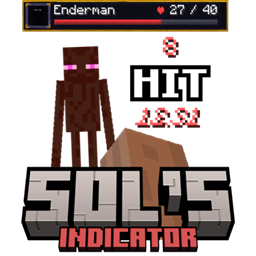
Sol's Indicator (Damage, Health, Custom Boss Bar HUD, and more!)


No reviews yet
A lightweight mod that gives you real-time visual feedback on every hit you land. Know exactly how much damage you're dealing, with razor-sharp accuracy right as it happens.
Community voices
Reviews
No reviews yet. Be the first to review this project!
Get it on
Available Platforms
Compatibility
Supported Environments
Must be installed on both the client and the server.
About
Project Details
For authors
Embed Badge
If you're the author of this project, you can embed a live badge anywhere that supports HTML or Markdown. It updates automatically whenever ratings change.
Use HTML for any page that supports it, or Markdown for README files and Markdown-based descriptions.
Identifiers
Platform IDs
Resources
External Links
About
Description
Sol's Damage Indicator
Author: solmochi
Need help, want to suggest a feature, or found a bug?
Join our community to catch exclusive early previews and upcoming changelogs before they go live!

Description
Sol's Damage Indicator is a visual combat HUD mod that shows exactly how much damage you deal in real-time. See floating damage numbers on enemies, track your hit combos with a stylish center-screen HUD, monitor any entity's health with a crosshair indicator, and watch boss fights come alive with custom RPG-themed boss bars featuring per-player damage rankings and cinematic death animations.
⚠️ Works in two modes — install on both server and client for full accuracy (melee, projectiles, spells, abilities), or use client-only for basic melee tracking.
✅ Fully functionable and playable on a Single-Player World.
Features
🌟 Damage Indicator HUD
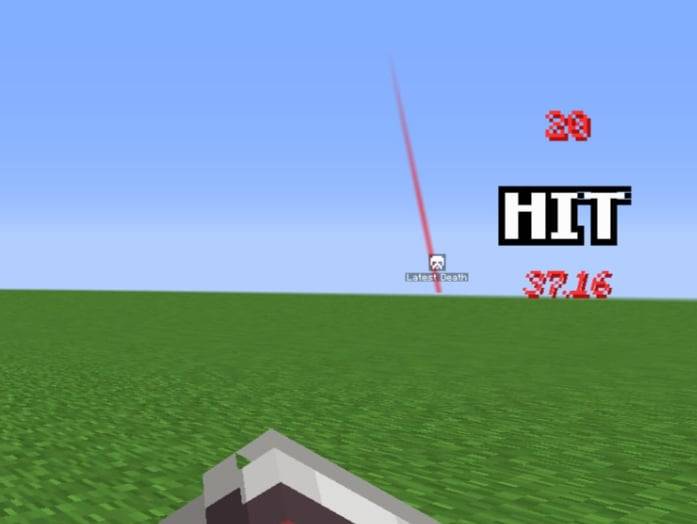
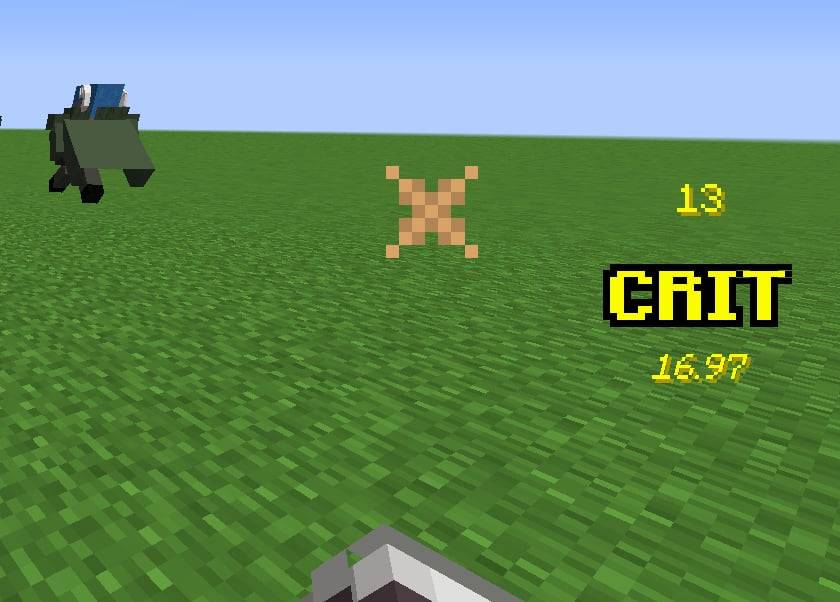
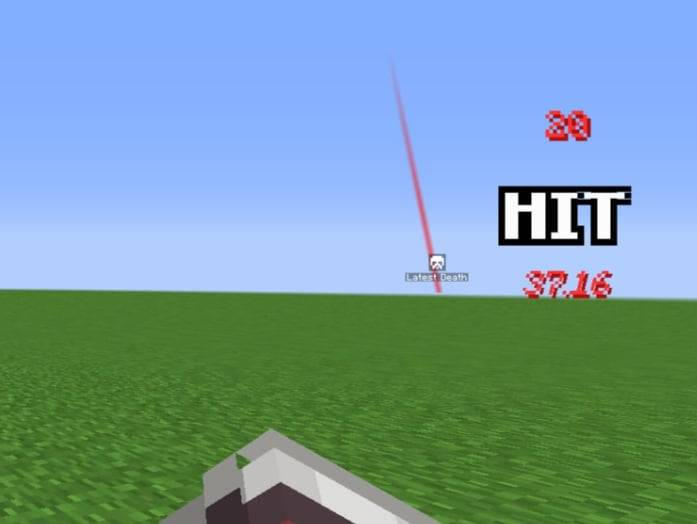
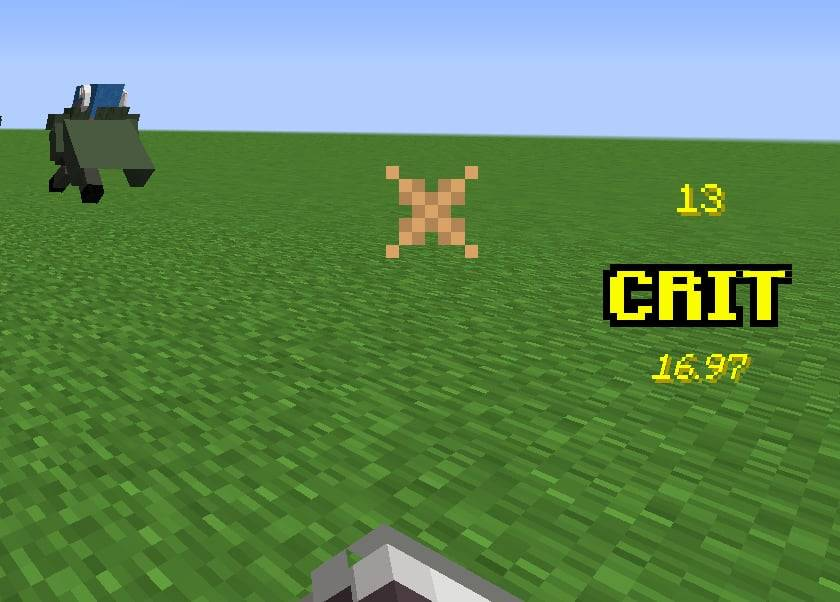
- Hit Counter & Combo Tracker — Displays hit count, "HIT" / "CRIT" text, and cumulative damage dealt on the center-right of your screen
- Throbbing Pulse Animation — Each hit triggers a scale pulse that stacks during rapid combos
- Critical Hit Detection — Crits display in green with "CRIT" text; relic crits show the multiplier (e.g., "CRIT 2.1x") in bright green
- Summary Phase — After 3.5 seconds of no hits, transitions to a summary showing total damage dealt with a dramatic pulsed "DAMAGE" label
- Auto-Fade — HUD fades out after 5 seconds of inactivity, then resets for the next combat
- Configurable Position — Can be placed on center-left or center-right of the screen
🌟 Floating Damage Numbers
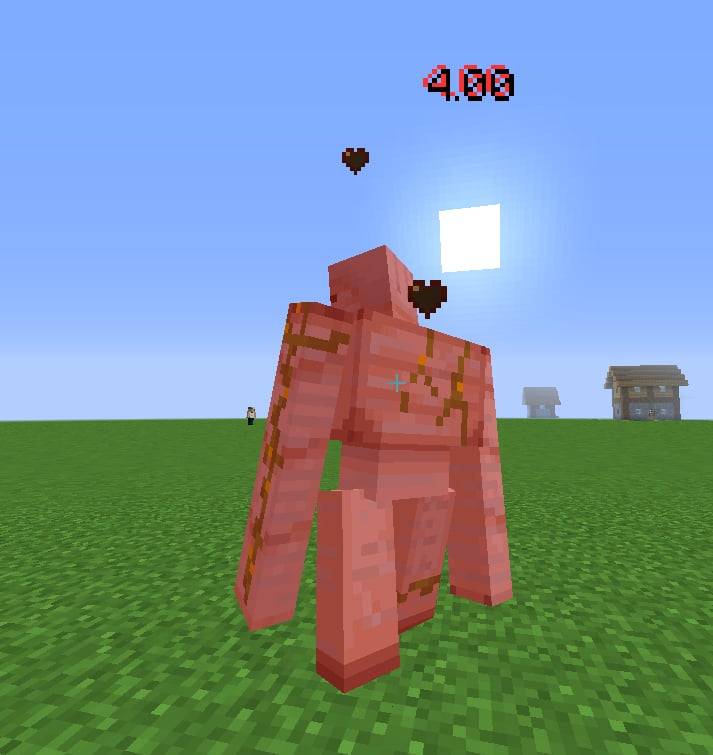
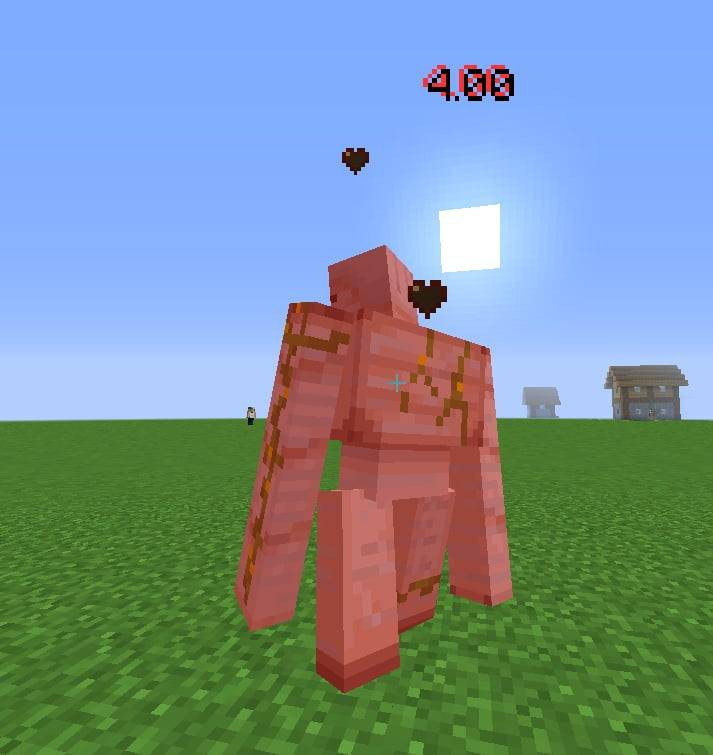
- World-Space Numbers — Damage numbers float upward from hit entities and fade out over 1.5 seconds
- Color-Coded — Red for normal hits, green for vanilla crits, bright green for relic system crits
- Crit Multiplier Display — Relic crits show the multiplier suffix (e.g., "12.50 2.1x")
- Spawn Animation — Numbers scale up with a quick throb on spawn, then settle
- Random Spread — Multiple simultaneous numbers spread out slightly to avoid overlap
🌟 Custom Boss Bar HUD
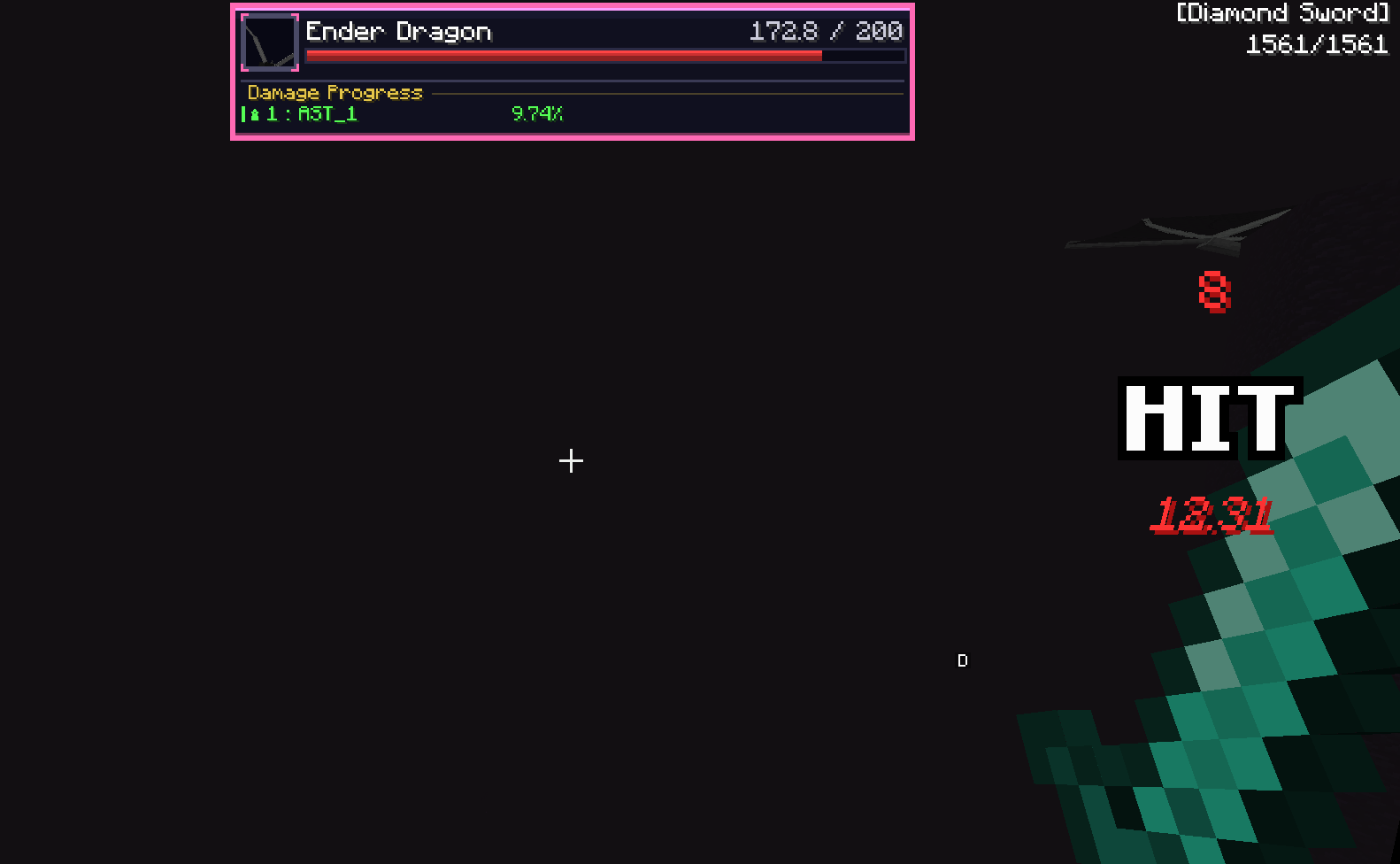
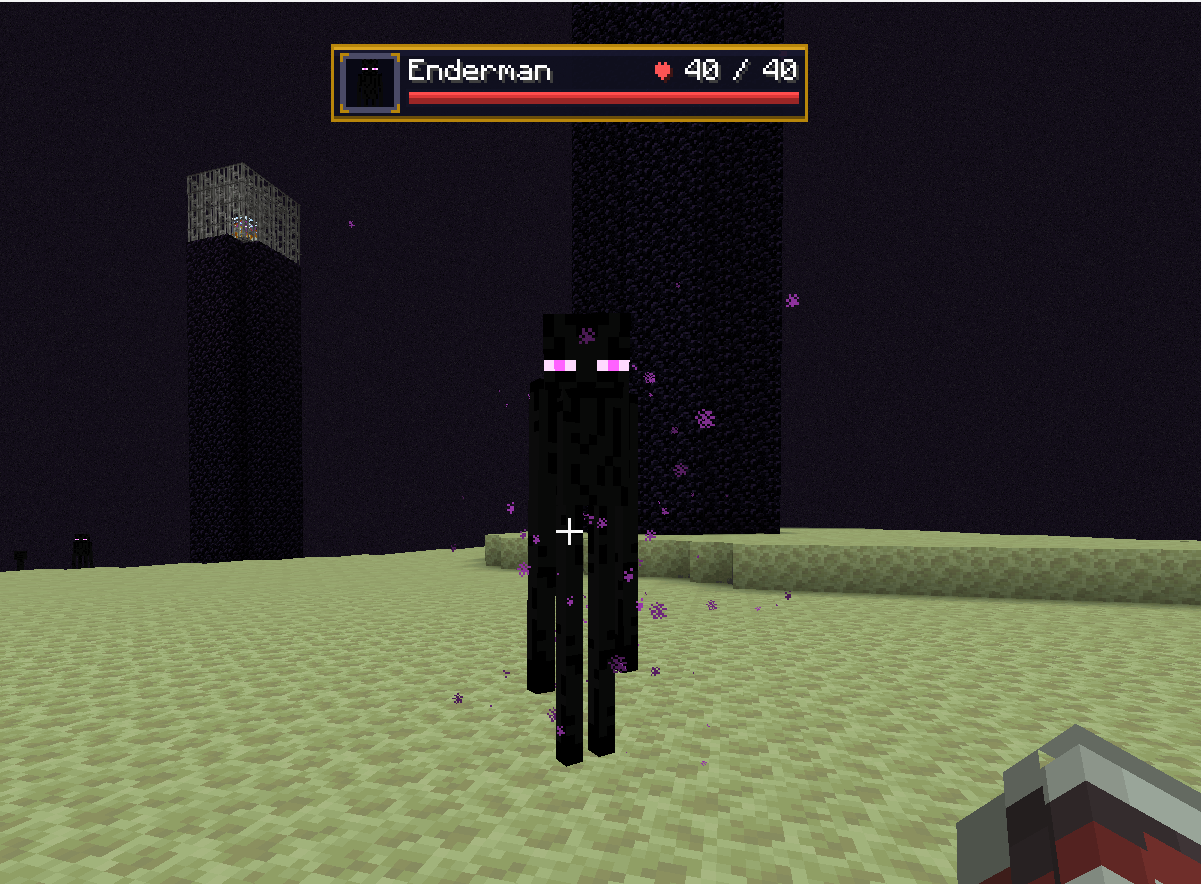
- RPG-Themed Design — Fully replaces vanilla boss bars with a styled panel featuring gold frames, gradient health bars, and entity portraits
- Entity Portraits — Renders a live 3D model of the boss entity inside a framed portrait box
- Dynamic Sizing — Bar width auto-expands to fit long entity names and HP text
- Color-Matched Bars — Health bar color adapts to the entity's custom name color, boss bar color setting, or mob type (red/green/blue)
- HP Numbers — Shows exact current HP / max HP (formatted: e.g., "125.4K / 500.0K")
- Entity Titles — Displays CustomNPC titles below the entity name when available
- Multiple Boss Bars — Supports configurable max boss bars on screen (default: 3) with "+N more" overflow label
- Compact Mode — 2nd+ boss bars use a compact layout showing only your own damage contribution
- Stale Data Cleanup — Automatically clears damage progress when entities heal to full or die
🌟 Boss Damage Progress
- Per-Player Damage Tracking — Server tracks cumulative damage dealt by each player to boss entities
- Damage Percentage Display — Shows each player's damage as a percentage of the boss's max HP (e.g., "PlayerName: 10.83%")
- RPG Rank Styling — Top contributors get medal icons: crown for #1, diamonds for #2–3, arrows for #4+
- 2-Column Grid Layout — Top 5 contributors displayed in an organized grid with a "Damage Progress" header
- Self-Highlighting — Your own name is highlighted in green; other players appear in white
- Self-Append — If you're not in the top 5, your entry is appended separately so you always see your contribution
- Auto-Detection — Uses reflection to detect any entity with a
ServerBossInfofield (supports vanilla + all modded bosses) - Inactivity Pruning — Players are removed from the damage list after configurable minutes of inactivity (default: 5 min)
🌟 Boss Death Animation
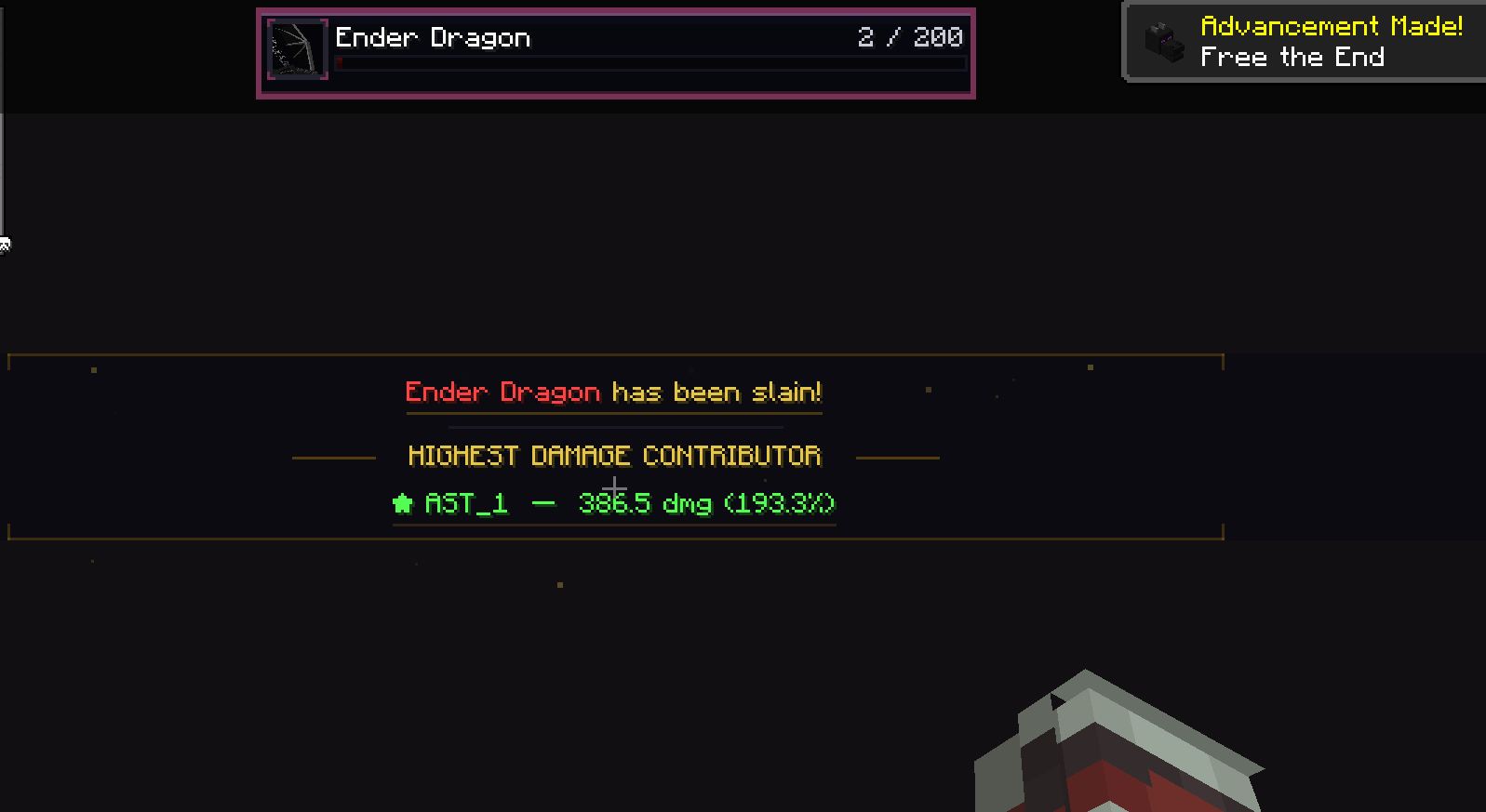
- Cinematic Kill Sequence — When a boss dies, plays a 10-second dramatic overlay with multiple phases:
🌟 Entity Health Indicator
- Crosshair Target Health — Shows a health bar panel for the entity you're looking at
- RPG Panel Design — Matches the boss bar style with gold frame, portrait, and gradient health bar
- Live Entity Portrait — Renders a 3D model of the targeted entity
- HP & Armor Display — Shows heart icon + current/max HP and diamond armor icon with armor value
- Modded Entity Support — Formats names from registry paths (e.g., "cartaddon:revolutionary_grunt" → "Revolutionary Grunt")
Client-Only Fallback Mode
- No Server Required — When the server doesn't have the mod, automatically falls back to client-side melee tracking via health deltas
- Seamless Switching — Detects server capability from the first damage packet; no manual configuration needed
- Melee Detection — Tracks attacks via
AttackEntityEventand monitors entity health changes each tick - Vanilla Crit Detection — Detects vanilla critical hits (falling + sprinting conditions) in client-only mode
Installation
- Download the mod
.jarfile - Place it in your
.minecraft/modsfolder - Launch Minecraft
For full features (all damage sources, boss tracking, death animations): Install on both server and client.
For basic melee tracking: Client-only installation works — no server needed.
Configuration
Client Settings (solsdamageindicator-client.toml)
| Setting | Default | Description |
|---|---|---|
| Boss Bar | ||
bossbar.enabled |
true |
Replace vanilla boss bars with custom styled HUD |
bossbar.damageProgress |
true |
Show per-player damage contribution below boss bars |
bossbar.barWidth |
250 |
Minimum boss bar width in pixels (100–500) |
bossbar.maxBossBars |
3 |
Max boss bars shown at once (1–10), remaining shown as "+N more" |
bossbar.deathAnimation |
true |
Play cinematic death overlay when a boss dies |
| Entity Health | ||
entityhealth.enabled |
true |
Show health bar for crosshair target entity |
entityhealth.damageProgress |
true |
Show your damage contribution below entity health bar |
entityhealth.range |
32.0 |
Max distance in blocks for entity health display (4–128) |
| Damage Indicator | ||
damageindicator.enabled |
true |
Show the center-screen damage HUD (hit count, HIT/CRIT, damage) |
damageindicator.leftSide |
false |
Position HUD on center-left instead of center-right |
| undefined |
Server Settings (solsdamageindicator-server.toml)
| Setting | Default | Description |
|---|---|---|
bossdamage.enabled |
true |
Track and broadcast per-player boss damage |
bossdamage.maxEntries |
5 |
Max top damage contributors shown in boss bar progress (1–30) |
bossdamage.relicCritIntegration |
true |
Use Sol's Relic System crit detection when available |
bossdamage.inactivityTimeout |
5 |
Minutes before inactive players are pruned from damage lists (0 = never) |
Commands
| Command | Description |
|---|---|
/solsdi debug |
Cycle through HUD debug modes (OFF → IN_TOP5 → NOT_IN_TOP5) |
/solsdi debug death |
Preview the boss death animation (alternates between "in top 5" and "not in top 5" variants) |
Note: Commands require operator permissions (permission level 2).
Cross-Mod Compatibility
Sol's Relic System Integration
- Detects custom critical hits from Sol's Relic System via reflection (no hard dependency)
- Relic crits display with bright green color and show the actual multiplier (e.g., "CRIT 2.1x")
- Floating damage numbers for relic crits are 25% larger with the multiplier suffix
- Can be toggled via
bossdamage.relicCritIntegrationserver config
Modded Boss Support
- Automatically detects any entity with a
ServerBossInfofield via reflection - Supports vanilla bosses (Wither, Ender Dragon) and all modded bosses
- Nested field search (1 level deep) catches bosses like Ender Dragon where the boss bar is on a sub-object
Modded Entity Support
- Entity health indicator works with all modded entities
- Automatically formats registry names into readable display names
- Detects CustomNPC titles via
getDisplay().getTitle()reflection
Entity Overlay Suppression
- Suppresses duplicate entity overlays from Jade, WTHIT, HWYLA, and similar mods
- Runs at highest event priority to null out
crosshairPickEntitybefore other mods read it - Restores the target after rendering so gameplay mechanics remain unaffected
How It Works
Server + Client Mode (Recommended)
- Server listens for
LivingDamageEvent(fires after ALL reductions: armor, enchantments, absorption) - Server sends a
DamageIndicatorPacketto the attacking player with the exact final damage - Client displays the accurate damage on the HUD and as floating numbers
- For boss entities, server also tracks cumulative damage per player and broadcasts updates to all boss bar viewers
Client-Only Mode (Fallback)
- Client detects player attacks via
AttackEntityEvent - Each tick, monitors the attacked entity's health for decreases
- Reports
healthBefore - healthAfteras damage dealt - Limitation: Only melee/sweep attacks are tracked; projectiles and indirect damage require the server component
See every hit. Track every boss. Dominate every fight.
Sol's Damage Indicator
Supports Minecraft Forge 1.16.5, 1.20.1!
Author: solmochi
Need help, want to suggest a feature, or found a bug?
Join our community to catch exclusive early previews and upcoming changelogs before they go live!
Description
Sol's Indicator is a visual combat HUD mod that shows exactly how much damage you deal in real-time. See floating damage numbers on enemies, track your hit combos with a stylish center-screen HUD, monitor any entity's health with a crosshair indicator, and watch boss fights come alive with custom RPG-themed boss bars featuring per-player damage rankings and cinematic death animations.
⚠️ Works in two modes — install on both server and client for full accuracy (melee, projectiles, spells, abilities), or use client-only for basic melee tracking.
✅ Fully functionable and playable on a Single-Player World.
Features
Damage Indicator HUD
- Hit Counter & Combo Tracker — Displays hit count, "HIT" / "CRIT" text, and cumulative damage dealt on the center-right of your screen
- Throbbing Pulse Animation — Each hit triggers a scale pulse that stacks during rapid combos
- Critical Hit Detection — Crits display in green with "CRIT" text; relic crits show the multiplier (e.g., "CRIT 2.1x") in bright green
- Summary Phase — After 3.5 seconds of no hits, transitions to a summary showing total damage dealt with a dramatic pulsed "DAMAGE" label
- Auto-Fade — HUD fades out after 5 seconds of inactivity, then resets for the next combat
- Configurable Position — Can be placed on center-left or center-right of the screen
Floating Damage Numbers
- World-Space Numbers — Damage numbers float upward from hit entities and fade out over 1.5 seconds
- Color-Coded — Red for normal hits, green for vanilla crits, bright green for relic system crits
- Crit Multiplier Display — Relic crits show the multiplier suffix (e.g., "12.50 2.1x")
- Spawn Animation — Numbers scale up with a quick throb on spawn, then settle
- Random Spread — Multiple simultaneous numbers spread out slightly to avoid overlap
- Billboard Rendering — Numbers always face the camera in 3D world space
Custom Boss Bar HUD
- RPG-Themed Design — Fully replaces vanilla boss bars with a styled panel featuring gold frames, gradient health bars, and entity portraits
- Entity Portraits — Renders a live 3D model of the boss entity inside a framed portrait box
- Dynamic Sizing — Bar width auto-expands to fit long entity names and HP text
- Color-Matched Bars — Health bar color adapts to the entity's custom name color, boss bar color setting, or mob type (red/green/blue)
- HP Numbers — Shows exact current HP / max HP (formatted: e.g., "125.4K / 500.0K")
- Entity Titles — Displays CustomNPC titles below the entity name when available
- Multiple Boss Bars — Supports configurable max boss bars on screen (default: 3) with "+N more" overflow label
- Compact Mode — 2nd+ boss bars use a compact layout showing only your own damage contribution
- Stale Data Cleanup — Automatically clears damage progress when entities heal to full or die
Boss Damage Progress
- Per-Player Damage Tracking — Server tracks cumulative damage dealt by each player to boss entities
- Damage Percentage Display — Shows each player's damage as a percentage of the boss's max HP (e.g., "PlayerName: 10.83%")
- RPG Rank Styling — Top contributors get medal icons: crown for #1, diamonds for #2–3, arrows for #4+
- 2-Column Grid Layout — Top 5 contributors displayed in an organized grid with a "Damage Progress" header
- Self-Highlighting — Your own name is highlighted in green; other players appear in white
- Self-Append — If you're not in the top 5, your entry is appended separately so you always see your contribution
- Auto-Detection — Uses reflection to detect any entity with a
ServerBossInfofield (supports vanilla + all modded bosses) - Inactivity Pruning — Players are removed from the damage list after configurable minutes of inactivity (default: 5 min)
Boss Death Animation
- Cinematic Kill Sequence — When a boss dies, plays a 10-second dramatic overlay with multiple phases:
Entity Health Indicator
- Crosshair Target Health — Shows a health bar panel for the entity you're looking at
- RPG Panel Design — Matches the boss bar style with gold frame, portrait, and gradient health bar
- Live Entity Portrait — Renders a 3D model of the targeted entity
- HP & Armor Display — Shows heart icon + current/max HP and diamond armor icon with armor value
- Modded Entity Support — Formats names from registry paths (e.g., "cartaddon:revolutionary_grunt" → "Revolutionary Grunt")
Client-Only Fallback Mode
- No Server Required — When the server doesn't have the mod, automatically falls back to client-side melee tracking via health deltas
- Seamless Switching — Detects server capability from the first damage packet; no manual configuration needed
- Melee Detection — Tracks attacks via
AttackEntityEventand monitors entity health changes each tick - Vanilla Crit Detection — Detects vanilla critical hits (falling + sprinting conditions) in client-only mode
Installation
- Install Minecraft Forge for 1.16.5 or 1.20.1
- Download the mod
.jarfile - Place it in your
.minecraft/modsfolder - Launch Minecraft
For full features (all damage sources, boss tracking, death animations): Install on both server and client.
For basic melee tracking: Client-only installation works — no server needed.
Configuration
Client Settings (solsdamageindicator-client.toml)
| Setting | Default | Description |
|---|---|---|
| Boss Bar | ||
bossbar.enabled |
true |
Replace vanilla boss bars with custom styled HUD |
bossbar.damageProgress |
true |
Show per-player damage contribution below boss bars |
bossbar.barWidth |
250 |
Minimum boss bar width in pixels (100–500) |
bossbar.maxBossBars |
3 |
Max boss bars shown at once (1–10), remaining shown as "+N more" |
bossbar.deathAnimation |
true |
Play cinematic death overlay when a boss dies |
| Entity Health | ||
entityhealth.enabled |
true |
Show health bar for crosshair target entity |
entityhealth.damageProgress |
true |
Show your damage contribution below entity health bar |
entityhealth.range |
32.0 |
Max distance in blocks for entity health display (4–128) |
| Damage Indicator | ||
damageindicator.enabled |
true |
Show the center-screen damage HUD (hit count, HIT/CRIT, damage) |
damageindicator.leftSide |
false |
Position HUD on center-left instead of center-right |
| undefined |
Server Settings (solsdamageindicator-server.toml)
| Setting | Default | Description |
|---|---|---|
bossdamage.enabled |
true |
Track and broadcast per-player boss damage |
bossdamage.maxEntries |
5 |
Max top damage contributors shown in boss bar progress (1–30) |
bossdamage.relicCritIntegration |
true |
Use Sol's Relic System crit detection when available |
bossdamage.inactivityTimeout |
5 |
Minutes before inactive players are pruned from damage lists (0 = never) |
Commands
| Command | Description |
|---|---|
/solsdi debug |
Cycle through HUD debug modes (OFF → IN_TOP5 → NOT_IN_TOP5) |
/solsdi debug death |
Preview the boss death animation (alternates between "in top 5" and "not in top 5" variants) |
Note: Commands require operator permissions (permission level 2).
Cross-Mod Compatibility
Sol's Relic System Integration
- Detects custom critical hits from Sol's Relic System via reflection (no hard dependency)
- Relic crits display with bright green color and show the actual multiplier (e.g., "CRIT 2.1x")
- Floating damage numbers for relic crits are 25% larger with the multiplier suffix
- Can be toggled via
bossdamage.relicCritIntegrationserver config
Modded Boss Support
- Automatically detects any entity with a
ServerBossInfofield via reflection - Supports vanilla bosses (Wither, Ender Dragon) and all modded bosses
- Nested field search (1 level deep) catches bosses like Ender Dragon where the boss bar is on a sub-object
Modded Entity Support
- Entity health indicator works with all modded entities
- Automatically formats registry names into readable display names
- Detects CustomNPC titles via
getDisplay().getTitle()reflection
Entity Overlay Suppression
- Suppresses duplicate entity overlays from Jade, WTHIT, HWYLA, and similar mods
- Runs at highest event priority to null out
crosshairPickEntitybefore other mods read it - Restores the target after rendering so gameplay mechanics remain unaffected
How It Works
Server + Client Mode (Recommended)
- Server listens for
LivingDamageEvent(fires after ALL reductions: armor, enchantments, absorption) - Server sends a
DamageIndicatorPacketto the attacking player with the exact final damage - Client displays the accurate damage on the HUD and as floating numbers
- For boss entities, server also tracks cumulative damage per player and broadcasts updates to all boss bar viewers
Client-Only Mode (Fallback)
- Client detects player attacks via
AttackEntityEvent - Each tick, monitors the attacked entity's health for decreases
- Reports
healthBefore - healthAfteras damage dealt - Limitation: Only melee/sweep attacks are tracked; projectiles and indirect damage require the server component
See every hit. Track every boss. Dominate every fight.
Screenshots
Gallery
-
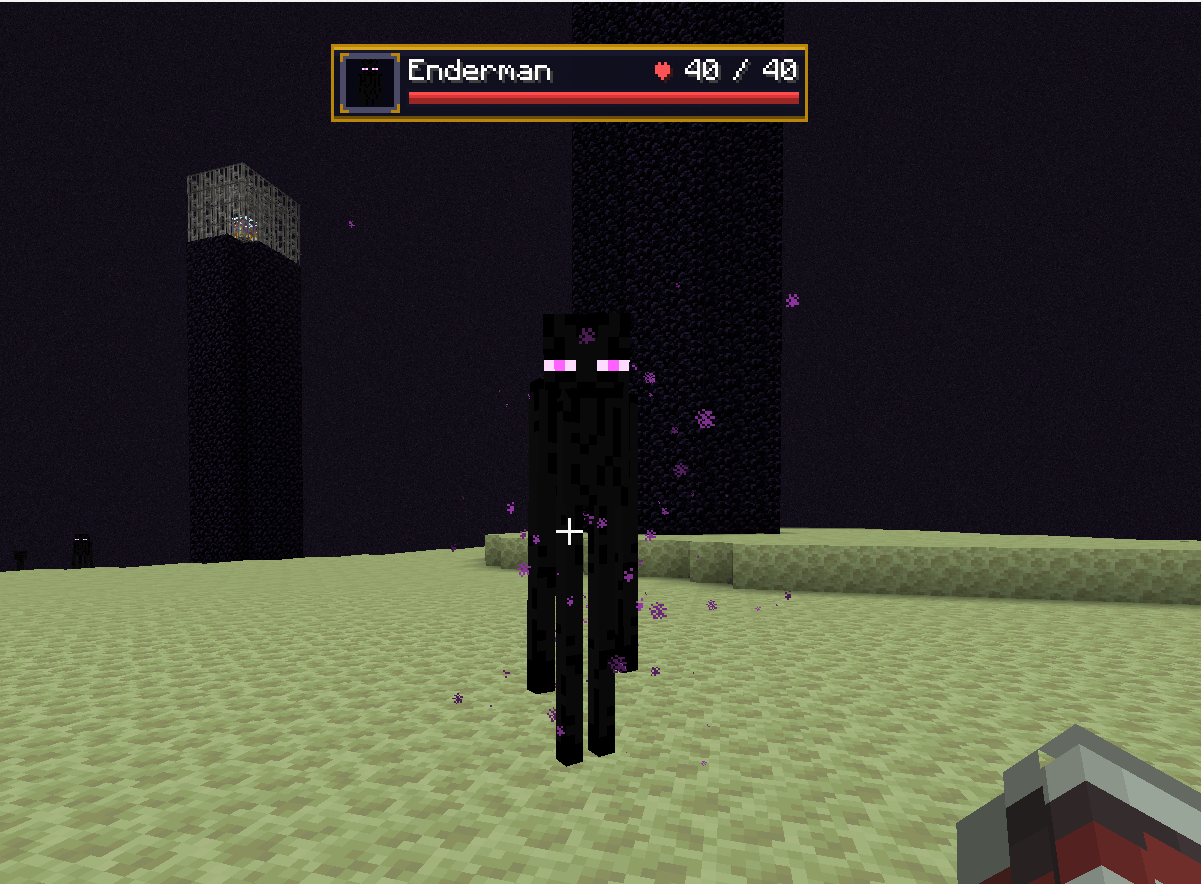 image_2026-03-08_042830141.png image_2026-03-08_042830141.png
 -
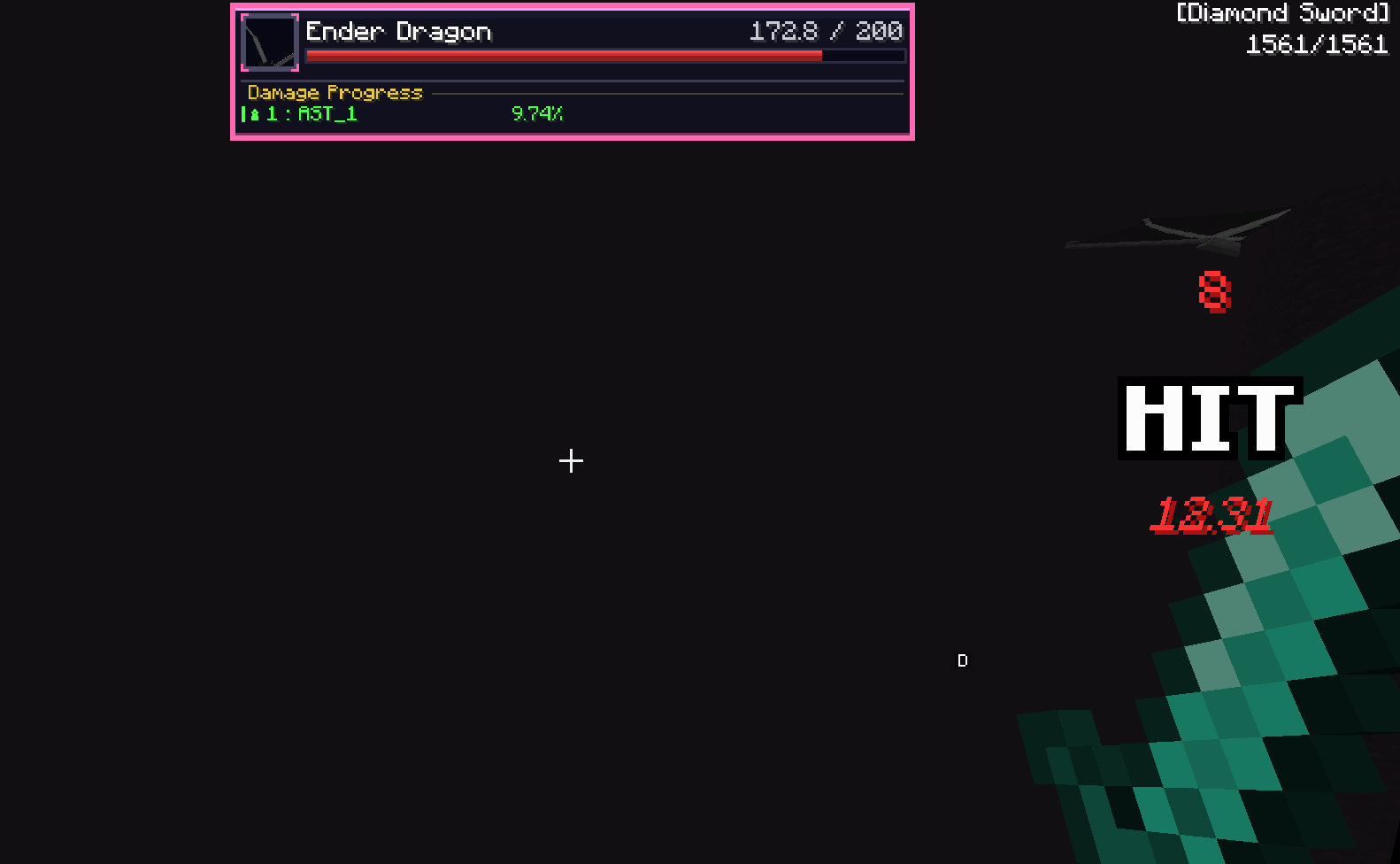 image_2026-03-08_040708370.png image_2026-03-08_040708370.png
 -
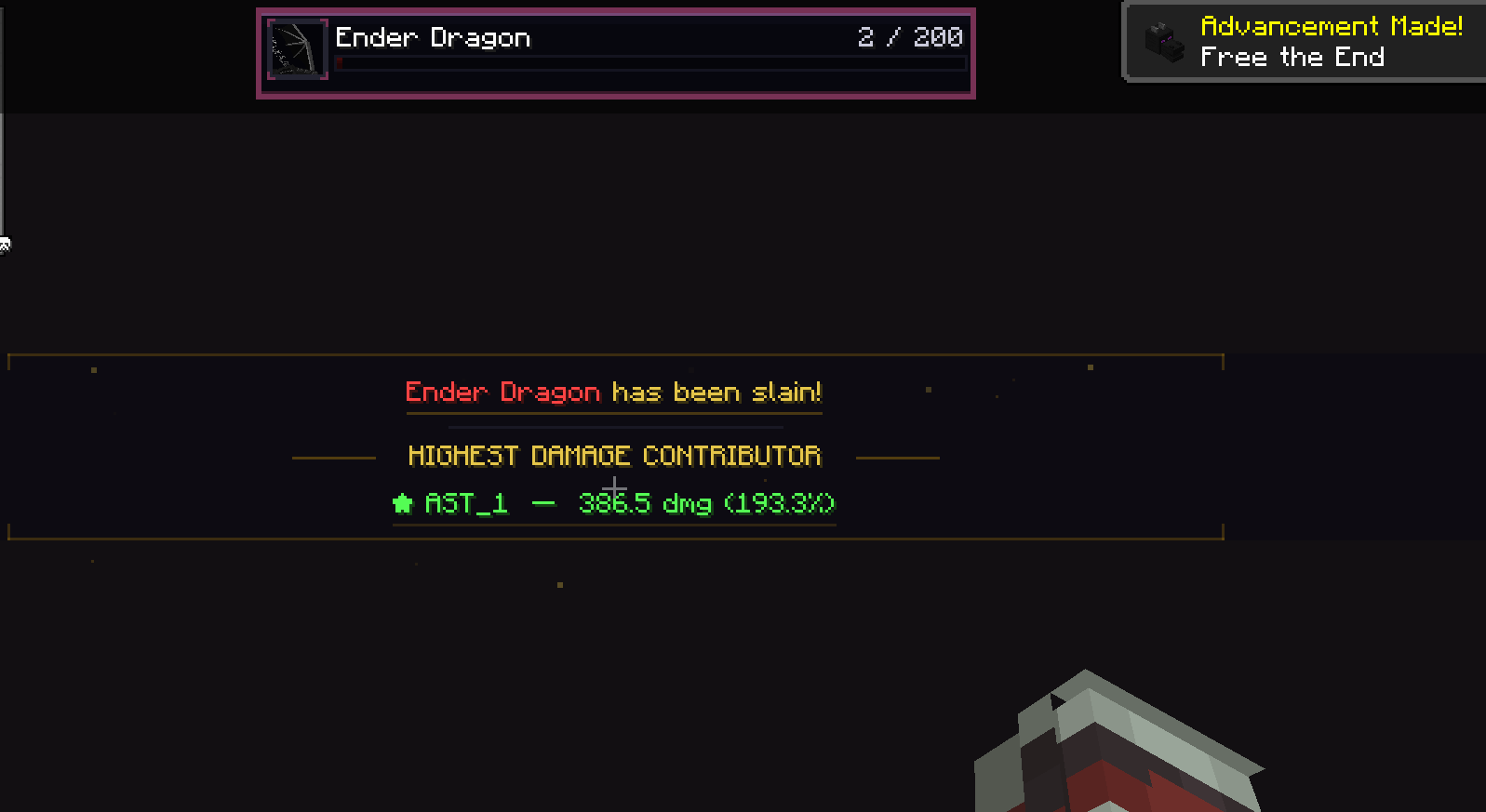 image_2026-03-08_042648579.png image_2026-03-08_042648579.png
 -
 ce4cc9fb-af41-47da-9c71-14ad62c6e015 (1).jpg ce4cc9fb-af41-47da-9c71-14ad62c6e015 (1).jpg
 -
 5df000be-9460-4045-83fa-ed6c42646ab4 (1).jpg 5df000be-9460-4045-83fa-ed6c42646ab4 (1).jpg
 -
 3c5fde37-9c9f-4238-b8e6-a6a0f3753131 (1).jpg 3c5fde37-9c9f-4238-b8e6-a6a0f3753131 (1).jpg
Versions
Files
Relations
Project Relations
More like this
Similar Mods
Suggestions use data such as tags, dependencies, dependents, descriptions, titles, and more to rank how much they overlap with this mod.
- Sol's Item Rarity: RPG Gear, Tool Perks & Loot Tiers
- Sol's Relic System (Crit System, Stats, and more.)
- Sol's Origin Addon
- Sol's MMNM Addon: AbilityProtection Rework (QoL, Improvements)
- Sol's AuthLogin
- Sol's Title System
- Sol's Party System (Ping, Track, Team, and more!)
- Sol's Leveling System
- Sol's Item Rarity x Loot Beams x Item Rarity
- Sol's Relic System ADDON
- Sol's Recipes and Renewables
- Sol's Rarity X Obscure Tooltips
On ModDex
Community snapshot
By the numbers
Statistics
Want to reach Minecraft players?
We're looking for a server hosting partner to feature here and other parts of the site. Interested? Send us a message!
Get in touchGet it on
Available Platforms
On ModDex
Community snapshot
By the numbers
Statistics
Resources