
Community listing page, reviews here may not be monitored by the author.
SoulBind


No reviews yet
A soulbinding mod that binds items to a specific player, preventing them from being used by other players.

Community voices
Reviews
No reviews yet. Be the first to review this project!
Get it on
Available Platforms
Compatibility
Supported Environments
Runs entirely on the server. Also works in singleplayer.
About
Project Details
For authors
Embed Badge
If you're the author of this project, you can embed a live badge anywhere that supports HTML or Markdown. It updates automatically whenever ratings change.
Use HTML for any page that supports it, or Markdown for README files and Markdown-based descriptions.
Identifiers
Platform IDs
Resources
External Links
About
Description
A soulbinding mod that binds items to a specific player, preventing them from being used by other players. 一个灵魂绑定模组,将物品绑定到特定玩家,防止其他玩家使用。
Features / 特点
Item Binding — Bind items to a specific player, only the bound player can use them 物品绑定 — 将物品绑定到指定玩家,仅绑定者可使用
Prevent Dropping — Bound items cannot be dropped by any means 禁止丢弃 — 绑定物品无法以任何方式丢弃
Prevent Pickup — Other players cannot pick up bound items 禁止拾取 — 其他玩家无法拾取绑定物品
Retain on Death — Bound items are kept on death (configurable) 死亡保留 — 死亡后保留绑定物品(可配置)
Auto Bind — Automatically bind specified items upon first acquisition 自动绑定 — 首次获取指定物品时自动绑定
Command System — Complete command system with multi-page help 命令系统 — 完整的命令系统,支持多页帮助
Configurable — Customize all functionality via config file 可配置 — 通过配置文件自定义所有功能
Installation / 安装
Install Fabric Loader and Fabric API 安装 Fabric Loader 和 Fabric API
Place the JAR into
.minecraft/mods/. 将 JAR 文件放入.minecraft/mods/目录Launch the game. 启动游戏
Command Usage / 命令用法
All commands require administrator privileges (default permission level: 2). 所有命令需要管理员权限(默认权限等级:2)。
Basic Commands / 基础命令
| Command / 命令 | Description / 说明 |
|---|---|
/soulbind |
Display help / 显示帮助信息 |
/soulbind help [page] |
Display help for a specified page / 显示指定页帮助信息 |
/soulbind bind |
Bind the held item to yourself / 将手持物品绑定到自己 |
/soulbind bind <player> |
Bind the held item to a specific player / 将手持物品绑定到指定玩家 |
/soulbind unbind |
Unbind the held item / 解绑手持物品 |
/soulbind check |
Check binding status of the held item / 查看手持物品绑定状态 |
/soulbind list |
List all bound items in inventory / 列出背包中所有绑定物品 |
/soulbind reload |
Reload config (requires permission level 3) / 重载配置文件(需要权限等级 3) |
Autobind Commands / 自动绑定命令
| Command / 命令 | Description / 说明 |
|---|---|
/soulbind autobind add |
Add the held item to autobind list / 将手持物品添加到自动绑定列表 |
/soulbind autobind add <item ID> |
Add specified item to autobind list / 将指定物品添加到自动绑定列表 |
/soulbind autobind remove |
Remove the held item from autobind list / 将手持物品从自动绑定列表移除 |
/soulbind autobind remove <item ID> |
Remove specified item from autobind list / 将指定物品从自动绑定列表移除 |
/soulbind autobind list |
List all autobind items / 列出所有自动绑定物品 |
/soulbind autobind toggle |
Toggle autobind feature (requires permission level 3) / 切换自动绑定功能(需要权限等级 3) |
Examples / 示例
/soulbind bind Steve
/soulbind unbind
/soulbind help 2
/soulbind autobind add minecraft:diamond_pickaxe
/soulbind autobind add
/soulbind autobind remove diamond_sword
/soulbind autobind list
Configuration / 配置
Configuration file located at .minecraft/config/soulbinding/soulbinding.json.
配置文件位于 .minecraft/config/soulbinding/soulbinding.json。
{
    "keepOnDeath": true,
    "allowUnbind": true,
    "showTooltip": true,
    "preventDrop": true,
    "preventPickup": true,
    "commandPermissionLevel": 2,
    "autoBindEnabled": true,
    "autoBindItems": [
        "minecraft:diamond_sword",
        "minecraft:netherite_sword",
        "minecraft:elytra"
    ],
    "language": "zh_cn"
}
| Field / 字段 | Description / 说明 |
|---|---|
keepOnDeath |
Keep bound items on death / 死亡后保留绑定物品 |
allowUnbind |
Allow players to manually unbind / 允许玩家手动解绑 |
showTooltip |
Show binding status in item tooltip / 在物品提示中显示绑定状态 |
preventDrop |
Prevent dropping bound items / 禁止丢弃绑定物品 |
preventPickup |
Prevent others from picking up bound items / 禁止其他玩家拾取绑定物品 |
commandPermissionLevel |
Minimum permission level for commands (0-4) / 命令最低权限等级 (0-4) |
autoBindEnabled |
Enable auto bind feature / 启用自动绑定功能 |
autoBindItems |
List of items to auto bind / 自动绑定物品列表 |
language |
Language code / 语言代码 |
Notes / 注意事项
Bound items display purple italic binding info in inventory. 绑定物品会在物品栏中显示紫色斜体的绑定信息。
Bound items can be freely moved between player inventory and containers. 绑定物品可以在玩家背包和容器之间自由移动。
Admins can unbind any item. 管理员可以解绑任何物品。
Use
/soulbind reloadafter modifying the config file. 修改配置文件后,可使用/soulbind reload重新加载。Auto-bound items are bound immediately when the player first obtains them. 自动绑定物品会在玩家首次获得时立即绑定。
Auto binding supports the following acquisition methods: 自动绑定支持以下获取方式:
- Picking up from the ground / 从地面拾取
- Taking from containers / 从容器中取出
- Given via commands / 通过命令给予
- Obtained through crafting / 通过合成获得
- Taking in Creative mode / 创造模式中取出
Development / 开发信息
- Minecraft: 1.20.1
- Fabric Loader: 0.17.2
- Fabric API: 0.92.6+1.20.1
- Java 17
A soulbinding mod that binds items to a specific player, preventing them from being used by other players. 一个灵魂绑定模组,将物品绑定到特定玩家,防止其他玩家使用。
Features / 特点
-
Item Binding — Bind items to a specific player, only the bound player can use them 物品绑定 — 将物品绑定到指定玩家,仅绑定者可使用
-
Prevent Dropping — Bound items cannot be dropped by any means 禁止丢弃 — 绑定物品无法以任何方式丢弃
-
Prevent Pickup — Other players cannot pick up bound items 禁止拾取 — 其他玩家无法拾取绑定物品
-
Retain on Death — Bound items are kept on death (configurable) 死亡保留 — 死亡后保留绑定物品(可配置)
-
Auto Bind — Automatically bind specified items upon first acquisition 自动绑定 — 首次获取指定物品时自动绑定
-
Command System — Complete command system with multi-page help 命令系统 — 完整的命令系统,支持多页帮助
-
Configurable — Customize all functionality via config file 可配置 — 通过配置文件自定义所有功能
Installation / 安装
-
Install Fabric Loader and Fabric API 安装 Fabric Loader 和 Fabric API
-
Place the JAR into
.minecraft/mods/. 将 JAR 文件放入.minecraft/mods/目录 -
Launch the game. 启动游戏
Command Usage / 命令用法
All commands require administrator privileges (default permission level: 2). 所有命令需要管理员权限(默认权限等级:2)。
Basic Commands / 基础命令
| Command / 命令 | Description / 说明 |
|---|---|
/soulbind |
Display help / 显示帮助信息 |
/soulbind help [page] |
Display help for a specified page / 显示指定页帮助信息 |
/soulbind bind |
Bind the held item to yourself / 将手持物品绑定到自己 |
/soulbind bind <player> |
Bind the held item to a specific player / 将手持物品绑定到指定玩家 |
/soulbind unbind |
Unbind the held item / 解绑手持物品 |
/soulbind check |
Check binding status of the held item / 查看手持物品绑定状态 |
/soulbind list |
List all bound items in inventory / 列出背包中所有绑定物品 |
/soulbind reload |
Reload config (requires permission level 3) / 重载配置文件(需要权限等级 3) |
Autobind Commands / 自动绑定命令
| Command / 命令 | Description / 说明 |
|---|---|
/soulbind autobind add |
Add the held item to autobind list / 将手持物品添加到自动绑定列表 |
/soulbind autobind add <item ID> |
Add specified item to autobind list / 将指定物品添加到自动绑定列表 |
/soulbind autobind remove |
Remove the held item from autobind list / 将手持物品从自动绑定列表移除 |
/soulbind autobind remove <item ID> |
Remove specified item from autobind list / 将指定物品从自动绑定列表移除 |
/soulbind autobind list |
List all autobind items / 列出所有自动绑定物品 |
/soulbind autobind toggle |
Toggle autobind feature (requires permission level 3) / 切换自动绑定功能(需要权限等级 3) |
Examples / 示例
/soulbind bind Steve
/soulbind unbind
/soulbind help 2
/soulbind autobind add minecraft:diamond_pickaxe
/soulbind autobind add
/soulbind autobind remove diamond_sword
/soulbind autobind list
Configuration / 配置
Configuration file located at .minecraft/config/soulbinding/soulbinding.json.
配置文件位于 .minecraft/config/soulbinding/soulbinding.json。
{
    "keepOnDeath": true,
    "allowUnbind": true,
    "showTooltip": true,
    "preventDrop": true,
    "preventPickup": true,
    "commandPermissionLevel": 2,
    "autoBindEnabled": true,
    "autoBindItems": [
        "minecraft:diamond_sword",
        "minecraft:netherite_sword",
        "minecraft:elytra"
    ],
    "language": "zh_cn"
}
| Field / 字段 | Description / 说明 |
|---|---|
keepOnDeath |
Keep bound items on death / 死亡后保留绑定物品 |
allowUnbind |
Allow players to manually unbind / 允许玩家手动解绑 |
showTooltip |
Show binding status in item tooltip / 在物品提示中显示绑定状态 |
preventDrop |
Prevent dropping bound items / 禁止丢弃绑定物品 |
preventPickup |
Prevent others from picking up bound items / 禁止其他玩家拾取绑定物品 |
commandPermissionLevel |
Minimum permission level for commands (0-4) / 命令最低权限等级 (0-4) |
autoBindEnabled |
Enable auto bind feature / 启用自动绑定功能 |
autoBindItems |
List of items to auto bind / 自动绑定物品列表 |
language |
Language code / 语言代码 |
Notes / 注意事项
-
Bound items display purple italic binding info in inventory. 绑定物品会在物品栏中显示紫色斜体的绑定信息。
-
Bound items can be freely moved between player inventory and containers. 绑定物品可以在玩家背包和容器之间自由移动。
-
Admins can unbind any item. 管理员可以解绑任何物品。
-
Use
/soulbind reloadafter modifying the config file. 修改配置文件后,可使用/soulbind reload重新加载。 -
Auto-bound items are bound immediately when the player first obtains them. 自动绑定物品会在玩家首次获得时立即绑定。
-
Auto binding supports the following acquisition methods: 自动绑定支持以下获取方式:
- Picking up from the ground / 从地面拾取
- Taking from containers / 从容器中取出
- Given via commands / 通过命令给予
- Obtained through crafting / 通过合成获得
- Taking in Creative mode / 创造模式中取出
Development / 开发信息
- Minecraft: 1.20.1
- Fabric Loader: 0.17.2
- Fabric API: 0.92.6+1.20.1
- Java 17
Screenshots
Gallery
-
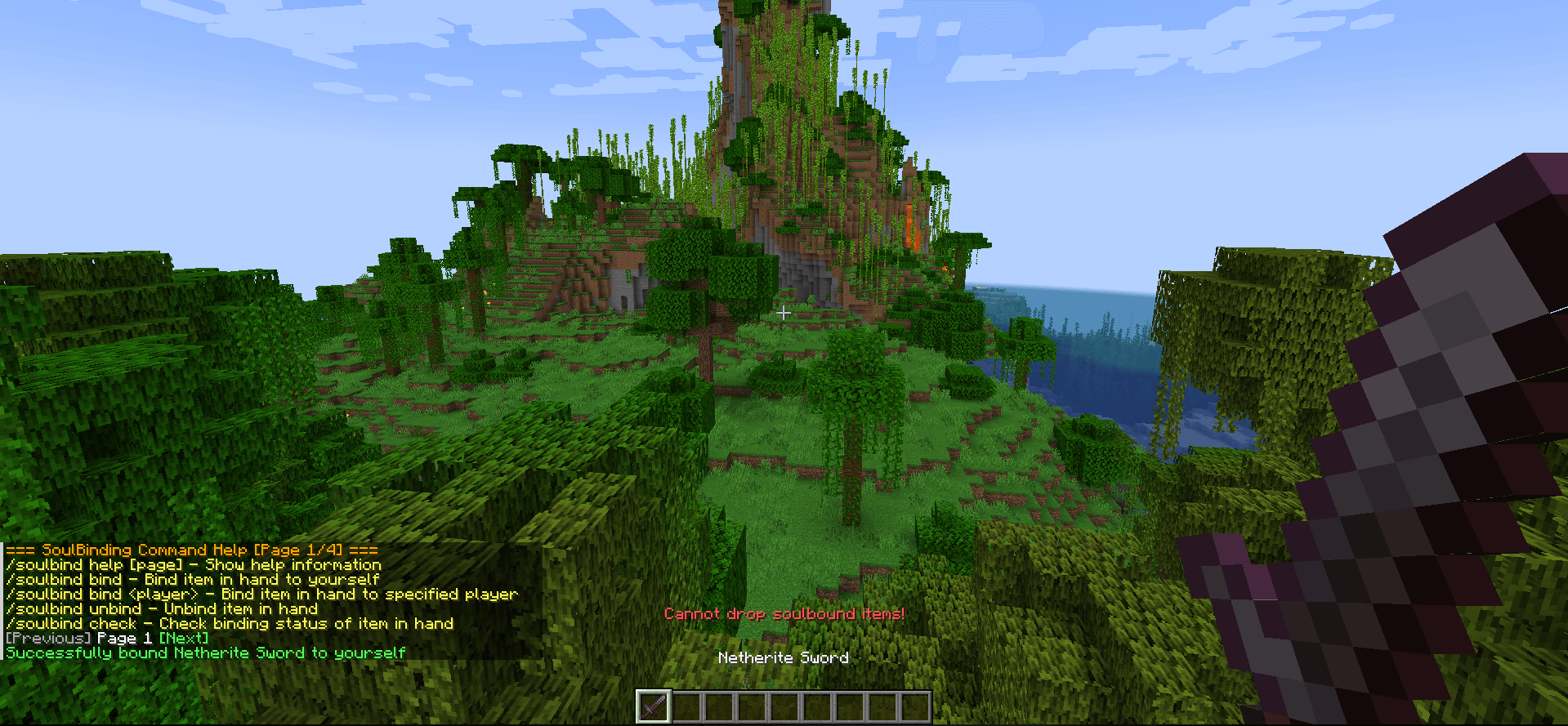 Test results.png Test results.png
-
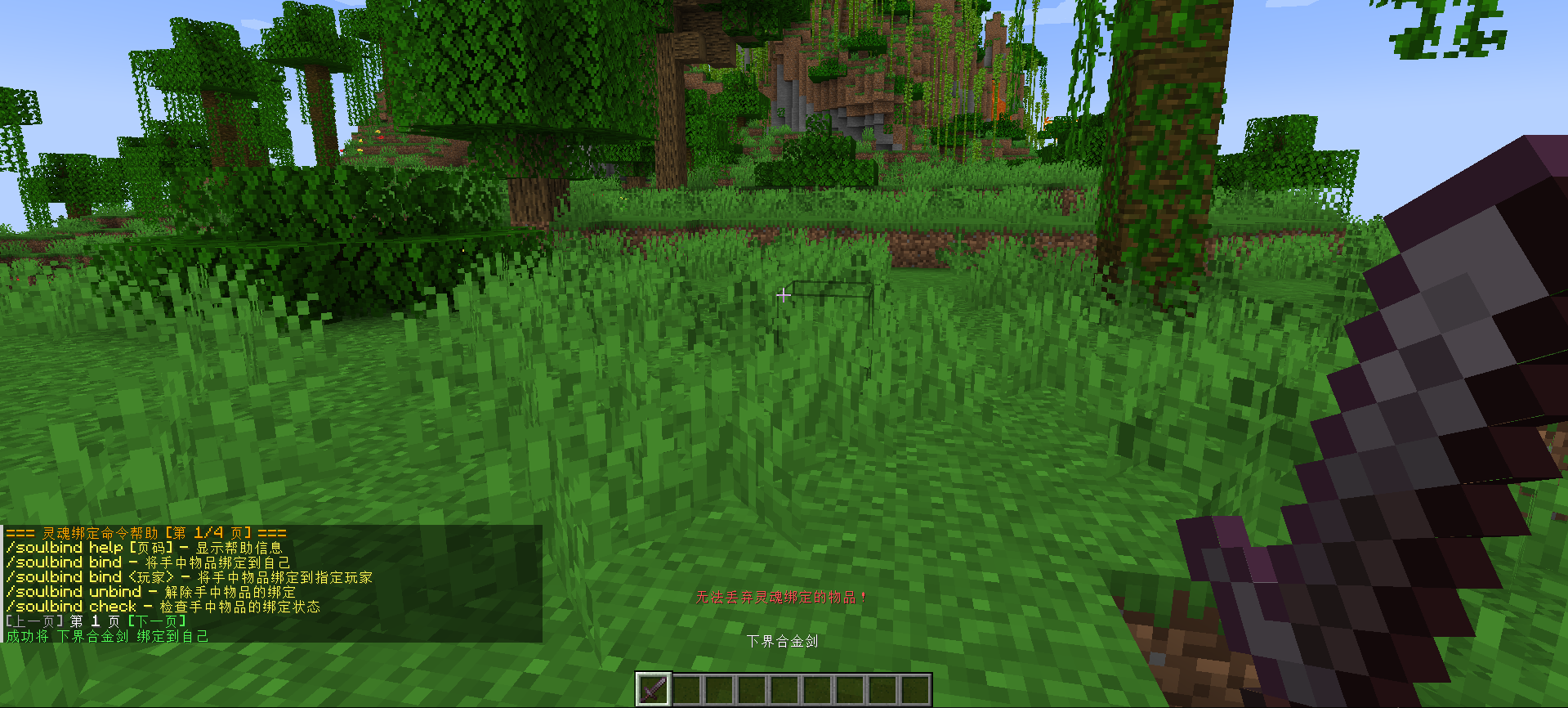 Test results (Chinese)
 -
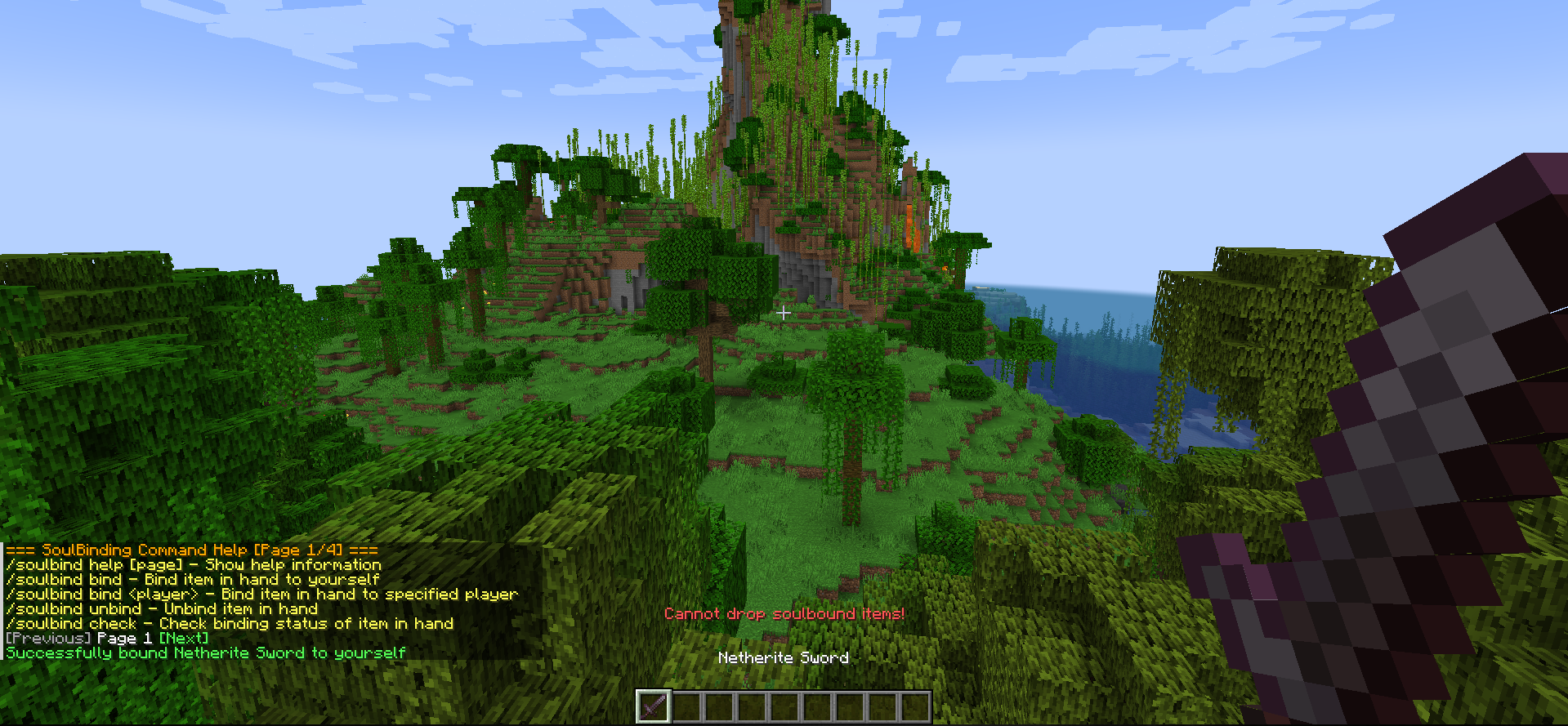 Test results (English)
Versions
Files
Relations
Project Relations
More like this
Similar Mods
Suggestions use data such as tags, dependencies, dependents, descriptions, titles, and more to rank how much they overlap with this mod.
On ModDex
Community snapshot
By the numbers
Statistics
 (opens in a new tab)
Get it on
Available Platforms
On ModDex
Community snapshot
By the numbers
Statistics
Resources