
Community listing page, reviews here may not be monitored by the author.
Sound Pulse


No reviews yet
A minimalist client-side mod that visualizes sound direction through distance-scaling HUD waves and critical threat alerts for enhanced tactical awareness.
Community voices
Reviews
No reviews yet. Be the first to review this project!
Get it on
Available Platforms
Compatibility
Supported Environments
Runs entirely on the client. Works on vanilla servers.
About
Project Details
For authors
Embed Badge
If you're the author of this project, you can embed a live badge anywhere that supports HTML or Markdown. It updates automatically whenever ratings change.
Use HTML for any page that supports it, or Markdown for README files and Markdown-based descriptions.
Identifiers
Platform IDs
Resources
External Links
About
Description
🔊 SoundPulse
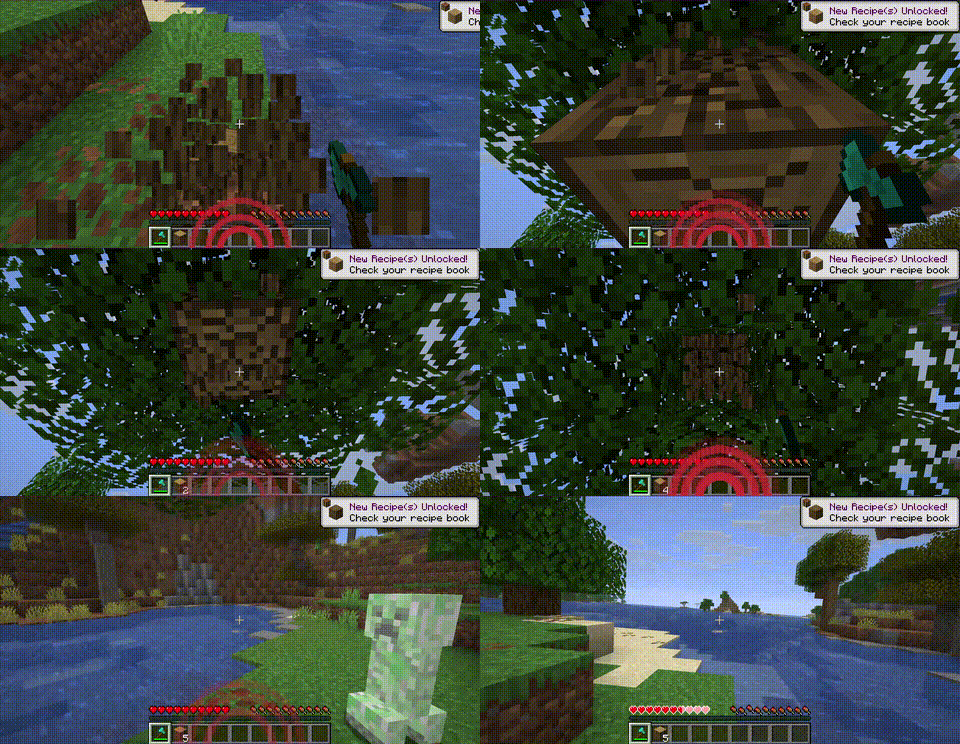
SoundPulse is a lightweight, high-performance client-side utility mod for Minecraft Fabric 26.1.x. It visualizes in-game sounds as minimalist, directional waves on your HUD, providing a tactical edge and enhanced spatial awareness without the clutter of vanilla subtitles.
Whether you are playing with your own music, have hearing difficulties, or simply want a cleaner way to track threats, SoundPulse delivers a sleek, modern solution.
✨ Key Features
🧭 8-Way Directional Tracking
SoundPulse doesn't just tell you a sound happened — it shows you exactly where it came from. The HUD displays curved wave icons pointing to 8 specific directions:
- Front, Back, Left, Right
- Front-Right, Front-Left, Back-Right, Back-Left
📏 Distance-Based Scaling
The visual intensity of the waves adapts to the proximity of the sound source:
- Near: Thick, aggressive lines for immediate threats
- Far: Thin, subtle lines for distant background noises
⚠️ Critical Threat Alerts (Strobe Effect)
Never get blindsided by a Creeper again. High-priority sounds like Creeper hissing or TNT priming trigger a rapid red strobe/flash effect on the corresponding direction of the HUD.
🛡️ Smart Filtering & Presets
To keep your screen clean, SoundPulse starts with Hostile sounds enabled by default. You can easily toggle other categories (Blocks, Players, Ambient, Music, Weather, Neutral, Voice) to suit your playstyle.
🎨 Category Colors
Each sound category has a distinct color:
| Category | Color |
|---|---|
| Hostile | Red |
| Blocks | Orange |
| Ambient | Green |
| Players | Blue |
| Music | Purple |
| Weather | Cyan |
| Neutral | Yellow |
| Voice | Gray |
💻 Commands
SoundPulse is fully configurable in-game. Every change you make is instantly saved to your configuration file.
| Command | Description |
|---|---|
/soundpulse toggle |
Enable or disable the mod entirely |
/soundpulse config |
View your current settings and active categories in chat |
/soundpulse category <name> <true/false> |
Toggle entire sound categories on or off |
/soundpulse color <category> <hex> |
Change the wave color for a specific category |
/soundpulse ignore add <id> |
Add a specific sound to the ignore list |
/soundpulse ignore remove <id> |
Remove a sound from the ignore list |
/soundpulse ignore list |
List all ignored sounds |
⚙️ Configuration
Settings are saved to config/soundpulse.json:
{
  "enabled": true,
  "maxOpacity": 0.65,
  "enabledCategories": ["HOSTILE"],
  "categoryColors": {},
  "ignoredSounds": []
}
Only the HOSTILE category is enabled by default. Use /soundpulse category to enable others.
📄 License
MIT © Cukkoo
🔊 SoundPulse
SoundPulse is a lightweight, high-performance client-side utility mod for Minecraft Fabric 26.1.x. It visualizes in-game sounds as minimalist, directional waves on your HUD, providing a tactical edge and enhanced spatial awareness without the clutter of vanilla subtitles.
Whether you are playing with your own music, have hearing difficulties, or simply want a cleaner way to track threats, SoundPulse delivers a sleek, modern solution.
✨ Key Features
🧭 8-Way Directional Tracking
SoundPulse doesn't just tell you a sound happened — it shows you exactly where it came from. The HUD displays curved wave icons pointing to 8 specific directions:
- Front, Back, Left, Right
- Front-Right, Front-Left, Back-Right, Back-Left
📏 Distance-Based Scaling
The visual intensity of the waves adapts to the proximity of the sound source:
- Near: Thick, aggressive lines for immediate threats
- Far: Thin, subtle lines for distant background noises
⚠️ Critical Threat Alerts (Strobe Effect)
Never get blindsided by a Creeper again. High-priority sounds like Creeper hissing or TNT priming trigger a rapid red strobe/flash effect on the corresponding direction of the HUD.
🛡️ Smart Filtering & Presets
To keep your screen clean, SoundPulse starts with Hostile sounds enabled by default. You can easily toggle other categories (Blocks, Players, Ambient, Music, Weather, Neutral, Voice) to suit your playstyle.
🎨 Category Colors
Each sound category has a distinct color:
| Category | Color |
|---|---|
| Hostile | Red |
| Blocks | Orange |
| Ambient | Green |
| Players | Blue |
| Music | Purple |
| Weather | Cyan |
| Neutral | Yellow |
| Voice | Gray |
💻 Commands
SoundPulse is fully configurable in-game. Every change you make is instantly saved to your configuration file.
| Command | Description |
|---|---|
/soundpulse toggle |
Enable or disable the mod entirely |
/soundpulse config |
View your current settings and active categories in chat |
/soundpulse category <name> <true/false> |
Toggle entire sound categories on or off |
/soundpulse color <category> <hex> |
Change the wave color for a specific category |
/soundpulse ignore add <id> |
Add a specific sound to the ignore list |
/soundpulse ignore remove <id> |
Remove a sound from the ignore list |
/soundpulse ignore list |
List all ignored sounds |
⚙️ Configuration
Settings are saved to config/soundpulse.json:
{
  "enabled": true,
  "maxOpacity": 0.65,
  "enabledCategories": ["HOSTILE"],
  "categoryColors": {},
  "ignoredSounds": []
}
Only the HOSTILE category is enabled by default. Use /soundpulse category to enable others.
📄 License
MIT © Cukkoo
Screenshots
Gallery
Versions
Files
Relations
Project Relations
More like this
Similar Mods
Suggestions use data such as tags, dependencies, dependents, descriptions, titles, and more to rank how much they overlap with this mod.
On ModDex
Community snapshot
By the numbers
Statistics
Want to reach Minecraft players?
We're looking for a server hosting partner to feature here and other parts of the site. Interested? Send us a message!
Get in touchGet it on
Available Platforms
On ModDex
Community snapshot
By the numbers
Statistics
Resources