Community listing page, reviews may not be monitored by the author.
SP Core

No reviews yet
SP Core provides shared APIs and a unified admin interface for SP Minecraft mods, connecting economy, quests, and RPG progression through reusable services and consistent management tools.

Community voices
Reviews
No reviews yet. Be the first to review this project!
Get it on
Available Platforms
About
Project Details
For authors
Embed Badge
If you're the author of this project, you can embed a live badge anywhere that supports HTML or Markdown. It updates automatically whenever ratings change.
Use HTML for any page that supports it, or Markdown for README files and Markdown-based descriptions.
Identifiers
Platform IDs
Resources
External Links
About
Description
SP Core

Version 0.5.0 · Minecraft Java Edition 26.2 · Fabric
SP Core provides shared APIs and a unified admin interface for SP Minecraft mods, connecting economy, quests, and RPG progression through reusable services and consistent management tools.
Manage your installed SP mods from one place with /spadmin.
Personal HUD editor
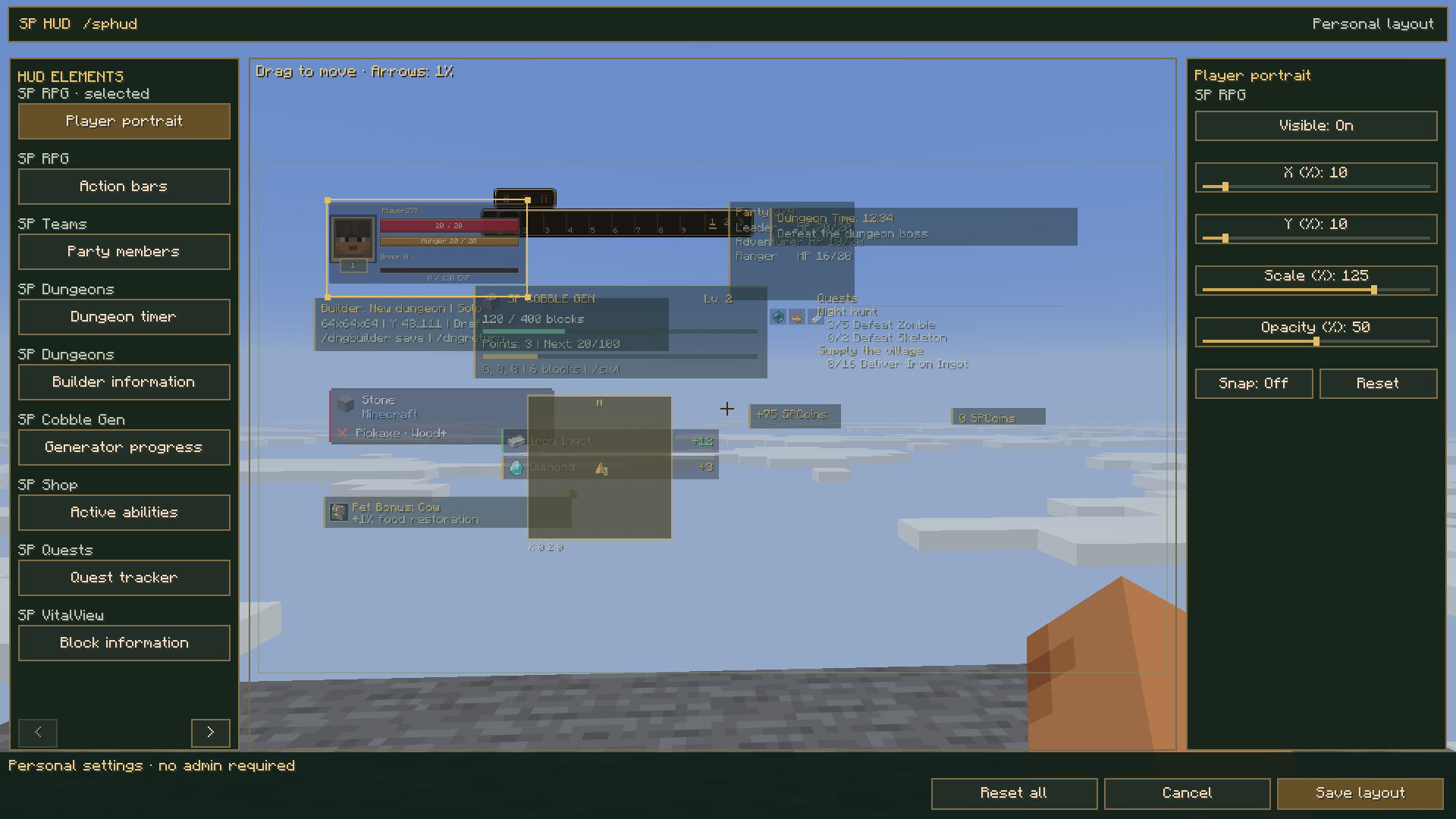
Run /sphud in a world to arrange supported HUD elements. This is a personal
client command: Survival players can use it without OP, Creative or cheats.
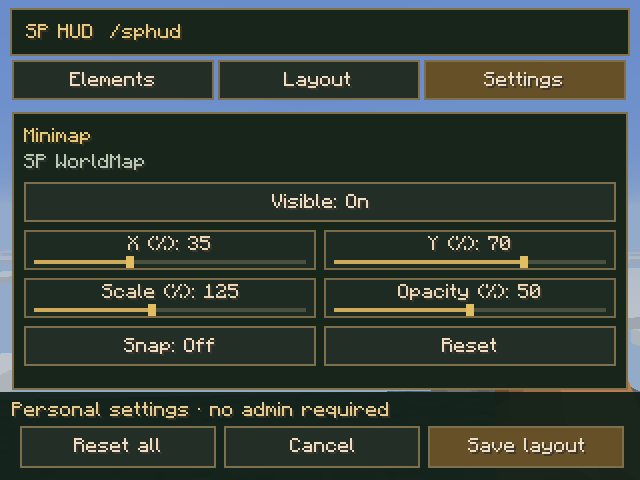
Select an element from the left or click its preview. Drag it to move; use X/Y sliders or arrow keys for 1% position steps. Adjust visibility, scale and opacity. Optional Snap uses 5% steps. Reset restores the selected element's defaults; Reset all resets all registered elements in the draft. Save layout persists changes. Cancel or Escape discards unsaved changes. The game keeps running.
Small GUI sizes use Elements / Layout / Settings tabs so every control fits.
Expanded integration: 14 screen elements across VitalView, Quests, Teams, Pets, RPG, Shop, Economy, Cobble Gen, Dungeons and WorldMap. Install each updated consumer alongside Core 0.5.0. Core alone shows an empty element list.
Settings are personal to the local instance and shared across worlds. Existing normalized settings are reused; fixed/pixel HUDs receive optional per-element personal layout files. Reset removes these overrides when saved. Server feature switches, availability and range restrictions still apply. Creature health bars and world-space labels remain attached to their targets. Action-bar scale stays fixed so native slot interaction retains its exact hit boxes.
HUD integration API · Current verification
Features
- One admin command: open
/spadminto access the installed SP modules. - Shared interface: a dark emerald and gold window with module icons, tabs, tables and a detail preview.
- Draft editing: review changes before applying them, or cancel the draft.
- Registry search: autocomplete entity, block and item IDs by name, including installed mods' entries.
- Flexible forms: text fields, automatic read-only values, dropdowns, new-category input and lists with Add/Remove controls.
- Responsive navigation: scrollable details and forms, with paging for smaller windows and long lists.
- Server permission checks: admin actions require game-master permission and are checked again when submitted.
- Shared economy integration: participating mods use the wallet supplied by SP Economy.
- Shared character experience integration: supported quest rewards use the progression supplied by SP RPG.
- Extensible modules: new mods can register their own panels and services through Core's APIs.
SP Core is the shared foundation. SP Economy manages balances and coins, SP Quests manages missions and progress, and SP RPG manages character levels and experience. Install the modules whose features you want to use.
In-game previews
These are actual Minecraft screenshots with the English interface, captured on October 14, 2026 with SP Core 0.3.0 and SP Quests 0.4.0.
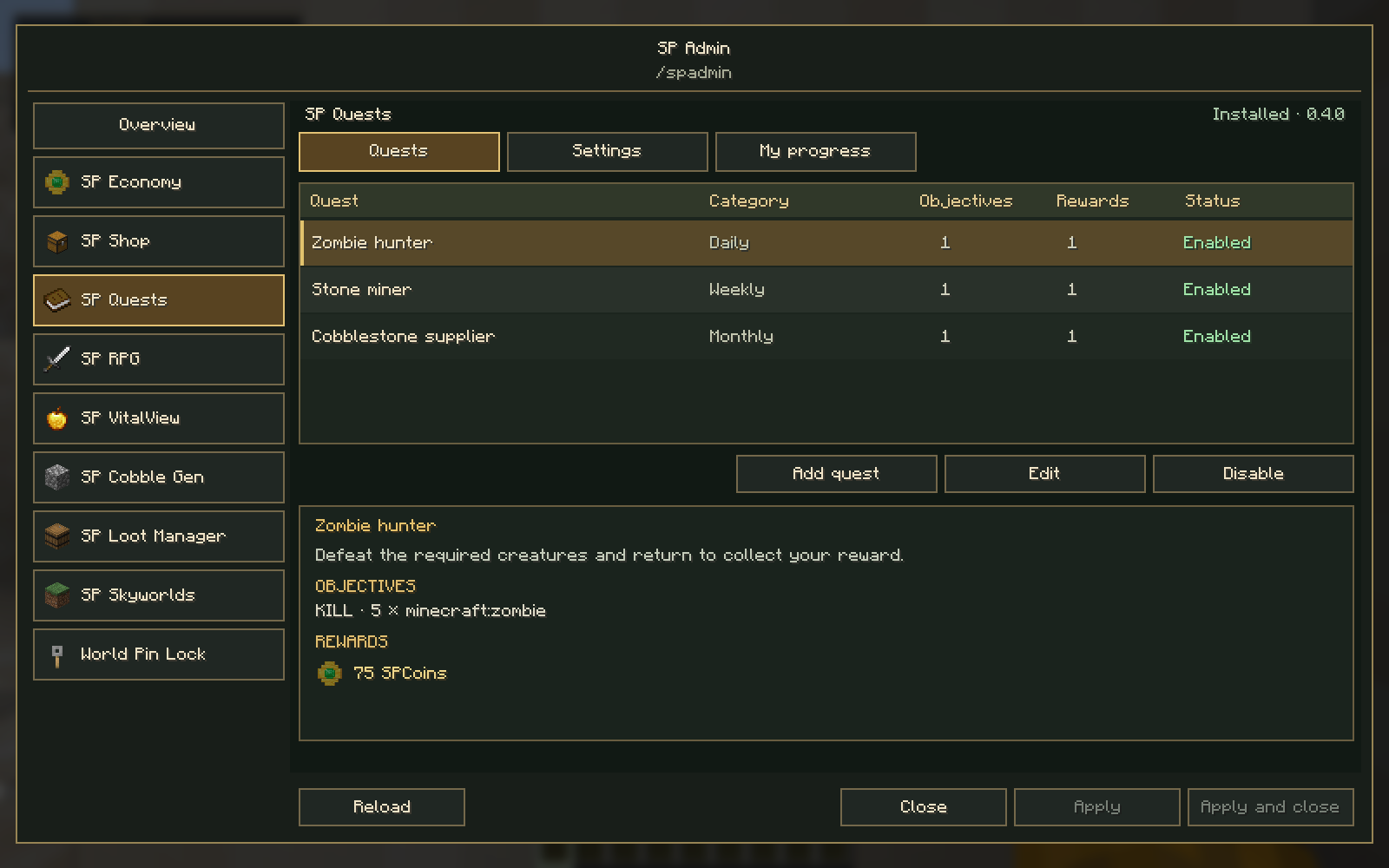
Unified admin window
Select a module on the left. Its tabs, available actions and selected entry's details appear on the right. The installed modules shown below belong to the test pack; your sidebar follows your own installation.
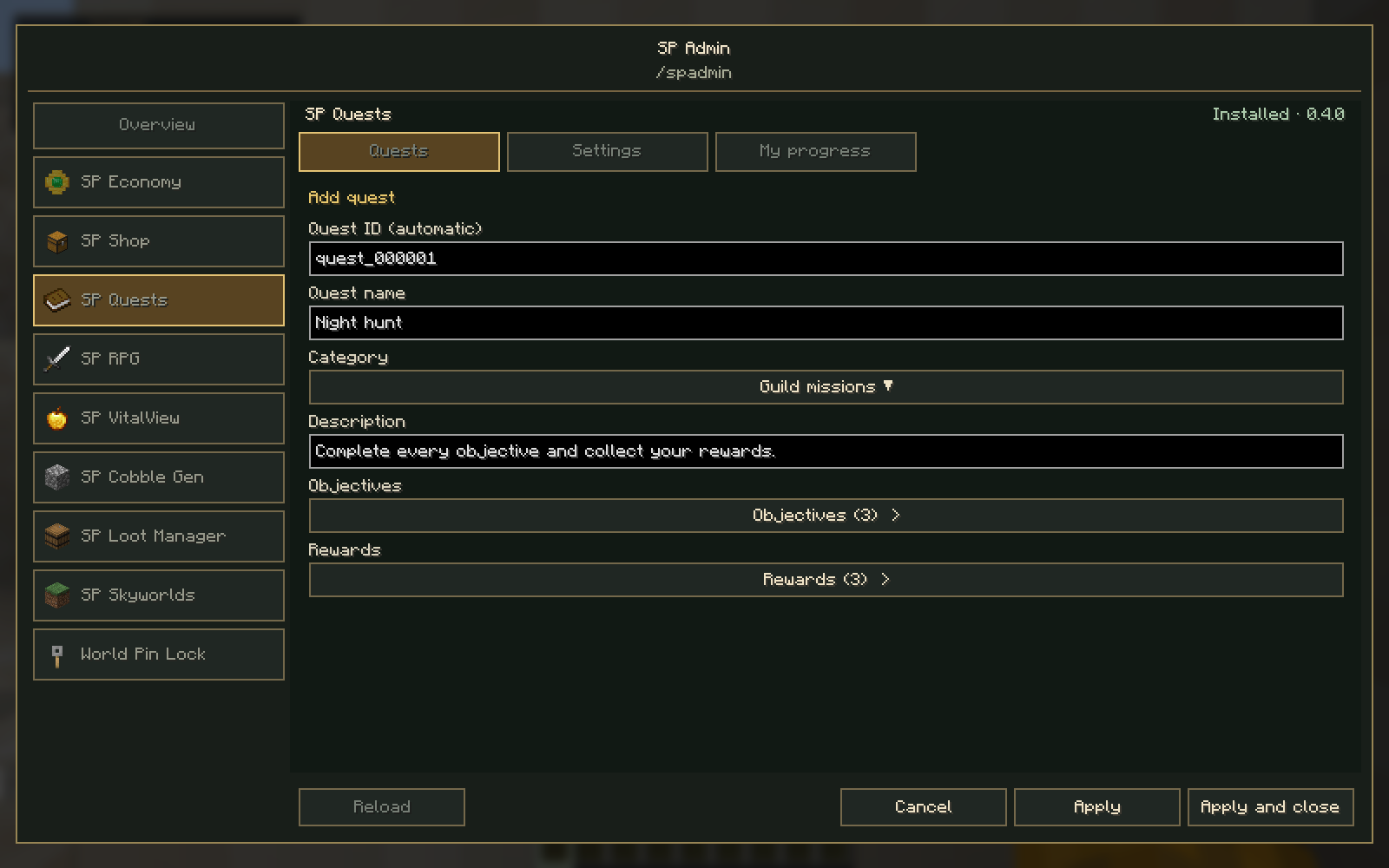
Shared editor
SP Quests uses Core's shared form controls for its catalog editor. The example below shows an automatic quest ID, category selection and separate lists containing three objectives and three rewards.
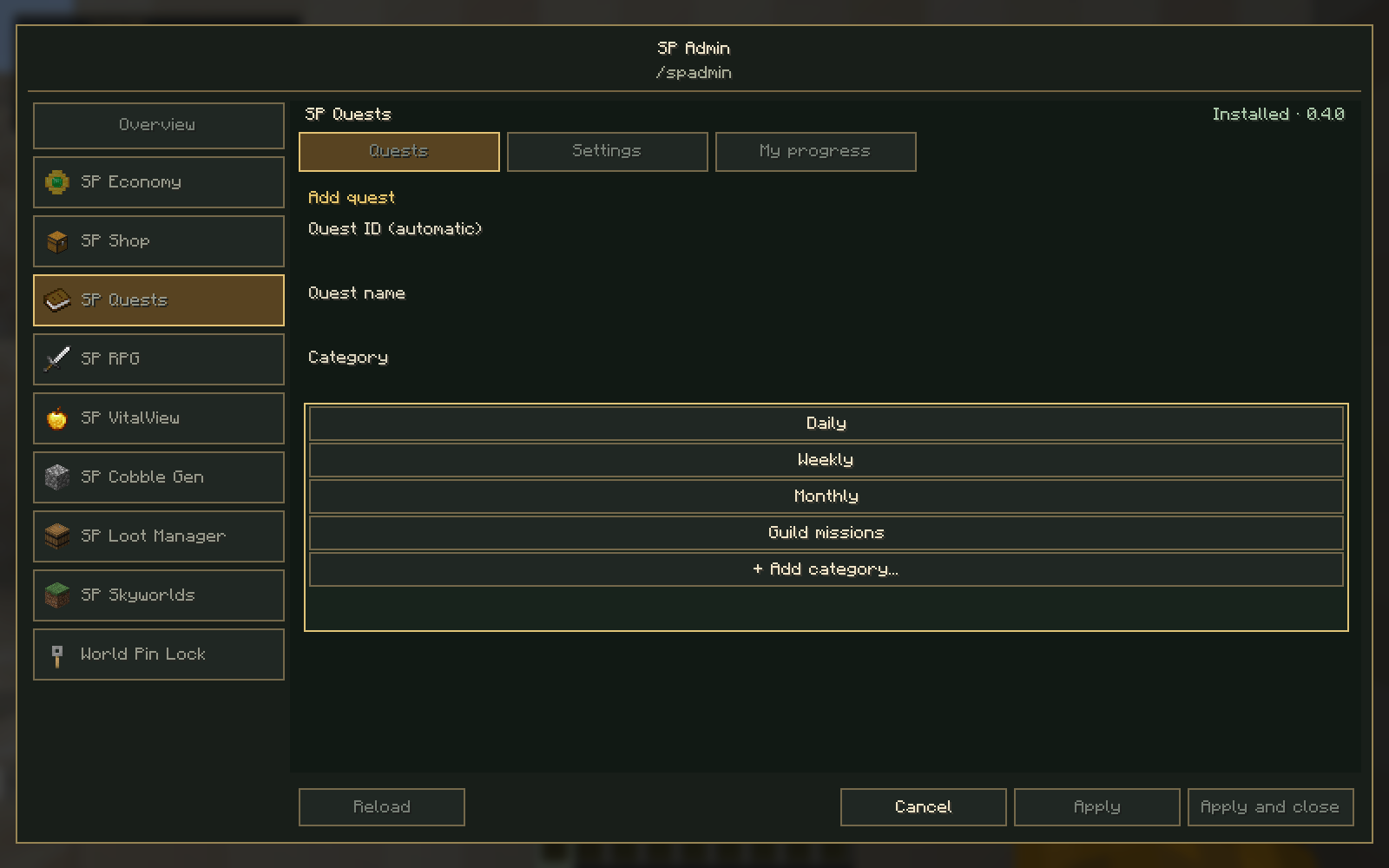
Category dropdown
Choose an existing category or select + Add category…. The new category remains part of the quest draft until it is saved with Apply.
Requirements
| Component | Required version |
|---|---|
| Minecraft Java Edition | 26.2 |
| Java | 25 or newer |
| Fabric Loader | 0.19.5 or newer |
| Fabric API | 0.160.0+26.2 |
| SP Core | Matching version on server and clients |
SP Core requires Fabric API. Other SP mods are installed separately and are optional for Core itself. Individual modules may have their own dependencies.
For multiplayer, install the same Core version on the server and participating clients. For singleplayer, install it in your local Minecraft instance. When updating, replace the old Core JAR and keep only one version installed.
How to use
Run /spadmin while in a world. It requires game-master command permission, normally operator level 2 on a server or cheats enabled in singleplayer. Creative mode alone does not grant access.
- Choose an installed module from the sidebar.
- Choose a tab and select the entry or setting you want to manage.
- Use the available action to open its form or module editor.
- Review your changes, then choose Apply, Apply and close, or Cancel.
Use Reload to refresh the admin window's data. A module's separate reload action reloads that module's own settings or catalog. Mouse-wheel navigation handles longer lists and forms.
Some modules open their existing editor screens from the hub. Their own access rules still apply: for example, SP Economy's editor also requires Creative mode, and World PIN Lock's settings are limited to the appropriate local world.
Supported SP modules
Core 0.3.0 has been checked with these versions:
| Module | Tested version | Integration |
|---|---|---|
| [SP Economy] | 1.3.0 | Wallet service and economy editor access |
| [SP Shop] | 0.10.0 | Shared wallet and shop editor access |
| [SP Quests] TBA | 0.4.0 | Catalog editor embedded in the shared window; mixed rewards |
| [SP RPG / Minecraft MMORPG] TBA | 0.5.6 | Character experience service and RPG admin actions |
| [SP VitalView] | 0.4.3 | Visual settings access |
| [SP Cobble Gen] | 0.4.1 | Generator settings access |
| [SP Loot Manager] | 1.1.0 | Loot editor access |
| [SP Skyworlds] | 0.7.4 | World settings actions |
| [World PIN Lock] | 1.1.0 | Local PIN settings access |
SP Quests embeds its catalog forms directly in the shared frame. Other supported modules retain their existing editor screens or command actions. See each module's page for its installation and permission requirements.
What is new in 0.3.0?
Core's shared editor now supports read-only fields, dropdowns, category creation and lists of editable entries. SP Quests 0.4.0 uses these controls for automatic IDs and multiple objectives and rewards.
The new character experience API lets SP RPG 0.5.6 provide explicit RPG experience rewards. Vanilla Minecraft XP and RPG XP remain separate reward types. The existing economy API remains unchanged.
Install matching Core 0.3.0 on server and clients for the current admin interface.
FAQ
Do I need every SP mod?
No. Core has no dependency on the consumer mods. Install only the modules you want, along with their own required dependencies.
Does Core create another wallet or reset progression?
No. The owning mods keep their existing balances, character data and quest progress. Core provides the shared connection between them.
Will a new SP mod require another Core update?
A mod using the existing APIs can register itself without changing Core. A new shared capability or API change may require a newer Core release.
Can I remove Core while keeping mods that require it?
Those mods need Core to load. Keep Core installed while using a dependent module.
Screenshots
Gallery
Versions
Files
Relations
Project Relations
More like this
Similar Mods
Suggestions use data such as tags, dependencies, dependents, descriptions, titles, and more to rank how much they overlap with this mod.
On ModDex
Community snapshot
By the numbers
Statistics

Get it on
Available Platforms
On ModDex
Community snapshot
By the numbers
Statistics
Resources