Community listing page, reviews may not be monitored by the author.
Stall

No reviews yet
Player-owned shops, custom trading, and a thriving player-driven economy.

Community voices
Reviews
No reviews yet. Be the first to review this project!
Get it on
Available Platforms
About
Project Details
For authors
Embed Badge
If you're the author of this project, you can embed a live badge anywhere that supports HTML or Markdown. It updates automatically whenever ratings change.
Use HTML for any page that supports it, or Markdown for README files and Markdown-based descriptions.
Identifiers
Platform IDs
About
Description

Physical player shops for Minecraft servers, with no client mod




Stall is a player shop system for Fabric dedicated servers on Minecraft 26.1.2, 26.2 and 26.3. Players turn an ordinary barrel, chest or shulker box into a shop, stock it with items, and set up trades that other players buy with a click. Shops are real blocks with real stock, and players on a vanilla client need nothing installed: Stall runs entirely on the server.
Running Spigot, Paper or Folia instead? The plugin is on Modrinth and the GitHub releases, and it reads the same shop files.
How It Works
- Get a Stall token with
/stall token. - Use the token on a barrel, chest, shulker box or custom block you're allowed to open. It becomes your shop, and whatever is inside is your stock.
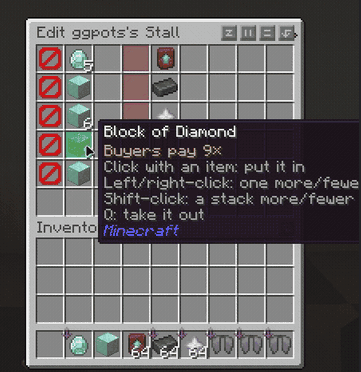
- Set up offers. Sneak and right-click your shop with empty hands, then click items from your inventory into an offer. Your items stay with you; the menu only holds copies.
- Players buy with a click. Anyone else who right-clicks your shop sees your offers and buys any offer the shop has stock for.
- Move it whenever you like. Break your shop or use
/stall remove, and the token comes back to you.
Key Features
Physical Shops A shop is a vanilla barrel, chest, trapped chest or shulker box, and its contents are the shop's stock. Payments go into the same container.
Custom Models & Tokens Supports custom furniture and block models from CraftEngine, Nexo, and Oraxen, plus configurable token items, custom model data and skull textures.
Two-for-Three Trades Every offer asks for up to two items and gives up to three items, each up to one stack. For example, 1 diamond + 2 gold ingots → 8 iron ingots.
Large Containers Grant
stall.barrel.largeorstall.shulker.largefor 54 stock slots. Breaking a shulker shop drops stock safely and returns the token.Up to Six Offers One row per offer, all on one page.
Clear Availability Each offer shows whether it's in stock, whether you can afford it, and whether the shop has room for your payment, and lists what's missing.
All-or-Nothing Trades Every trade is checked in full before anything moves. No partial trades and no lost items.
Exact Item Matching Enchantments, names, durability and potion types all count.
Shop Limits & Overrides Tiers such as
stall.limit.5, checked through Fabric API's permission API, plus/stall admin maxoverride commands.Claim Friendly Shops only go where their owner could open the container anyway, so protection mods decide where shops can go.
Protected Stock Other players can't break or open a shop, and hoppers can't drain it.
Saved With the World Shops are kept in the world's own folder, so a world backup includes them.
Explosions leave shop containers and their stock intact. Missing containers are cleaned up automatically, with tokens waiting for /stall reclaim. Double chests are one shop covering both halves, with 54 slots of stock. Copper chests are excluded because copper golems can remove their contents.
Requirements
- Minecraft 26.1.2–26.3, Java 25
- Fabric Loader 0.19.3 or newer
- Fabric API
- LuckPerms is optional
Commands
| Command | |
|---|---|
/stall |
Show how shops work and the commands below. |
/stall token [amount] |
Get Stall tokens. |
/stall list |
List your shops and your shop limit. |
/stall info |
Show the owner and offers of the shop you're looking at. |
/stall remove |
Remove the shop you're looking at and give its token back to its owner. |
/stall reclaim |
Collect tokens from shops removed while you were offline. |
/stall preview |
See your own shops the way buyers do. |
/stall admin give <player> [amount] |
Give a player Stall tokens. |
/stall admin max <limit|offers> <set|add|take> <player> <amount> |
Set, add, or take from a player's shop limit or max offers override. |
/stall admin max <limit|offers> reset <player> |
Reset a player's shop limit or max offers override. |
/stall admin reload |
Reload config.yml and lang.yml. |
Permissions
| Permission | Default | |
|---|---|---|
stall.use |
everyone | Open shops and buy from them. |
stall.create |
everyone | Turn a barrel, chest or shulker box into a shop with a token. |
stall.token |
everyone | Use /stall token. |
stall.limit.<n> |
none | Own up to n shops, from 0 to 100. |
stall.limit.unlimited |
op | Own any number of shops. |
stall.offers.<n> |
none | Have up to n offers per shop (1 to 6). |
stall.barrel.large |
none | Barrel shops have 54 stock slots instead of 27. |
stall.shulker.large |
none | Shulker box shops have 54 stock slots instead of 27. |
stall.admin |
op | Edit and remove any shop, and use /stall admin. |
Players without a stall.limit tier can own 3 shops.
Links
Large barrels use one vanilla 54-slot menu: 27 ordinary slots and 27 attached slots. Hoppers and comparators see only the ordinary slots. Empty the extra slots before /stall remove, uninstalling Stall, or moving a world between Fabric and Spigot/Paper; breaking the barrel drops its extra items.
Screenshots
Gallery
-
 screenshot-2026-10-28_03-57-46_3631915.png screenshot-2026-10-28_03-57-46_3631915.png
Versions
Files
Relations
Project Relations
More like this
Similar Mods
Suggestions use data such as tags, dependencies, dependents, descriptions, titles, and more to rank how much they overlap with this mod.
On ModDex
Community snapshot
By the numbers
Statistics

Get it on
Available Platforms
On ModDex
Community snapshot
By the numbers