Community listing page, reviews may not be monitored by the author.
SteamCraft P2P

No reviews yet
Play Minecraft Java multiplayer with friends via Steam P2P (Spacewar AppID 480). No port forwarding, no Hamachi, zero config!

Community voices
Reviews
No reviews yet. Be the first to review this project!
Get it on
Available Platforms
About
Project Details
For authors
Embed Badge
If you're the author of this project, you can embed a live badge anywhere that supports HTML or Markdown. It updates automatically whenever ratings change.
Use HTML for any page that supports it, or Markdown for README files and Markdown-based descriptions.
Identifiers
Platform IDs
Resources
External Links
About
Description
SteamCraft - Minecraft P2P Multiplayer over Steam (Spacewar)
SteamCraft is an open-source Minecraft mod that allows you to play multiplayer with your friends using Steam's Peer-to-Peer (P2P) network infrastructure via Spacewar (AppID 480).
Say goodbye to port forwarding headaches, Hamachi/Radmin VPN issues, and waiting in queues on free hosting services!
Key Features
- Zero Port Forwarding: No need to touch your router, open ports, or configure firewalls.
- No Third-Party VPNs: Forget about Hamachi, Radmin VPN, or ngrok.
- Direct and Secure: Traffic is encrypted and tunneled through Valve's Steam Datagram Relay (SDR).
- Full Steam Integration: In-game Steam Friends list and native Steam Overlay (
Shift + Tab) invite support. - Batteries Included: Pre-bundled with native Steamworks libraries (
steam_api64.dll,steamworks4j64.dll, Linux.so, and macOS.dylib). No extra installation required!
How to Play
As Host (Opening your world):
- Make sure the official Steam client is running in the background.
- Launch Minecraft and load into your Singleplayer world.
- Press
Escand select "Open to LAN" (or "Abrir en LAN"). - Configure your desired game settings and click "Start LAN World".
- The mod will automatically register your session with Steam.
- Open your pause menu and click "Invite Steam Friends", or open the Steam Overlay (
Shift + Tab), right-click any friend, and click "Invite to Game".
As Guest (Joining a friend):
- Ensure you have Minecraft open on the same game version and modloader as the host.
- Head to the Multiplayer screen.
- Click the "Steam Friends" button at the top of the screen.
- Click "Join" next to your friend's name.
- Alternative: If your friend sent you a Steam invite, simply accept it directly from your Steam chat notification!
Supported Platforms & Versions
Client (LAN Multiplayer):
- Fabric:
1.16.5,1.18.2,1.19.2,1.19.4,1.20.1,1.20.4,1.21.1,26.3(Requires Fabric API) - Forge:
1.7.10,1.12.2,1.16.5,1.18.2,1.19.2,1.19.4,1.20.1,1.20.4,26.3 - NeoForge:
1.20.4,1.21.1,26.3
Dedicated Servers (24/7 Hosting):
- Paper / Spigot: Universal plugin (
steamcraft-spigot.jar) compatible with 1.12.2 up to 26.3+. - Fabric / Forge / NeoForge Server: Dedicated server jars auto-detect headless servers and publish the port via Steam.
Installation
- Download the
.jarfile corresponding to your mod loader (Fabric, Forge, or NeoForge) and game version. - Place the
.jarinside your.minecraft/modsfolder. - Launch Minecraft with Steam open in the background
Screenshots
Gallery
-
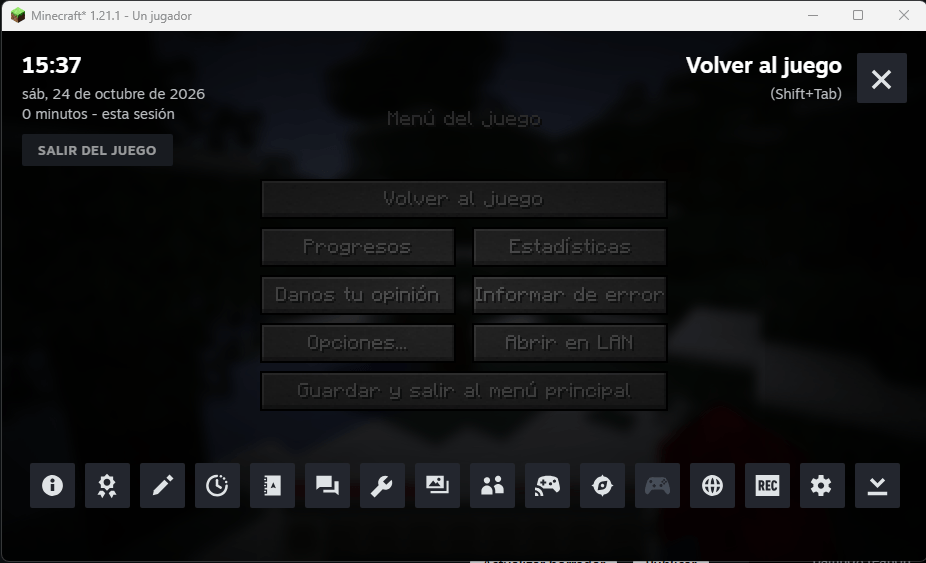 SteamOverlay.png SteamOverlay.png
-
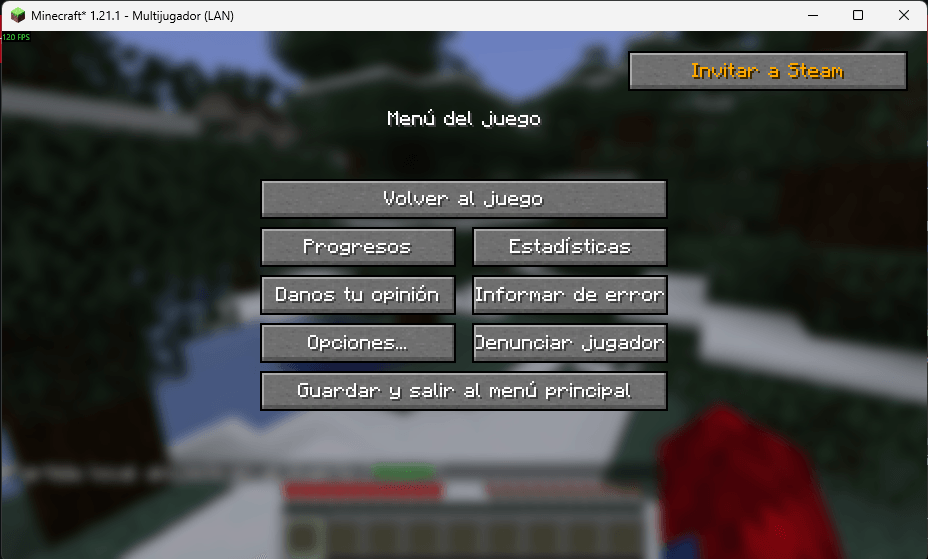 Captura de pantalla 2026-10-24 153829.png Captura de pantalla 2026-10-24 153829.png
Versions
Files
Relations
Project Relations
More like this
Similar Mods
Suggestions use data such as tags, dependencies, dependents, descriptions, titles, and more to rank how much they overlap with this mod.
On ModDex
Community snapshot
By the numbers
Statistics

Get it on
Available Platforms
On ModDex
Community snapshot
By the numbers
Statistics
Resources