Community listing page, reviews here may not be monitored by the author.
StepCraft


No reviews yet
Connect your players' real life movement to in-game rewards.
Community voices
Reviews
No reviews yet. Be the first to review this project!
Get it on
Available Platforms
Compatibility
Supported Environments
Runs on a dedicated server only; does not work in singleplayer.
About
Project Details
For authors
Embed Badge
If you're the author of this project, you can embed a live badge anywhere that supports HTML or Markdown. It updates automatically whenever ratings change.
Use HTML for any page that supports it, or Markdown for README files and Markdown-based descriptions.
Identifiers
Platform IDs
Resources
External Links
About
Description

### 🔴 TO USE THIS PLEASE REACH OUT TO: [email protected]. We are currently in closed Beta :)
Connect your players' real-world movement to in-game rewards.
StepCraft is a **server-side Minecraft Fabric mod** that turns real-world step goals into in-game rewards. Players sync their steps through the **StepCraft Companion mobile app**, then return to your server to claim rewards when they hit the goals you set.
Instead of generic login bonuses, StepCraft gives your community rewards that feel earned.
To register your server, head over to the [StepCraft Website](https://stepcraft.org/).
***
## What StepCraft Adds
* Daily step-based reward goals
* Monthly leaderboard rewards
* In-game reward claiming
* Step-history screens for players
* Public and private server support
* Invite-code and QR-code joining
* Configurable reward tiers
* Custom claim windows
* Join reminders for unclaimed rewards
* Custom reminder messages
* In-game player and admin menus
* Web dashboard setup and management
* Companion mobile app for players
* In-game UI title and layout customization
* Live config reload support
***
## Why Server Owners Use It
StepCraft helps communities build a daily habit around your server.
Players stay active in real life, sync their steps, and come back to claim rewards in Minecraft. Monthly leaderboards add longer-term goals, while daily rewards keep players checking in regularly.
StepCraft works especially well for:
* survival servers
* SMP communities
* friend groups
* fitness-focused communities
* servers looking for a unique retention system
***
## Server Features
### Daily Rewards
Create step goals and reward tiers for your players. When players hit those goals, they can claim rewards in-game.
### Monthly Leaderboards
Reward your most active players over a full month. Players can view the monthly leaderboard and claim finalized monthly rewards through the StepCraft UI.
### Claim Windows
Control how long players have to claim missed or pending rewards.
### Join Reminders
Players can receive private reminders when they join if they have unclaimed daily or monthly rewards.
Reminder messages can be customized from the dashboard and support Minecraft-style formatting.
### Public or Private Servers
Run a public StepCraft server or keep access limited with invite codes and QR-code joining.
### Dashboard Management
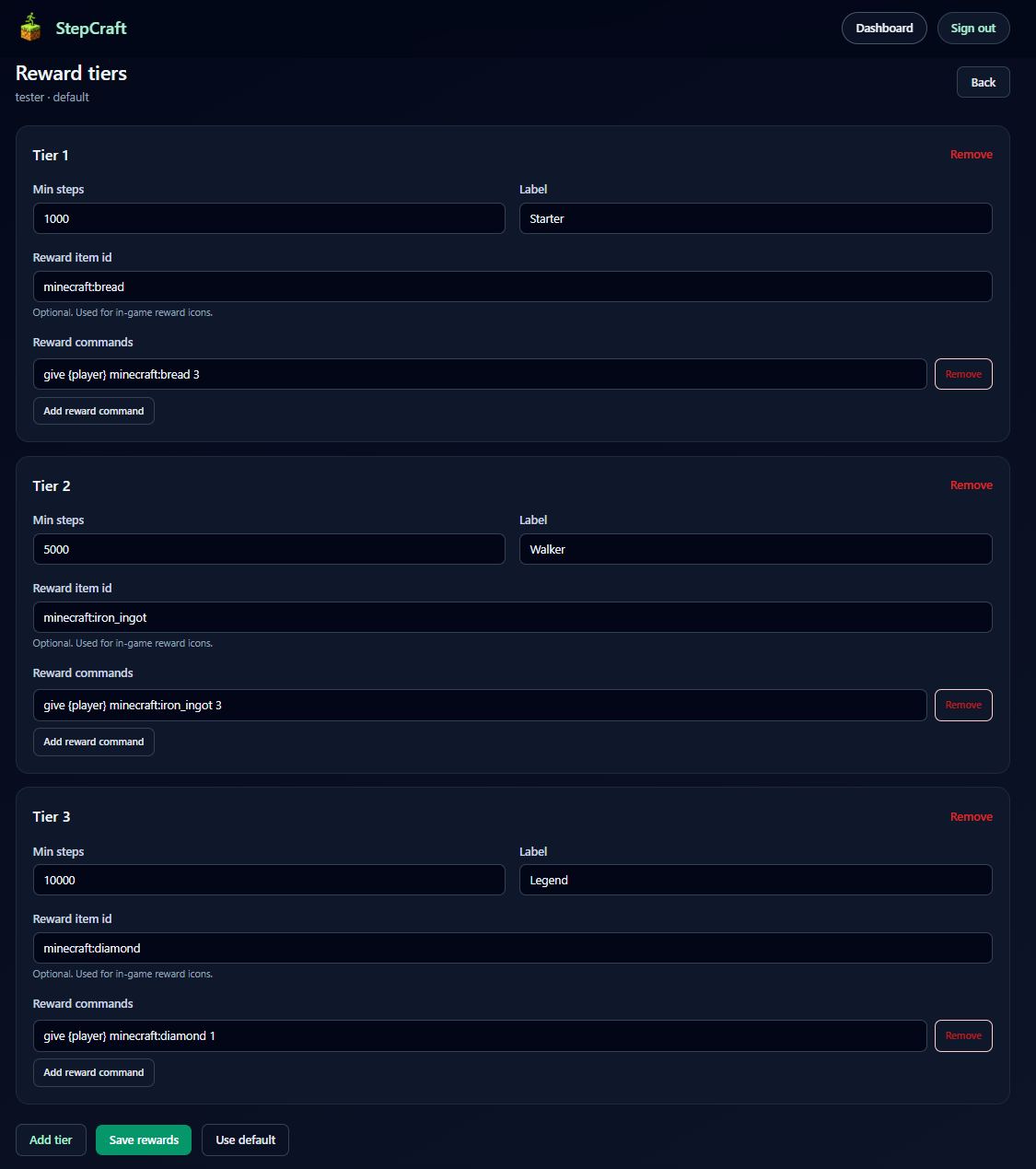
Use the StepCraft Web Dashboard to manage server setup, reward tiers, invite codes, reminder messages, billing, and server settings.
### Companion App
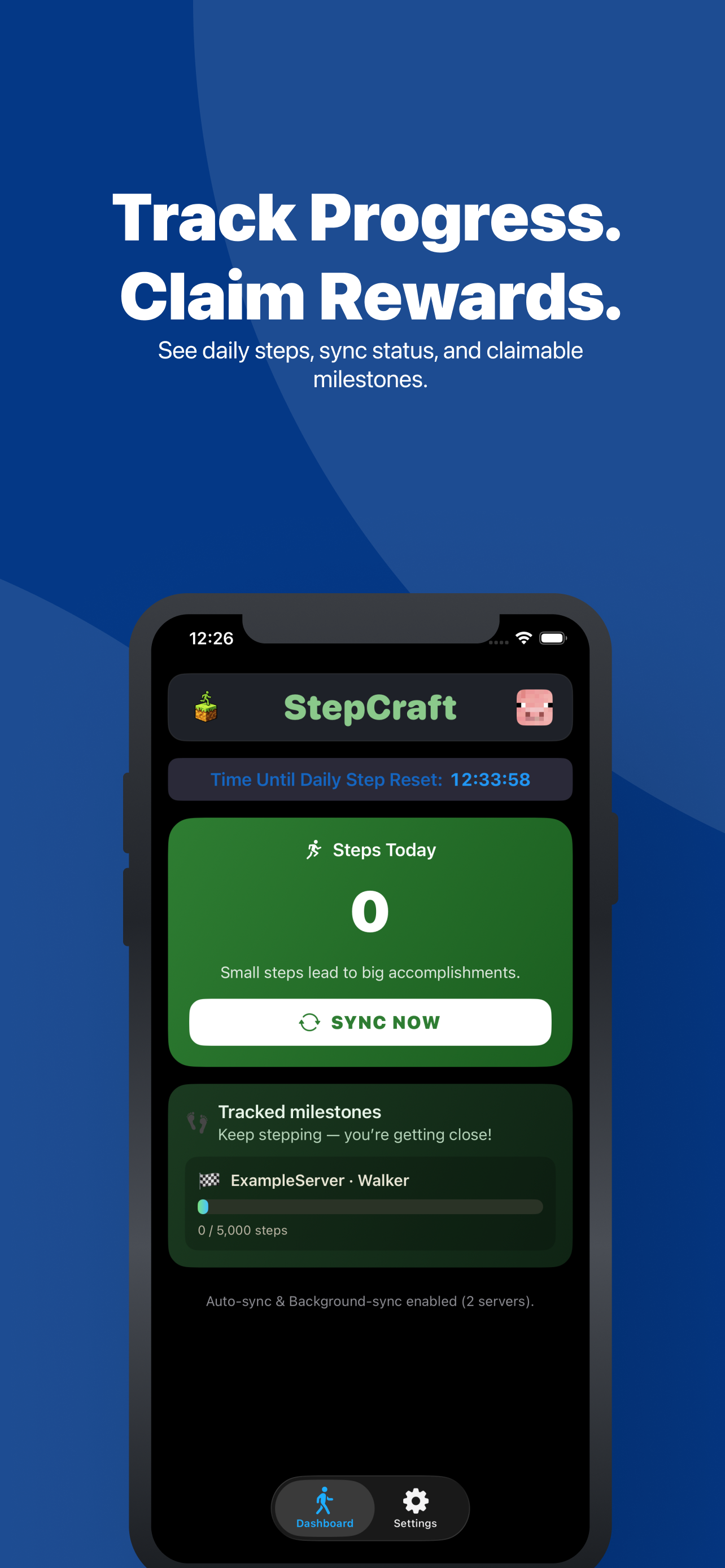
Players use the StepCraft Companion app to join servers, sync steps, track progress, and see available rewards.
### In-Game Admin Tools
Admins can manage StepCraft from in-game menus, including server setup, player tools, reward testing, monthly rewards, join reminders, and UI customization.

***
## Private Server Support
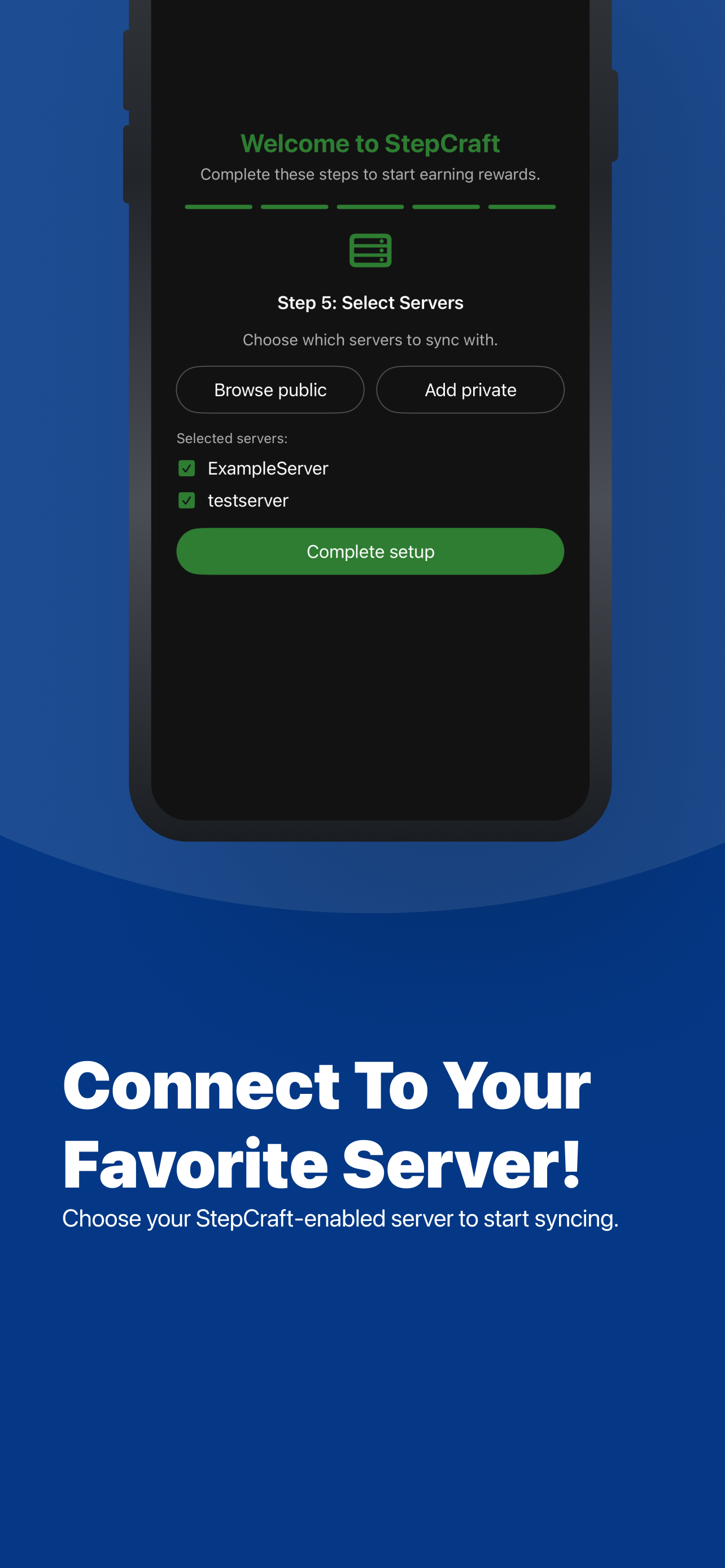
Private servers can use invite codes and QR-code joining so only approved players can connect through StepCraft.
This makes StepCraft easy to use with friend groups, family servers, private SMPs, and invite-only communities.
***
## Getting Started
1. Install the StepCraft mod on your Minecraft server.
2. Register your server through the [StepCraft Website](https://stepcraft.org/).
3. Connect your API key to the mod.
4. Configure rewards and settings in the dashboard.
5. Let players join through the StepCraft Companion app.
6. Players sync steps and claim rewards in-game.
***
## Commands
StepCraft uses `/stepcraft` for player, admin, setup, and customization tools.
### Player Commands
`/stepcraft`
Opens the StepCraft player UI.
`/stepcraft ui`
Opens the StepCraft player UI.
`/stepcraft steps`
Opens your step-history screen.
`/stepcraft steps <username>`
Shows step history for a player. Regular players can only view themselves. Admins can view other players.
`/stepcraft claim_reward`
Opens the reward-claiming UI.
`/stepcraft claim_reward <username>`
Claims rewards for a player. Regular players can only claim for themselves. Admins can claim for other players.
`/stepcraft monthly_leaderboard`
Opens the monthly leaderboard and monthly reward flow.
### Admin Commands
These commands require operator/admin permissions.
`/stepcraft ui_admin`
Opens the StepCraft admin UI.
`/stepcraft set_api_key <key>`
Saves the StepCraft API key for this server.
`/stepcraft reload`
Reloads StepCraft config and UI data without a full server restart.
`/stepcraft info`
Shows StepCraft server info from the backend.
`/stepcraft claim_status <username>`
Checks reward claim status for a player.
`/stepcraft players_data`
Shows full player records from the backend.
`/stepcraft player_names`
Shows the StepCraft player name list for the server.
`/stepcraft bans`
Shows current StepCraft bans.
`/stepcraft ban [username] [reason]`
Bans yourself or a specific player.
`/stepcraft unban [username]`
Unbans yourself or a specific player.
`/stepcraft delete_player [username]`
Deletes your own StepCraft player record or a specific player record.
### UI Customization Commands
These commands require operator/admin permissions.
`/stepcraft ui_titles_config list`
Lists configurable UI title keys.
`/stepcraft ui_titles_config get <key>`
Shows the current and default value for a UI title.
`/stepcraft ui_titles_config set <key> <title>`
Sets a custom UI title.
`/stepcraft ui_titles_config reset <key>`
Resets a UI title to its default value.
`/stepcraft ui_layout_config list_screens`
Lists customizable StepCraft screens.
`/stepcraft ui_layout_config list <screen>`
Lists layout elements for a screen.
`/stepcraft ui_layout_config set_slot <screen> <key> <0-53>`
Moves a UI element to a slot.
`/stepcraft ui_layout_config set_icon <screen> <key> <minecraft:item_id>`
Changes a UI element icon.
`/stepcraft ui_layout_config set_visible <screen> <key> <true|false>`
Shows or hides a UI element.
`/stepcraft ui_layout_config reset <screen> [key]`
Resets a screen layout or specific layout key.
`/stepcraft ui_layout_config editor <screen>`
Opens the in-game layout editor.
***
## Notes
* StepCraft is server-side only.
* Players use the Companion app to sync steps and join servers.
* Server setup and management are handled through the StepCraft Website.
* Backend-connected commands require a valid StepCraft API key.
* `/stepcraft steps` replaces the older `/stepcraft today_steps` command.
* Monthly rewards are accessed through `/stepcraft monthly_leaderboard`.
***
## Links
[StepCraft Website](https://stepcraft.org/)

Turn Real-World Steps Into Minecraft Rewards
StepCraft connects your players' real-world movement to your Minecraft server.
Players sync their steps through the StepCraft Companion mobile app, then return to your server to track progress, compete on monthly leaderboards, and claim rewards when they reach the goals you configure.
Instead of another login bonus or passive reward system, StepCraft gives players rewards tied to something they actually accomplished outside the game.
Register your server and get started at the StepCraft Website.
How It Works
- Install StepCraft on your server.
- Register your server through the StepCraft web dashboard.
- Add your server API key to the StepCraft configuration.
- Configure your step goals and rewards.
- Players join your StepCraft server through the companion app.
- Players sync their steps and claim rewards in Minecraft.
What StepCraft Adds
Step-Based Rewards
- Daily step-based reward goals
- Configurable reward tiers
- Custom claim windows
- In-game reward claiming
- Join reminders for unclaimed rewards
- Custom reminder messages
Leaderboards and Player Progress
- Monthly leaderboard rewards
- Player step-history screens
- In-game player directory and menus
- Player heads displayed in the StepCraft interface
Server Management
- Web dashboard setup and management
- In-game admin menus
- Public and private server support
- Invite-code and QR-code joining
- Live configuration reload support
Customization
- Customizable reward settings
- Configurable in-game UI layouts
- Custom in-game UI titles
Player Companion App
Players use the StepCraft Companion mobile app to connect their real-world step activity to participating Minecraft servers.
Why Use StepCraft?
Give Players a Reason to Come Back
Daily step goals create another progression loop alongside normal Minecraft gameplay.
Reward Real-World Activity
Players earn rewards based on real-world movement rather than simply logging in or waiting for a timer.
Create Friendly Competition
Monthly leaderboards give your community another way to compete, with configurable rewards for top players.
Make Your Server Different
StepCraft gives your server a feature that players are unlikely to find on a typical SMP or community server.
Manage Everything in One Place
Server owners can register and manage their StepCraft server through the web dashboard, while many player and administrative interactions happen directly in Minecraft.
Server Support
StepCraft currently supports:
Fabric
- Minecraft 1.21.1
- Minecraft 1.21.11
- Minecraft 26.2
Paper
- Minecraft 1.21.x
- Currently tested on Paper 1.21.1 and 1.21.11
- Minecraft 26.2
Make sure you download the StepCraft file that matches your server platform and Minecraft version.
Getting Started
Getting StepCraft running only requires a few steps:
1. Download StepCraft
Choose the correct version for your Minecraft server.
2. Install the plugin or mod
Place StepCraft in your server's appropriate plugins or mods folder.
3. Register your server
Create or sign in to your account at the StepCraft Website and register your Minecraft server.
4. Add your API key
Copy the API key generated for your server and add it to your StepCraft configuration.
5. Restart and configure
Start your server, configure your rewards, and begin inviting players.
For detailed instructions, see the [StepCraft Setup Guide]([SETUP GUIDE URL]).
Designed for Server Owners
StepCraft is built to give server owners control over how step-based progression fits into their community.
Configure your rewards, customize the in-game experience, manage your server from the dashboard, and let StepCraft handle the connection between player activity and Minecraft.
Ready to add step-powered progression to your server?
Screenshots
Gallery
-
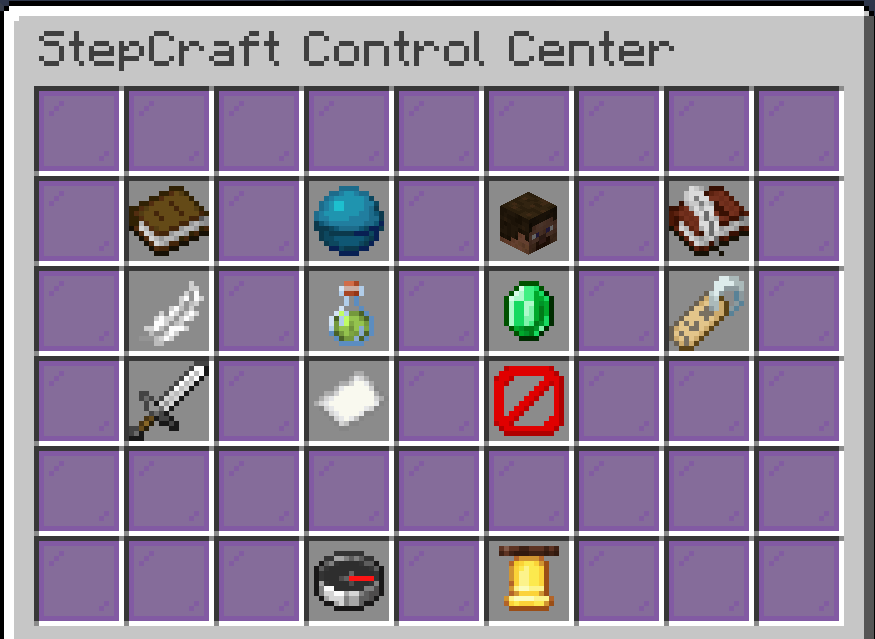 In-Game Admin Control Center This is the in-game dashboard where the admins can manage StepCraft's different components of.
 -
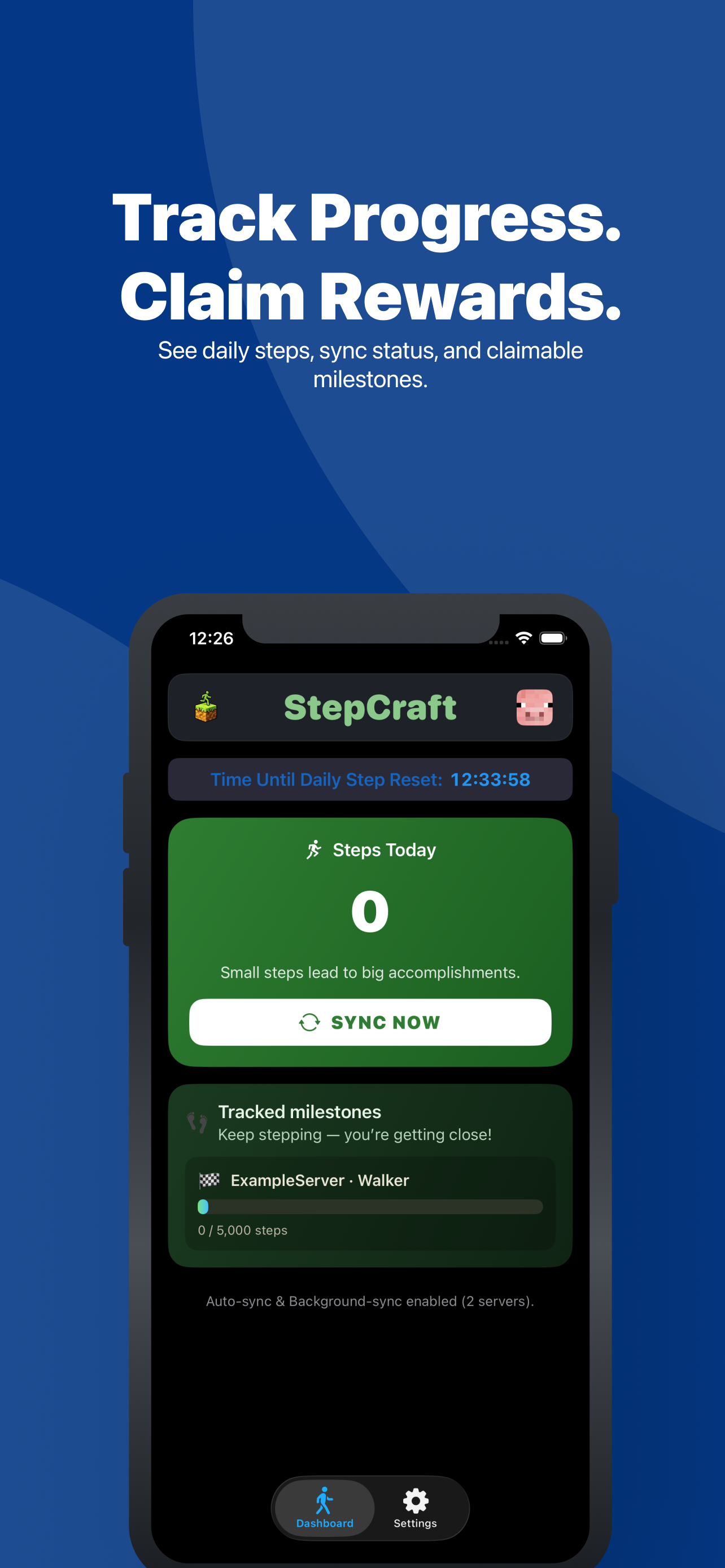 Player App UI Dashboard This is what the app looks like that players will use to connect their steps to your server.
 -
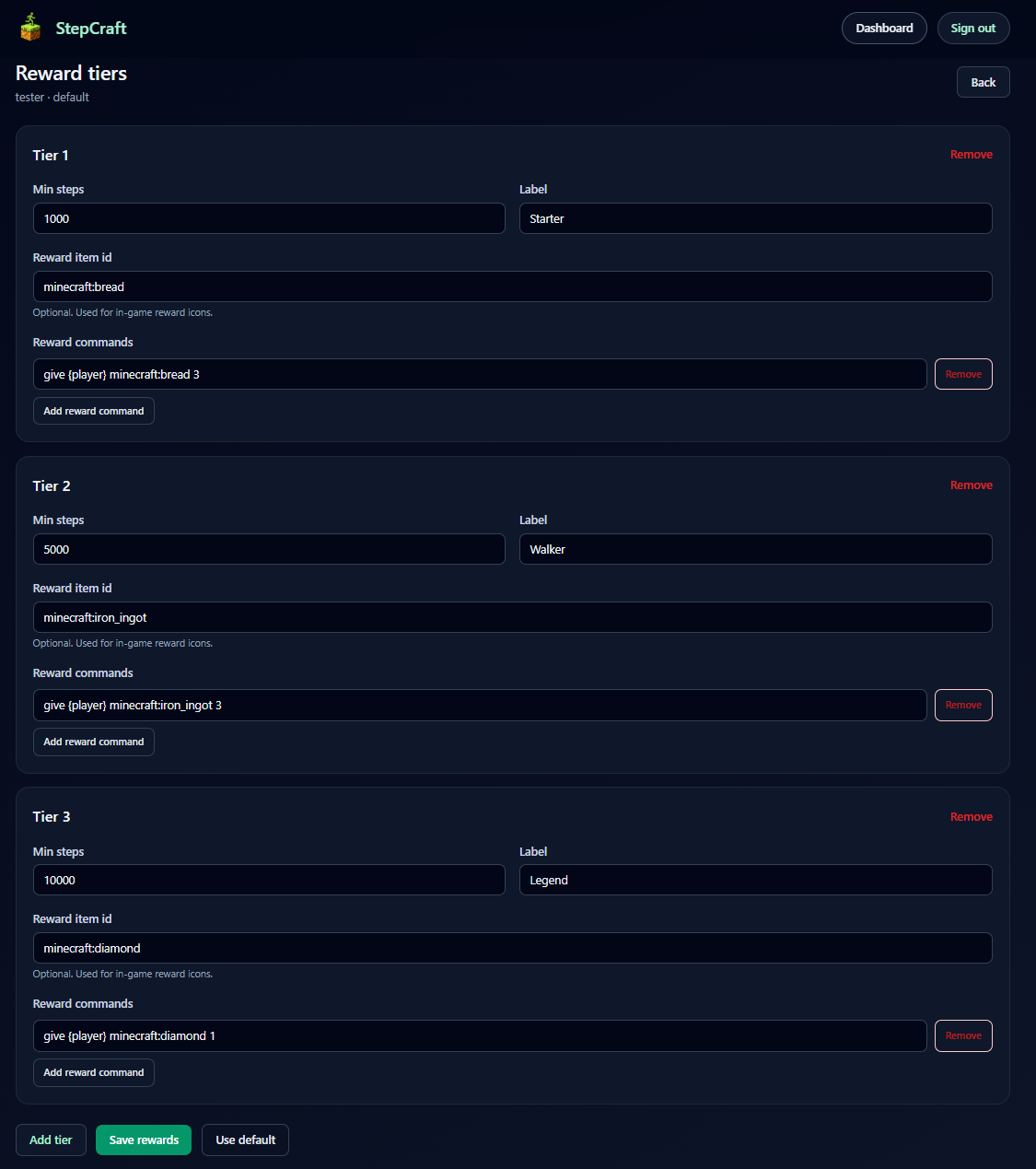 Admin Rewards Web Dashboard This is how you can edit the reward structure for you server. No need to mess with config files and can be changed from anywhere on the web!
-
 Admin UI The in-game control panel that the admin can use to manage the StepCraft service and their active players.
 -
 Reward Config Configure your server rewards using a web dashboard rather than confusing config files.
 -
 Player App UI This is what the UI looks like for players on the mobile app. They can track rewards that you have set if they have joined your server, as well as set up notifications when they have reached those rewards.
 -
 Player Server Joining Players can connect to your server either by browsing the public server list if you have made your server public or by using an invite code if you have set your server to be private.
Versions
Files
Relations
Project Relations
More like this
Similar Mods
Suggestions use data such as tags, dependencies, dependents, descriptions, titles, and more to rank how much they overlap with this mod.
On ModDex
Community snapshot
By the numbers
Statistics
Want to reach Minecraft players?
We're looking for a server hosting partner to feature here and other parts of the site. Interested? Send us a message!
Get in touchGet it on
Available Platforms
On ModDex
Community snapshot
By the numbers
Statistics
Resources