
Community listing page, reviews may not be monitored by the author.
stow

No reviews yet
Sort inventories, remember and label storage, plan builds, refill tools and rockets, preview shulkers, automate attacks and Mending, with instant trades, fast chest sorting, area claims and log harvesting via companion.

Community voices
Reviews
No reviews yet. Be the first to review this project!
Get it on
Available Platforms
About
Project Details
For authors
Embed Badge
If you're the author of this project, you can embed a live badge anywhere that supports HTML or Markdown. It updates automatically whenever ratings change.
Use HTML for any page that supports it, or Markdown for README files and Markdown-based descriptions.
Identifiers
Platform IDs
Resources
External Links
About
Description
stow
A quiet home for your items. Stow brings inventory sorting, remembered storage, build planning and everyday tool helpers together for Minecraft 26.3 on Fabric.
Paste a materials list, find what you already own, gather the rest and keep track while you build. Sort chests, move stacks, refill blocks and rockets, preview shulkers, trade with villagers and repair your Mending tools without a collection of separate inventory utilities.
Stow 1.0.6 fixes the Claim area camera: W now flies where you look, A/D are no longer swapped and the mouse turns the view. Area selection now has two steps: pick the footprint, then set the height with the scroll wheel. It also adds a controls panel, F1 to hide the HUD while selecting, and a What's new screen after updates. No companion update is needed; Claim area still needs companion 1.0.5 or later. The 1.0.6 changes have been compiled and checked but not yet tested in-game.
Stow 1.0.5 added storage owner labels with an Owner filter, Claim area with a free camera for older storage, and a compact storage list with container icons. The floating material list no longer covers your status effects. The release also includes a performance pass, shulker memory fixes, a new equipment HUD order and a Mouse Tweaks Shift-drag fix. Storage owner labels and Claim area need the updated server companion (1.0.5); the rest works with the client alone. Features were checked in an isolated Minecraft client/server. Individual modpacks, dedicated servers and protection mods still need compatibility testing.
Keep your inventory in order
- Five sort orders: creative catalogue, name, quantity, item type and combine-only. Middle-click sorts; Shift and Ctrl select your alternate orders.
- Move several stacks: Shift-drag matching items, or use Ctrl + Shift-drag for every crossed item in Both mode. With Mouse Tweaks installed, Stow's drags keep their Matching filter, and Mouse Tweaks' other gestures and wheel actions keep working. Result slots are excluded from drag gestures to prevent accidental crafting or trading.
- Search and pin: find inventory items and pin positions you want sorting, drag and deposit actions to leave alone. Ordinary Shift-transfers can also avoid pinned destinations.
- Smart deposit: move items into open storage immediately, with matching-only transfers, keep amounts and hotbar protection.
- Quick bundles: Shift-left-drag to fill a held bundle, Shift-right-drag to unpack it, or drag from a placed bundle. Capacity, item components and pinned positions are respected.
- Shulker previews: hover any undyed or colored shulker box for its 27-slot contents grid, including counts and durability indicators. The grid replaces the duplicate written item list; names and lore remain. Disable previews in Inventory settings if you prefer the normal list.
Remember your storage
Stow remembers snapshots of chests, barrels and shulker boxes you open. Search those snapshots, rename storage, review contents and highlight the chests holding a material through walls. Right-click a floating material counter to show or stop its source glow.
- Compact storage list: denser cards in up to three columns, with a chest, barrel or shulker icon on every card. Shulker cards take the box's dye color; undyed and older unknown-color entries use a neutral style until refreshed.
- Shulker tracking: a shulker you place is remembered from its known contents once the server confirms it. Picked-up or moved boxes are removed instead of leaving stale entries or duplicate totals.
- Status effects stay visible: in the player inventory, the floating material list moves below active potion/status effects, including with the recipe book open. Tight layouts keep scrolling or the Materials button.
Memory reflects the last time you opened a container or confirmed a shulker placement. It cannot inspect unopened storage or see somebody else's changes until you reopen it. Forgetting a snapshot keeps its project selection; reopening refreshes its contents. Undo restores forgotten entries.
Label and claim your storage (companion)
With the updated 1.0.5 companion on the server, or locally in single-player:
- Storage owner labels: newly placed chests, trapped chests, barrels and shulker boxes are labeled with the player who placed them. Cards show a player, Shared, Unclaimed or Mixed owners for double chests with different owners.
- Owner filter: cycle the storage and project storage-selection lists through Everyone, Mine, Shared, Unclaimed, Mixed and individual players. Project totals are not affected.
- Change a label: open the storage and use Rename → Storage owner to claim unclaimed storage, mark it Shared or restore its player label. Only the labeling player or an operator can change an existing label.
- Claim area: use Storage → Claim area → Fly and select corners to fly a local free camera that follows your movement keys. Pick the footprint (left-click corner 1, right-click corner 2), set the height with the scroll wheel, then review the box and claim its unclaimed storage in one step. A controls panel shows the keys for each step, Backspace goes back and F1 hides the HUD. Existing owners and Shared labels are always kept. The companion visits only loaded chunks, up to 262,144 positions, with corners within 64 blocks of you on each axis. Cancelling keeps the claims already made.
Existing storage starts Unclaimed; opening it does not claim it. Labels organize your list. They do not lock containers, grant access, reveal unopened contents or identify who originally placed older storage. Without the updated companion, Stow keeps working and shows labels you have already seen, but you can't edit them.
Turn a materials list into a build plan
Open Materials → Import and paste ordinary text, including a YouTube materials list. Formats such as 128 Oak Logs, Glass x64 and 2 stacks of Stone work without a schematic mod. Review the results, correct uncertain names, skip unrelated lines and choose whether to add quantities or replace matching targets. Duplicates combine and Undo reverses the import.
Create separate projects with their own material goals and counted chests. Totals can include your inventory, remembered storage or both. Newly discovered chests can join the active project automatically. Star the materials you want on the HUD, edit quantities and hide individual goals without deleting them.
Finish project becomes available when every goal is met. Counts keep updating as you use materials, with neutral colors and “N used” instead of planning warnings. Reopen restores normal planning colors. Both support Undo.
The paper icon copies every saved target as plain text with exact item IDs, ready to share or import into another project. Projects support 1,024 material types and targets up to 1,000,000 items each. Imports accept 65,536 characters and 2,048 lines; unknown or ambiguous rows stay excluded until corrected.
Keep building and look after your tools
- Block and rocket refill: top up the hand you used from matching inventory reserves, including offhand rockets and Elytra boosts. Choose a threshold from 0–16; 0 waits until the last item is used. Rocket flight and explosion data must match, and pinned reserves are skipped.
- Block-count HUD: see your remaining building stock beside the hotbar or place the counter elsewhere.
- Tool selection: middle-click a world block to choose a suitable hotbar tool. Alt + T toggles automatic mining-tool selection, which starts off. Hold Sneak to keep your own choice temporarily.
- Tool replacement: replace worn main-hand tools from inventory using Keep 1 durability or After break. Keep 1 preserves the old tool and blocks a damaging use without a suitable spare. Pinned spares, armor and offhand equipment are excluded from this replacement feature.
- Equipment HUD: watch hotbar-tool and worn-armor durability as remaining points or percentage only. Equipment appears in hotbar order from left to right, then armor from helmet to boots. The detailed equipment screen also shows backpack and offhand gear, sorted by durability.
Trade from your whole inventory
Shift + left-click the villager's output to keep trading the selected offer, topping up both payment slots in place from your main inventory and hotbar, including partial stacks and two-item costs. It stops when materials, villager stock or inventory space run out. Another click, a keypress, scrolling or closing the menu stops further batches.
With the updated Stow companion, these bulk trades complete instantly in one server operation. Without it, Stow repeats normal transactions at a paced rate. Both paths stop at stock, payment and inventory-space limits, with at most 128 batches per gesture. The server controls all prices, experience and item matching. Instant work already completed cannot be cancelled afterward. Servers can disable acceleration with instantVillagerTrading=false in config/stow-companion.properties and a restart. Missing replies time out after five seconds without replay. Custom merchant menus use the client fallback. As with vanilla merchant selection and output transfers, payments and results can use pinned inventory positions. Other recipe outputs keep their normal Shift-click behavior.
Repair Mending items while you collect XP
Alt + M toggles auto-mending. Damaged Mending items cycle from your inventory into the offhand, most missing durability first. Collect XP normally; Stow does not create XP or repair items without Mending. Each repaired item returns to its original position, and your original offhand item is restored.
The selected main-hand slot remains available for farming, and pinned donor positions are skipped. Worn armor and your main-hand item still receive normal Mending repairs. Toggle off to stop; menus, focus loss, pause, death and spectator mode also stop activation. A pending return waits until normal gameplay allows a safe swap. Manual changes stop the cycle without overwriting them. If a disconnect prevents the return packet, the borrowed tool and original offhand item remain in their current swapped positions; reconnecting does not restart the cycle.
Hold Attack or click at an interval
Alt + A toggles automatic Attack. In Settings → Automatic attack, choose Hold Attack for continuous mining with an initial attack, or Interval clicks for repeated attacks. The interval is 50–60000 ms, with a 500 ms default. Clicks follow game ticks, at most 20 per second; normal combat cooldowns and item-use handling still apply.
Toggle again to stop. Opening a menu or chat, switching away from the game, pausing, dying, spectator mode or disconnecting stops it and releases held Attack. It stays off when you return.
Optional companion: faster sorting, connected logs and storage labels
The Stow client works without a server-side Stow installation. Add the separate stow companion for:
- Instant trades: whole-inventory villager trades complete in one server operation (see above).
- Fast chest sorting: supported vanilla chests, trapped/double chests, barrels, ender chests and shulker boxes sort in one validated server operation. The server checks the current contents, permissions, stack limits and exact item/component totals; player inventory and cursor stay untouched. Custom menus, older companions and oversized requests keep the normal client queue. Requests are bounded to 54 storage slots and 24 KiB. Server owners can disable acceleration with
fastChestSorting=falseinconfig/stow-companion.propertiesand restart. - Connected-log harvesting: hold an axe, aim at an unstripped log and press Alt + S. The companion strips and then harvests the connected group of the same type, including all vanilla logs and Nether stems. Tall columns, long rows and dense piles are supported; the configurable count limit defaults to 16,384 logs. Reach, loaded chunks, permissions, durability and normal loot rules apply. Press again to cancel. Without the companion, Alt + S only strips nearby visible logs and does not harvest them.
- Storage owner labels and Claim area (new in 1.0.5): placer labels, label editing and area claims for older storage, as described above. These need companion 1.0.5 or later.
For single-player, install both JARs locally to enable these companion features. Exact compatibility with individual Timber, storage or protection mods is not guaranteed.
Make it yours
Open the command palette with Ctrl + K. Change shortcuts, sorting defaults and settings in-game. Drag and resize the material, equipment and block-count HUDs, choose their alignment and reset their placement. English and German translations are included, with compact hover help and brief action feedback. After an update, a What's new in Stow screen shows the highlights once; turn it off or reopen it under Settings → Appearance.
Common controls: P pins a hovered slot, N tracks a material and H prioritizes a hovered floating material counter. New attack and mending toggles start off. All listed shortcuts can be edited or unbound.
Stow 1.0.5 also does less repeated work in inventory menus and HUDs. Storage totals, searches and previews are calculated once per change instead of every frame, and owner labels add no per-frame checks.
Install
For Minecraft 26.3:
- Install Java 25+, Fabric Loader 0.19.5+, Fabric API 0.161.0+26.3 and Cloth Config 26.3.159+.
- Put the Stow client JAR in your client's
modsfolder. Replace older Stow JARs and remove Mouse Wheelie; the two mods are incompatible. - Optionally install Mod Menu 21.0.0 for access to settings.
- For companion features, put the separate companion JAR and Fabric API on the server. Use companion 1.0.5 or later for storage owner labels and Claim area; 1.0.6 needs no companion update. In single-player, put both Stow JARs in the client. The companion does not need Cloth Config or Mod Menu.
Existing Stow projects, chest memories, goals, selected chests and priorities are retained; 1.0.5 needs no migration. Removing Stow stops its features; keep config/stow/ if you want your saved plans and memories for a later reinstall. Client-only inventory helpers do not require the companion. Servers can impose their own restrictions on automated actions.
Stow checks public GitHub, Modrinth and CurseForge release listings for updates and shows a clickable notice. Those checks send no player, world, server or account data. Pending moderation can delay update notices.
About Stow
I made Stow for my friends and our Minecraft server with AI assistance. Much of its code, UI, translations, documentation and branding was generated or edited with AI. I choose the features and test them, but this is a personal project and may have rough edges.
Inventory sorting is adapted from Mouse Wheelie by Siphalor and contributors. Stow retains the Apache 2.0 license and upstream attribution. Material Design Icons are credited in the source. Fabric, Cloth Config and Mod Menu are separate projects and are not bundled.
Source and GitHub downloads · Detailed feature guide · Changelog · Report a bug
This is an independent project, not affiliated with Mojang or Microsoft. Minecraft and its assets are not included.
Screenshots
Gallery
-
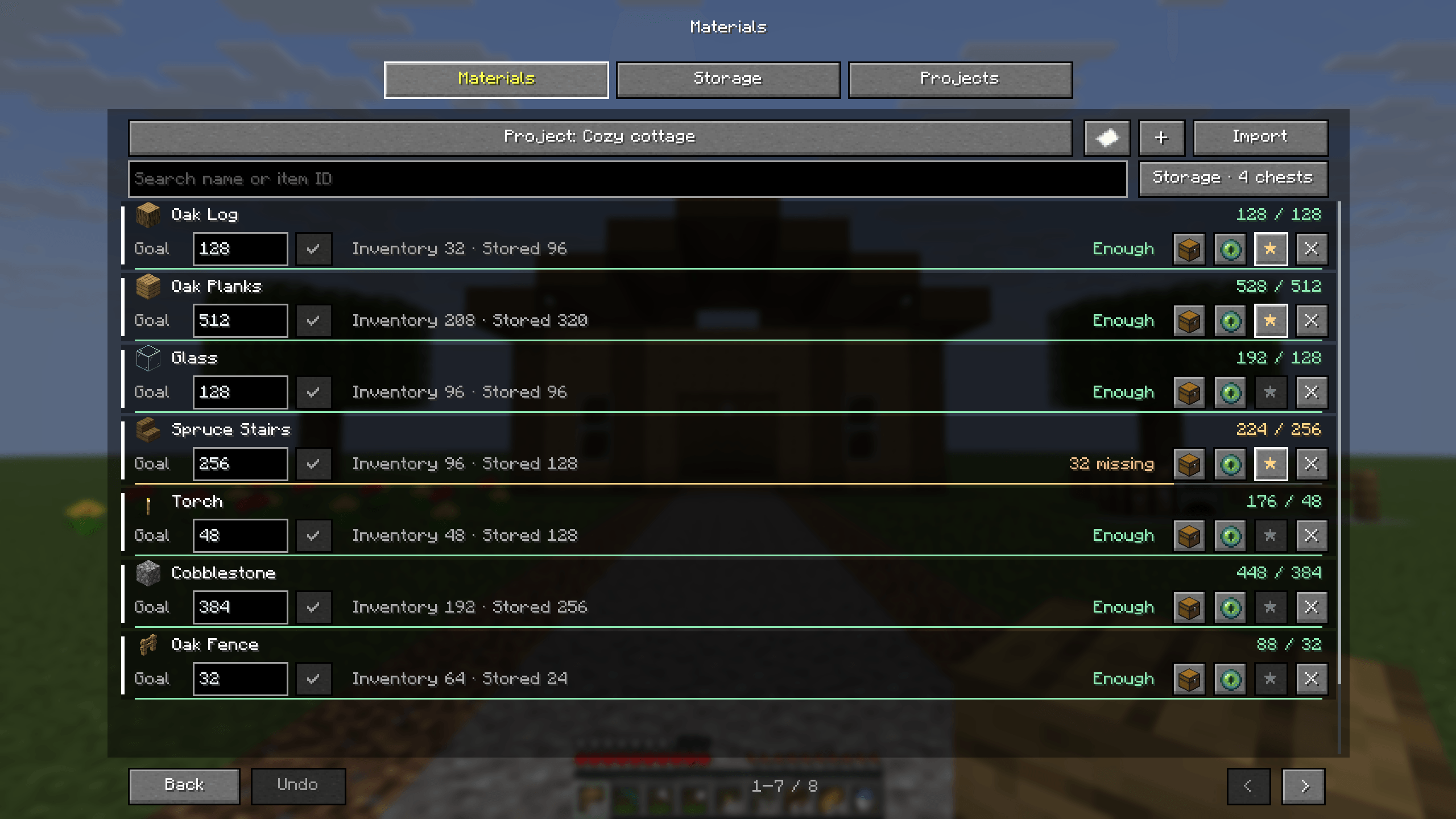 Stow 1.0 — your build starts with a list More material rows, live inventory and remembered-storage totals, editable targets, pixel priority stars, import and plain-text export.
 -
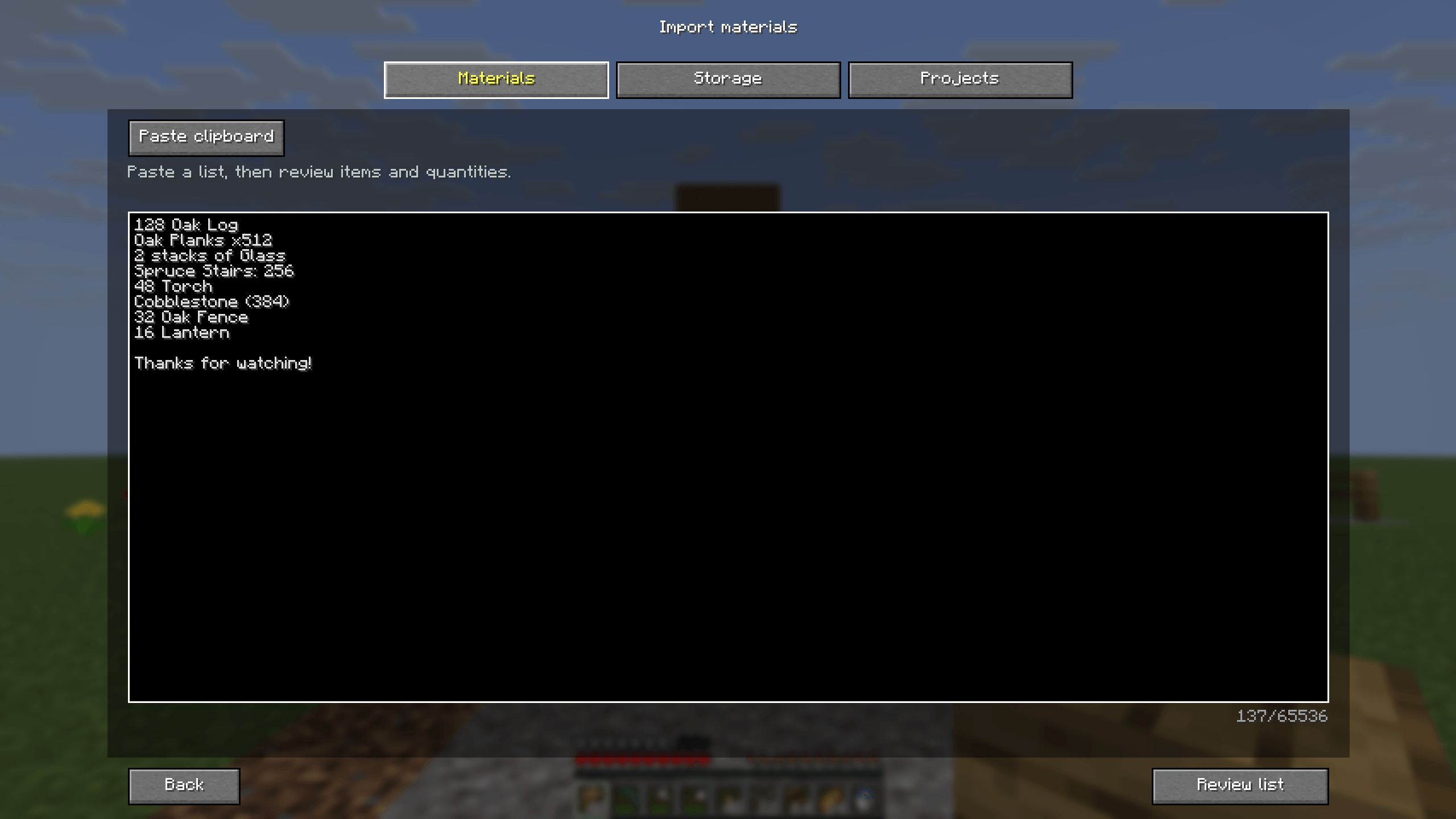 Paste a materials list Paste ordinary text from a video description or build guide. Names, item IDs, counts and stacks can be reviewed before anything changes.
 -
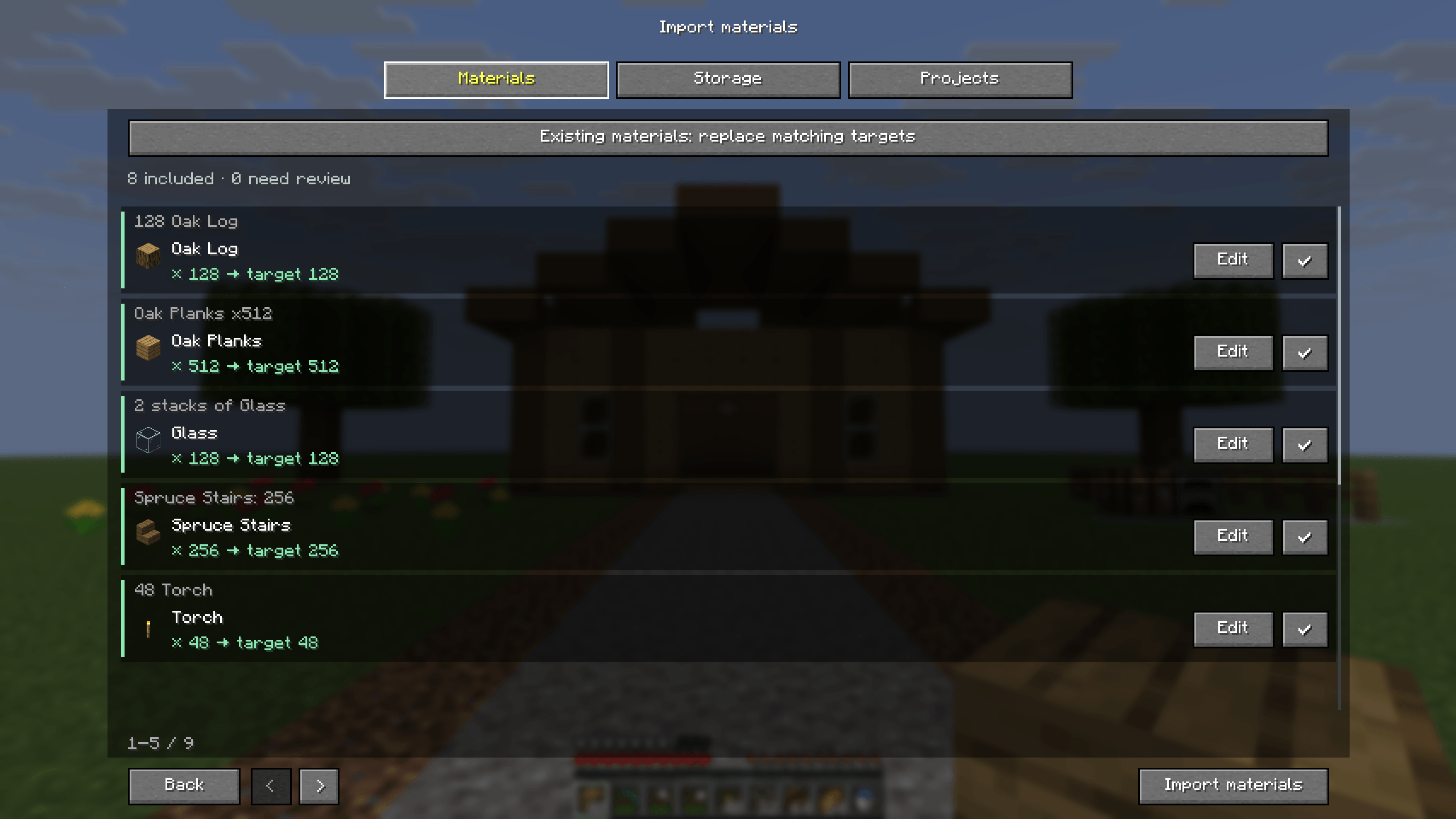 Review before you import Review recognized items and target quantities, edit uncertain rows, skip unrelated text and choose how matching project targets are updated.
 -
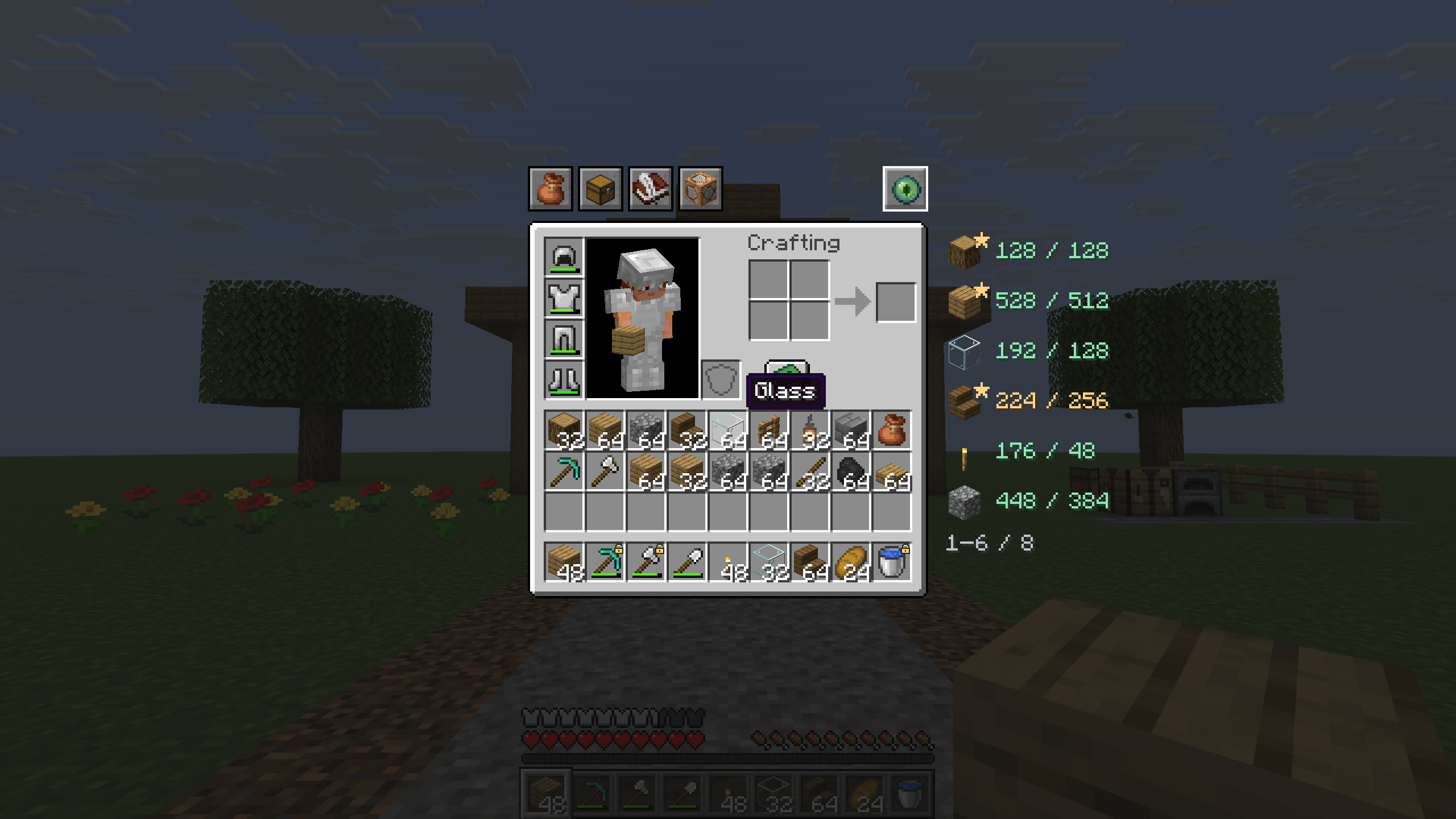 Inventory helpers with Minecraft charm Minecraft item icons, pinned hotbar slots, material priorities and inventory totals sit beside the vanilla survival inventory.
 -
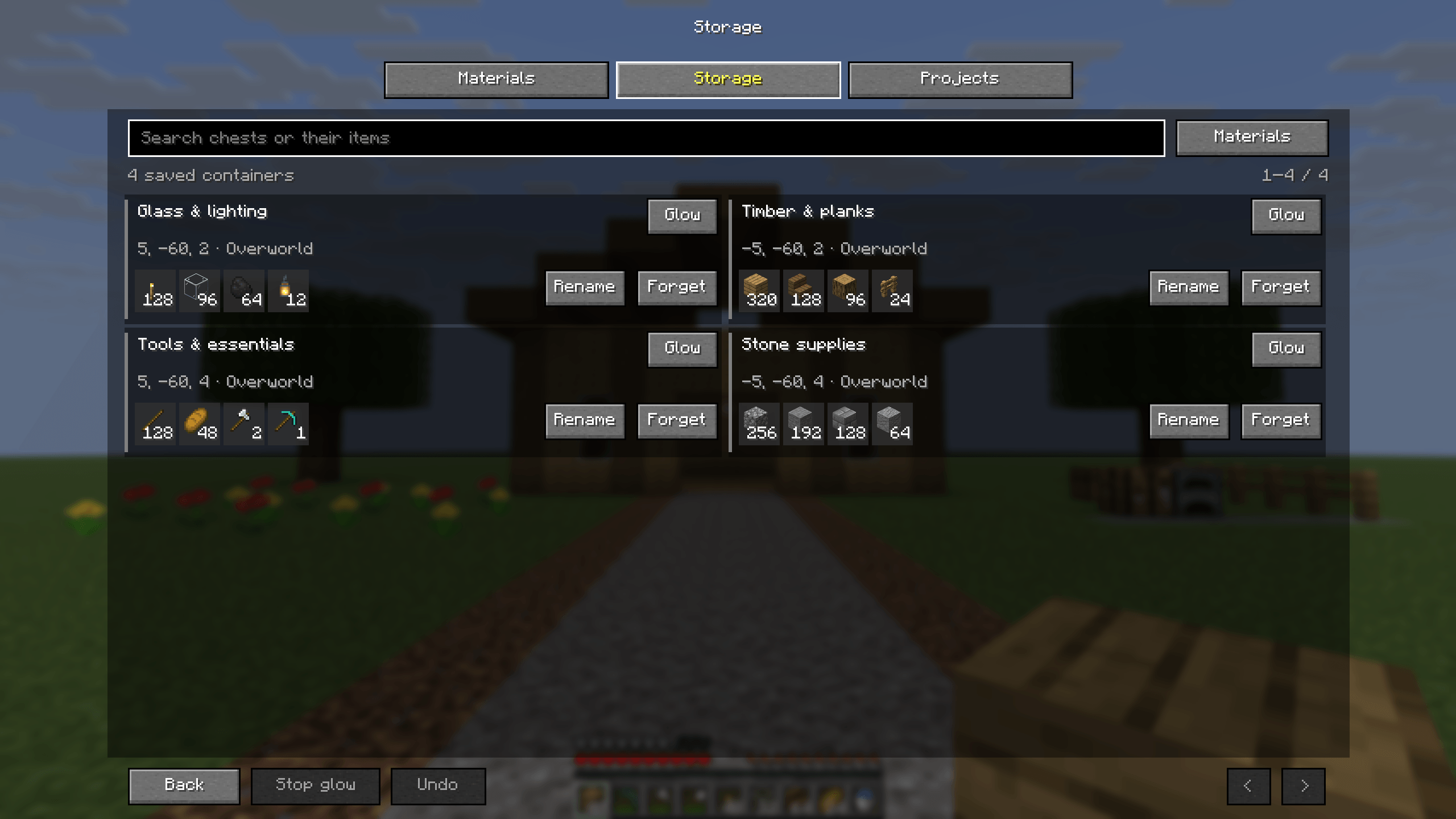 Remember where the supplies are Named storage, clear item previews, search and source highlighting help you find supplies from your last chest visit.
 -
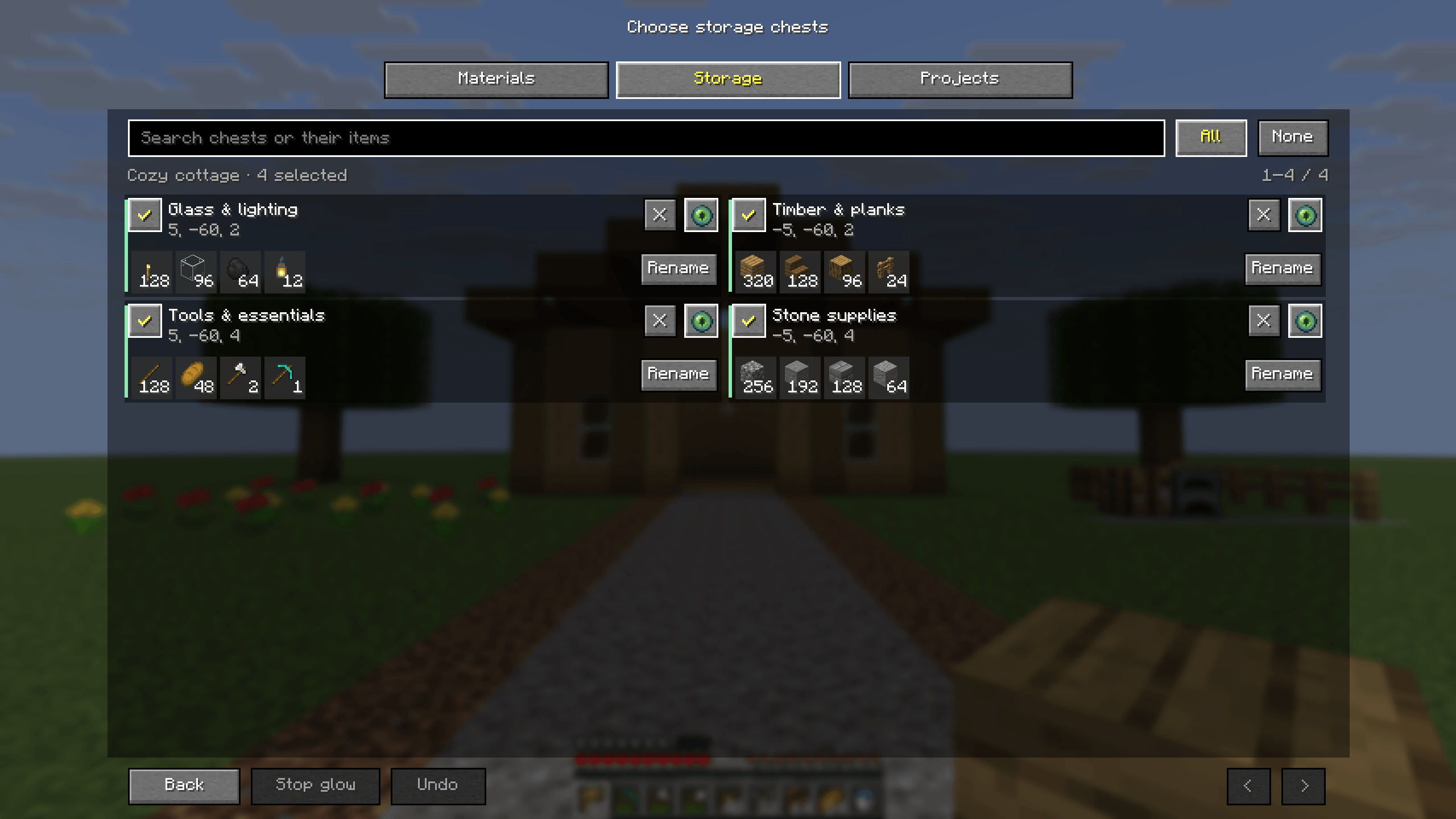 Choose storage for each project Include or exclude remembered chests, rename them, find them with glow or forget a snapshot with Undo. Reopened chests refresh project totals.
 -
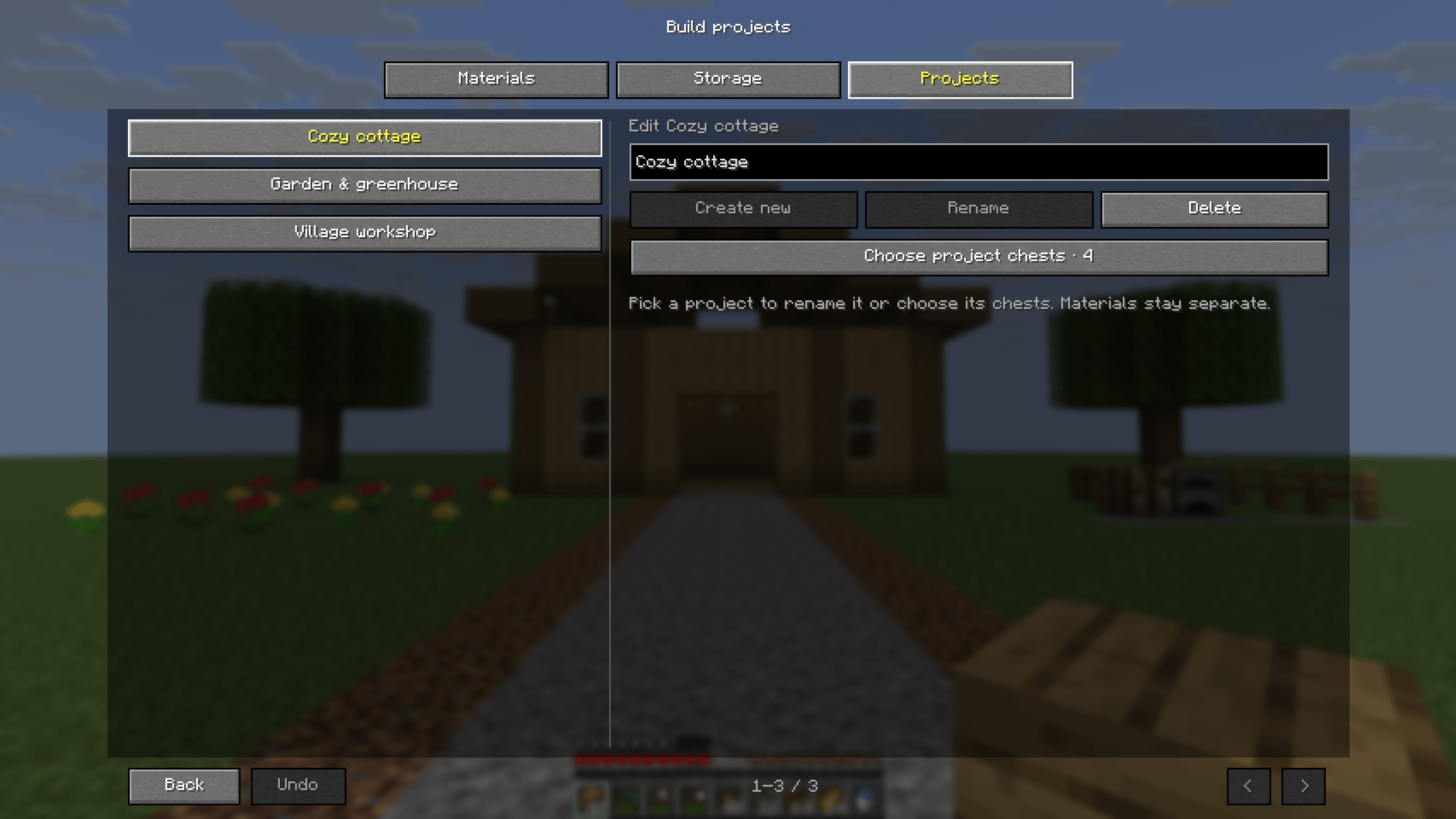 Keep your builds organised Separate projects retain their own materials and selected storage. Switch from the cottage to the garden or workshop.
 -
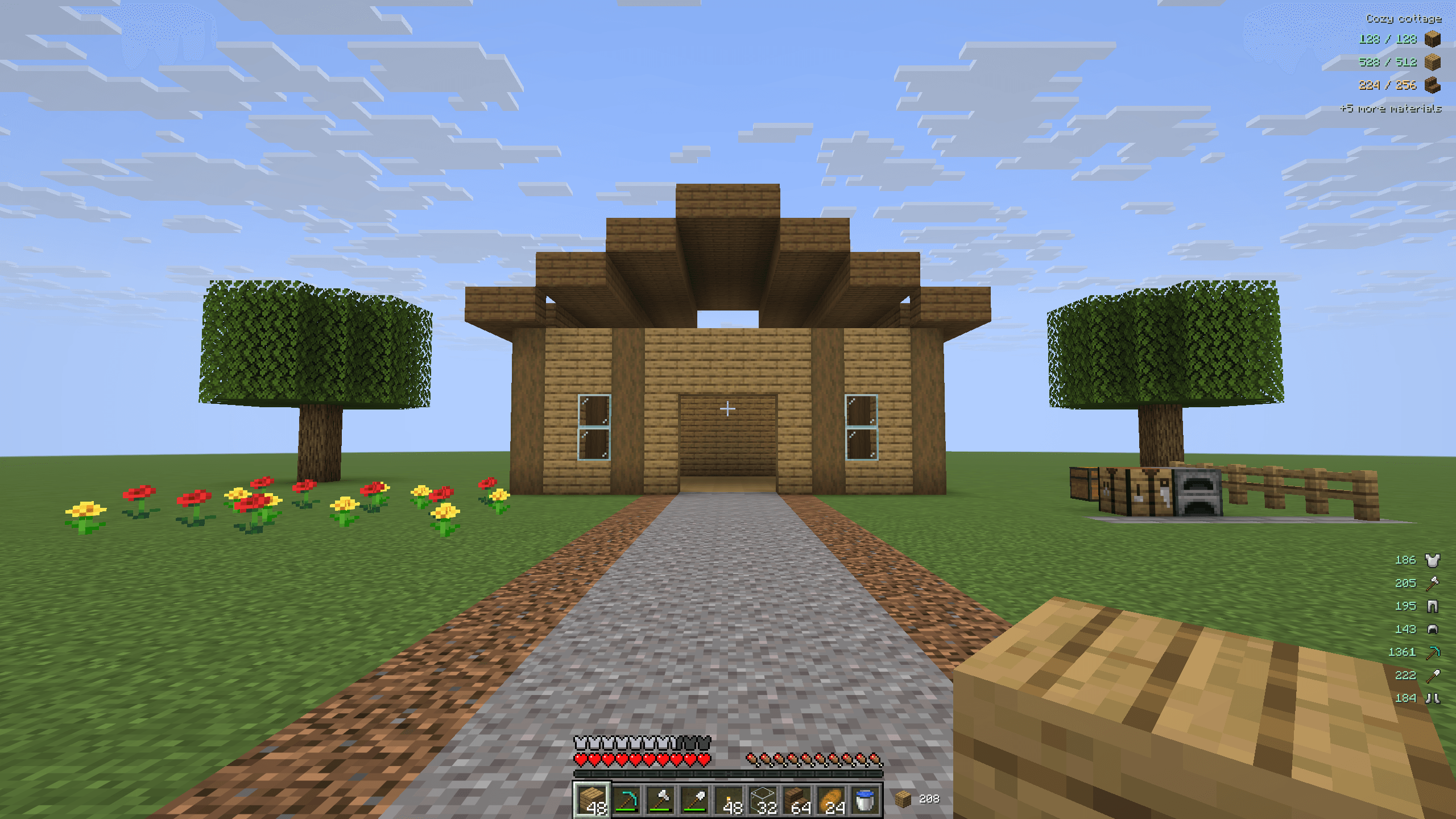 Stow 1.0 — keep building Track project supplies, see additional materials, read remaining equipment durability and keep building stock beside the hotbar.
 -
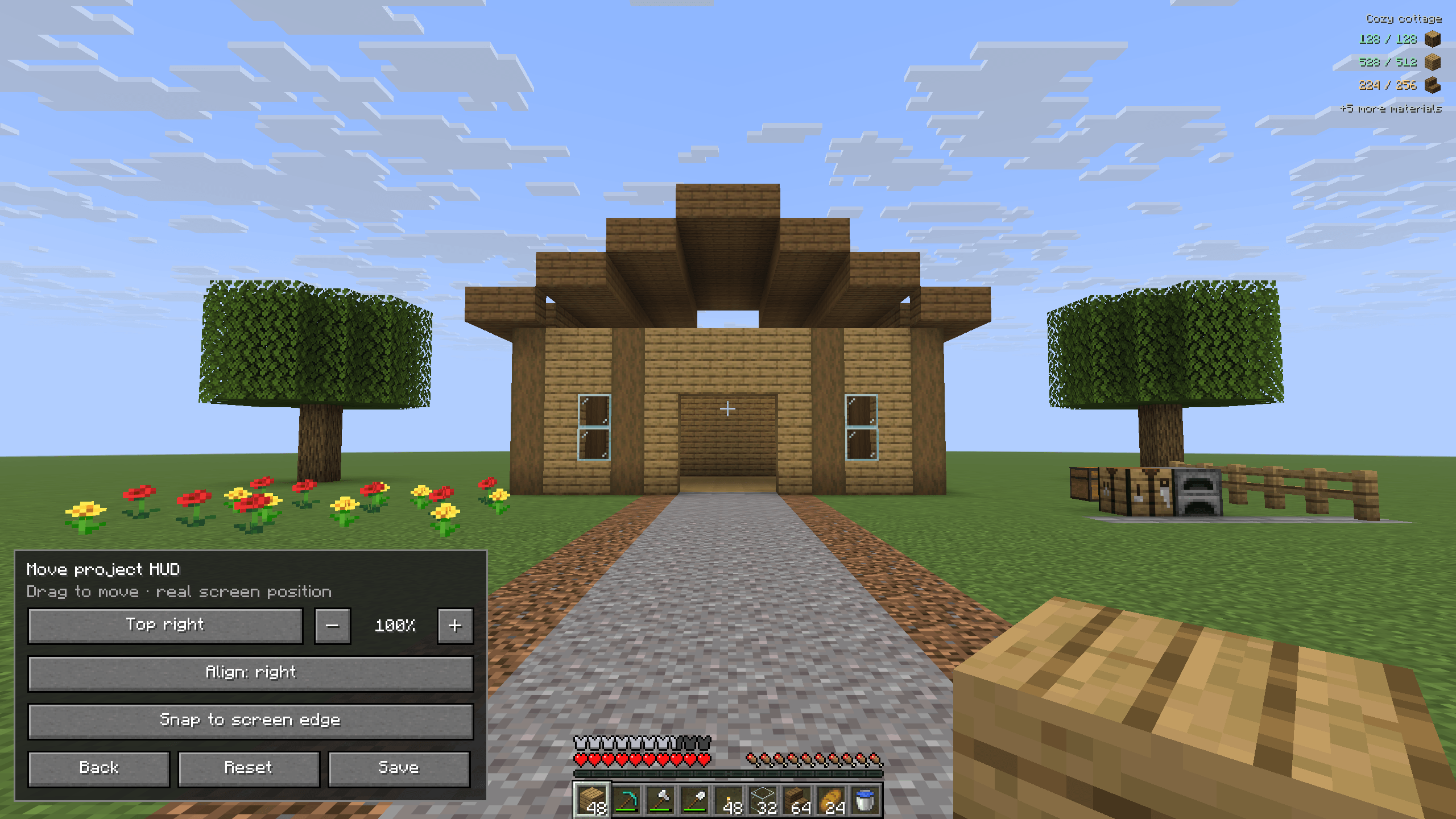 Put the HUD where you want it Preview the real HUD while changing alignment, size and position, then save the layout or reset its defaults.
 -
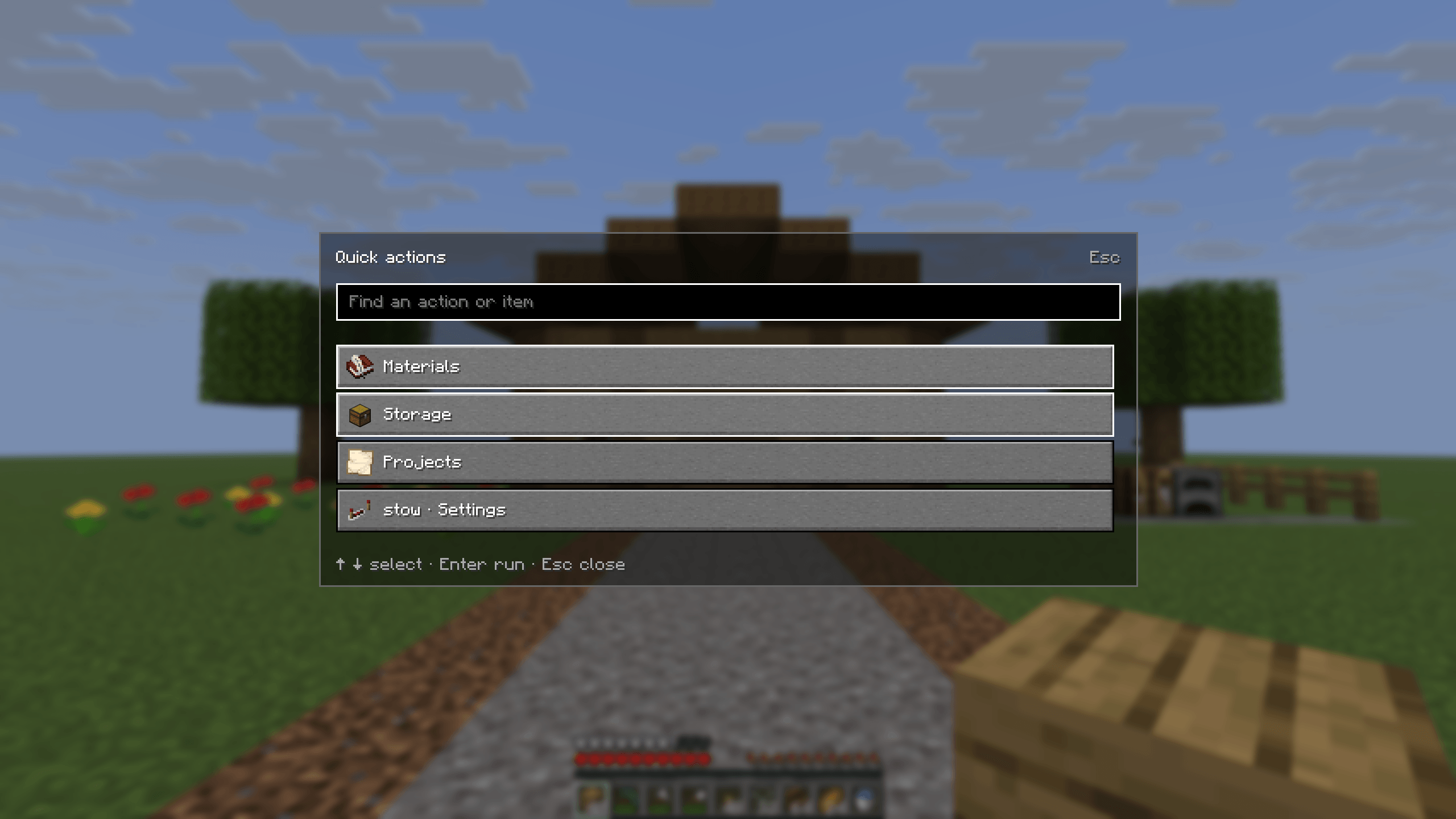 Find an action quickly Open Quick actions with Ctrl + K to find Materials, Storage, Projects, settings and contextual inventory actions.
 -
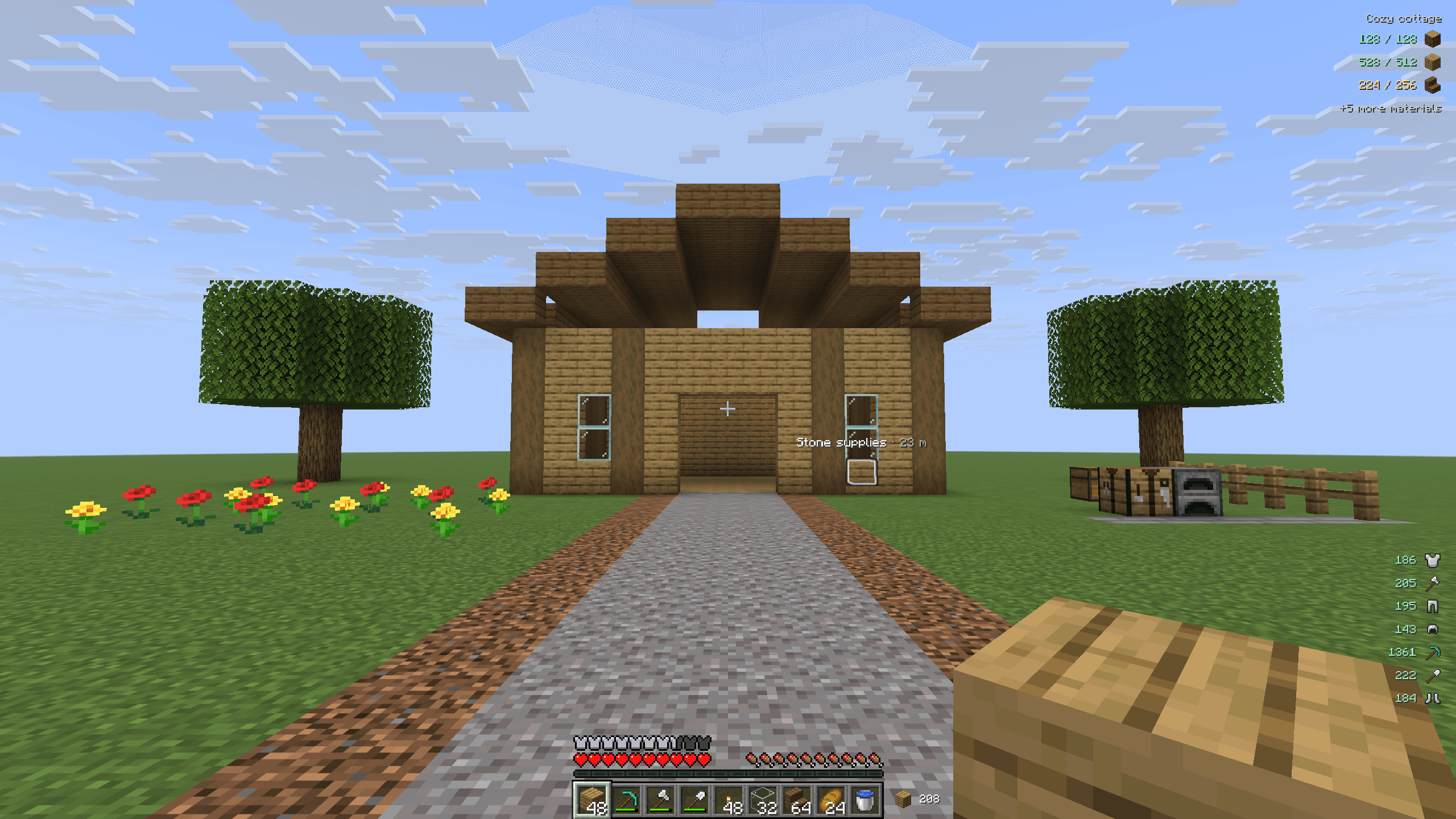 Find storage through walls Highlight a remembered source chest with its native Minecraft outline and a name label, even when the chest is behind a wall.
Versions
Files
Relations
Project Relations
More like this
Similar Mods
Suggestions use data such as tags, dependencies, dependents, descriptions, titles, and more to rank how much they overlap with this mod.
On ModDex
Community snapshot
By the numbers
Statistics

Get it on
Available Platforms
On ModDex
Community snapshot
By the numbers
Statistics
Resources