
Community listing page, reviews may not be monitored by the author.
Support Steve (NPC Companion & Workers)

No reviews yet
Add intelligent Minecraft NPC companions and workers! Summon Steve to farm crops, mine ores, chop trees, guard areas, fight hostile mobs, collect items, and work independently.

Community voices
Reviews
No reviews yet. Be the first to review this project!
Get it on
Available Platforms
About
Project Details
For authors
Embed Badge
If you're the author of this project, you can embed a live badge anywhere that supports HTML or Markdown. It updates automatically whenever ratings change.
Use HTML for any page that supports it, or Markdown for README files and Markdown-based descriptions.
Identifiers
Platform IDs
Resources
External Links
About
Description
Support Steve (NPC Companion & Workers)
Your Personal Minecraft AI Companion and Workforce
Bring intelligent NPC companions and autonomous workers into your Minecraft world!
Support Steve is a Minecraft Forge mod that introduces independent Steve NPCs with their own AI, inventories, equipment, jobs, and navigation systems.
Summon your own Steve companions and turn them into farmers, miners, guards, production workers, and combat assistants. Assign tasks, define work areas, manage their equipment, and let them help you gather resources and survive dangerous encounters.
Unlike ordinary Minecraft followers, Support Steve gives every companion an individual inventory, configurable work assignments, autonomous behaviors, and the ability to operate independently.
Whether you need a loyal combat companion, an automated mining assistant, a dedicated farmer, or a team of Minecraft NPC workers, Support Steve brings a new level of automation and companionship to your survival world.
KEY FEATURES
1. Intelligent NPC Companion AI
Every summoned Steve is an independent NPC companion with its own behavior and inventory.
-
Follow and protect their owner.
-
Automatically attack hostile Minecraft mobs.
-
Fight back when attacked.
-
Defend their owner against nearby threats.
-
Automatically equip suitable weapons and armor.
-
Eat food from their inventory when their health is low.
-
Collect dropped items.
-
Follow assigned tasks and return to their owner.
Steve is designed to be more than an ordinary follower. He can assist with survival, combat, and resource gathering.
2. Autonomous Worker and Job System
Turn your Steve companions into useful Minecraft workers!
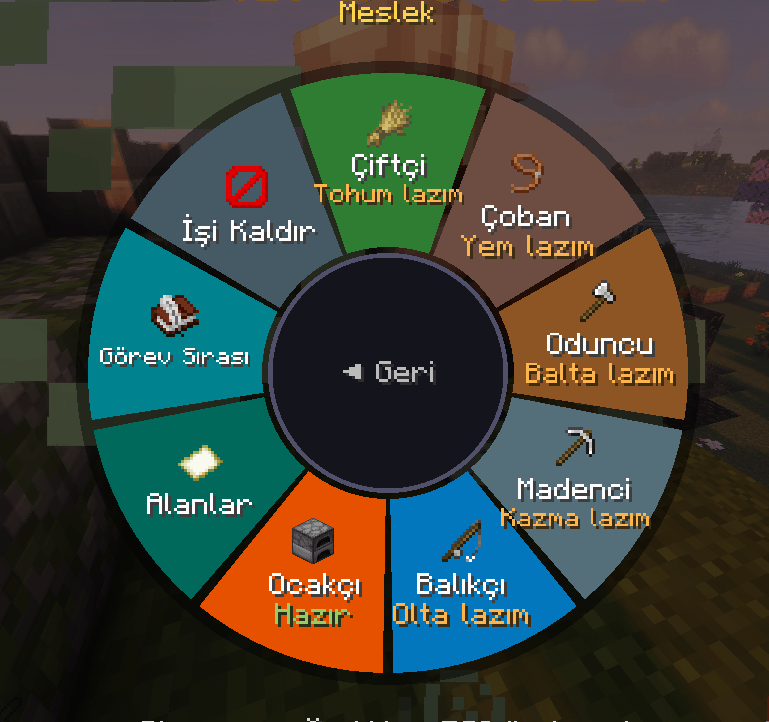
Interact with Steve and open the radial menu to assign different professions and tasks.
Available Jobs:
-
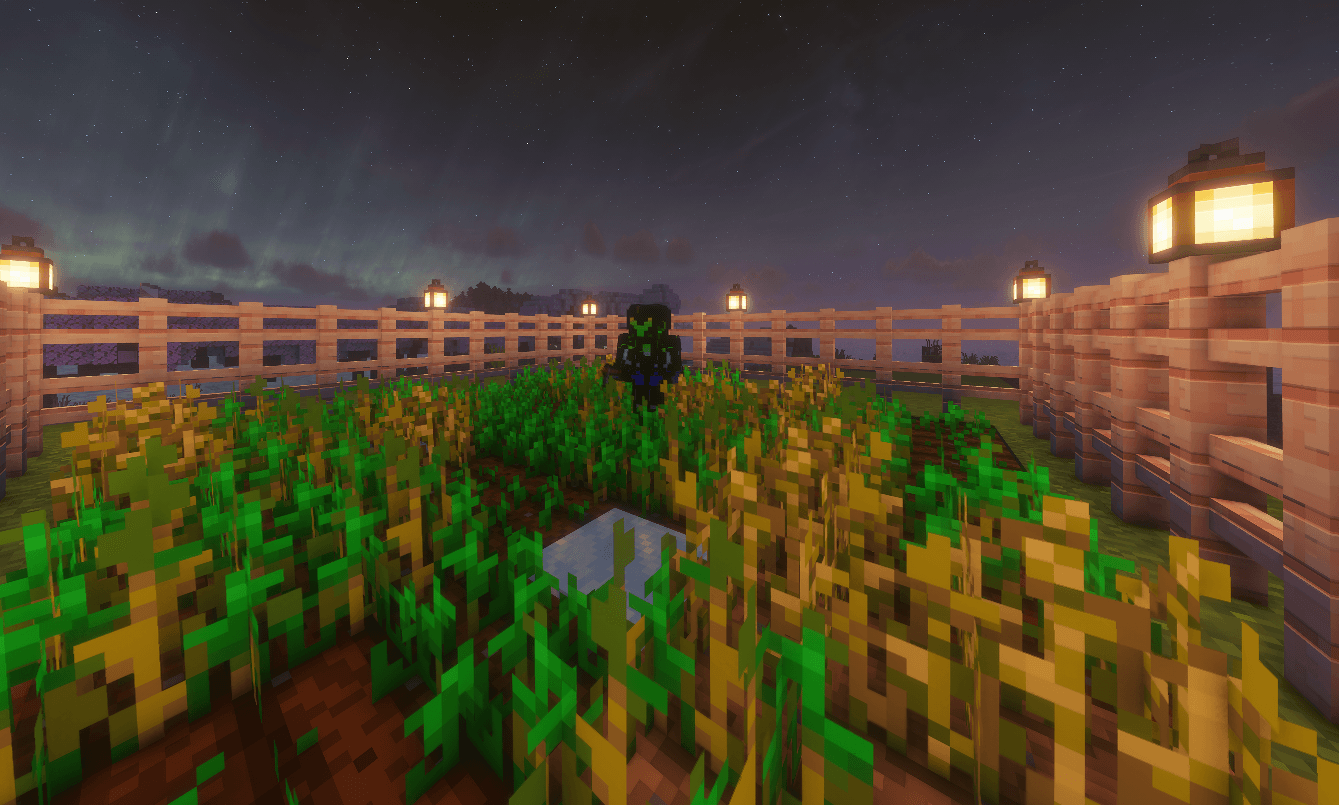
Farmer: Harvest mature crops and replant seeds.
-
Guard: Patrol and defend designated areas.
-
Production Worker: Chop trees, mine stone and ores, and perform basic resource processing.
-
Miner: Search for selected ores and follow connected ore veins.
-
Escort: Accompany and protect you or another Steve.
-
Stay / Sit: Remain at an assigned location.
Workers can perform their jobs without requiring a separately defined work zone. Their default working radius is 16 blocks.
Build your own team of specialized Minecraft AI workers!
3. Advanced Autonomous Mining
Steve is not limited to mining random nearby blocks.
The advanced mining system allows you to choose exactly which resources your miner should search for.
Supported mining filters:
-
Coal
-
Iron
-
Copper
-
Gold
-
Redstone
-
Lapis Lazuli
-
Diamond
-
Emerald
-
Stone
Mining capabilities:
-
Search for selected ores.
-
Follow connected ore veins up to 32 blocks.
-
Dig 1x2 mining tunnels.
-
Search surrounding areas for matching resources.
-
Automatically select suitable mining tools.
Assign multiple mining assistants and organize your own resource-gathering team.
4. Personal Inventory and Equipment
Every Steve has an independent inventory and equipment system.
Inventory layout:
-
27 backpack slots.
-
4 armor slots.
-
Main-hand equipment slot.
-
Off-hand equipment slot.
Inventory features:
-
Independent inventory for every NPC.
-
Automatically equip suitable weapons and armor.
-
Periodic equipment evaluation.
-
Saved inventory and character data.
-
Food consumption when health is low.
Your companions manage their own equipment instead of depending entirely on the player's inventory.
Tip: Shift + Right-click Steve to access his inventory directly.
5. Guard, Patrol and Escort System
Protect your base, farms, mining areas, and other important locations.
-
Assign guards to designated areas.
-
Let Steve patrol selected regions.
-
Protect your owner against hostile mobs.
-
Escort another Steve.
-
Assign multiple companions to different locations.
-
Manage guard and work positions independently.
Create your own defensive workforce and keep your important areas protected.
6. Work Areas and Area Wand
Use the Area Wand to define where your NPC companions should work.
-
Select area corners.
-
Create designated work zones.
-
Configure different zone types.
-
Visualize selected regions.
-
Assign workers to designated locations.
-
Configure guard patrol areas.
-
Manage selected regions through the Area Wand interface.
Work zones help organize your NPC workforce and control where your companions perform their tasks.
7. Remote Summoning and Smart Navigation
Lost your Steve companion during an adventure?
Call your companions back remotely!
-
Press H to call your Steve companions.
-
Use
/supportsteve cometo request a return. -
Call the Steve you are looking at or all your companions.
-
Waypoint-based navigation.
-
Obstacle handling during movement.
-
Automatic teleportation when an owner-following Steve gets too far away.
-
Remote calling support for Steves located in unloaded chunks.
Spend less time searching for your companions and more time exploring Minecraft.
8. Custom HUD and Interface
Manage your NPC workforce through an integrated HUD and interactive interface.
The custom HUD displays:
-
Nearby Steve names.
-
Health bars.
-
Current jobs.
-
Current behavior and status.
-
Travelling indicators.
-
Escorting status.
-
Paused and guarding indicators.
Interact with your Steve companions through a radial menu to assign jobs, manage tasks, and access their inventory.
Press F1 to hide the Support Steve HUD.
9. Individual NPC Reset System
Sometimes a worker may get stuck or behave unexpectedly.
Use the Reset option in the Jobs section of the radial menu.
The reset system:
-
Clears temporary AI states.
-
Cancels active tasks.
-
Resets the current job.
-
Clears assigned work positions.
-
Clears temporary AI memory.
-
Returns Steve to owner-following behavior.
Your companion keeps its inventory, level, and name.
10. Summoning System
Bring your first companion into the world using a command or the craftable Summoning Orb.
Summoning Orb Recipe:
-
3 Amethyst Shards
-
4 Iron Ingots
-
1 Emerald
-
1 Glass
The Summoning Orb has a 30-second cooldown.
You can also summon Steve directly using the available commands.
11. Commands and Controls
Keybinds:
| Key | Action |
|---|---|
| H | Remotely call Steve companions |
| F1 | Hide the Support Steve HUD |
| Right-click Steve | Open radial interaction menu |
| Shift + Right-click Steve | Open inventory |
Available commands:
| Command | Description |
|---|---|
/supportsteve summon |
Summon a Steve |
/supportsteve list |
List your Steves |
/supportsteve call |
Call your companions |
/supportsteve remove |
Remove a Steve |
/supportsteve rename |
Rename a Steve |
/supportsteve come |
Request Steve to return |
12. A Growing Minecraft NPC Worker System
Support Steve is actively developed with a focus on intelligent NPC behavior, independent workers, resource gathering, and companion management.
The goal is to make Minecraft worlds feel more alive by allowing players to build their own teams of useful, autonomous companions.
Instead of doing everything yourself, summon Steve, assign a profession, and let your companions help you build, gather, explore, and survive.
CURRENT DEVELOPMENT STATUS
Support Steve is actively being developed and improved.
Please keep in mind:
-
Some features may be incomplete or experimental.
-
NPC AI may occasionally behave unexpectedly.
-
Pathfinding and navigation may not always work perfectly.
-
Bugs and performance issues may occur.
-
Features and mechanics may change in future updates.
-
Compatibility with other mods is not guaranteed.
-
Performance depends on your world, hardware, and the number of active Steve companions.
Feedback, bug reports, and suggestions are welcome!
INSTALLATION
-
Install Minecraft 1.20.1.
-
Install Minecraft Forge 47.2.0 or newer.
-
Download the latest Support Steve
.jarfile. -
Place the file inside your
.minecraft/modsfolder. -
Launch Minecraft.
-
Summon your first Steve using the Summoning Orb or
/supportsteve summon.
COMPATIBILITY
-
Minecraft Version: 1.20.1
-
Mod Loader: Minecraft Forge
-
Forge Version: 47.2.0 or newer
-
Java: 17 or newer
-
Languages: English and Turkish
Fabric and NeoForge are not currently supported.
ABOUT
Support Steve is developed by RichPlayStudio.
Our goal is to bring smarter companions, useful NPC workers, autonomous mining, farming assistance, and independent AI characters into Minecraft.
Build your own workforce. Give every companion a purpose. Let Steve help you survive.
One player. Multiple companions. Endless possibilities.
TÜRKÇE AÇIKLAMA
Support Steve – Minecraft NPC Yoldaş ve İşçi Sistemi
Kendi Steve Ekibini Kur. Görev Ver. Dünyanı Birlikte Geliştir.
Minecraft dünyana akıllı NPC yoldaşlar ve bağımsız çalışan işçiler ekle!
Support Steve, kendi yapay zekâsına, envanterine, ekipmanlarına, görevlerine ve hareket sistemine sahip Steve karakterlerini dünyana ekleyen bir Minecraft Forge modudur.
Kendi Steve karakterlerini çağırabilir, onlara çiftçilik, madencilik, muhafızlık, üretim ve refakat görevleri verebilirsin.
Steve yalnızca seni takip eden sıradan bir NPC değildir. Kendi envanterini yönetebilir, uygun ekipmanlarını kuşanabilir, düşmanlarla savaşabilir ve atandığı görevleri bağımsız olarak yerine getirebilir.
ÖNE ÇIKAN ÖZELLİKLER
1. Akıllı NPC Yoldaş Sistemi
-
Kendi Steve karakterini çağır.
-
Seni takip etmesini ve korumasını sağla.
-
Düşman yaratıklarla otomatik savaşmasını sağla.
-
Envanterindeki uygun silah ve zırhları kuşanmasını sağla.
-
Canı azaldığında yiyecek kullanmasını sağla.
-
Yere düşen eşyaları toplamasını sağla.
2. Meslek ve İşçi Sistemi
-
Çiftçi: Olgunlaşan ürünleri toplar ve yeniden eker.
-
Muhafız: Belirlenen alanlarda devriye gezer.
-
Üretim İşçisi: Ağaç keser, taş ve maden çıkarır, temel kaynak işleme işlemleri yapar.
-
Madenci: Seçilen madenleri arar ve damarları takip eder.
-
Refakatçi: Seni veya başka bir Steve'i koruyarak takip eder.
-
Bekle / Otur: Belirlenen konumda kalır.
3. Gelişmiş Otomatik Madencilik
-
9 farklı maden ve blok filtresi.
-
Kömür, Demir, Bakır, Altın, Kızıltaş, Lapis Lazuli, Elmas, Zümrüt ve Taş.
-
1x2 maden tünelleri açma.
-
Birbirine bağlı maden damarlarını 32 bloğa kadar takip etme.
-
Uygun aletleri otomatik seçme.
4. Bağımsız Envanter ve Ekipman
-
27 sırt çantası yuvası.
-
4 zırh yuvası.
-
Ana el ve yardımcı el ekipman yuvaları.
-
Otomatik zırh ve silah kuşanma.
-
Kaydedilen NPC envanteri ve karakter verileri.
5. Muhafız ve Koruma Sistemi
-
Belirli bölgelerde koruma görevi.
-
Devriye alanları belirleme.
-
Oyuncuyu ve diğer Steve karakterlerini koruma.
-
Farklı NPC'lere farklı görevler atama.
6. Alan Belirleme Sistemi
-
Area Wand ile çalışma bölgeleri oluştur.
-
Alan köşelerini belirle.
-
Çalışma ve koruma bölgelerini yönet.
-
NPC'leri istediğin bölgelere görevlendir.
7. Uzaktan Çağırma ve Navigasyon
-
H tuşuyla Steve'lerini çağır.
-
/supportsteve comekomutunu kullan. -
Yol ve engel aşma sistemi.
-
Çok uzaklaşan yoldaşların sahibine ışınlanması.
-
Yüklenmemiş chunk'larda bulunan Steve'leri uzaktan çağırma.
8. Özel HUD ve Arayüz
-
Yakındaki Steve karakterlerinin canını görüntüle.
-
Aktif mesleklerini ve durumlarını takip et.
-
Dairesel menü üzerinden görevlerini yönet.
-
F1 ile HUD'u gizle.
9. NPC Sıfırlama Sistemi
-
Geçici yapay zekâ durumlarını temizle.
-
Aktif görevleri sıfırla.
-
Steve'i yeniden oyuncuyu takip etmeye döndür.
-
Envanter, seviye ve isim bilgilerini koru.
KURULUM
-
Minecraft 1.20.1 yükle.
-
Forge 47.2.0 veya üzerini kur.
-
Support Steve
.jardosyasını indir. -
Dosyayı
.minecraft/modsklasörüne yerleştir. -
Oyunu başlat.
-
Çağırma Küresi veya
/supportsteve summonkomutuyla ilk Steve'ini çağır.
TEKNİK BİLGİLER
-
Minecraft: 1.20.1
-
Mod Loader: Forge
-
Forge: 47.2.0 veya üzeri
-
Java: 17 veya üzeri
-
Diller: Türkçe ve İngilizce
GELİŞTİRİCİ
RichPlayStudio
Support Steve, Minecraft içerisinde daha akıllı NPC yoldaşlar, bağımsız işçiler, otomatik madencilik ve yardımcı karakterler oluşturma amacıyla geliştirilmektedir.
Kendi ekibini oluştur. Her Steve'e bir görev ver.
Sen dünyanı geliştirirken Steve senin için çalışsın.
Screenshots
Gallery
-
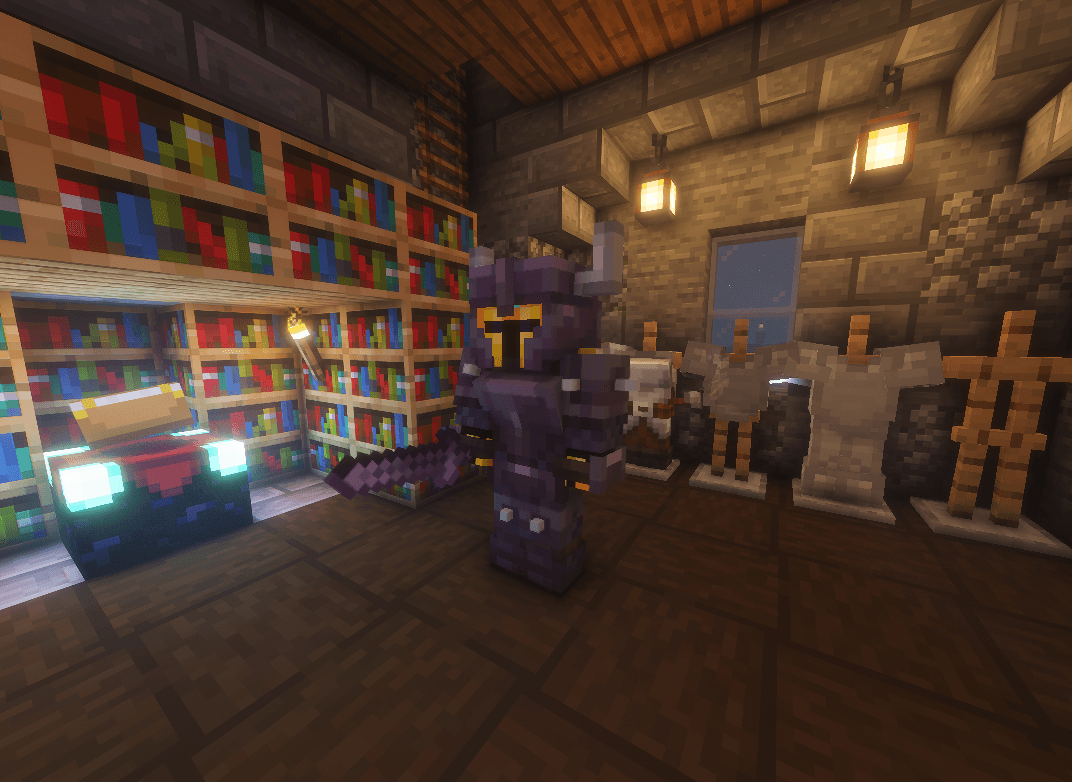 Ekran görüntüsü 2026-10-30 163734.png Ekran görüntüsü 2026-10-30 163734.png
-
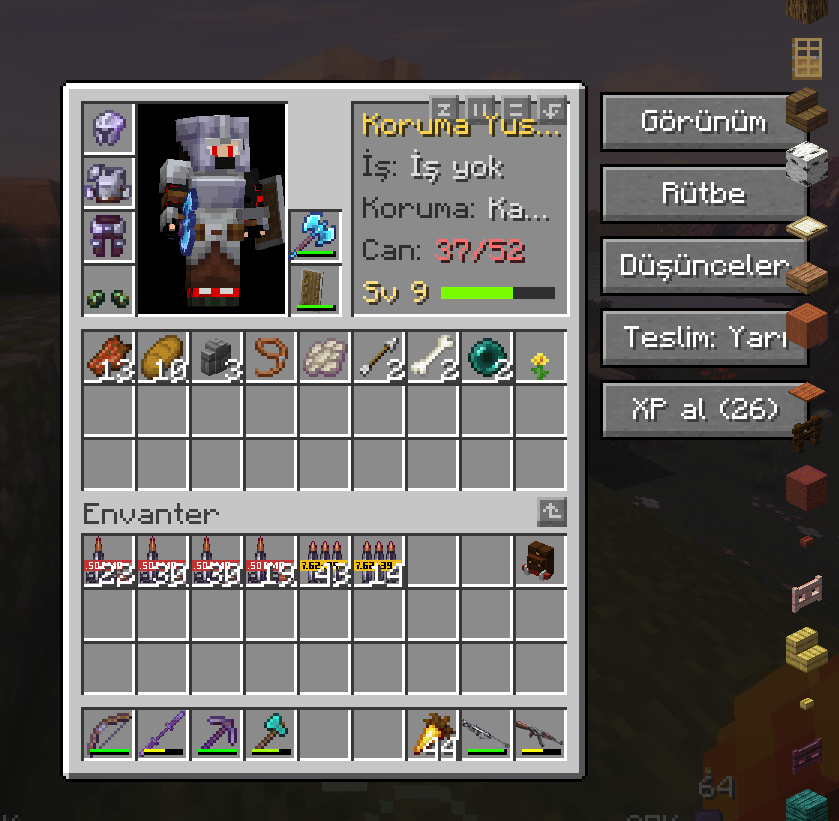 Ekran görüntüsü 2026-10-30 164201.png Ekran görüntüsü 2026-10-30 164201.png
-
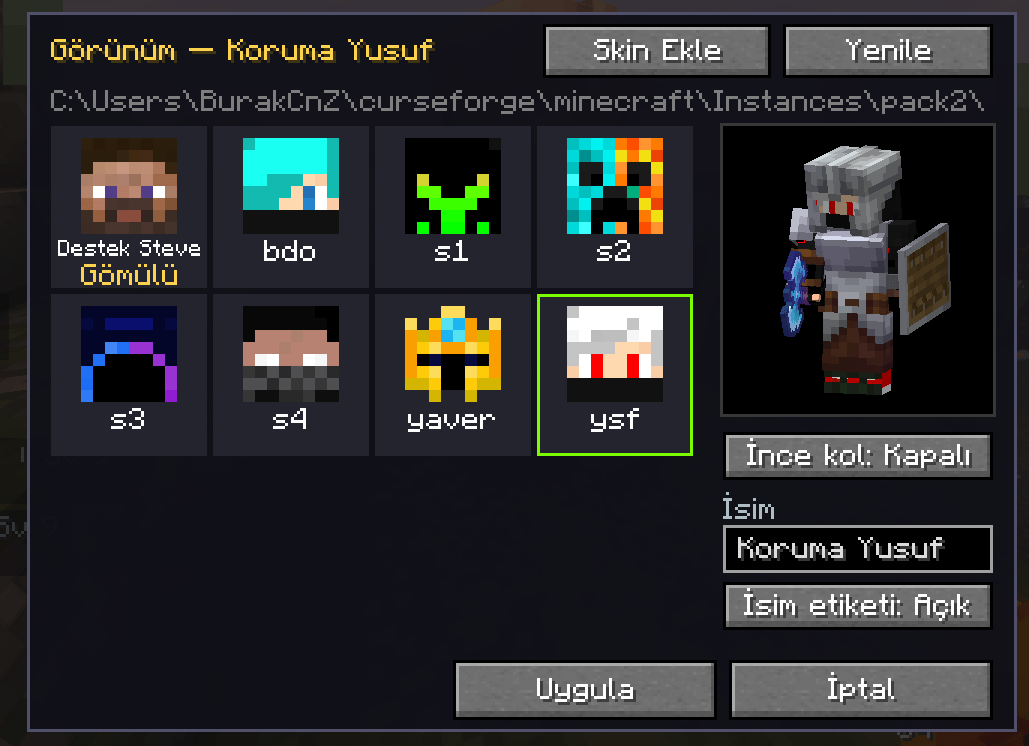 Ekran görüntüsü 2026-10-30 164208.png Ekran görüntüsü 2026-10-30 164208.png
-
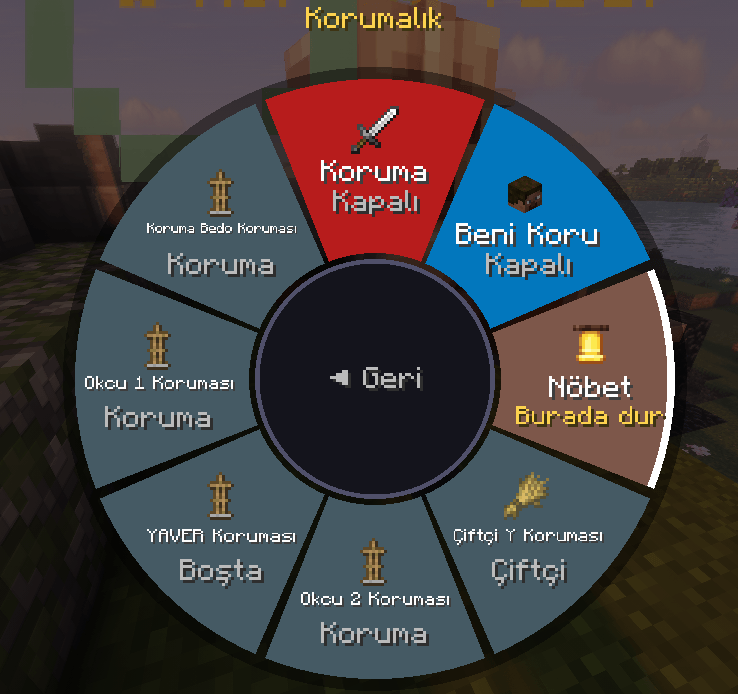 Ekran görüntüsü 2026-10-30 164221.png Ekran görüntüsü 2026-10-30 164221.png
-
 Ekran görüntüsü 2026-10-30 164214.png Ekran görüntüsü 2026-10-30 164214.png
-
 Ekran görüntüsü 2026-10-30 163929.png Ekran görüntüsü 2026-10-30 163929.png
Versions
Files
Relations
Project Relations
More like this
Similar Mods
Suggestions use data such as tags, dependencies, dependents, descriptions, titles, and more to rank how much they overlap with this mod.
On ModDex
Community snapshot
By the numbers
Statistics

Get it on
Available Platforms
On ModDex
Community snapshot
By the numbers
Statistics
Resources