
Community listing page, reviews here may not be monitored by the author.
svrUptime


No reviews yet
Track how long your world has been running — in both Minecraft calendar time and real-world time.
Community voices
Reviews
No reviews yet. Be the first to review this project!
Get it on
Available Platforms
Compatibility
Supported Environments
Runs entirely on the server. Also works in singleplayer.
About
Project Details
For authors
Embed Badge
If you're the author of this project, you can embed a live badge anywhere that supports HTML or Markdown. It updates automatically whenever ratings change.
Use HTML for any page that supports it, or Markdown for README files and Markdown-based descriptions.
Identifiers
Platform IDs
About
Description
⏱️ svrUptime
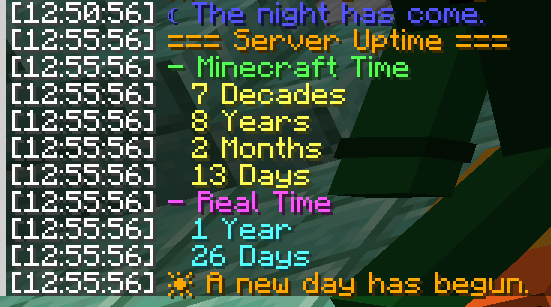
Two clean chat broadcasts a day — let everyone see exactly how long your world has been running.









svrUptime keeps a quiet running tally of how long your world has existed and announces it at the two natural turning points of the Minecraft day — dawn and dusk. No dashboards, no scoreboard clutter: just a clean chat readout when the sun comes up, a short flavor line when night falls, and an /uptime command for anyone curious in between. It runs entirely server-side, so vanilla clients can connect and see every message, and it works just as well in single-player. "Day 4,217" hits differently than a blank morning sky.
🆕 New in 1.2.7: sleeping no longer undercounts the day number, both clocks now read down to the tick, /uptime query can ask either clock on its own, and a new admin toggle decides whether Real Time counts time slept through. One jar runs on every Minecraft 26.x release — 26.1 through 26.3.
✨ Features
- 🌅 Two daily broadcasts, on the in-game clock. A full uptime report at dawn (start of each Minecraft day, ~06:00) and a short flavor line at dusk (~18:00, tick 12000) — each fires exactly once per day.
- 🕰️ Dual time views, down to the tick. (26.x) Every report shows uptime two ways: Minecraft Time (in-game days rolled up into a months → years → decades → … → millennia calendar) and Real Time (seconds → minutes → hours → days → … → decades). Both bottom out at exact ticks, so a reading is never rounded off.
- 😴 Sleep-aware day count. (26.x) When your players sleep through the night, those days still count — the day number matches the sunrises they actually lived through, not just the time the server spent simulating. An admin toggle decides whether Real Time counts them too: world time, or the server's actual runtime.
- ⌨️
/uptimeon demand. Anyone can query the current uptime at any moment, ask for either clock on its own, and choose how large a unit to roll up to — from ticks all the way to millennia. (Per-clock queries and tick units: 26.x.) - 🎨 Configurable morning & evening messages. Set your own dawn and dusk text — standard Minecraft
§color codes supported — in a plain JSON file. - 🎚️ Independent toggles. Turn the uptime broadcast, the morning message, and the evening message on or off separately — live, in-game, no restart.
- ♻️ Live reload. Edit the config and apply it instantly with an admin command.
- 🧩 Server-side & universal. One jar runs on Fabric and NeoForge; vanilla clients need nothing, and it works in single-player too.
⌨️ Commands
Everything hangs off /uptime, with /ut as a shorthand alias for all of it. query and help are open to everyone; the admin branch requires gamemaster / operator permission.
| Command | Access | What it does |
|---|---|---|
/uptime query |
Everyone | Show the full uptime report (rolled all the way up to millennia) |
/uptime query <unit> |
Everyone | Same report, capped at a chosen largest unit — ticks, days, months, years, decades, centuries, millennia |
/uptime query gametime [unit] |
Everyone | (26.x) Minecraft Time only, same unit list as above |
/uptime query realtime [unit] |
Everyone | (26.x) Real Time only — ticks, seconds, minutes, hours, days, months, years, decades |
/uptime help |
Everyone | List available commands (admin lines shown only to admins) |
/uptime admin broadcast enable|disable |
Admin | Toggle the daily uptime report |
/uptime admin morning enable|disable |
Admin | Toggle the dawn (morning) message |
/uptime admin evening enable|disable |
Admin | Toggle the dusk (evening) message |
/uptime admin sleeptime enable|disable |
Admin | (26.x) Whether Real Time counts the time sleeping fast-forwarded through — enabled: world time · disabled: actual server runtime |
/uptime admin status |
Admin | Show current toggles, the world clock, executed ticks, the fast-forwarded gap between them, and real days elapsed |
/uptime admin reload |
Admin | Re-read svruptime.json from disk |
/ut is a full redirect — anywhere you'd type /uptime, /ut works identically (/ut query years, /ut admin status, …).
Rows marked (26.x) arrived in 1.2.7. The 1.21.x back-ports run 1.2.5, which has everything else — note that there, uptime still counts only the ticks the server actually ran, so nights slept through don't add to it.
⚙️ Configuration
The config lives at config/svruptime.json, is created on first launch with the defaults below, and hot-reloads with /uptime admin reload. Both message strings accept standard Minecraft § color/format codes, and the boolean flags are the same switches flipped by /uptime admin … — in-game changes are written straight back to the file, so command state and the file never drift apart.
{
  "broadcastEnabled": true,      // send the full uptime report at dawn
  "morningMessageEnabled": true, // send the morning message at dawn
  "eveningMessageEnabled": true, // send the evening message at dusk
  "realTimeIncludesSleep": true, // count sleep fast-forward in Real Time (26.x)
  "morningMessage": "§6☀ A new day has begun.",
  "eveningMessage": "§9☾ The night has come."
}
🧪 Compatibility
| Loaders | Fabric and NeoForge — one jar runs on both |
| Minecraft | 26.1 – 26.3 — one jar, v1.2.7 · 1.21.11 and 1.21 – 1.21.10 — v1.2.5 (no 26.x-only features) |
| Fabric API | Required on Fabric · not needed on NeoForge |
| Side | Server-side — vanilla clients supported, single-player too |
| Extra libraries | None |
Enjoying it? Hop in the Discord · ⭐ the repo · explore the rest of Lunixia's Minecraft QOL Mods
⛏️ Small, focused mods that cut out the boring stuff.
⏱️ svrUptime
Two clean chat broadcasts a day — let everyone see exactly how long your world has been running.



svrUptime keeps a quiet running tally of how long your world has existed and announces it at the two natural turning points of the Minecraft day — dawn and dusk. No dashboards, no scoreboard clutter: just a clean chat readout when the sun comes up, a short flavor line when night falls, and an /uptime command for anyone curious in between. It runs entirely server-side, so vanilla clients can connect and see every message, and it works just as well in single-player. "Day 4,217" hits differently than a blank morning sky.
🆕 New in 1.2.7: sleeping no longer undercounts the day number, both clocks now read down to the tick, /uptime query can ask either clock on its own, and a new admin toggle decides whether Real Time counts time slept through. One jar runs on every Minecraft 26.x release — 26.1 through 26.3.
✨ Features
- 🌅 Two daily broadcasts, on the in-game clock. A full uptime report at dawn (start of each Minecraft day, ~06:00) and a short flavor line at dusk (~18:00, tick 12000) — each fires exactly once per day.
- 🕰️ Dual time views, down to the tick. (26.x) Every report shows uptime two ways: Minecraft Time (in-game days rolled up into a months → years → decades → … → millennia calendar) and Real Time (seconds → minutes → hours → days → … → decades). Both bottom out at exact ticks, so a reading is never rounded off.
- 😴 Sleep-aware day count. (26.x) When your players sleep through the night, those days still count — the day number matches the sunrises they actually lived through, not just the time the server spent simulating. An admin toggle decides whether Real Time counts them too: world time, or the server's actual runtime.
- ⌨️
/uptimeon demand. Anyone can query the current uptime at any moment, ask for either clock on its own, and choose how large a unit to roll up to — from ticks all the way to millennia. (Per-clock queries and tick units: 26.x.) - 🎨 Configurable morning & evening messages. Set your own dawn and dusk text — standard Minecraft
§color codes supported — in a plain JSON file. - 🎚️ Independent toggles. Turn the uptime broadcast, the morning message, and the evening message on or off separately — live, in-game, no restart.
- ♻️ Live reload. Edit the config and apply it instantly with an admin command.
- 🧩 Server-side & universal. One jar runs on Fabric and NeoForge; vanilla clients need nothing, and it works in single-player too.
⌨️ Commands
Everything hangs off /uptime, with /ut as a shorthand alias for all of it. query and help are open to everyone; the admin branch requires gamemaster / operator permission.
| Command | Access | What it does |
|---|---|---|
/uptime query |
Everyone | Show the full uptime report (rolled all the way up to millennia) |
/uptime query <unit> |
Everyone | Same report, capped at a chosen largest unit — ticks, days, months, years, decades, centuries, millennia |
/uptime query gametime [unit] |
Everyone | (26.x) Minecraft Time only, same unit list as above |
/uptime query realtime [unit] |
Everyone | (26.x) Real Time only — ticks, seconds, minutes, hours, days, months, years, decades |
/uptime help |
Everyone | List available commands (admin lines shown only to admins) |
/uptime admin broadcast enable|disable |
Admin | Toggle the daily uptime report |
/uptime admin morning enable|disable |
Admin | Toggle the dawn (morning) message |
/uptime admin evening enable|disable |
Admin | Toggle the dusk (evening) message |
/uptime admin sleeptime enable|disable |
Admin | (26.x) Whether Real Time counts the time sleeping fast-forwarded through — enabled: world time · disabled: actual server runtime |
/uptime admin status |
Admin | Show current toggles, the world clock, executed ticks, the fast-forwarded gap between them, and real days elapsed |
/uptime admin reload |
Admin | Re-read svruptime.json from disk |
/ut is a full redirect — anywhere you'd type /uptime, /ut works identically (/ut query years, /ut admin status, …).
Rows marked (26.x) arrived in 1.2.7. The 1.21.x back-ports run 1.2.5, which has everything else — note that there, uptime still counts only the ticks the server actually ran, so nights slept through don't add to it.
⚙️ Configuration
The config lives at config/svruptime.json, is created on first launch with the defaults below, and hot-reloads with /uptime admin reload. Both message strings accept standard Minecraft § color/format codes, and the boolean flags are the same switches flipped by /uptime admin … — in-game changes are written straight back to the file, so command state and the file never drift apart.
{
  "broadcastEnabled": true,      // send the full uptime report at dawn
  "morningMessageEnabled": true, // send the morning message at dawn
  "eveningMessageEnabled": true, // send the evening message at dusk
  "realTimeIncludesSleep": true, // count sleep fast-forward in Real Time (26.x)
  "morningMessage": "§6☀ A new day has begun.",
  "eveningMessage": "§9☾ The night has come."
}
🧪 Compatibility
| Loaders | Fabric and NeoForge — one jar runs on both |
| Minecraft | 26.1 – 26.3 — one jar, v1.2.7 · 1.21.11 and 1.21 – 1.21.10 — v1.2.5 (no 26.x-only features) |
| Fabric API | Required on Fabric · not needed on NeoForge |
| Side | Server-side — vanilla clients supported, single-player too |
| Extra libraries | None |
Enjoying it? Hop in the Discord · ⭐ the repo · explore the rest of Lunixia's Minecraft QOL Mods
⛏️ Small, focused mods that cut out the boring stuff.
Screenshots
Gallery
Versions
Files
Relations
Project Relations
More like this
Similar Mods
Suggestions use data such as tags, dependencies, dependents, descriptions, titles, and more to rank how much they overlap with this mod.
On ModDex
Community snapshot
By the numbers
Statistics
Want to reach Minecraft players?
We're looking for a server hosting partner to feature here and other parts of the site. Interested? Send us a message!
Get in touchGet it on
Available Platforms
On ModDex
Community snapshot
By the numbers